- JMP will suspend normal business operations for our Winter Holiday beginning on Wednesday, Dec. 24, 2025, at 5:00 p.m. ET (2:00 p.m. ET for JMP Accounts Receivable).
Regular business hours will resume at 9:00 a.m. EST on Friday, Jan. 2, 2026. - We’re retiring the File Exchange at the end of this year. The JMP Marketplace is now your destination for add-ins and extensions.
- Subscribe to RSS Feed
- Mark Topic as New
- Mark Topic as Read
- Float this Topic for Current User
- Bookmark
- Subscribe
- Mute
- Printer Friendly Page
Discussions
Solve problems, and share tips and tricks with other JMP users.- JMP User Community
- :
- Discussions
- :
- Actions missed by Advanced Log/Workflow Builder

- Mark as New
- Bookmark
- Subscribe
- Mute
- Subscribe to RSS Feed
- Get Direct Link
- Report Inappropriate Content
Actions missed by Advanced Log/Workflow Builder
container to collect actions which are not recorded yet.
NB:
"Workflow Builder + Add-Ins" is already discussed in this post:
Workflow Builder + Add-Ins
and this wish list entry:
Workflow Builder + AddIns
[More Topic Containers like this]
NB: If an action gets recorded by new version of Jmp, I try to update the posts.
@ Jmp support, development: If I missed to do so, feel free to change the respective post (I guess you can do so)
| fixed: | |||
| 1 | delete cell values | Link | - |
| 2 | fill to end of table / fill to row | Link | JMP 17.2 |
| 2b | replace missing with previous values | - | |
| 3 | enable scroll lock | Link | - |
| 4 | run table script | Link | - |
| 5 12 | manual row and column selection row selection via "select rows" | Link Link | - - |
| 6 | summary: drag n drop | Link | - |
| 7 | row colors & markers | Link | JMP 17.2 |
| 8 | Tables/summary: LDF | Link | JMP 17.1 |
| 9 | open html file | Link | - |
| 10 | open H5 file | Link | - |
| 11 | copy frame content | Link | - |
| 13 | clear exclude / hide | Link | - |
| 14 | Virtual Links: settings | Link | - |
| 16 | optimize: row deletion after selection via header graph | Link | JMP 17.2 |
| 17 | copy to journal | Link | - |
| 17a | 17? - again - sorry outline close orientation | Link | - |
| 17b | display box orientation | - | |
| 18 | actions from tables red triangle menu | Link | - |
| 19 | width=0 | Link | - |


- Mark as New
- Bookmark
- Subscribe
- Mute
- Subscribe to RSS Feed
- Get Direct Link
- Report Inappropriate Content
Re: Actions missed by Advanded Log/Worflow Builder
Sorry this didn't reply to each comment as i thought it would. The right click Fill to and all that menu -- that is reported and a defect is out there to fix the recording.
It is correct that you can delete rows and that is recorded now -- but deleting some content in the table or columns is not recorded currently. The color and marker issue is fixed - in 17.2 and beyond.
Running a script from the table does not record -- but if you generate a platform, then either use the red triangle menu to save that script to the workflow -- or close that platform -- that is recorded.
- Mark as New
- Bookmark
- Subscribe
- Mute
- Subscribe to RSS Feed
- Get Direct Link
- Report Inappropriate Content
Re: Actions missed by Advanded Log/Worflow Builder
Just to be clear, v17.2 is not available yet - it will be the next maintenance release, available later this year. Sorry for any confusion there. Mostly wanted you to know we were aware of the issue and had fixed it at some point, moving forward. Thank you for trying these things and reporting them.
- Mark as New
- Bookmark
- Subscribe
- Mute
- Subscribe to RSS Feed
- Get Direct Link
- Report Inappropriate Content
Re: Actions missed by Advanded Log/Worflow Builder
OK, curious to see what will be new ...
- Mark as New
- Bookmark
- Subscribe
- Mute
- Subscribe to RSS Feed
- Get Direct Link
- Report Inappropriate Content
Re: Actions missed by Advanded Log/Worflow Builder
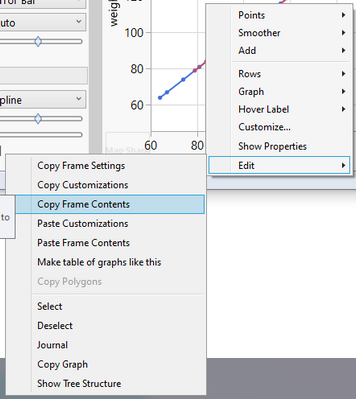
11) copy and paste Frame content in Graph Builder (to overlay different plots)
- Mark as New
- Bookmark
- Subscribe
- Mute
- Subscribe to RSS Feed
- Get Direct Link
- Report Inappropriate Content
Re: Actions missed by Advanded Log/Worflow Builder
12) Select Rows from the the rows "menu" on the bottom left:
(Select Excluded from the Rows/Row Selection menu)
- Mark as New
- Bookmark
- Subscribe
- Mute
- Subscribe to RSS Feed
- Get Direct Link
- Report Inappropriate Content
Re: Actions missed by Advanded Log/Worflow Builder
13) Excluded/Clear and Hidden/Clear (in the rows menu on the bottom left)
NB: Selected/Clear is recorded
- Mark as New
- Bookmark
- Subscribe
- Mute
- Subscribe to RSS Feed
- Get Direct Link
- Report Inappropriate Content
Re: Actions missed by Advanded Log/Worflow Builder
14) Settings for Virtual Table linking:
https://community.jmp.com/t5/Discussions/Virtual-linking-two-tables-via-JSL-scripting/m-p/634584/hig...
- Mark as New
- Bookmark
- Subscribe
- Mute
- Subscribe to RSS Feed
- Get Direct Link
- Report Inappropriate Content
Re: Actions missed by Advanded Log/Worflow Builder
15) Dashboards to Workflow Builder
no issue, works like expected
- Mark as New
- Bookmark
- Subscribe
- Mute
- Subscribe to RSS Feed
- Get Direct Link
- Report Inappropriate Content
Re: Actions missed by Advanded Log/Worflow Builder
16) The example with row deletion is amazing:
Jmp understands that I want want to delete the inverse of the initial row selection.
like AI Copilot :)
But one has to do it like in the video:
- select a row
- select matching cells
- invert the selection
- delete rows
Then the recorded script will also work with a future table.
If the user is lazy and uses a header graph to select rows, the script is much less useful:
:column << Select Rows([matrix of rows]) << delete rows();
Fixed in Jmp 17.2 :)
For the column deletion, Jmp deletes the last selected columns. Not wrong - but not as clever as in the first example with the rows.
cols=associative array(current data table() << get column names());
cols << remove( associative array({sex}));
For Each({col}, cols,current data table() << delete columns(col));
btw: Is there a function Delete Columns which accepts a list of columns?
- Mark as New
- Bookmark
- Subscribe
- Mute
- Subscribe to RSS Feed
- Get Direct Link
- Report Inappropriate Content
Re: Actions missed by Advanded Log/Worflow Builder
17) copy results to a Journal (Ctrl L)
Workflow Builder or the "baby steps" into Scripting
@brady_brady :
there is no sense having this thing if someone can point and click their way to something that isn't picked up
Recommended Articles
- © 2026 JMP Statistical Discovery LLC. All Rights Reserved.
- Terms of Use
- Privacy Statement
- Contact Us