cancel
Showing results for 
Show  only  | Search instead for 
Did you mean: 
  • Learn how to build custom Python data connectors and further customize JMP’s Data Connector Framework with the Python Data Connector Demo, available now in the JMP Marketplace!
  • See how to move from signal modeling to system modeling at the first JMP Aerospace Analytics webinar. Register. June 18, 1 p.m. US Eastern Time.

Discussions

Solve problems, and share tips and tricks with other JMP users.
Choose Language Hide Translation Bar
jorgeramosdealm
Level III

Heat Map box customization

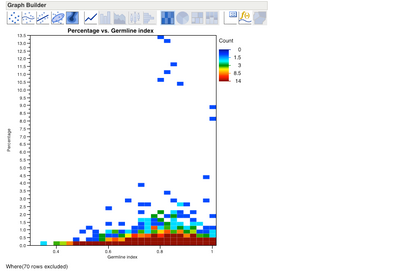
Does anyone know how to change the size of the boxes from a heat map?

2277_heatmap.png

File is in attachment.

1 REPLY 1
XanGregg
Staff

Re: Heat Map box customization

I think the sizes are based on the default histogram binning, which is largely based on the number of rows. I'm afraid I don't see a way to override that. Summarizing the data so that there are fewer rows may help. For example,

  1. use Distribution to make histograms of those two columns
  2. adjust the bins
  3. Save Level Midpoints for each histogram
  4. Table > Summary by the two midpoint columns, which produces a new table with those two columns plus an N Rows column.
  5. Graph the two variables as X and Y and put N Rows in the Freq column.

If you find binning that works, you'll probably want to edit the last germline midpoint so it is less than 1 so those values don't spill into the next cell.

Recommended Articles