- Don’t miss your chance to experience Discovery Summit Europe at our best available rate! Early bird registration through 31 Oct.
- Graph Builder Toolbar streamlines interactive graphing. Creates shortcuts on Report and GraphBuilder Helpers toolbars. Download and install the extension.
- Subscribe to RSS Feed
- Mark Topic as New
- Mark Topic as Read
- Float this Topic for Current User
- Bookmark
- Subscribe
- Mute
- Printer Friendly Page
Discussions
Solve problems, and share tips and tricks with other JMP users.- User Community
- :
- Discussions
- :
- Re: Graph Builder: reference line, different for each Y group

- Mark as New
- Bookmark
- Subscribe
- Mute
- Subscribe to RSS Feed
- Get Direct Link
- Report Inappropriate Content
Graph Builder: reference line, different for each Y group
Hello everybody,
I would like to know if it is possible to define separated reference lines on the X axis when we have Y groups.
Here is an example using the BigClass data table.
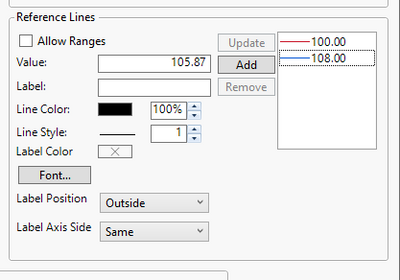
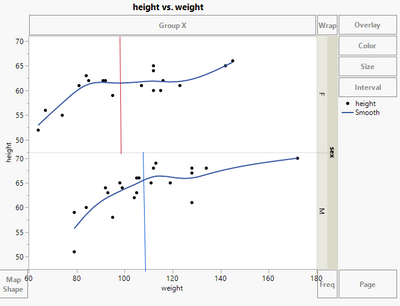
I can define two reference lines, but I would like to display the red one only on the top graph and the blue one on the bottom graph.
Here is what I get:
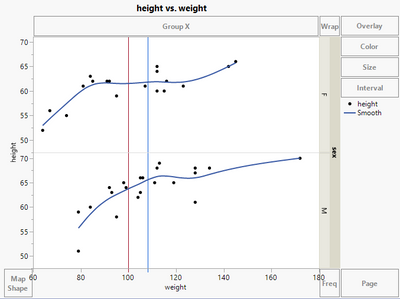
Here is what I would like to get:
Is there a way to do that without playing with the menu Customize > Script ...?
Thanks in advance!
Accepted Solutions

- Mark as New
- Bookmark
- Subscribe
- Mute
- Subscribe to RSS Feed
- Get Direct Link
- Report Inappropriate Content
Re: Graph Builder: reference line, different for each Y group
and here an option with no JSL:
use a "bar" graph (with "float" style) with Response axis = X


Names Default to Here(1);
dt = Open( "$SAMPLE_DATA/Big Class.jmp" );
// via right click - new formula column
New Column( "Mean[height][sex]",	Formula( Col Mean( :height, :sex ) ));


Graph Builder(
	Variables(
		X( :height ),
		X( :"Mean[height][sex]"n, Position( 1 ) ),
		Y( :weight ),
		Group Y( :sex ),
		Color( :sex )
	),
	Elements(
		Points( X( 1 ), Y),
		Smoother( X( 1 ), Y ),
		Bar( X( 2 ), Bar Style( "Float" ), Response Axis( "X" ) )
	)
);
- Mark as New
- Bookmark
- Subscribe
- Mute
- Subscribe to RSS Feed
- Get Direct Link
- Report Inappropriate Content
Re: Graph Builder: reference line, different for each Y group
Graph Builder is designed to facilitate comparisons within and between groups. So, if you have multiple FrameBoxes from using grouping variables then, as you say, the x and y axes (and any reference lines associated with these) will always be common. So I believe the answer is 'no', not without resorting to JSL.
- Mark as New
- Bookmark
- Subscribe
- Mute
- Subscribe to RSS Feed
- Get Direct Link
- Report Inappropriate Content
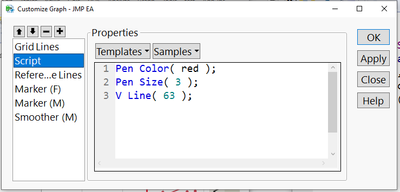
Re: Graph Builder: reference line, different for each Y group
Fortunately, it's less JSL than one might expect:
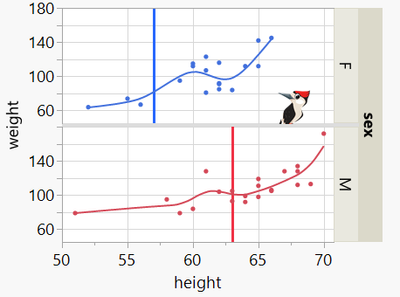
right click / customize / + / type:
- Mark as New
- Bookmark
- Subscribe
- Mute
- Subscribe to RSS Feed
- Get Direct Link
- Report Inappropriate Content
Re: Graph Builder: reference line, different for each Y group
and here an option with no JSL:
use a "bar" graph (with "float" style) with Response axis = X
Names Default to Here(1);
dt = Open( "$SAMPLE_DATA/Big Class.jmp" );
// via right click - new formula column
New Column( "Mean[height][sex]",	Formula( Col Mean( :height, :sex ) ));


Graph Builder(
	Variables(
		X( :height ),
		X( :"Mean[height][sex]"n, Position( 1 ) ),
		Y( :weight ),
		Group Y( :sex ),
		Color( :sex )
	),
	Elements(
		Points( X( 1 ), Y),
		Smoother( X( 1 ), Y ),
		Bar( X( 2 ), Bar Style( "Float" ), Response Axis( "X" ) )
	)
);- Mark as New
- Bookmark
- Subscribe
- Mute
- Subscribe to RSS Feed
- Get Direct Link
- Report Inappropriate Content
Re: Graph Builder: reference line, different for each Y group
Hi @hogi ,
That's a very nice way to answer the problem, thanks! But if I understand correctly, it works only if we want to highlight a summary statistic value (mean, median...) and not a user defined threshold?
- Mark as New
- Bookmark
- Subscribe
- Mute
- Subscribe to RSS Feed
- Get Direct Link
- Report Inappropriate Content
Re: Graph Builder: reference line, different for each Y group
The basic step is
Bar Style( "Float" )
It can also be used for user defined thresholds. Jus store it in a column and plot it as Bar chart with Bar Style("Float")
- Mark as New
- Bookmark
- Subscribe
- Mute
- Subscribe to RSS Feed
- Get Direct Link
- Report Inappropriate Content
Re: Graph Builder: reference line, different for each Y group
Clear, thanks for your help @hogi !
Recommended Articles
- © 2026 JMP Statistical Discovery LLC. All Rights Reserved.
- Terms of Use
- Privacy Statement
- Contact Us