- Don’t miss your chance to experience Discovery Summit Europe at our best available rate! Early bird registration through 31 Oct.
- Image to Table JMP extension imports single or batch images as data tables. Useful to extract curves from pictures or convert image data to curve data to use in analyses like Functional Data Explorer. Download and install the extension.
- Subscribe to RSS Feed
- Mark Topic as New
- Mark Topic as Read
- Float this Topic for Current User
- Bookmark
- Subscribe
- Mute
- Printer Friendly Page
Discussions
Solve problems, and share tips and tricks with other JMP users.- User Community
- :
- Discussions
- :
- Graph Builder: reference line, different for each Y group

- Mark as New
- Bookmark
- Subscribe
- Mute
- Subscribe to RSS Feed
- Get Direct Link
- Report Inappropriate Content
Graph Builder: reference line, different for each Y group
Hello everybody,
I would like to know if it is possible to define separated reference lines on the X axis when we have Y groups.
Here is an example using the BigClass data table.
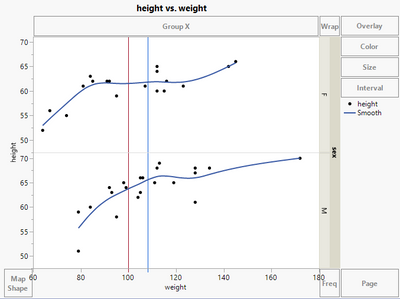
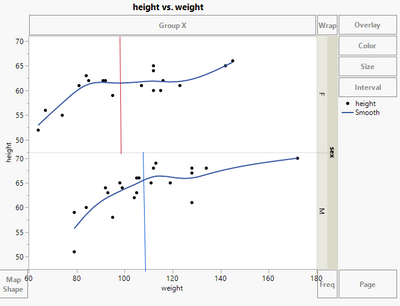
I can define two reference lines, but I would like to display the red one only on the top graph and the blue one on the bottom graph.
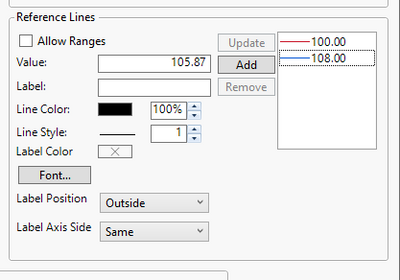
Here is what I get:
Here is what I would like to get:
Is there a way to do that without playing with the menu Customize > Script ...?
Thanks in advance!
Accepted Solutions

- Mark as New
- Bookmark
- Subscribe
- Mute
- Subscribe to RSS Feed
- Get Direct Link
- Report Inappropriate Content
Re: Graph Builder: reference line, different for each Y group
and here an option with no JSL:
use a "bar" graph (with "float" style) with Response axis = X


Names Default to Here(1);
dt = Open( "$SAMPLE_DATA/Big Class.jmp" );
// via right click - new formula column
New Column( "Mean[height][sex]",	Formula( Col Mean( :height, :sex ) ));


Graph Builder(
	Variables(
		X( :height ),
		X( :"Mean[height][sex]"n, Position( 1 ) ),
		Y( :weight ),
		Group Y( :sex ),
		Color( :sex )
	),
	Elements(
		Points( X( 1 ), Y),
		Smoother( X( 1 ), Y ),
		Bar( X( 2 ), Bar Style( "Float" ), Response Axis( "X" ) )
	)
);
- Mark as New
- Bookmark
- Subscribe
- Mute
- Subscribe to RSS Feed
- Get Direct Link
- Report Inappropriate Content
Re: Graph Builder: reference line, different for each Y group
Graph Builder is designed to facilitate comparisons within and between groups. So, if you have multiple FrameBoxes from using grouping variables then, as you say, the x and y axes (and any reference lines associated with these) will always be common. So I believe the answer is 'no', not without resorting to JSL.
- Mark as New
- Bookmark
- Subscribe
- Mute
- Subscribe to RSS Feed
- Get Direct Link
- Report Inappropriate Content
Re: Graph Builder: reference line, different for each Y group
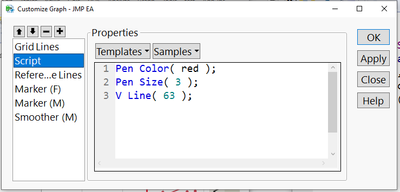
Fortunately, it's less JSL than one might expect:
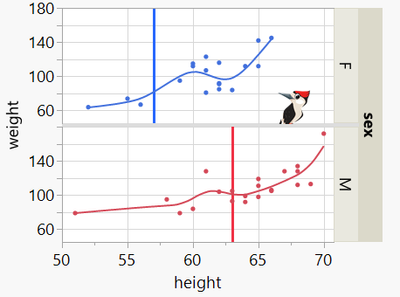
right click / customize / + / type:
- Mark as New
- Bookmark
- Subscribe
- Mute
- Subscribe to RSS Feed
- Get Direct Link
- Report Inappropriate Content
Re: Graph Builder: reference line, different for each Y group
and here an option with no JSL:
use a "bar" graph (with "float" style) with Response axis = X
Names Default to Here(1);
dt = Open( "$SAMPLE_DATA/Big Class.jmp" );
// via right click - new formula column
New Column( "Mean[height][sex]",	Formula( Col Mean( :height, :sex ) ));


Graph Builder(
	Variables(
		X( :height ),
		X( :"Mean[height][sex]"n, Position( 1 ) ),
		Y( :weight ),
		Group Y( :sex ),
		Color( :sex )
	),
	Elements(
		Points( X( 1 ), Y),
		Smoother( X( 1 ), Y ),
		Bar( X( 2 ), Bar Style( "Float" ), Response Axis( "X" ) )
	)
);- Mark as New
- Bookmark
- Subscribe
- Mute
- Subscribe to RSS Feed
- Get Direct Link
- Report Inappropriate Content
Re: Graph Builder: reference line, different for each Y group
Hi @hogi ,
That's a very nice way to answer the problem, thanks! But if I understand correctly, it works only if we want to highlight a summary statistic value (mean, median...) and not a user defined threshold?
- Mark as New
- Bookmark
- Subscribe
- Mute
- Subscribe to RSS Feed
- Get Direct Link
- Report Inappropriate Content
Re: Graph Builder: reference line, different for each Y group
The basic step is
Bar Style( "Float" )
It can also be used for user defined thresholds. Jus store it in a column and plot it as Bar chart with Bar Style("Float")
- Mark as New
- Bookmark
- Subscribe
- Mute
- Subscribe to RSS Feed
- Get Direct Link
- Report Inappropriate Content
Re: Graph Builder: reference line, different for each Y group
Clear, thanks for your help @hogi !
Recommended Articles
- © 2026 JMP Statistical Discovery LLC. All Rights Reserved.
- Terms of Use
- Privacy Statement
- Contact Us