cancel
Showing results for 
Show  only  | Search instead for 
Did you mean: 
  • JMP will suspend normal business operations for our Winter Holiday beginning on Wednesday, Dec. 24, 2025, at 5:00 p.m. ET (2:00 p.m. ET for JMP Accounts Receivable).
    Regular business hours will resume at 9:00 a.m. EST on Friday, Jan. 2, 2026.
  • We’re retiring the File Exchange at the end of this year. The JMP Marketplace is now your destination for add-ins and extensions.

Discussions

Solve problems, and share tips and tricks with other JMP users.
%3CLINGO-SUB%20id%3D%22lingo-sub-55291%22%20slang%3D%22en-US%22%20mode%3D%22NONE%22%3EProblema%20di%20formato%20decimale%3C%2FLINGO-SUB%3E%3CLINGO-BODY%20id%3D%22lingo-body-55291%22%20slang%3D%22en-US%22%20mode%3D%22NONE%22%3E%3CP%3EHo%20colonne%20in%20cui%20voglio%20limitare%20le%20cifre%20decimali%20a%202.%20Ad%20esempio%2C%200%2C335256%20dovrebbe%20essere%200%2C34.%20Sto%20usando%20dt%3AColumnName%20%26lt%3B%26lt%3B%20Format(%20%22Fixed%20Dec%22%2C%2012%2C%202%20)%3B%20e%20funziona%20perfettamente.%20Tuttavia%2C%20alcune%20celle%20nelle%20colonne%20hanno%20valori%20come%3A%20%26lt%3B0.00234%20per%20cui%20questo%20formato%20restituisce%200.00%2C%20mentre%20voglio%20%26lt%3B0.00.%20Come%20posso%20raggiungere%20questo%20obiettivo%3F%20Grazie.%3C%2FP%3E%3C%2FLINGO-BODY%3E%3CLINGO-SUB%20id%3D%22lingo-sub-55297%22%20slang%3D%22en-US%22%20mode%3D%22NONE%22%3ERi%3A%20Problema%20formato%20decimale%3C%2FLINGO-SUB%3E%3CLINGO-BODY%20id%3D%22lingo-body-55297%22%20slang%3D%22en-US%22%20mode%3D%22NONE%22%3E%3CP%3EPuoi%20usare%20un%3CA%20href%3D%22https%3A%2F%2Fwww.jmp.com%2Fsupport%2Fhelp%2F14%2Fnumeric-formats.shtml%23720962%22%20target%3D%22_blank%22%20rel%3D%22noopener%20noreferrer%22%3E%20Formato%20personalizzato%3C%2FA%3E%20per%20ottenere%20quello%20che%20vuoi.%3C%2FP%3E%0A%3CP%3E%26nbsp%3B%3C%2FP%3E%0A%3CP%3ENel%3CA%20href%3D%22https%3A%2F%2Fwww.jmp.com%2Fsupport%2Fhelp%2F14%2Fthe-column-info-window.shtml%23%22%20target%3D%22_blank%22%20rel%3D%22noopener%20noreferrer%22%3E%20Informazioni%20colonna%3C%2FA%3E%20finestra%20scegliere%20Formato-%26gt%3B%20Personalizzato.%3C%2FP%3E%0A%3CP%3E%3CSPAN%20class%3D%22lia-inline-image-display-wrapper%20lia-image-align-inline%22%20image-alt%3D%22JMPScreenSnapz192.png%22%20style%3D%22width%3A%20388px%3B%22%3E%3CSPAN%20class%3D%22lia-inline-image-display-wrapper%22%20image-alt%3D%22JMPScreenSnapz192.png%22%20style%3D%22width%3A%20388px%3B%22%3E%3Cspan%20class%3D%22lia-inline-image-display-wrapper%22%20image-alt%3D%22JMPScreenSnapz192.png%22%20style%3D%22width%3A%20388px%3B%22%3E%3Cimg%20src%3D%22https%3A%2F%2Fcommunity.jmp.com%2Ft5%2Fimage%2Fserverpage%2Fimage-id%2F10450i62BA6BA80F89BA9C%2Fimage-size%2Fmedium%3Fv%3Dv2%26amp%3Bpx%3D400%22%20role%3D%22button%22%20title%3D%22JMPScreenSnapz192.png%22%20alt%3D%22JMPScreenSnapz192.png%22%20%2F%3E%3C%2Fspan%3E%3C%2FSPAN%3E%3C%2FSPAN%3E%3C%2FP%3E%0A%3CP%3EQuindi%20fare%20clic%20sul%20pulsante%20Imposta%20formato%20formato%20personalizzato.%3C%2FP%3E%0A%3CP%3E%3CSPAN%20class%3D%22lia-inline-image-display-wrapper%20lia-image-align-inline%22%20image-alt%3D%22JMPScreenSnapz193-2.png%22%20style%3D%22width%3A%20400px%3B%22%3E%3CSPAN%20class%3D%22lia-inline-image-display-wrapper%22%20image-alt%3D%22JMPScreenSnapz193-2.png%22%20style%3D%22width%3A%20400px%3B%22%3E%3Cspan%20class%3D%22lia-inline-image-display-wrapper%22%20image-alt%3D%22JMPScreenSnapz193-2.png%22%20style%3D%22width%3A%20400px%3B%22%3E%3Cimg%20src%3D%22https%3A%2F%2Fcommunity.jmp.com%2Ft5%2Fimage%2Fserverpage%2Fimage-id%2F10451iA2F59619DEE7D424%2Fimage-size%2Fmedium%3Fv%3Dv2%26amp%3Bpx%3D400%22%20role%3D%22button%22%20title%3D%22JMPScreenSnapz193-2.png%22%20alt%3D%22JMPScreenSnapz193-2.png%22%20%2F%3E%3C%2Fspan%3E%3C%2FSPAN%3E%3C%2FSPAN%3E%3C%2FP%3E%0A%3CP%3EFinirai%20in%20una%20versione%20di%3CA%20href%3D%22https%3A%2F%2Fwww.jmp.com%2Fsupport%2Fhelp%2F14%2Fformula-editor.shtml%23%22%20target%3D%22_blank%22%20rel%3D%22noopener%20noreferrer%22%3E%20Editor%20di%20formule%3C%2FA%3E%20che%20ti%20permetter%C3%A0%20di%20riformattare%20il%20valore%20come%20desideri.%3C%2FP%3E%0A%3CP%3EAlla%20fine%20sembrerebbe%20qualcosa%20del%20genere.%3C%2FP%3E%0A%3CP%3E%3CSPAN%20class%3D%22lia-inline-image-display-wrapper%20lia-image-align-inline%22%20image-alt%3D%22JMPScreenSnapz194.png%22%20style%3D%22width%3A%20999px%3B%22%3E%3CSPAN%20class%3D%22lia-inline-image-display-wrapper%22%20image-alt%3D%22JMPScreenSnapz194.png%22%20style%3D%22width%3A%20999px%3B%22%3E%3Cspan%20class%3D%22lia-inline-image-display-wrapper%22%20image-alt%3D%22JMPScreenSnapz194.png%22%20style%3D%22width%3A%20999px%3B%22%3E%3Cimg%20src%3D%22https%3A%2F%2Fcommunity.jmp.com%2Ft5%2Fimage%2Fserverpage%2Fimage-id%2F10452i62989AC27F138256%2Fimage-size%2Flarge%3Fv%3Dv2%26amp%3Bpx%3D999%22%20role%3D%22button%22%20title%3D%22JMPScreenSnapz194.png%22%20alt%3D%22JMPScreenSnapz194.png%22%20%2F%3E%3C%2Fspan%3E%3C%2FSPAN%3E%3C%2FSPAN%3E%3C%2FP%3E%3C%2FLINGO-BODY%3E%3CLINGO-SUB%20id%3D%22lingo-sub-55293%22%20slang%3D%22en-US%22%20mode%3D%22NONE%22%3ERi%3A%20Problema%20formato%20decimale%3C%2FLINGO-SUB%3E%3CLINGO-BODY%20id%3D%22lingo-body-55293%22%20slang%3D%22en-US%22%20mode%3D%22NONE%22%3E%3CP%3ENon%20importa%2C%20ho%20pensato%20di%20poter%20usare%20PValue%20per%20ottenere%20ci%C3%B2%20che%20volevo.%20Quindi%2C%20il%20formato%20%C3%A8%3A%3CSPAN%3E%20dt%3AColumnName%20%26lt%3B%26lt%3B%20Format(%20%22PValue%22%2C%206%20)%3B%20Non%20riesco%20ancora%20a%20limitarlo%20a%202%20decimali%20per%C3%B2!!%3C%2FSPAN%3E%3C%2FP%3E%3C%2FLINGO-BODY%3E
Choose Language Hide Translation Bar
Aam_jmp
Level IV

Decimal Format Problem

I have columns where I want to limit the decimal places to 2. Example, 0.335256 should be 0.34. I am using dt:ColumnName << Format( "Fixed Dec", 12, 2 ); and it works perfectly. However, some cells in the columns have values like: <0.00234 for which this Format outputs 0.00, whereas I want <0.00. How can I achieve this? Thank you.

1 ACCEPTED SOLUTION

Accepted Solutions
Aam_jmp
Level IV

Re: Decimal Format Problem

Never mind, I figured I can use PValue to achieve what I wanted. So, the format is : dt:ColumnName << Format( "PValue", 6 ); I still cannot limit it to 2 decimals though!!

View solution in original post

2 REPLIES 2
Aam_jmp
Level IV

Re: Decimal Format Problem

Never mind, I figured I can use PValue to achieve what I wanted. So, the format is : dt:ColumnName << Format( "PValue", 6 ); I still cannot limit it to 2 decimals though!!

Jeff_Perkinson
Community Manager Community Manager

Re: Decimal Format Problem

You can use a Custom Format to get what you want.


In the Column Info window choose Format->Custom.
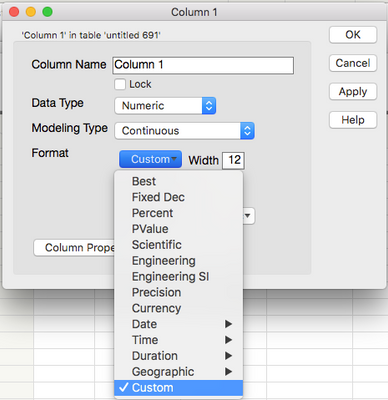
JMPScreenSnapz192.png

Then click the Set Custom Format format button.
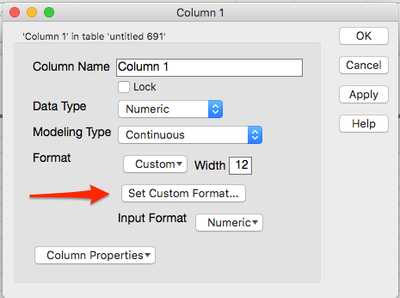
JMPScreenSnapz193-2.png

You'll end up in a version of the Formula Editor which will allow you to reformat the value as you wish.

Ultimately it would look something like this.
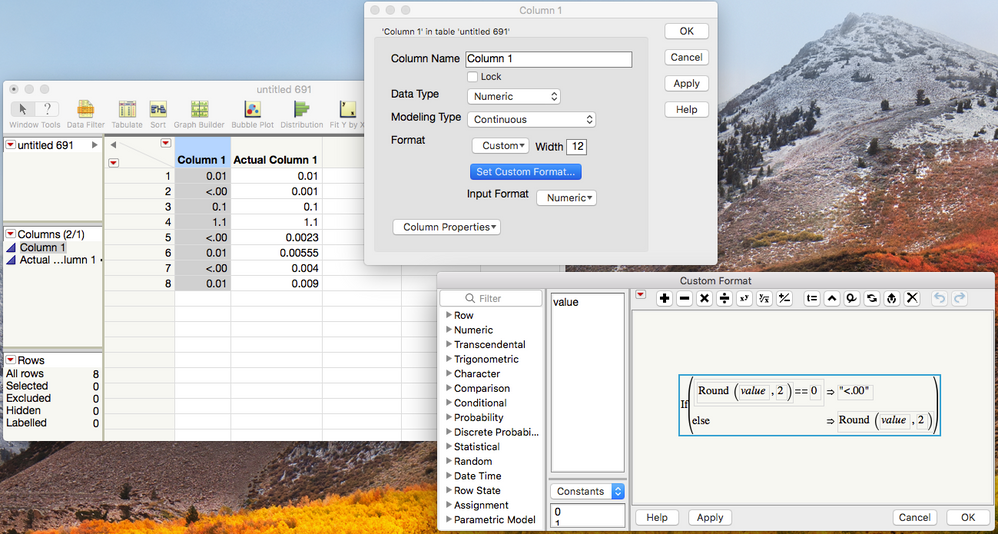
JMPScreenSnapz194.png

-Jeff

Recommended Articles