- Don’t miss your chance to experience Discovery Summit Europe at our best available rate! Early bird registration through 31 Oct.
- Graph Builder Toolbar streamlines interactive graphing. Creates shortcuts on Report and GraphBuilder Helpers toolbars. Download and install the extension.
- Subscribe to RSS Feed
- Mark Topic as New
- Mark Topic as Read
- Float this Topic for Current User
- Bookmark
- Subscribe
- Mute
- Printer Friendly Page
Discussions
Solve problems, and share tips and tricks with other JMP users.- User Community
- :
- Discussions
- :
- Decimal Format Problem

- Mark as New
- Bookmark
- Subscribe
- Mute
- Subscribe to RSS Feed
- Get Direct Link
- Report Inappropriate Content
Decimal Format Problem
I have columns where I want to limit the decimal places to 2. Example, 0.335256 should be 0.34. I am using dt:ColumnName << Format( "Fixed Dec", 12, 2 ); and it works perfectly. However, some cells in the columns have values like: <0.00234 for which this Format outputs 0.00, whereas I want <0.00. How can I achieve this? Thank you.
Accepted Solutions
- Mark as New
- Bookmark
- Subscribe
- Mute
- Subscribe to RSS Feed
- Get Direct Link
- Report Inappropriate Content
Re: Decimal Format Problem
Never mind, I figured I can use PValue to achieve what I wanted. So, the format is : dt:ColumnName << Format( "PValue", 6 ); I still cannot limit it to 2 decimals though!!
- Mark as New
- Bookmark
- Subscribe
- Mute
- Subscribe to RSS Feed
- Get Direct Link
- Report Inappropriate Content
Re: Decimal Format Problem
Never mind, I figured I can use PValue to achieve what I wanted. So, the format is : dt:ColumnName << Format( "PValue", 6 ); I still cannot limit it to 2 decimals though!!


 Community Manager
- Mark as New
- Bookmark
- Subscribe
- Mute
- Subscribe to RSS Feed
- Get Direct Link
- Report Inappropriate Content
Re: Decimal Format Problem
You can use a Custom Format to get what you want.
In the Column Info window choose Format->Custom.
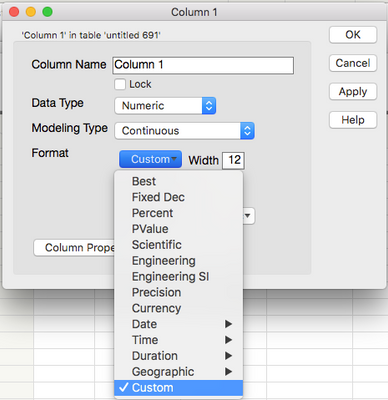
Then click the Set Custom Format format button.
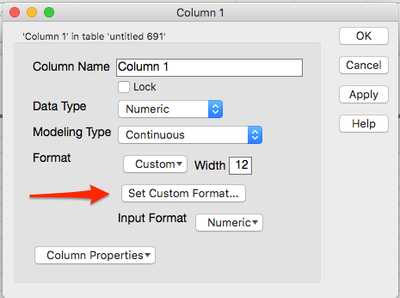
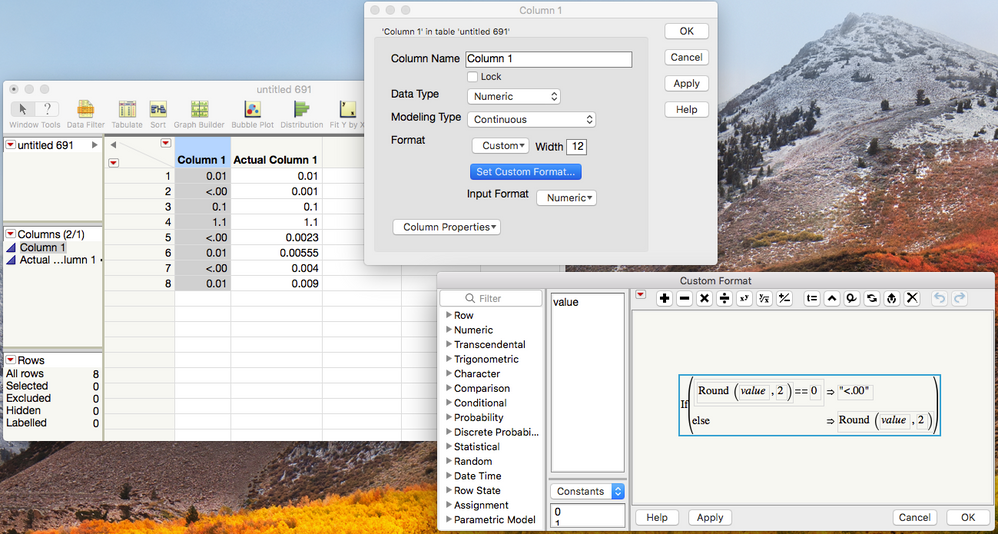
You'll end up in a version of the Formula Editor which will allow you to reformat the value as you wish.
Ultimately it would look something like this.
Recommended Articles
- © 2026 JMP Statistical Discovery LLC. All Rights Reserved.
- Terms of Use
- Privacy Statement
- Contact Us