Hi JMP team and Community members,
Maybe I haven't searched long enough, but it seems Space-Filling design are only accessible through DoE -> Classical -> Mixture or through DoE -> Special Purpose -> Space Filling Designs.
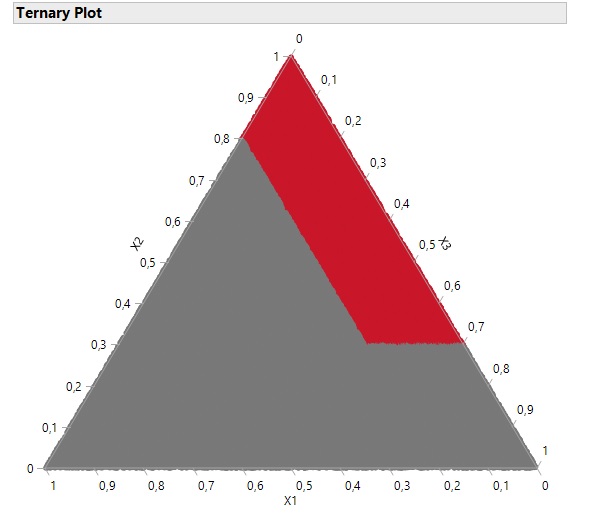
However, I had a case where a Mixture design would be the type of design to choose (because factors are components in a formulation) and an area of the experimental space should be excluded (see image, red area is excluded because of stability issues).
I tried to do the option "Disallowed combinations filter/script", but it doesn't work with Mixture designs.
I also tried the "Candidate Runs" method, by generating 100000 points in my experimental space, excluding the red area, and trying to create a Custom design with covariates. It does work, but I would like the option here to use a Space-Filling design, to have more flexibility in the modeling and avoid "blind spots".
I also tried the Space-Filling from "Special Purpose" menu and adding the constraints, but very strangely it seems to have a bug, as all generated points are at 0.
DOE(
	Space Filling Design,
	{Add Response( Maximize, "Y", ., ., . ), Add Factor( Mixture, 0, 1, "X1", 0 ),
	Add Factor( Mixture, 0, 1, "X2", 0 ), Add Factor( Mixture, 0, 1, "X3", 0 ),
	Set Random Seed( 1883266761 ), Disallowed Combinations( X2 >= 0.3 & X1 <= 0.2 ),
	FFF Optimality Criterion( MaxPro ),
	Space Filling Design Type( Fast Flexible Filling, 30 ), Simulate Responses( 0 )}
);
For my use case I will simply generate the Space-Filling design with no constraints and manually exclude points in the area (not optimal method, but it seems to be the only option here to have a Space-FIlling design), but I would like to have in the Custom design the option to use Space-Filling design (with covariates for Mixtures design with specific constraints for example).