- JMP will suspend normal business operations for our Winter Holiday beginning on Wednesday, Dec. 24, 2025, at 5:00 p.m. ET (2:00 p.m. ET for JMP Accounts Receivable).
Regular business hours will resume at 9:00 a.m. EST on Friday, Jan. 2, 2026. - We’re retiring the File Exchange at the end of this year. The JMP Marketplace is now your destination for add-ins and extensions.
- Subscribe to RSS Feed
- Mark Topic as New
- Mark Topic as Read
- Float this Topic for Current User
- Bookmark
- Subscribe
- Mute
- Printer Friendly Page
Discussions
Solve problems, and share tips and tricks with other JMP users.- JMP User Community
- :
- Discussions
- :
- Show multiple images in graph label?

- Mark as New
- Bookmark
- Subscribe
- Mute
- Subscribe to RSS Feed
- Get Direct Link
- Report Inappropriate Content
Show multiple images in graph label?
I really appreciate the ability to add images to a JMP table, and add that column as "label" so that when I hover over the data point, it shows the image!
However, when I add two different images as label, only the first one is shown. I'd really like to be able to hover over a data point and view both images. Is there any way to do that in JMP? Or is the only solution to use an external program to concatenate the images before loading into JMP?


- Mark as New
- Bookmark
- Subscribe
- Mute
- Subscribe to RSS Feed
- Get Direct Link
- Report Inappropriate Content
Re: Show multiple images in graph label?
You handle this by combining the 2 images into one window, and then saving that combined image.

- Mark as New
- Bookmark
- Subscribe
- Mute
- Subscribe to RSS Feed
- Get Direct Link
- Report Inappropriate Content
Re: Show multiple images in graph label?
To see more labels at once, In Jmp >=16, you could also enable the Label Viewer from the Hover Label menu:
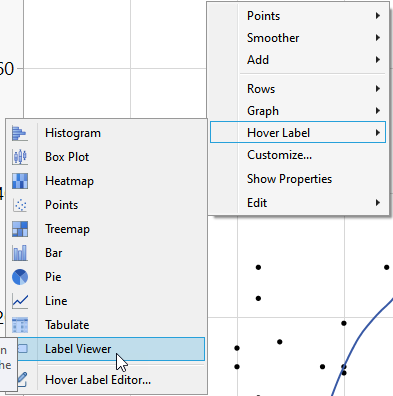
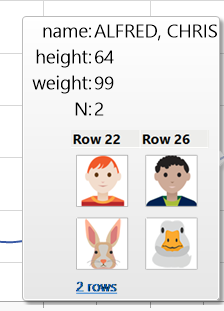
With Jmp <16 you can install the Label-Viewer AddIn and activate it from the Add-Ins Menu.
- Mark as New
- Bookmark
- Subscribe
- Mute
- Subscribe to RSS Feed
- Get Direct Link
- Report Inappropriate Content
Re: Show multiple images in graph label?
Hi @hogi , I'm trying to understand how the Label Viewer works. When I try it, I'm only seeing a single image, even when I have set multiple image columns to Label.
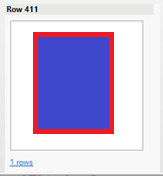
In your example, it appears the hover label is showing you two separate rows? And for each row, are the two images each saved in different columns?
- Mark as New
- Bookmark
- Subscribe
- Mute
- Subscribe to RSS Feed
- Get Direct Link
- Report Inappropriate Content
Re: Show multiple images in graph label?
Hm, surprising, @nascif_jmp ?
@markschwab , could you share your file?
In the Sample Library you can find an example file and a script to see how a Hover Label should look like with Label Viewer enabled.
dt = Open( "$SAMPLE_DATA/Big Class Families.jmp" );
dt <<Run Script("Display Multiple Images with Label Viewer")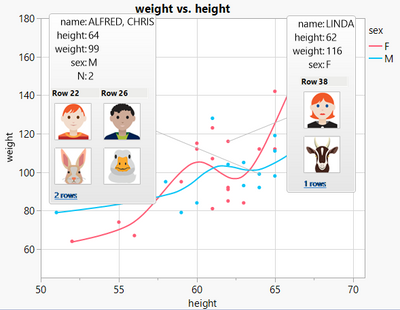
Recommended Articles
- © 2026 JMP Statistical Discovery LLC. All Rights Reserved.
- Terms of Use
- Privacy Statement
- Contact Us