- Discovery Summit 2026: Early User Edition - September 23-24.Register. It's free.
- Graph Builder Toolbar streamlines interactive graphing. Creates shortcuts on Report and GraphBuilder Helpers toolbars. Download and install the extension.
- Subscribe to RSS Feed
- Mark Topic as New
- Mark Topic as Read
- Float this Topic for Current User
- Bookmark
- Subscribe
- Mute
- Printer Friendly Page
Discussions
Solve problems, and share tips and tricks with other JMP users.- User Community
- :
- Discussions
- :
- Re: Range check refresh in column

- Mark as New
- Bookmark
- Subscribe
- Mute
- Subscribe to RSS Feed
- Get Direct Link
- Report Inappropriate Content
Range check refresh in column
Hi,
I have this file with column that has range check property, but the numbers in the column are not filtered automatically.
Please see the table attached.
How may I apply the range via scripting?
Thank you.
Accepted Solutions
- Mark as New
- Bookmark
- Subscribe
- Mute
- Subscribe to RSS Feed
- Get Direct Link
- Report Inappropriate Content
Re: Range check refresh in column
The answer is:
dt = New Table( "RangeCheckDB",Add Rows( 6 ),New Column( "X",Numeric,"Continuous",Format( "Best", 12 ),
Range Check( LELT( 0, 100 ) ),Set Selected,Set Values( [0.46, 0.06, -903.19, 0.1, 1555, -233] )));
col = Column( dt, "X" );
prop = col << Get Property( "Range Check" ); // prop = Range Check( LELT( 0, 100 ) )
col << Delete property( "Range Check" ); // Delete property from col
// Set property back to original value
Eval( // Evaluate the expression
Eval Expr( // Evaluate items marked with Expr()
col << set property( "Range Check", Expr( Arg Expr( prop, 1 ) ) ) // Arg Expr( prop, 1 ) == LELT( 0, 100 )
)
);

- Mark as New
- Bookmark
- Subscribe
- Mute
- Subscribe to RSS Feed
- Get Direct Link
- Report Inappropriate Content
Re: Range check refresh in column
I'm not completely sure what you expect the script to do, but generally you can adjust the range check values using:
:"-32 mesh" << Range Check(LTLT(-100, 100));
If you want to adjust the range check to the values in your data file you could try something like that:
:"-32 mesh" << Range Check(LELE(colmin(:"-32 mesh"), 100));
Of course I don't know how the range check makes sense then. Hope that helps anyways.
- Mark as New
- Bookmark
- Subscribe
- Mute
- Subscribe to RSS Feed
- Get Direct Link
- Report Inappropriate Content
Re: Range check refresh in column
Thank you,
What I mean - I have the table with range check property already EXISTS in the column,
but still see the values beyond the range.
May be there is some refresh function for range check that will convert out of range values to missing?
I dont want to add the property, but to refresh the existing.
Thanks again.
- Mark as New
- Bookmark
- Subscribe
- Mute
- Subscribe to RSS Feed
- Get Direct Link
- Report Inappropriate Content
Re: Range check refresh in column
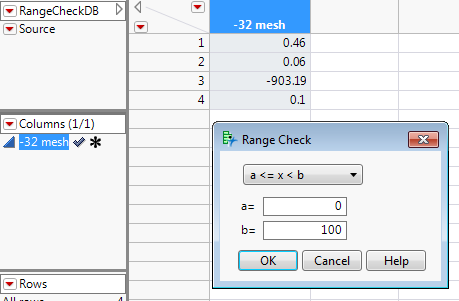
Ah I see the problem now.
What works for me is the following:
:"-32 mesh" << Delete Property("Range Check");
:"-32 mesh" << Range Check(LELT(0, 100));
But there might be a more elegant way that I do not know.


- Mark as New
- Bookmark
- Subscribe
- Mute
- Subscribe to RSS Feed
- Get Direct Link
- Report Inappropriate Content
Re: Range check refresh in column
Do you need the column property? I think of this property as the way to prevent interactive users of this data table from entering values that are deemed invalid by a range check. If you are populating the column with only the script, then you don't need this property. If you are cleaning the data after importing it from another source, then there is another way. If you are filtering the data as part of the function of the script, then there is another way.
It reminds me of another JMP column property: column formula. They are a tough habit for scripters to break.
- Mark as New
- Bookmark
- Subscribe
- Mute
- Subscribe to RSS Feed
- Get Direct Link
- Report Inappropriate Content
Re: Range check refresh in column
Thank you,
I still prefer to use the Range Check.
It works while adding the property to the column, but doesn't while cocatenating new data to the column with existing property.
So, is there some way to delete/add Range check property in following way?
myProp = myColumn << Get Property("Range Check");
myColumn << Delete Property( "Range Check" );
myColumn << Set Property(myProp);
Thanks.
- Mark as New
- Bookmark
- Subscribe
- Mute
- Subscribe to RSS Feed
- Get Direct Link
- Report Inappropriate Content
Re: Range check refresh in column
The answer is:
dt = New Table( "RangeCheckDB",Add Rows( 6 ),New Column( "X",Numeric,"Continuous",Format( "Best", 12 ),
Range Check( LELT( 0, 100 ) ),Set Selected,Set Values( [0.46, 0.06, -903.19, 0.1, 1555, -233] )));
col = Column( dt, "X" );
prop = col << Get Property( "Range Check" ); // prop = Range Check( LELT( 0, 100 ) )
col << Delete property( "Range Check" ); // Delete property from col
// Set property back to original value
Eval( // Evaluate the expression
Eval Expr( // Evaluate items marked with Expr()
col << set property( "Range Check", Expr( Arg Expr( prop, 1 ) ) ) // Arg Expr( prop, 1 ) == LELT( 0, 100 )
)
);
Recommended Articles
- © 2026 JMP Statistical Discovery LLC. All Rights Reserved.
- Terms of Use
- Privacy Statement
- Contact Us