- Don’t miss your chance to experience Discovery Summit Europe at our best available rate! Early bird registration through 31 Oct.
- Graph Builder Toolbar streamlines interactive graphing. Creates shortcuts on Report and GraphBuilder Helpers toolbars. Download and install the extension.
- Subscribe to RSS Feed
- Mark Topic as New
- Mark Topic as Read
- Float this Topic for Current User
- Bookmark
- Subscribe
- Mute
- Printer Friendly Page
Discussions
Solve problems, and share tips and tricks with other JMP users.- User Community
- :
- Discussions
- :
- Paired T Test in Bivariate Analysis

- Mark as New
- Bookmark
- Subscribe
- Mute
- Subscribe to RSS Feed
- Get Direct Link
- Report Inappropriate Content
Paired T Test in Bivariate Analysis
I received an example from a customer of some data analysis. They performed 3 tests on the data.
- Linear Fit
- Orthogonal Fit Ratio = 1.000
- Paired t Test
I am able to get the first two through the Fit Y by X however I cannot find anywhere (online and in the software) to do a Paired t Test.
They did create two more columns for "Standard Value" and "Delta" which are formulas but are blank in the data table.
Any suggestions?
Thanks
Accepted Solutions


 Community Manager
- Mark as New
- Bookmark
- Subscribe
- Mute
- Subscribe to RSS Feed
- Get Direct Link
- Report Inappropriate Content
Re: Paired T Test in Bivariate Analysis
Hi @MDrake,
The typical way in JMP to perform a paired t-test using the Matched Pairs platform, which is available under Analyze > Specialized Modeling > Matched Pairs.
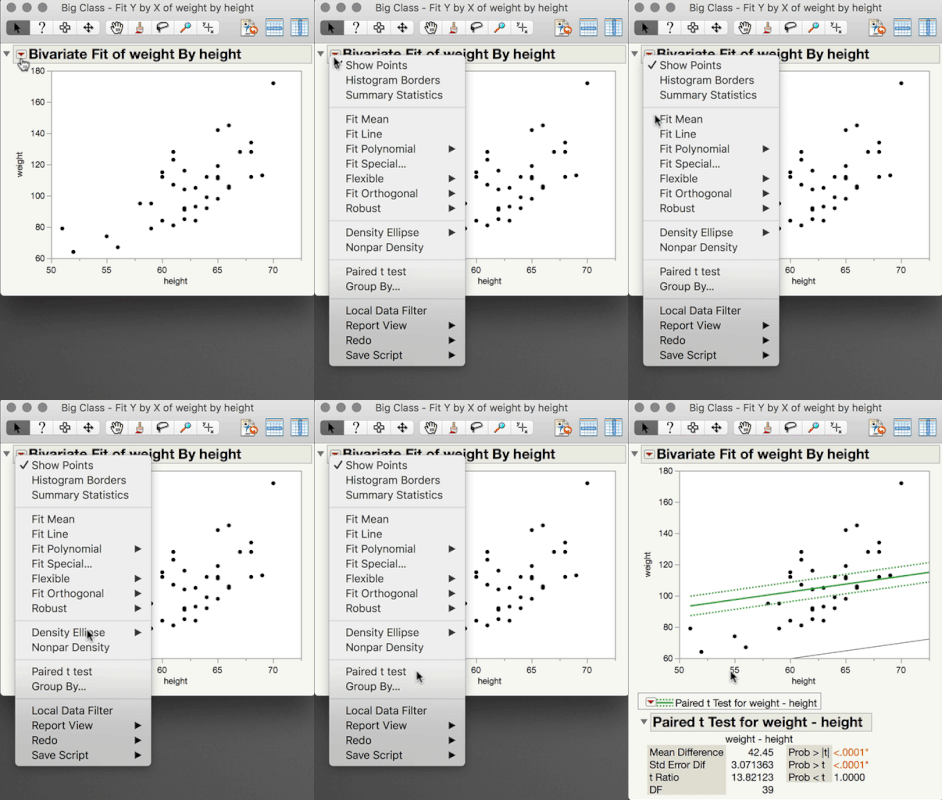
A less common way to perform the Paired t-test is using Fit Y by X just as you have before (with a continuous Y variable, and a continuous X variable), but before clicking the Red Triangle, hold down the Shift key on your keyboard. You will see the Paired T-test option now available in the menu. TheMatched Pairs platform has more options, but occasionally it's useful to run the Paired T-test through Fit Y by X.
I hope this helps,


- Mark as New
- Bookmark
- Subscribe
- Mute
- Subscribe to RSS Feed
- Get Direct Link
- Report Inappropriate Content
Re: Paired T Test in Bivariate Analysis
Hi,
The Paired t-test platform has moved from the main "Analyze" menu to "Analyze" > "Specialized Modeling" > "Matched Pairs".
To use this platform, your response needs to be split into columns (e.g. Before, After) with each row representing a unique item (e.g. Patient).
Cheers,
TS
Community Manager
- Mark as New
- Bookmark
- Subscribe
- Mute
- Subscribe to RSS Feed
- Get Direct Link
- Report Inappropriate Content
Re: Paired T Test in Bivariate Analysis
Hi @MDrake,
The typical way in JMP to perform a paired t-test using the Matched Pairs platform, which is available under Analyze > Specialized Modeling > Matched Pairs.
A less common way to perform the Paired t-test is using Fit Y by X just as you have before (with a continuous Y variable, and a continuous X variable), but before clicking the Red Triangle, hold down the Shift key on your keyboard. You will see the Paired T-test option now available in the menu. TheMatched Pairs platform has more options, but occasionally it's useful to run the Paired T-test through Fit Y by X.
I hope this helps,
- Mark as New
- Bookmark
- Subscribe
- Mute
- Subscribe to RSS Feed
- Get Direct Link
- Report Inappropriate Content
Re: Paired T Test in Bivariate Analysis
Thank you that is excatly what I needed!
Recommended Articles
- © 2026 JMP Statistical Discovery LLC. All Rights Reserved.
- Terms of Use
- Privacy Statement
- Contact Us