- JMP will suspend normal business operations for our Winter Holiday beginning on Wednesday, Dec. 24, 2025, at 5:00 p.m. ET (2:00 p.m. ET for JMP Accounts Receivable).
Regular business hours will resume at 9:00 a.m. EST on Friday, Jan. 2, 2026. - We’re retiring the File Exchange at the end of this year. The JMP Marketplace is now your destination for add-ins and extensions.
- Subscribe to RSS Feed
- Mark Topic as New
- Mark Topic as Read
- Float this Topic for Current User
- Bookmark
- Subscribe
- Mute
- Printer Friendly Page
Discussions
Solve problems, and share tips and tricks with other JMP users.- JMP User Community
- :
- Discussions
- :
- Nested data filter row selection

- Mark as New
- Bookmark
- Subscribe
- Mute
- Subscribe to RSS Feed
- Get Direct Link
- Report Inappropriate Content
Nested data filter row selection
Hello,
I'm working on a project where I'll have data categorized in a data table and users will down select to a specific option via an interface I'm creating.
What I want the script below to do is:
- In the left radio box, Choice 1, the person selects the age.
- In the data table all rows that are not that age are hidden and excluded in the data table.
- In the right radio box, Choice 2, it's dynamically updated to only show options that are not hidden or excluded and will contain a list of names to choose from.
- Once both of these options are selected, only 1 row will remain, which the row number is returned in my_row.
What I would like help on:
- Rows are not hidden and excluded automatically when options from Choice 1 are selected, even though show(1) and include(1) are included in the filter terms
- Radio box 2 is not dynamically updated as a result of the Choice 1
- Both of these do not "work together", Choice 2 overwrites row states of Choice 1 and can select from any row. This is probably because it's not dynamically updated(?)
References
- https://community.jmp.com/t5/Discussions/Nested-Multiple-Data-Filter-Context-Box/m-p/54915
- Scripting Index: Radio Box Display
dt = Open( "$SAMPLE_DATA/Big Class.jmp" );

dt << Clear Row States;

New Window( "Example",
	Data Filter Context Box(
		H List Box(
			Panel Box( "Choice 1",
				dt << Data Filter(
					Add Filter(
						columns( :age ),
						Display( :age, Size( 140, 185 ), "Radio Box Display" ),
						Mode( Select( 1 ), Show( 1 ), Include( 1 ) )
			)	)	),
			Panel Box( "Choice 2",
				H List Box(
					Data Filter Context Box(
						V List Box(
							dt << Data Filter(
								Add Filter(
									columns( :name ),
									Display( :name, Size( 160, 150 ), Radio Box Display ),
									Mode( Select( 1 ) )
)	)	)	)	)	)	)	)	);

my_row = dt << Get selected rows;
show( my_row );
- Tags:
- windows
Accepted Solutions


- Mark as New
- Bookmark
- Subscribe
- Mute
- Subscribe to RSS Feed
- Get Direct Link
- Report Inappropriate Content
Re: Nested data filter row selection
Using fully customized filters could be fairly simple solution. This on other hand might not be even if it works (this one time)
Names Default To Here(1);

dt = Open("$SAMPLE_DATA/Big Class.jmp");

dt << Data Filter(
	Location({2793, 233}),
	Conditional,
	Mode(Show(1), Include(1)),
	Add Filter(
		columns(:age, :name),
		Display(:age, N Items(6)),
		Display(:name, N Items(15), Find(Set Text("")))
	)
);

(Window("Data Filter for Big Class")["Data Filter",LineUpBox(2)]) << NCol(2);
(Window("Data Filter for Big Class")["Data Filter",LineUpRulerBox(1)]) << Widths({300,300});
Below are some modifications to your script using Filter Change Handler (state handlers can be very buggy and finicky in JMP, you have been warned :))
Names Default To Here(1);

dt = Open("$SAMPLE_DATA/Big Class.jmp");

dt << clear row states;

Summarize(myage = By(:age));

//make a dialog window
nw = New Window("Sample",
	vlb1 = H List Box(
		lb1 = Border Box(
			obj1 = dt << Data Filter(Add Filter(columns(:age)), Display(:age, "Radio Box Display"), Mode(Select(1), Show(1), Include(1)))
		),
		lb2 = Border Box()
	)
);

// Creates list of names that are not excluded or hidden
f = function({a},
	Try(Summarize(myname = By(:name)));
	//here is the script that runs each time someone clicks in the top box
	//delete the current column list box, if it exists
	Try((lb2 << child) << delete box());

	//append a new col list box, with all columns of the data table selected in the listbox
	lb2 << append(
		Panel Box("Select Script", sel1 = Radio Box(myname, Show(my_names = sel1 << Get Selected)))
	);
);

fch = obj1 << Make Filter Change Handler(f);- Mark as New
- Bookmark
- Subscribe
- Mute
- Subscribe to RSS Feed
- Get Direct Link
- Report Inappropriate Content
Re: Nested data filter row selection
Here's an example of what I'm looking for, but I don't know how to get to the code, since it's an application.
When you have multiple data tables up:
Semiconductor Toolkit (link below) > Utilities (top right) > Attach Table Limits
You first click on the table you want to view columns for, then a second list is generated on the right of what columns are present in the data table you clicked on. This will dynamically update if you choose a new data table.
I've found something similar in the thread below, but am finding it difficult to translate this code into what I'm needing.
Back to the original post:
- Choice 1: if I click on "15", 7 rows in the dt are selected, the rest should be excluded and hidden.
- A secondary option is to use summarize( namelist = by( :name ) ), which will get me a list of unique names that aren't excluded or hidden, but without using radio box, this list will feed into Choice 2. I'm not sure how to make this dynamic.
- Choice 2 will dynamically update a name list based upon the age selected in choice 1.
- Once a selection in Choice 2 is made, only one row will be selected.
Let's say I select: Choice 1 = 15 & Choice 2 = Amy, then row 29 will be selected and I can use << Get selected rows to save this row number to a variable.
Semiconductor Toolkit add-in:
https://community.jmp.com/t5/JMP-Add-Ins/Semiconductor-Toolkit/ta-p/22460
- Mark as New
- Bookmark
- Subscribe
- Mute
- Subscribe to RSS Feed
- Get Direct Link
- Report Inappropriate Content
Re: Nested data filter row selection
I have a feeling I'm close, I'm running into two problems now.
I've modified the solution code from the thread below further.
Names Default To Here( 1 );

dt = Open( "$SAMPLE_DATA/Big Class.jmp" );

dt << clear row states;

Summarize( myage = By( :age ) );

//make a dialog window
nw = New Window( "Sample",
	vlb1 = H List Box(
		lb1 = Border Box(

			obj1 = dt << Data Filter(
				Add Filter( columns( :age ) ),
				Display( :age, "Radio Box Display" ),
				Mode( Select( 1 ), Show( 1 ), Include( 1 ) )
			);
			Wait( 0 );

			// Creates list of names that are not excluded or hidden
			Try( namelist = Summarize( myname = By( :name ) ) );

			//here is the script that runs each time someone clicks in the top box
			//delete the current column list box, if it exists
			Try( lb2 << delete );

			//append a new col list box, with all columns of the data table selected in the listbox
			vlb1 << append( lb2 = Border Box( Left( 10 ), Right( 10 ), bottom( 10 ), top( 10 ), sides( 15 ), // Col title
					Panel Box( "Select Script",
						sel1 = radio box( eval( namelist ), show( my_names = sel1 << Get Selected) )	)
					), all ) );
	)
);
If you comment out all of vlb1, you get a small box that you can select from the different ages in Big Class. The other rows are excluded and hidden.
Problems:
- The second summarize, namelist, is not dynamically updating with different age selection. How can the script be updated to do this?
- The second Try() is from the solution code and is dynamic, so I'm not sure why the first one wouldn't be.
- JMP errors out when the vlb1 is uncommented, error picture below. I'm not sure where the deleted object reference is in this part of the code. Can anyone see it?
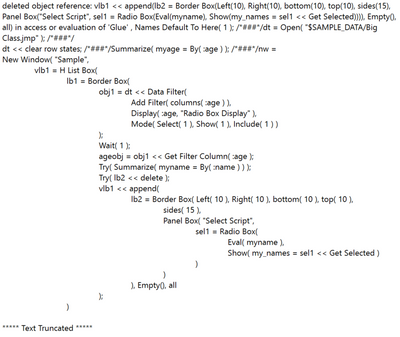
I think if these two can be solved, then I should be able to find some way to return a single row number.
- Mark as New
- Bookmark
- Subscribe
- Mute
- Subscribe to RSS Feed
- Get Direct Link
- Report Inappropriate Content
Re: Nested data filter row selection
Using fully customized filters could be fairly simple solution. This on other hand might not be even if it works (this one time)
Names Default To Here(1);

dt = Open("$SAMPLE_DATA/Big Class.jmp");

dt << Data Filter(
	Location({2793, 233}),
	Conditional,
	Mode(Show(1), Include(1)),
	Add Filter(
		columns(:age, :name),
		Display(:age, N Items(6)),
		Display(:name, N Items(15), Find(Set Text("")))
	)
);

(Window("Data Filter for Big Class")["Data Filter",LineUpBox(2)]) << NCol(2);
(Window("Data Filter for Big Class")["Data Filter",LineUpRulerBox(1)]) << Widths({300,300});
Below are some modifications to your script using Filter Change Handler (state handlers can be very buggy and finicky in JMP, you have been warned :))
Names Default To Here(1);

dt = Open("$SAMPLE_DATA/Big Class.jmp");

dt << clear row states;

Summarize(myage = By(:age));

//make a dialog window
nw = New Window("Sample",
	vlb1 = H List Box(
		lb1 = Border Box(
			obj1 = dt << Data Filter(Add Filter(columns(:age)), Display(:age, "Radio Box Display"), Mode(Select(1), Show(1), Include(1)))
		),
		lb2 = Border Box()
	)
);

// Creates list of names that are not excluded or hidden
f = function({a},
	Try(Summarize(myname = By(:name)));
	//here is the script that runs each time someone clicks in the top box
	//delete the current column list box, if it exists
	Try((lb2 << child) << delete box());

	//append a new col list box, with all columns of the data table selected in the listbox
	lb2 << append(
		Panel Box("Select Script", sel1 = Radio Box(myname, Show(my_names = sel1 << Get Selected)))
	);
);

fch = obj1 << Make Filter Change Handler(f);- Mark as New
- Bookmark
- Subscribe
- Mute
- Subscribe to RSS Feed
- Get Direct Link
- Report Inappropriate Content
Re: Nested data filter row selection
@jthi, thank you once again for your incredible help! The answer was so simple, yet again ahaha.
I modified your first suggestion to suit my needs because I see what you mean by state handlers being buggy and finicky in JMP.
- Mark as New
- Bookmark
- Subscribe
- Mute
- Subscribe to RSS Feed
- Get Direct Link
- Report Inappropriate Content
Re: Nested data filter row selection
I have made Wish List item regarding different state handlers in JMP Improve JMP's state handlers (hover label, row state handler, filter state handler, scheduler, ...) .
Recommended Articles
- © 2025 JMP Statistical Discovery LLC. All Rights Reserved.
- Terms of Use
- Privacy Statement
- Contact Us