cancel
Showing results for 
Show  only  | Search instead for 
Did you mean: 
  • JMP will suspend normal business operations for our Winter Holiday beginning on Wednesday, Dec. 24, 2025, at 5:00 p.m. ET (2:00 p.m. ET for JMP Accounts Receivable).
    Regular business hours will resume at 9:00 a.m. EST on Friday, Jan. 2, 2026.
  • We’re retiring the File Exchange at the end of this year. The JMP Marketplace is now your destination for add-ins and extensions.

Discussions

Solve problems, and share tips and tricks with other JMP users.
%3CLINGO-SUB%20id%3D%22lingo-sub-423062%22%20slang%3D%22en-US%22%20mode%3D%22NONE%22%3EJMP16%20Python%20Synergies%3A%20c%C3%B3mo%20hacer%20que%20el%20script%20vuelva%20a%20funcionar%20para%20la%20importaci%C3%B3n%20de%20datos%3C%2FLINGO-SUB%3E%3CLINGO-BODY%20id%3D%22lingo-body-423062%22%20slang%3D%22en-US%22%20mode%3D%22NONE%22%3E%3CP%3EQuerido.%3C%2FP%3E%3CP%3E%26nbsp%3B%3C%2FP%3E%3CP%3EComenc%C3%A9%20hace%20un%20tiempo%20a%20importar%20mis%20datos%20a%20trav%C3%A9s%20de%20algunos%20scripts%20y%20usando%20la%20interfaz%20phyton%20y%20%22simplemente%22%20siguiendo%20este%20ejemplo%20en%20la%20p%C3%A1gina%203%20-%3CA%20href%3D%22https%3A%2F%2Fwww.jmp.com%2Fcontent%2Fdam%2Fjmp%2Fdocuments%2Fen%2Fwhite-papers%2Fwp-jmp-synergies-python-r.pdf%22%20target%3D%22_blank%22%20rel%3D%22noopener%20noreferrer%22%3E%20wp-jmp-synergies-python-r.pdf%3C%2FA%3E%3C%2FP%3E%3CP%3EAhora%20instal%C3%A9%20JMP%2016%20PRO%20y%20prob%C3%A9%20mis%20scripts%20de%20nuevo%2C%20pero%20%22%C3%A9l%22%20no%20quiere%20comenzar%20a%20no%20reconocer%20m%C3%A1s%20mi%20versi%C3%B3n%20de%20Python%20al%20principio.%20Antes%20de%20que%20funcionara%20bien%20%3A)%3C%2Fimg%3E%3C%2FP%3E%3CP%3ESe%20detiene%20aqu%C3%AD%20-%26gt%3B%20L%C3%ADnea%202%3C%2FP%3E%3CP%3Exxxxxxxxxxxxxxxxxxxxxxxxxxxxxx%3C%2FP%3E%3CP%3ENombres%20predeterminados%20aqu%C3%AD%20(1)%3B%3C%2FP%3E%3CP%3EPython%20Init%20()%3B%3C%2FP%3E%3CP%3EPython%20Submit%20(%22%5C%20%5B%23%20Licenciado%20bajo%20la%20licencia%20MIT%20(...%20y%20as%C3%AD%20sucesivamente%20...)%3CSPAN%20class%3D%22lia-inline-image-display-wrapper%20lia-image-align-inline%22%20image-alt%3D%22Script_Phython_Import_JMP16Pro.PNG%22%20style%3D%22width%3A%20661px%3B%22%3E%3Cspan%20class%3D%22lia-inline-image-display-wrapper%22%20image-alt%3D%22Script_Phython_Import_JMP16Pro.PNG%22%20style%3D%22width%3A%20661px%3B%22%3E%3Cimg%20src%3D%22https%3A%2F%2Fcommunity.jmp.com%2Ft5%2Fimage%2Fserverpage%2Fimage-id%2F36245i04FA8C94A60374D3%2Fimage-dimensions%2F661x249%3Fv%3Dv2%22%20width%3D%22661%22%20height%3D%22249%22%20role%3D%22button%22%20title%3D%22Script_Phython_Import_JMP16Pro.PNG%22%20alt%3D%22Script_Phython_Import_JMP16Pro.PNG%22%20%2F%3E%3C%2Fspan%3E%3C%2FSPAN%3E%3C%2FP%3E%3CP%3E%3CSPAN%20class%3D%22lia-inline-image-display-wrapper%20lia-image-align-inline%22%20image-alt%3D%22Python.Error.PNG%22%20style%3D%22width%3A%20454px%3B%22%3E%3Cspan%20class%3D%22lia-inline-image-display-wrapper%22%20image-alt%3D%22Python.Error.PNG%22%20style%3D%22width%3A%20454px%3B%22%3E%3Cimg%20src%3D%22https%3A%2F%2Fcommunity.jmp.com%2Ft5%2Fimage%2Fserverpage%2Fimage-id%2F36246iC3AFAF07C447BA81%2Fimage-dimensions%2F454x229%3Fv%3Dv2%22%20width%3D%22454%22%20height%3D%22229%22%20role%3D%22button%22%20title%3D%22Python.Error.PNG%22%20alt%3D%22Python.Error.PNG%22%20%2F%3E%3C%2Fspan%3E%3C%2FSPAN%3E%3C%2FP%3E%3CP%3EPero%20tengo%20Python%203.8.1%20y%20funcion%C3%B3%20en%20JMP%2015%20Pro.%3C%2FP%3E%3CP%3E%C2%BFAlguien%20puede%20indicarme%20c%C3%B3mo%20solucionarlo%3F%20Recuerdo%20c%C3%B3mo%20instal%C3%A9%20Python%20y%20todos%20los%20paquetes%20siguiendo%20las%20instrucciones%20del%20libro%20de%20secuencias%20de%20comandos%2C%20pero%20%C2%BFtengo%20que%20volver%20a%20hacerlo%3F%3C%2FP%3E%3CP%3E%C2%BFTal%20vez%20tu%20sepas%3F%3C%2FP%3E%3CP%3EMejores%20deseos%20para%20usted.%3C%2FP%3E%3CP%3EViejo%3C%2FP%3E%3CP%3E%26nbsp%3B%3C%2FP%3E%3C%2FLINGO-BODY%3E%3CLINGO-LABS%20id%3D%22lingo-labs-423062%22%20slang%3D%22en-US%22%20mode%3D%22NONE%22%3E%3CLINGO-LABEL%3EScripting%3C%2FLINGO-LABEL%3E%3CLINGO-LABEL%3EVentanas%3C%2FLINGO-LABEL%3E%3C%2FLINGO-LABS%3E%3CLINGO-SUB%20id%3D%22lingo-sub-423098%22%20slang%3D%22en-US%22%20mode%3D%22NONE%22%3ERe%3A%20JMP16%20Python%20Synergies%20-%20C%C3%B3mo%20hacer%20que%20el%20script%20vuelva%20a%20funcionar%20para%20la%20importaci%C3%B3n%20de%20datos%3C%2FLINGO-SUB%3E%3CLINGO-BODY%20id%3D%22lingo-body-423098%22%20slang%3D%22en-US%22%20mode%3D%22NONE%22%3E%3CP%3ENo%20soy%20un%20experto%20en%20Python%2C%20pero%20...%3C%2FP%3E%3COL%3E%3CLI%3ESi%20todav%C3%ADa%20tiene%2015%20instalados%2C%20%C2%BFtodav%C3%ADa%20funciona%20all%C3%AD%3F%3C%2FLI%3E%3CLI%3E%C2%BFSe%20ejecuta%20desde%20la%20ventana%20cmd.exe%3F%20sol%C3%ADa%3CSTRONG%3E%20Python%20--versi%C3%B3n%3C%2FSTRONG%3E%20y%20el%3CSTRONG%3E%20sendero%3C%2FSTRONG%3E%20comando%20para%20echar%20un%20vistazo%20a%20mi%20instalaci%C3%B3n.%3C%2FLI%3E%3C%2FOL%3E%3CP%3E%3CSPAN%20class%3D%22lia-inline-image-display-wrapper%20lia-image-align-inline%22%20image-alt%3D%22Capture.PNG%22%20style%3D%22width%3A%20999px%3B%22%3E%3Cspan%20class%3D%22lia-inline-image-display-wrapper%22%20image-alt%3D%22The%20path%20command%20shows%20two%20Python%20directories.%22%20style%3D%22width%3A%20999px%3B%22%3E%3Cimg%20src%3D%22https%3A%2F%2Fcommunity.jmp.com%2Ft5%2Fimage%2Fserverpage%2Fimage-id%2F36249iAA8DD84E4A3E2467%2Fimage-size%2Flarge%3Fv%3Dv2%26amp%3Bpx%3D999%22%20role%3D%22button%22%20title%3D%22Capture.PNG%22%20alt%3D%22The%20path%20command%20shows%20two%20Python%20directories.%22%20%2F%3E%3Cspan%20class%3D%22lia-inline-image-caption%22%20onclick%3D%22event.preventDefault()%3B%22%3EThe%20path%20command%20shows%20two%20Python%20directories.%3C%2Fspan%3E%3C%2Fspan%3E%3CSPAN%20class%3D%22lia-inline-image-caption%22%20onclick%3D%22event.preventDefault()%3B%22%3EEl%20comando%20de%20ruta%20muestra%20dos%20directorios%20de%20Python.%3C%2FSPAN%3E%3C%2FSPAN%3E%3C%2FP%3E%3CP%3ECreo%20que%20JMP%20probablemente%20usa%20la%20configuraci%C3%B3n%20del%20registro%20para%20encontrar%20la%20instalaci%C3%B3n%20de%20Python.%20Tambi%C3%A9n%20hay%20un%20argumento%20en%20PythonInit%20o%20PythonConnect%20para%20especificar%20la%20ruta.%3C%2FP%3E%3CP%3Ehago%3CEM%3E%20no%3C%2FEM%3E%20uso%20la%20versi%C3%B3n%20anaconda%2C%20y%20lo%20hago%3CEM%3E%20no%3C%2FEM%3E%20utilizar%20entornos%20virtuales.%3C%2FP%3E%3C%2FLINGO-BODY%3E
Choose Language Hide Translation Bar
Ole_Luehn
Level III

JMP16 Python Synergies - How to make script re-work for data import

Dear.


I started a while ago to import my data via some scripts and using the phyton interface and "just" following here this example on page 3 - wp-jmp-synergies-python-r.pdf

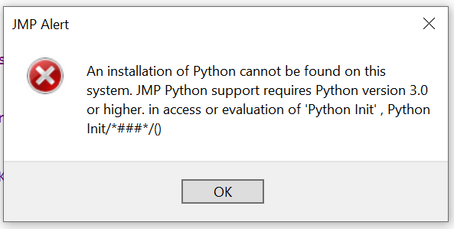
Now I installed JMP 16 PRO and tried my scripts again - but "he" doesn´t want to start not recognizing my python version anymore in the beginning. Before it worked fine :)

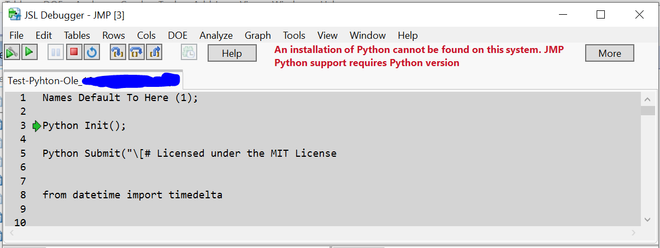
He stops here --> Line 2

xxxxxxxxxxxxxxxxxxxxxxxxxxxxxx

Names Default To Here (1);

Python Init();

Python Submit("\[# Licensed under the MIT License (...and so on...)Script_Phython_Import_JMP16Pro.PNG

Python.Error.PNG

But I have Python 3.8.1 and it worked in JMP 15 Pro.

Can someone indicate me how to solve it? I remember how I installed Python and all packages following the guidance in the scripting book - but do I need to do it again?

Maybe you know?

Best wishes to you.

Ole


1 ACCEPTED SOLUTION

Accepted Solutions
Ole_Luehn
Level III

Re: JMP16 Python Synergies - How to make script re-work for data import

Hi Craige. 
I somehow followed all the infos which I could find on the documentation in the scripting guide. "problems with python".

Now, I had help from a very skilled colleague who tried some things in python.

Finally, he was / we were not succesful. Then, I deinstalled Anaconda and re-installed python. 

It worked again now. So I am able to use my old scripts as used before! 


So - I have solved it just by re-installing python. The packages numpy and so on didn´t need to be re-installed! 


Best wishes.

Ole

 

Troubleshooting the JMP Python Integration

View solution in original post

2 REPLIES 2
Craige_Hales
Super User

Re: JMP16 Python Synergies - How to make script re-work for data import

Not a Python expert, but...

  1. If you still have 15 installed, does it still work there?
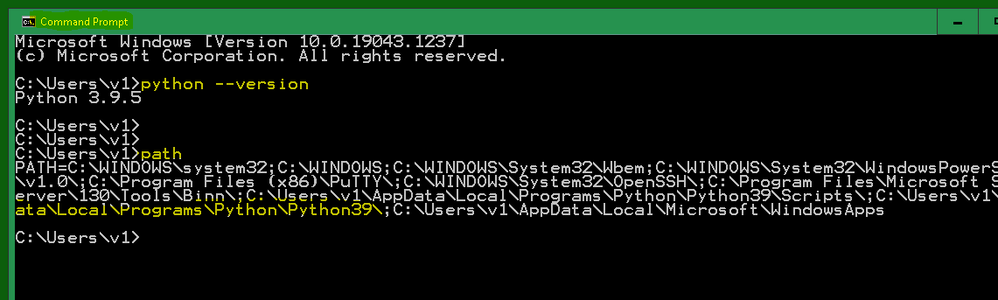
  2. Does it run from the cmd.exe window? I used python --version and the path command to peek at my installation.

The path command shows two Python directories.The path command shows two Python directories.

I think JMP probably uses registry settings to find the python installation. There is also an argument in the PythonInit or PythonConnect to specify the path.

I do not use the anaconda version, and I do not use virtual environments.

Craige
Ole_Luehn
Level III

Re: JMP16 Python Synergies - How to make script re-work for data import

Hi Craige. 
I somehow followed all the infos which I could find on the documentation in the scripting guide. "problems with python".

Now, I had help from a very skilled colleague who tried some things in python.

Finally, he was / we were not succesful. Then, I deinstalled Anaconda and re-installed python. 

It worked again now. So I am able to use my old scripts as used before! 


So - I have solved it just by re-installing python. The packages numpy and so on didn´t need to be re-installed! 


Best wishes.

Ole


Troubleshooting the JMP Python Integration

Recommended Articles