- Don’t miss your chance to experience Discovery Summit Europe at our best available rate! Early bird registration through 31 Oct.
- Image to Table JMP extension imports single or batch images as data tables. Useful to extract curves from pictures or convert image data to curve data to use in analyses like Functional Data Explorer. Download and install the extension.
- Subscribe to RSS Feed
- Mark Topic as New
- Mark Topic as Read
- Float this Topic for Current User
- Bookmark
- Subscribe
- Mute
- Printer Friendly Page
Discussions
Solve problems, and share tips and tricks with other JMP users.- User Community
- :
- Discussions
- :
- Re: JMP16 Python Synergies - How to make script re-work for data import

- Mark as New
- Bookmark
- Subscribe
- Mute
- Subscribe to RSS Feed
- Get Direct Link
- Report Inappropriate Content
JMP16 Python Synergies - How to make script re-work for data import
Dear.
I started a while ago to import my data via some scripts and using the phyton interface and "just" following here this example on page 3 - wp-jmp-synergies-python-r.pdf
Now I installed JMP 16 PRO and tried my scripts again - but "he" doesn´t want to start not recognizing my python version anymore in the beginning. Before it worked fine :)
He stops here --> Line 2
xxxxxxxxxxxxxxxxxxxxxxxxxxxxxx
Names Default To Here (1);
Python Init();
Python Submit("\[# Licensed under the MIT License (...and so on...)
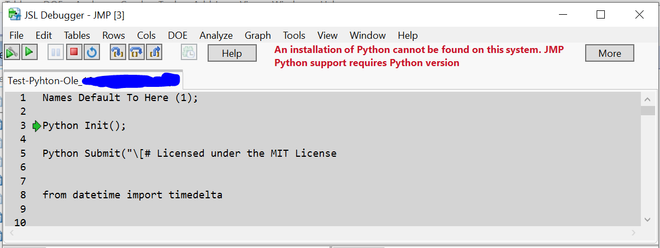
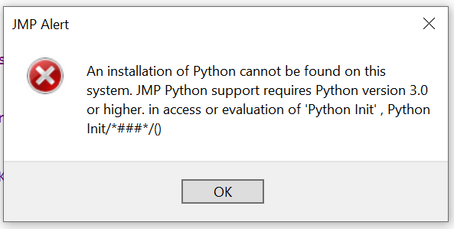
But I have Python 3.8.1 and it worked in JMP 15 Pro.
Can someone indicate me how to solve it? I remember how I installed Python and all packages following the guidance in the scripting book - but do I need to do it again?
Maybe you know?
Best wishes to you.
Ole
Accepted Solutions
- Mark as New
- Bookmark
- Subscribe
- Mute
- Subscribe to RSS Feed
- Get Direct Link
- Report Inappropriate Content
Re: JMP16 Python Synergies - How to make script re-work for data import
Hi Craige.
I somehow followed all the infos which I could find on the documentation in the scripting guide. "problems with python".
Now, I had help from a very skilled colleague who tried some things in python.
Finally, he was / we were not succesful. Then, I deinstalled Anaconda and re-installed python.
It worked again now. So I am able to use my old scripts as used before!
So - I have solved it just by re-installing python. The packages numpy and so on didn´t need to be re-installed!
Best wishes.
Ole


- Mark as New
- Bookmark
- Subscribe
- Mute
- Subscribe to RSS Feed
- Get Direct Link
- Report Inappropriate Content
Re: JMP16 Python Synergies - How to make script re-work for data import
Not a Python expert, but...
- If you still have 15 installed, does it still work there?
- Does it run from the cmd.exe window? I used python --version and the path command to peek at my installation.
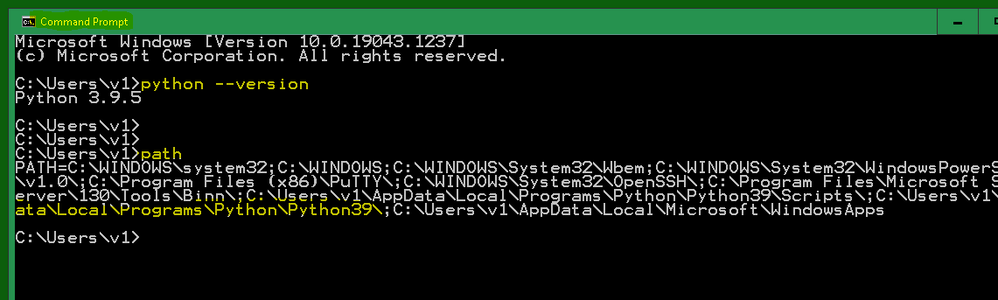
I think JMP probably uses registry settings to find the python installation. There is also an argument in the PythonInit or PythonConnect to specify the path.
I do not use the anaconda version, and I do not use virtual environments.
- Mark as New
- Bookmark
- Subscribe
- Mute
- Subscribe to RSS Feed
- Get Direct Link
- Report Inappropriate Content
Re: JMP16 Python Synergies - How to make script re-work for data import
Hi Craige.
I somehow followed all the infos which I could find on the documentation in the scripting guide. "problems with python".
Now, I had help from a very skilled colleague who tried some things in python.
Finally, he was / we were not succesful. Then, I deinstalled Anaconda and re-installed python.
It worked again now. So I am able to use my old scripts as used before!
So - I have solved it just by re-installing python. The packages numpy and so on didn´t need to be re-installed!
Best wishes.
Ole
Recommended Articles
- © 2026 JMP Statistical Discovery LLC. All Rights Reserved.
- Terms of Use
- Privacy Statement
- Contact Us