cancel
Showing results for 
Show  only  | Search instead for 
Did you mean: 
  • JMP will suspend normal business operations for our Winter Holiday beginning on Wednesday, Dec. 24, 2025, at 5:00 p.m. ET (2:00 p.m. ET for JMP Accounts Receivable).
    Regular business hours will resume at 9:00 a.m. EST on Friday, Jan. 2, 2026.
  • We’re retiring the File Exchange at the end of this year. The JMP Marketplace is now your destination for add-ins and extensions.

Discussions

Solve problems, and share tips and tricks with other JMP users.
%3CLINGO-SUB%20id%3D%22lingo-sub-423062%22%20slang%3D%22en-US%22%20mode%3D%22NONE%22%3EJMP16%20Python%20Synergies%20-%20Comment%20faire%20retravailler%20le%20script%20pour%20l'importation%20de%20donn%C3%A9es%3C%2FLINGO-SUB%3E%3CLINGO-BODY%20id%3D%22lingo-body-423062%22%20slang%3D%22en-US%22%20mode%3D%22NONE%22%3E%3CP%3ECher.%3C%2FP%3E%3CP%3E%26nbsp%3B%3C%2FP%3E%3CP%3EJ'ai%20commenc%C3%A9%20il%20y%20a%20quelque%20temps%20%C3%A0%20importer%20mes%20donn%C3%A9es%20via%20des%20scripts%20et%20en%20utilisant%20l'interface%20phyton%20et%20%22juste%22%20en%20suivant%20ici%20cet%20exemple%20%C3%A0%20la%20page%203%20-%3CA%20href%3D%22https%3A%2F%2Fwww.jmp.com%2Fcontent%2Fdam%2Fjmp%2Fdocuments%2Fen%2Fwhite-papers%2Fwp-jmp-synergies-python-r.pdf%22%20target%3D%22_blank%22%20rel%3D%22noopener%20noreferrer%22%3E%20wp-jmp-synergies-python-r.pdf%3C%2FA%3E%3C%2FP%3E%3CP%3EMaintenant%2C%20j'ai%20install%C3%A9%20JMP%2016%20PRO%20et%20essay%C3%A9%20%C3%A0%20nouveau%20mes%20scripts%20-%20mais%20%22il%22%20ne%20veut%20plus%20commencer%20%C3%A0%20ne%20pas%20reconna%C3%AEtre%20ma%20version%20python%20au%20d%C3%A9but.%20Avant%20%C3%A7a%20marchait%20bien%20%3A)%3C%2Fimg%3E%3C%2FP%3E%3CP%3EIl%20s'arr%C3%AAte%20ici%20--%26gt%3B%20Ligne%202%3C%2FP%3E%3CP%3Exxxxxxxxxxxxxxxxxxxxxxxxxxxxxx%3C%2FP%3E%3CP%3ENoms%20par%20d%C3%A9faut%20ici%20(1)%3B%3C%2FP%3E%3CP%3EInit%20Python()%3B%3C%2FP%3E%3CP%3EPython%20Submit(%22%5C%5B%23%20Licenci%C3%A9%20sous%20la%20licence%20MIT%20(...et%20ainsi%20de%20suite...)%3CSPAN%20class%3D%22lia-inline-image-display-wrapper%20lia-image-align-inline%22%20image-alt%3D%22Script_Phython_Import_JMP16Pro.PNG%22%20style%3D%22width%3A%20661px%3B%22%3E%3CSPAN%20class%3D%22lia-inline-image-display-wrapper%22%20image-alt%3D%22Script_Phython_Import_JMP16Pro.PNG%22%20style%3D%22width%3A%20661px%3B%22%3E%3Cspan%20class%3D%22lia-inline-image-display-wrapper%22%20image-alt%3D%22Script_Phython_Import_JMP16Pro.PNG%22%20style%3D%22width%3A%20661px%3B%22%3E%3Cimg%20src%3D%22https%3A%2F%2Fcommunity.jmp.com%2Ft5%2Fimage%2Fserverpage%2Fimage-id%2F36245i04FA8C94A60374D3%2Fimage-dimensions%2F661x249%3Fv%3Dv2%22%20width%3D%22661%22%20height%3D%22249%22%20role%3D%22button%22%20title%3D%22Script_Phython_Import_JMP16Pro.PNG%22%20alt%3D%22Script_Phython_Import_JMP16Pro.PNG%22%20%2F%3E%3C%2Fspan%3E%3C%2FSPAN%3E%3C%2FSPAN%3E%3C%2FP%3E%3CP%3E%3CSPAN%20class%3D%22lia-inline-image-display-wrapper%20lia-image-align-inline%22%20image-alt%3D%22Python.Error.PNG%22%20style%3D%22width%3A%20454px%3B%22%3E%3CSPAN%20class%3D%22lia-inline-image-display-wrapper%22%20image-alt%3D%22Python.Error.PNG%22%20style%3D%22width%3A%20454px%3B%22%3E%3Cspan%20class%3D%22lia-inline-image-display-wrapper%22%20image-alt%3D%22Python.Error.PNG%22%20style%3D%22width%3A%20454px%3B%22%3E%3Cimg%20src%3D%22https%3A%2F%2Fcommunity.jmp.com%2Ft5%2Fimage%2Fserverpage%2Fimage-id%2F36246iC3AFAF07C447BA81%2Fimage-dimensions%2F454x229%3Fv%3Dv2%22%20width%3D%22454%22%20height%3D%22229%22%20role%3D%22button%22%20title%3D%22Python.Error.PNG%22%20alt%3D%22Python.Error.PNG%22%20%2F%3E%3C%2Fspan%3E%3C%2FSPAN%3E%3C%2FSPAN%3E%3C%2FP%3E%3CP%3EMais%20j'ai%20Python%203.8.1%20et%20cela%20a%20fonctionn%C3%A9%20dans%20JMP%2015%20Pro.%3C%2FP%3E%3CP%3EQuelqu'un%20peut-il%20m'indiquer%20comment%20le%20r%C3%A9soudre%3F%20Je%20me%20souviens%20comment%20j'ai%20install%C3%A9%20Python%20et%20tous%20les%20packages%20en%20suivant%20les%20instructions%20du%20livre%20de%20script%20-%20mais%20dois-je%20le%20refaire%20%3F%3C%2FP%3E%3CP%3EPeut-%C3%AAtre%20savez-vous%3F%3C%2FP%3E%3CP%3EMeilleurs%20voeux%20%C3%A0%20vous.%3C%2FP%3E%3CP%3EOl%C3%A9%3C%2FP%3E%3CP%3E%26nbsp%3B%3C%2FP%3E%3C%2FLINGO-BODY%3E%3CLINGO-LABS%20id%3D%22lingo-labs-423062%22%20slang%3D%22en-US%22%20mode%3D%22NONE%22%3E%3CLINGO-LABEL%3EScript%3C%2FLINGO-LABEL%3E%3CLINGO-LABEL%3Eles%20fen%C3%AAtres%3C%2FLINGO-LABEL%3E%3C%2FLINGO-LABS%3E%3CLINGO-SUB%20id%3D%22lingo-sub-426209%22%20slang%3D%22en-US%22%20mode%3D%22NONE%22%3ERe%26nbsp%3B%3A%20JMP16%20Python%20Synergies%20-%20Comment%20retravailler%20le%20script%20pour%20l'importation%20de%20donn%C3%A9es%3C%2FLINGO-SUB%3E%3CLINGO-BODY%20id%3D%22lingo-body-426209%22%20slang%3D%22en-US%22%20mode%3D%22NONE%22%3E%3CP%3ESalut%20Craige.%3CBR%20%2F%3EJ'ai%20en%20quelque%20sorte%20suivi%20toutes%20les%20infos%20que%20j'ai%20pu%20trouver%20sur%20la%20documentation%20dans%20le%20guide%20de%20script.%20%22probl%C3%A8mes%20avec%20python%22.%3C%2FP%3E%3CP%3EMaintenant%2C%20j'ai%20eu%20l'aide%20d'un%20coll%C3%A8gue%20tr%C3%A8s%20comp%C3%A9tent%20qui%20a%20essay%C3%A9%20certaines%20choses%20en%20python.%3C%2FP%3E%3CP%3EFinalement%2C%20il%20a%20%2F%20nous%20n'avons%20pas%20r%C3%A9ussi.%20Ensuite%2C%20j'ai%20d%C3%A9sinstall%C3%A9%20Anaconda%20et%20r%C3%A9install%C3%A9%20Python.%3C%2FP%3E%3CP%3ECela%20a%20fonctionn%C3%A9%20%C3%A0%20nouveau%20maintenant.%20Je%20peux%20donc%20utiliser%20mes%20anciens%20scripts%20comme%20avant%26nbsp%3B!%3C%2FP%3E%3CP%3E%26nbsp%3B%3C%2FP%3E%3CP%3EDonc%20-%20je%20l'ai%20r%C3%A9solu%20simplement%20en%20r%C3%A9installant%20python.%20Les%20packages%20numpy%20et%20ainsi%20de%20suite%20n'ont%20pas%20eu%20besoin%20d'%C3%AAtre%20r%C3%A9install%C3%A9s%20!%3C%2FP%3E%3CP%3E%26nbsp%3B%3C%2FP%3E%3CP%3EMeilleurs%20v%C5%93ux.%3C%2FP%3E%3CP%3EOl%C3%A9%3C%2FP%3E%3CP%3E%26nbsp%3B%3C%2FP%3E%3CP%3E%3CA%20href%3D%22https%3A%2F%2Fwww.jmp.com%2Fsupport%2Fhelp%2Fzh-cn%2F15.2%2Findex.shtml%23page%2Fjmp%2Ftroubleshooting-the-jmp-python-integration.shtml%22%20target%3D%22_blank%22%20rel%3D%22noopener%20noreferrer%22%3ED%C3%A9pannage%20de%20l'int%C3%A9gration%20JMP%20Python%3C%2FA%3E%3C%2FP%3E%3C%2FLINGO-BODY%3E%3CLINGO-SUB%20id%3D%22lingo-sub-423098%22%20slang%3D%22en-US%22%20mode%3D%22NONE%22%3ERe%26nbsp%3B%3A%20JMP16%20Python%20Synergies%20-%20Comment%20retravailler%20le%20script%20pour%20l'importation%20de%20donn%C3%A9es%3C%2FLINGO-SUB%3E%3CLINGO-BODY%20id%3D%22lingo-body-423098%22%20slang%3D%22en-US%22%20mode%3D%22NONE%22%3E%3CP%3EPas%20un%20expert%20Python%2C%20mais...%3C%2FP%3E%3COL%3E%3CLI%3ESi%20vous%20en%20avez%20encore%2015%20install%C3%A9s%2C%20est-ce%20que%20%C3%A7a%20marche%20toujours%20l%C3%A0-bas%20%3F%3C%2FLI%3E%3CLI%3EEst-ce%20qu'il%20s'ex%C3%A9cute%20%C3%A0%20partir%20de%20la%20fen%C3%AAtre%20cmd.exe%26nbsp%3B%3F%20j'ai%20utilis%C3%A9%3CSTRONG%3E%20python%20--version%3C%2FSTRONG%3E%20et%20le%3CSTRONG%3E%20chemin%3C%2FSTRONG%3E%20commande%20pour%20jeter%20un%20%C5%93il%20%C3%A0%20mon%20installation.%3C%2FLI%3E%3C%2FOL%3E%3CP%3E%3CSPAN%20class%3D%22lia-inline-image-display-wrapper%20lia-image-align-inline%22%20image-alt%3D%22The%20path%20command%20shows%20two%20Python%20directories.%22%20style%3D%22width%3A%20999px%3B%22%3E%3CSPAN%20class%3D%22lia-inline-image-display-wrapper%22%20image-alt%3D%22The%20path%20command%20shows%20two%20Python%20directories.%22%20style%3D%22width%3A%20999px%3B%22%3E%3Cspan%20class%3D%22lia-inline-image-display-wrapper%22%20image-alt%3D%22The%20path%20command%20shows%20two%20Python%20directories.%22%20style%3D%22width%3A%20999px%3B%22%3E%3Cimg%20src%3D%22https%3A%2F%2Fcommunity.jmp.com%2Ft5%2Fimage%2Fserverpage%2Fimage-id%2F36249iAA8DD84E4A3E2467%2Fimage-size%2Flarge%3Fv%3Dv2%26amp%3Bpx%3D999%22%20role%3D%22button%22%20title%3D%22Capture.PNG%22%20alt%3D%22The%20path%20command%20shows%20two%20Python%20directories.%22%20%2F%3E%3Cspan%20class%3D%22lia-inline-image-caption%22%20onclick%3D%22event.preventDefault()%3B%22%3EThe%20path%20command%20shows%20two%20Python%20directories.%3C%2Fspan%3E%3C%2Fspan%3E%3CSPAN%20class%3D%22lia-inline-image-caption%22%20onclick%3D%22event.preventDefault()%3B%22%3EThe%20path%20command%20shows%20two%20Python%20directories.%3C%2FSPAN%3E%3C%2FSPAN%3E%3CSPAN%20class%3D%22lia-inline-image-caption%22%20onclick%3D%22event.preventDefault()%3B%22%3ELa%20commande%20path%20affiche%20deux%20r%C3%A9pertoires%20Python.%3C%2FSPAN%3E%3C%2FSPAN%3E%3C%2FP%3E%3CP%3EJe%20pense%20que%20JMP%20utilise%20probablement%20les%20param%C3%A8tres%20de%20registre%20pour%20trouver%20l'installation%20de%20python.%20Il%20existe%20%C3%A9galement%20un%20argument%20dans%20PythonInit%20ou%20PythonConnect%20pour%20sp%C3%A9cifier%20le%20chemin.%3C%2FP%3E%3CP%3Eje%20le%20fais%3CEM%3E%20ne%20pas%3C%2FEM%3E%20utiliser%20la%20version%20anaconda%2C%20et%20je%20fais%3CEM%3E%20ne%20pas%3C%2FEM%3E%20utiliser%20des%20environnements%20virtuels.%3C%2FP%3E%3C%2FLINGO-BODY%3E
Choose Language Hide Translation Bar
Ole_Luehn
Level III

JMP16 Python Synergies - How to make script re-work for data import

Dear.


I started a while ago to import my data via some scripts and using the phyton interface and "just" following here this example on page 3 - wp-jmp-synergies-python-r.pdf

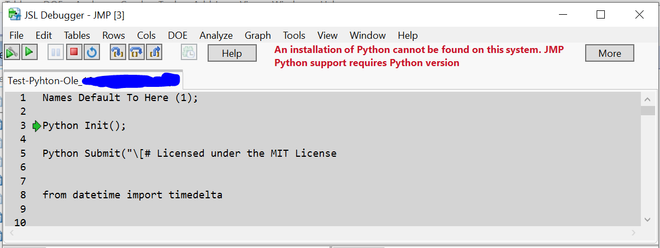
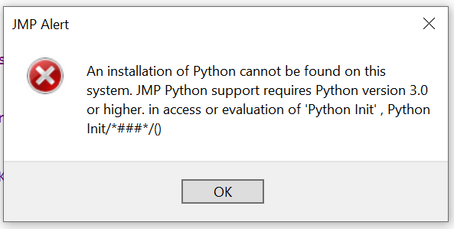
Now I installed JMP 16 PRO and tried my scripts again - but "he" doesn´t want to start not recognizing my python version anymore in the beginning. Before it worked fine :)

He stops here --> Line 2

xxxxxxxxxxxxxxxxxxxxxxxxxxxxxx

Names Default To Here (1);

Python Init();

Python Submit("\[# Licensed under the MIT License (...and so on...)Script_Phython_Import_JMP16Pro.PNG

Python.Error.PNG

But I have Python 3.8.1 and it worked in JMP 15 Pro.

Can someone indicate me how to solve it? I remember how I installed Python and all packages following the guidance in the scripting book - but do I need to do it again?

Maybe you know?

Best wishes to you.

Ole


1 ACCEPTED SOLUTION

Accepted Solutions
Ole_Luehn
Level III

Re: JMP16 Python Synergies - How to make script re-work for data import

Hi Craige. 
I somehow followed all the infos which I could find on the documentation in the scripting guide. "problems with python".

Now, I had help from a very skilled colleague who tried some things in python.

Finally, he was / we were not succesful. Then, I deinstalled Anaconda and re-installed python. 

It worked again now. So I am able to use my old scripts as used before! 


So - I have solved it just by re-installing python. The packages numpy and so on didn´t need to be re-installed! 


Best wishes.

Ole

 

Troubleshooting the JMP Python Integration

View solution in original post

2 REPLIES 2
Craige_Hales
Super User

Re: JMP16 Python Synergies - How to make script re-work for data import

Not a Python expert, but...

  1. If you still have 15 installed, does it still work there?
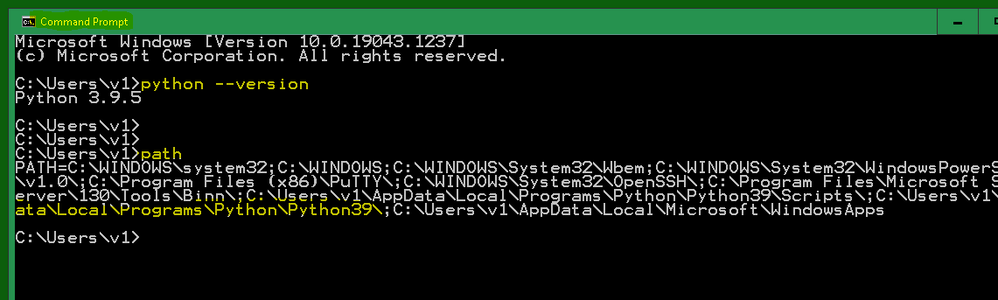
  2. Does it run from the cmd.exe window? I used python --version and the path command to peek at my installation.

The path command shows two Python directories.The path command shows two Python directories.

I think JMP probably uses registry settings to find the python installation. There is also an argument in the PythonInit or PythonConnect to specify the path.

I do not use the anaconda version, and I do not use virtual environments.

Craige
Ole_Luehn
Level III

Re: JMP16 Python Synergies - How to make script re-work for data import

Hi Craige. 
I somehow followed all the infos which I could find on the documentation in the scripting guide. "problems with python".

Now, I had help from a very skilled colleague who tried some things in python.

Finally, he was / we were not succesful. Then, I deinstalled Anaconda and re-installed python. 

It worked again now. So I am able to use my old scripts as used before! 


So - I have solved it just by re-installing python. The packages numpy and so on didn´t need to be re-installed! 


Best wishes.

Ole


Troubleshooting the JMP Python Integration

Recommended Articles