- JMP will suspend normal business operations for our Winter Holiday beginning on Wednesday, Dec. 24, 2025, at 5:00 p.m. ET (2:00 p.m. ET for JMP Accounts Receivable).
Regular business hours will resume at 9:00 a.m. EST on Friday, Jan. 2, 2026. - We’re retiring the File Exchange at the end of this year. The JMP Marketplace is now your destination for add-ins and extensions.
- Subscribe to RSS Feed
- Mark Topic as New
- Mark Topic as Read
- Float this Topic for Current User
- Bookmark
- Subscribe
- Mute
- Printer Friendly Page
Discussions
Solve problems, and share tips and tricks with other JMP users.- JMP User Community
- :
- Discussions
- :
- If statement Formula not working

- Mark as New
- Bookmark
- Subscribe
- Mute
- Subscribe to RSS Feed
- Get Direct Link
- Report Inappropriate Content
If statement Formula not working
For the past couple years when I copy and paste the formula below it has not worked consistently. I've tried typing it in the formula box and have at times been succesful but it's not consistent.
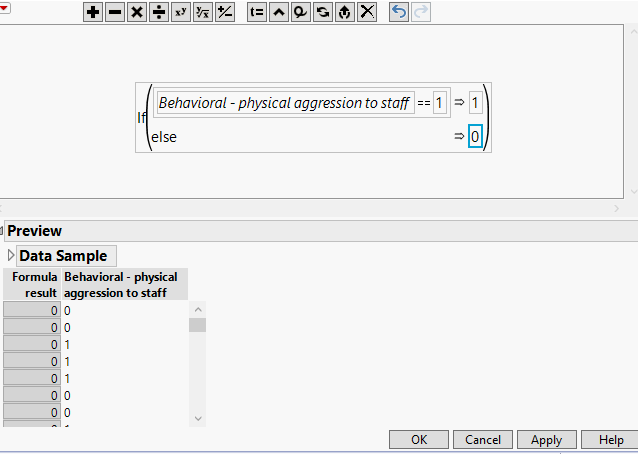
I was finally upgraded to JMP 14 last week and an option that is awesome is that I can preview a data sample to see what the formula result will look like. However, I can't figure out why this formula won't work. Below is a screenshot of the formula as well as the preview of the dataset and formula result.
Are there any suggestions?
Accepted Solutions


- Mark as New
- Bookmark
- Subscribe
- Mute
- Subscribe to RSS Feed
- Get Direct Link
- Report Inappropriate Content
Re: If statement Formula not working
The data looks to be left justified in the preview. Is the data type set to character for the Behavioral - physical aggression to staff column? If so, you will need to add double-quotes around the number on the right side of the == operator or change the data type of the column.


- Mark as New
- Bookmark
- Subscribe
- Mute
- Subscribe to RSS Feed
- Get Direct Link
- Report Inappropriate Content
Re: If statement Formula not working
A possible issue may be that JMP may be having an issue with
Behaviorial - physical aggression to staffIs this a calculation of a column or variable called
Behavioral
from which is subtracted a column or variable called
physical aggression to staff
or
is this a single column or variable called
Behavioral - physical aggression to staff
JMP can get confused over this. If it is one column and not a calculation, you should actually state the formula as
If( :Name("Behavioral - physical aggression to staff") == 1,
     1,
     0
);
The JMP formula editor will not display the :Name() function, but by you putting into your formula, it will make sure JMP understands what you are specifying.

- Mark as New
- Bookmark
- Subscribe
- Mute
- Subscribe to RSS Feed
- Get Direct Link
- Report Inappropriate Content
Re: If statement Formula not working
Also, if the 1s in the table were calculated, they might not be exactly 1 (which is what you are testing for). The table displays a value that is rounded to about 10 digits. Try
Round(:Name("Behavioral - physical aggression to staff"), 5) == 1and see if that works better.
- Mark as New
- Bookmark
- Subscribe
- Mute
- Subscribe to RSS Feed
- Get Direct Link
- Report Inappropriate Content
Re: If statement Formula not working
@ErnestPasour for the awesome comment!
- Mark as New
- Bookmark
- Subscribe
- Mute
- Subscribe to RSS Feed
- Get Direct Link
- Report Inappropriate Content
Re: If statement Formula not working
The data looks to be left justified in the preview. Is the data type set to character for the Behavioral - physical aggression to staff column? If so, you will need to add double-quotes around the number on the right side of the == operator or change the data type of the column.
- Mark as New
- Bookmark
- Subscribe
- Mute
- Subscribe to RSS Feed
- Get Direct Link
- Report Inappropriate Content
Re: If statement Formula not working
Thank you very much! That worked perfectly! This will save me a lot of time.
Recommended Articles
- © 2025 JMP Statistical Discovery LLC. All Rights Reserved.
- Terms of Use
- Privacy Statement
- Contact Us