cancel
Showing results for 
Show  only  | Search instead for 
Did you mean: 
  • JMP will suspend normal business operations for our Winter Holiday beginning on Wednesday, Dec. 24, 2025, at 5:00 p.m. ET (2:00 p.m. ET for JMP Accounts Receivable).
    Regular business hours will resume at 9:00 a.m. EST on Friday, Jan. 2, 2026.
  • We’re retiring the File Exchange at the end of this year. The JMP Marketplace is now your destination for add-ins and extensions.

Discussions

Solve problems, and share tips and tricks with other JMP users.
%3CLINGO-SUB%20id%3D%22lingo-sub-261273%22%20slang%3D%22en-US%22%20mode%3D%22NONE%22%3E%C2%BFC%C3%B3mo%20separar%20grupos%20de%20diagrama%20de%20caja%20con%20una%20l%C3%ADnea%20recta%3F%3C%2FLINGO-SUB%3E%3CLINGO-BODY%20id%3D%22lingo-body-261273%22%20slang%3D%22en-US%22%20mode%3D%22NONE%22%3E%3CDIV%3E%3CDIV%3EHola%20todos%2C%3C%2FDIV%3E%3CDIV%3EMe%20las%20arreglo%20para%20alinear%20los%20puntos%20de%20datos%20con%20los%20cuadros%20de%20cuadros%20correspondientes%2C%20pero%20dependiendo%20de%20los%20datos%20puede%20haber%20m%C3%A1s%20cuadros%20en%20un%20grupo.%20Para%20fines%20de%20interpretaci%C3%B3n%2C%20me%20gustar%C3%ADa%20dibujar%20l%C3%ADneas%20adicionales%20en%20la%20trama%20que%20separen%20visualmente%20cada%20grupo%20%22F%22%2C%20como%20en%20la%20imagen%20de%20la%20derecha%20adjunta.%20Agradecer%C3%ADa%20por%20pistas%20sobre%20c%C3%B3mo%20hacer%20eso.%20Atentamente.%20%3CSPAN%20class%3D%22lia-inline-image-display-wrapper%20lia-image-align-inline%22%20image-alt%3D%22picture_3.jpg%22%20style%3D%22width%3A%20999px%3B%22%3E%3Cspan%20class%3D%22lia-inline-image-display-wrapper%22%20image-alt%3D%22picture_3.jpg%22%20style%3D%22width%3A%20999px%3B%22%3E%3Cimg%20src%3D%22https%3A%2F%2Fcommunity.jmp.com%2Ft5%2Fimage%2Fserverpage%2Fimage-id%2F23462i9A13E875DA882425%2Fimage-size%2Flarge%3Fv%3Dv2%26amp%3Bpx%3D999%22%20role%3D%22button%22%20title%3D%22picture_3.jpg%22%20alt%3D%22picture_3.jpg%22%20%2F%3E%3C%2Fspan%3E%3C%2FSPAN%3E%3C%2FDIV%3E%3C%2FDIV%3E%3C%2FLINGO-BODY%3E%3CLINGO-SUB%20id%3D%22lingo-sub-261287%22%20slang%3D%22en-US%22%20mode%3D%22NONE%22%3ERe%3A%20%C2%BFC%C3%B3mo%20separar%20grupos%20de%20diagrama%20de%20caja%20con%20una%20l%C3%ADnea%20recta%3F%3C%2FLINGO-SUB%3E%3CLINGO-BODY%20id%3D%22lingo-body-261287%22%20slang%3D%22en-US%22%20mode%3D%22NONE%22%3E%3CP%3ENo%20estoy%20seguro%20de%20que%20esto%20sea%20lo%20que%20desea%2C%20pero%20si%20usa%20Graph%20Builder%20y%20arrastra%20los%20par%C3%A1metros%20al%20eje%20Y%20y%20la%20funci%C3%B3n%201%20a%20la%20opci%C3%B3n%20Grupo%20X%20y%20la%20funci%C3%B3n%202%20al%20eje%20X%3C%2FP%3E%3CP%3E%3CSPAN%20class%3D%22lia-inline-image-display-wrapper%20lia-image-align-inline%22%20image-alt%3D%22Graph%20Builder.png%22%20style%3D%22width%3A%20400px%3B%22%3E%3Cspan%20class%3D%22lia-inline-image-display-wrapper%22%20image-alt%3D%22Graph%20Builder.png%22%20style%3D%22width%3A%20400px%3B%22%3E%3Cimg%20src%3D%22https%3A%2F%2Fcommunity.jmp.com%2Ft5%2Fimage%2Fserverpage%2Fimage-id%2F23465i7870889ED717A2D2%2Fimage-size%2Fmedium%3Fv%3Dv2%26amp%3Bpx%3D400%22%20role%3D%22button%22%20title%3D%22Graph%20Builder.png%22%20alt%3D%22Graph%20Builder.png%22%20%2F%3E%3C%2Fspan%3E%3C%2FSPAN%3E%3C%2FP%3E%3CP%3E%E2%80%83%3C%2FP%3E%3CP%3Eobtendr%C3%A1%20las%20%C3%A1reas%20separadas%3C%2FP%3E%3C%2FLINGO-BODY%3E%3CLINGO-SUB%20id%3D%22lingo-sub-261295%22%20slang%3D%22en-US%22%20mode%3D%22NONE%22%3ERe%3A%20%C2%BFC%C3%B3mo%20separar%20grupos%20de%20diagrama%20de%20caja%20con%20una%20l%C3%ADnea%20recta%3F%3C%2FLINGO-SUB%3E%3CLINGO-BODY%20id%3D%22lingo-body-261295%22%20slang%3D%22en-US%22%20mode%3D%22NONE%22%3E%3CP%3EHola%20statman%2C%20gracias%20por%20tu%20respuesta%2C%20se%20ve%20bien%20y%20usar%C3%A9%20ese%20m%C3%A9todo.%20Sin%20embargo%2C%20pens%C3%A9%20que%20los%20grupos%20principales%20F1%2C%20F2%20y%20F3%20se%20pueden%20mostrar%20en%20el%20eje%20X%2C%20pero%20ahora%20no%20importa.%20Puse%20la%20Caracter%C3%ADstica%202%20como%20color%20para%20hacer%20diferencias%20entre%20los%20subgrupos.%20Las%20leyendas%20redundantes%20se%20pueden%20eliminar.%20Gracias%20otra%20vez.%3C%2FP%3E%3CP%3E%3CSPAN%20class%3D%22lia-inline-image-display-wrapper%20lia-image-align-inline%22%20image-alt%3D%22picture_2.jpg%22%20style%3D%22width%3A%20654px%3B%22%3E%3Cspan%20class%3D%22lia-inline-image-display-wrapper%22%20image-alt%3D%22picture_2.jpg%22%20style%3D%22width%3A%20654px%3B%22%3E%3Cimg%20src%3D%22https%3A%2F%2Fcommunity.jmp.com%2Ft5%2Fimage%2Fserverpage%2Fimage-id%2F23470i4BC3431B5C8D067E%2Fimage-size%2Flarge%3Fv%3Dv2%26amp%3Bpx%3D999%22%20role%3D%22button%22%20title%3D%22picture_2.jpg%22%20alt%3D%22picture_2.jpg%22%20%2F%3E%3C%2Fspan%3E%3C%2FSPAN%3E%3C%2FP%3E%3C%2FLINGO-BODY%3E%3CLINGO-SUB%20id%3D%22lingo-sub-261378%22%20slang%3D%22en-US%22%20mode%3D%22NONE%22%3ERe%3A%20%C2%BFC%C3%B3mo%20separar%20grupos%20de%20diagrama%20de%20caja%20con%20una%20l%C3%ADnea%20recta%3F%3C%2FLINGO-SUB%3E%3CLINGO-BODY%20id%3D%22lingo-body-261378%22%20slang%3D%22en-US%22%20mode%3D%22NONE%22%3E%3CP%3E%C2%BFEs%20posible%3F%26nbsp%3B%3C%2FP%3E%3C%2FLINGO-BODY%3E%3CLINGO-SUB%20id%3D%22lingo-sub-261380%22%20slang%3D%22en-US%22%20mode%3D%22NONE%22%3ERe%3A%20%C2%BFC%C3%B3mo%20separar%20grupos%20de%20diagrama%20de%20caja%20con%20una%20l%C3%ADnea%20recta%3F%3C%2FLINGO-SUB%3E%3CLINGO-BODY%20id%3D%22lingo-body-261380%22%20slang%3D%22en-US%22%20mode%3D%22NONE%22%3E%3CP%3Eyo%20solo%20%3CA%20href%3D%22http%3A%2F%2Fgoogle.com%22%20target%3D%22_self%22%20rel%3D%22nofollow%20noopener%20noreferrer%22%3E%20googleado%20%3C%2FA%3E%20eso.%26nbsp%3B%3C%2FP%3E%3C%2FLINGO-BODY%3E
Choose Language Hide Translation Bar
lukasz
Level IV

How to separate box plot groups with a straight line?

Hello Everybody,
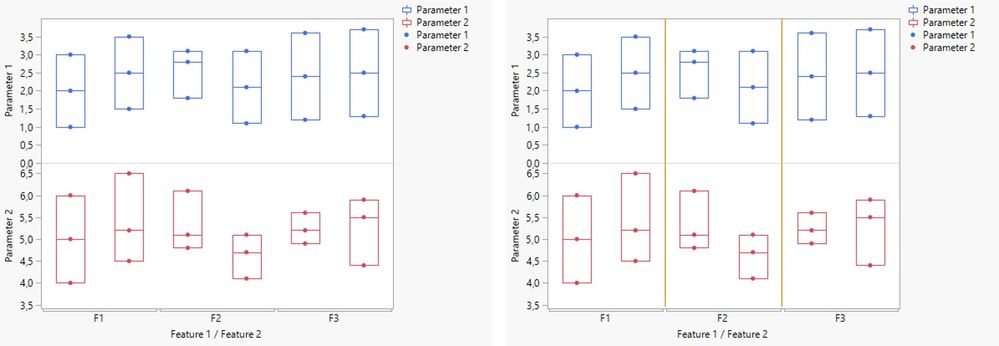
I manage to align data points to corresponding box plots but depending on data there can be more boxes in one group. For interpretation purposes I would like to draw additional lines on the plot that will visually separate each "F" group, like in the right hand picture attached. I would appreciate for hints how to do that. Best regards.picture_3.jpg
1 ACCEPTED SOLUTION

Accepted Solutions

statman
Super User

Re: How to separate box plot groups with a straight line?

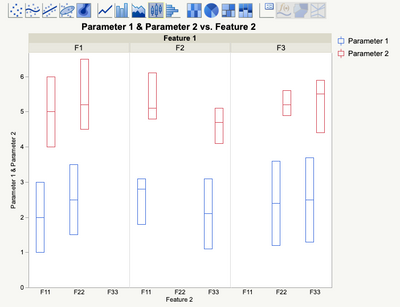
Not sure this is what you want, but if you use Graph Builder and drag the Parameters to the Y axis and Feature 1 to the Group X option and feature 2 to the X axis
Graph Builder.png

you will get the separate areas

"All models are wrong, some are useful" G.E.P. Box

View solution in original post

2 REPLIES 2
statman
Super User

Re: How to separate box plot groups with a straight line?

Not sure this is what you want, but if you use Graph Builder and drag the Parameters to the Y axis and Feature 1 to the Group X option and feature 2 to the X axis

Graph Builder.png

you will get the separate areas

"All models are wrong, some are useful" G.E.P. Box
lukasz
Level IV

Re: How to separate box plot groups with a straight line?

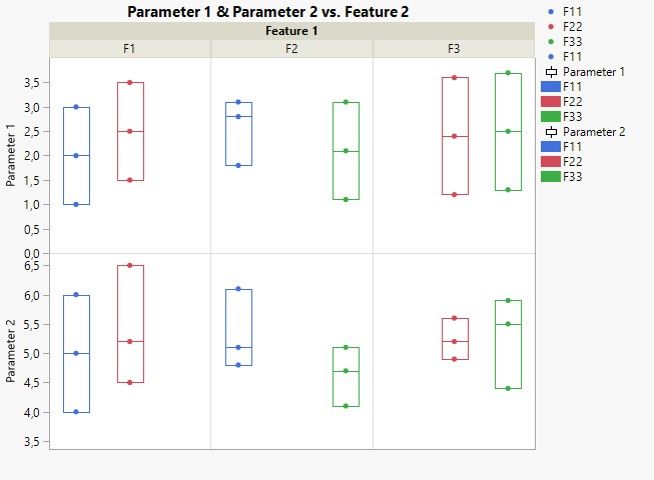
Hello statman, thank you for your reply, that looks good and I will use that method. However I thought that the main groups F1, F2 and F3 can be displayed in the X axis but now it doesn't matter. I put Feature 2 as color to make differences between subgroups. Redundant legends can be removed. Thank you once again.
picture_2.jpg

Recommended Articles