- Don’t miss your chance to experience Discovery Summit Europe at our best available rate! Early bird registration through 31 Oct.
- Graph Builder Toolbar streamlines interactive graphing. Creates shortcuts on Report and GraphBuilder Helpers toolbars. Download and install the extension.
- Subscribe to RSS Feed
- Mark Topic as New
- Mark Topic as Read
- Float this Topic for Current User
- Bookmark
- Subscribe
- Mute
- Printer Friendly Page
Discussions
Solve problems, and share tips and tricks with other JMP users.- User Community
- :
- Discussions
- :
- Re: How to save JMP graph to interactive html file

- Mark as New
- Bookmark
- Subscribe
- Mute
- Subscribe to RSS Feed
- Get Direct Link
- Report Inappropriate Content
How to save JMP graph to interactive html file
Dear users,
I am quite new in jmp community and i am trying to save a bubble graph to html interactive file. However, i am not able to find this option. Pl help me out.
Accepted Solutions


- Mark as New
- Bookmark
- Subscribe
- Mute
- Subscribe to RSS Feed
- Get Direct Link
- Report Inappropriate Content
Re: How to save JMP graph to interactive html file
Your attachments are not being uploaded.
What version of JMP are you using?
On your Bubble Plot output, the pull down menus are hidden, the image below will tell you about that
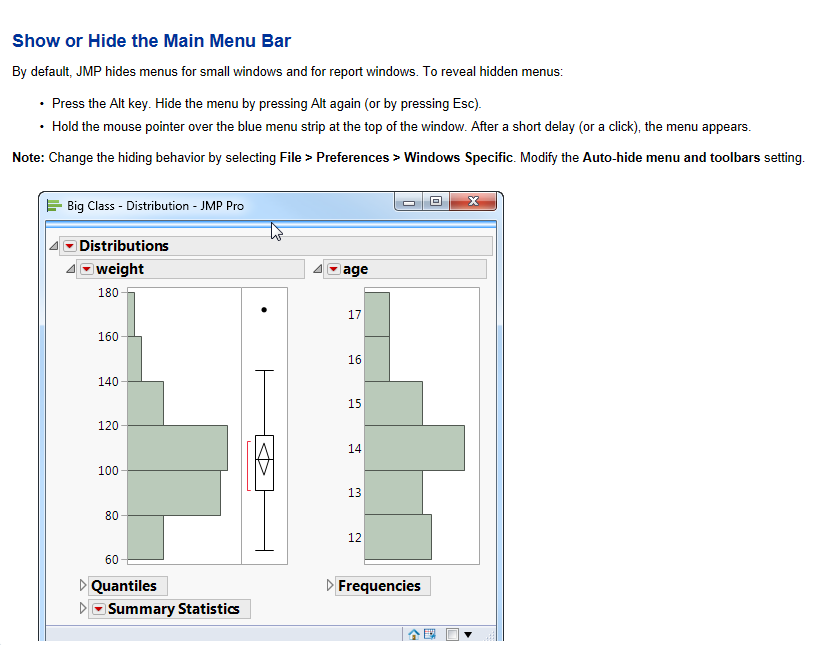
So if you click on the bar, the pull down menus will appear, and you can select
File==>Save As
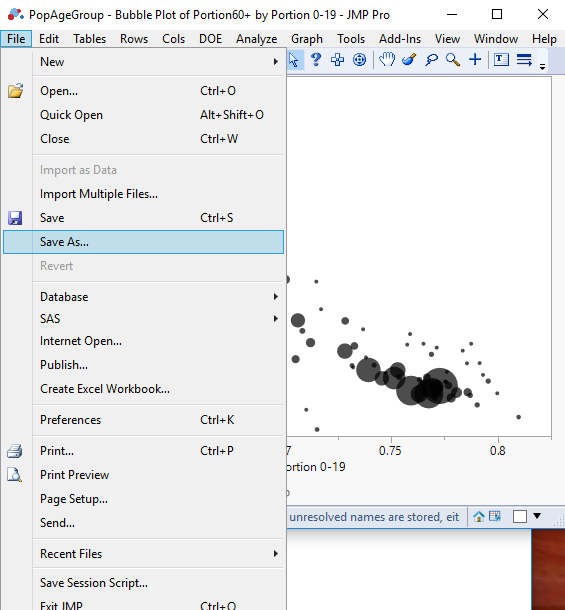
When the Save As window pops up, you then go to the drop down arrow for the "Save File Type" and select "Interactive HTML"
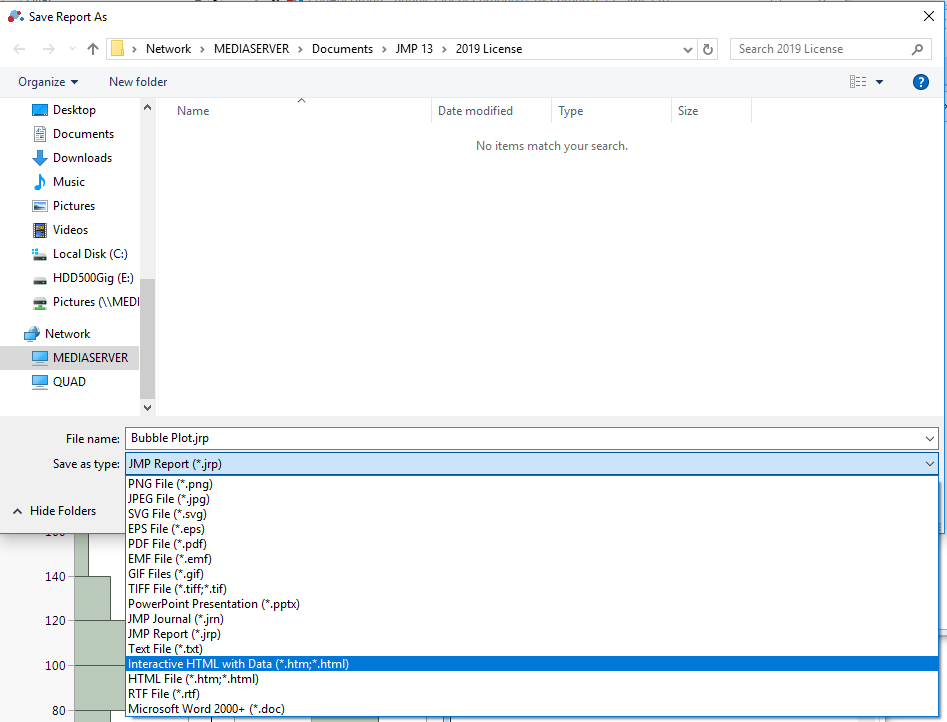
If you do not have the option on this screen to select Interactive HTML, then I suspect you do not have a current version of JMP

- Mark as New
- Bookmark
- Subscribe
- Mute
- Subscribe to RSS Feed
- Get Direct Link
- Report Inappropriate Content
Re: How to save JMP graph to interactive html file
@godara70a ,
Help > Scripting Index >Save Interactive HTML
dt = Open( "$SAMPLE_DATA/Big Class.jmp" );
biv = bivariate( y( :weight ), x( :height ) );
rbiv = biv << report;
rbiv << Save Interactive HTML( "C:/example.html" );Uday
- Mark as New
- Bookmark
- Subscribe
- Mute
- Subscribe to RSS Feed
- Get Direct Link
- Report Inappropriate Content
Re: How to save JMP graph to interactive html file
it seems like this script is to save data to Interactive HTML. I am
attaching my screenshot of graph window for your reference. Pl let me know
if you can help.
- Mark as New
- Bookmark
- Subscribe
- Mute
- Subscribe to RSS Feed
- Get Direct Link
- Report Inappropriate Content
Re: How to save JMP graph to interactive html file
- Click on the Display Window the Bubble Plot is in.
- Go to the "File" pull down menu option and select "Save As"
- You may not think there is a list of Pull Down menus at the top of the Bubble Chart window, but by default, in JMP, they are hidden until you click on the small bar that goes across the top of the window, just a bove the Outline Box that has the title of the chart.
- In the Save As window, click on the down arrow at the right side of the "Save as type:" line at the lower part of the window, and select, "Interactive HTML"
- Mark as New
- Bookmark
- Subscribe
- Mute
- Subscribe to RSS Feed
- Get Direct Link
- Report Inappropriate Content
Re: How to save JMP graph to interactive html file
As you see in the attached screenshot, there is no file option on that
window. So, pl let me know if I am missing something.
thanks,
Manish
- Mark as New
- Bookmark
- Subscribe
- Mute
- Subscribe to RSS Feed
- Get Direct Link
- Report Inappropriate Content
Re: How to save JMP graph to interactive html file
Your attachments are not being uploaded.
What version of JMP are you using?
On your Bubble Plot output, the pull down menus are hidden, the image below will tell you about that
So if you click on the bar, the pull down menus will appear, and you can select
File==>Save As
When the Save As window pops up, you then go to the drop down arrow for the "Save File Type" and select "Interactive HTML"
If you do not have the option on this screen to select Interactive HTML, then I suspect you do not have a current version of JMP


 Community Manager
- Mark as New
- Bookmark
- Subscribe
- Mute
- Subscribe to RSS Feed
- Get Direct Link
- Report Inappropriate Content
Re: How to save JMP graph to interactive html file
Recommended Articles
- © 2026 JMP Statistical Discovery LLC. All Rights Reserved.
- Terms of Use
- Privacy Statement
- Contact Us