cancel
Showing results for 
Show  only  | Search instead for 
Did you mean: 
  • JMP will suspend normal business operations for our Winter Holiday beginning on Wednesday, Dec. 24, 2025, at 5:00 p.m. ET (2:00 p.m. ET for JMP Accounts Receivable).
    Regular business hours will resume at 9:00 a.m. EST on Friday, Jan. 2, 2026.
  • We’re retiring the File Exchange at the end of this year. The JMP Marketplace is now your destination for add-ins and extensions.

Discussions

Solve problems, and share tips and tricks with other JMP users.
%3CLINGO-SUB%20id%3D%22lingo-sub-350658%22%20slang%3D%22en-US%22%20mode%3D%22NONE%22%3EComment%20repr%C3%A9senter%20graphiquement%20un%20histogramme%20avec%20des%20barres%20d'erreur%20calcul%C3%A9es%20dans%20JMP%3C%2FLINGO-SUB%3E%3CLINGO-BODY%20id%3D%22lingo-body-350658%22%20slang%3D%22en-US%22%20mode%3D%22NONE%22%3E%3CP%3EBonjour%20%C3%A0%20tous%2C%3C%2FP%3E%0A%3CP%3E%26nbsp%3B%3C%2FP%3E%0A%3CP%3EJe%20suis%20nouveau%20dans%20JMP%20et%20j'essaie%20de%20comprendre%20ou%20de%20comprendre%20comment%20tracer%20un%20histogramme%20et%20inclure%20des%20barres%20d'erreur%20calcul%C3%A9es%20dans%20JMP.%3C%2FP%3E%0A%3CP%3EPour%20illustrer%20ma%20question%2C%20j'ai%20joint%20une%20capture%20d'%C3%A9cran%20du%20graphique%20%C3%A0%20colonnes%20et%20des%20barres%20d'erreur%20que%20je%20voudrais%20g%C3%A9n%C3%A9rer.%3C%2FP%3E%0A%3CP%3ELe%20jeu%20de%20donn%C3%A9es%20a%204%20r%C3%A9pliques%20not%C3%A9es%20R1-R4.%20Je%20voudrais%20calculer%20la%20moyenne%20de%20R1%26amp%3B2%20et%20calculer%20s%C3%A9par%C3%A9ment%20la%20moyenne%20de%20R3%26amp%3BR4.%3C%2FP%3E%0A%3CP%3ELe%20graphique%20r%C3%A9sultant%20doit%20avoir%20la%20m%C3%AAme%20disposition%20que%20celui%20ci-joint%2C%20%C3%A0%20l'exception%20de%20la%20repr%C3%A9sentation%20des%20moyennes.%3C%2FP%3E%0A%3CP%3EJ'aimerais%20%C3%A9galement%20que%20l'erreur%20de%20cette%20moyenne%20calcul%C3%A9e%20soit%20indiqu%C3%A9e%20pour%20chaque%20colonne.%3C%2FP%3E%0A%3CP%3EComment%20pourrais-je%20m'y%20prendre%20%3F%20J'ai%20essay%C3%A9%20de%20nombreuses%20fa%C3%A7ons%20d'empiler%20des%20donn%C3%A9es%20et%20de%20tracer%2C%20mais%20je%20n'arrive%20jamais%20%C3%A0%20obtenir%20le%20r%C3%A9sultat%20souhait%C3%A9.%20Sans%20oublier%20que%20je%20n'ai%20pas%20encore%20d%C3%A9couvert%20comment%20tracer%20les%20barres%20d'erreur%20en%20haut%20de%20mes%20colonnes.%3C%2FP%3E%0A%3CP%3E%26nbsp%3B%3C%2FP%3E%0A%3CP%3EJ'ai%20%C3%A9galement%20joint%20l'ensemble%20de%20donn%C3%A9es%20qui%20a%20%C3%A9t%C3%A9%20utilis%C3%A9%20pour%20g%C3%A9n%C3%A9rer%20la%20figure.%3C%2FP%3E%0A%3CP%3E%26nbsp%3B%3C%2FP%3E%0A%3CP%3EToute%20contribution%20est%20appr%C3%A9ci%C3%A9e%26nbsp%3B!%3C%2FP%3E%0A%3CP%3EMerci%2C%3C%2FP%3E%0A%3CP%3Ecactus%20censur%C3%A9%20%3A)%3C%2Fimg%3E%3C%2FP%3E%0A%3CP%3E%3CSPAN%20class%3D%22lia-inline-image-display-wrapper%20lia-image-align-inline%22%20image-alt%3D%22Imagefinal.png%22%20style%3D%22width%3A%20400px%3B%22%3E%3CSPAN%20class%3D%22lia-inline-image-display-wrapper%22%20image-alt%3D%22Imagefinal.png%22%20style%3D%22width%3A%20400px%3B%22%3E%3Cspan%20class%3D%22lia-inline-image-display-wrapper%22%20image-alt%3D%22Imagefinal.png%22%20style%3D%22width%3A%20400px%3B%22%3E%3Cimg%20src%3D%22https%3A%2F%2Fcommunity.jmp.com%2Ft5%2Fimage%2Fserverpage%2Fimage-id%2F29545i47549C331F88FDAA%2Fimage-size%2Fmedium%3Fv%3Dv2%26amp%3Bpx%3D400%22%20role%3D%22button%22%20title%3D%22Imagefinal.png%22%20alt%3D%22Imagefinal.png%22%20%2F%3E%3C%2Fspan%3E%3C%2FSPAN%3E%3C%2FSPAN%3E%3C%2FP%3E%0A%3CP%3E%E2%80%83%3C%2FP%3E%3C%2FLINGO-BODY%3E%3CLINGO-LABS%20id%3D%22lingo-labs-350658%22%20slang%3D%22en-US%22%20mode%3D%22NONE%22%3E%3CLINGO-LABEL%3EGraphique%3C%2FLINGO-LABEL%3E%3C%2FLINGO-LABS%3E%3CLINGO-SUB%20id%3D%22lingo-sub-350804%22%20slang%3D%22en-US%22%20mode%3D%22NONE%22%3ERe%26nbsp%3B%3A%20Comment%20repr%C3%A9senter%20graphiquement%20un%20histogramme%20avec%20des%20barres%20d'erreur%20calcul%C3%A9es%20dans%20JMP%3C%2FLINGO-SUB%3E%3CLINGO-BODY%20id%3D%22lingo-body-350804%22%20slang%3D%22en-US%22%20mode%3D%22NONE%22%3E%3CP%3ESalut%20Mark%2C%3C%2FP%3E%3CP%3EMerci%20pour%20votre%20r%C3%A9ponse.%20Je%20vais%20m'y%20mettre.%20Votre%20explication%20est%20pourtant%20logique%20!%3C%2FP%3E%3CP%3E%26nbsp%3B%3C%2FP%3E%3CP%3EAcclamations%2C%3C%2FP%3E%3CP%3Ecactus%20censur%C3%A9%3C%2FP%3E%3C%2FLINGO-BODY%3E%3CLINGO-SUB%20id%3D%22lingo-sub-350749%22%20slang%3D%22en-US%22%20mode%3D%22NONE%22%3ERe%26nbsp%3B%3A%20Comment%20repr%C3%A9senter%20graphiquement%20un%20histogramme%20avec%20des%20barres%20d'erreur%20calcul%C3%A9es%20dans%20JMP%3C%2FLINGO-SUB%3E%3CLINGO-BODY%20id%3D%22lingo-body-350749%22%20slang%3D%22en-US%22%20mode%3D%22NONE%22%3E%3CP%3EOh%2C%20maintenant%20je%20peux%20voir%20la%20photo%20que%20vous%20avez%20partag%C3%A9e.%3C%2FP%3E%0A%3CP%3E%26nbsp%3B%3C%2FP%3E%0A%3CP%3EVous%20devez%20cr%C3%A9er%20une%20nouvelle%20variable%20de%20regroupement%20qui%20indique%20si%20la%20ligne%20appartient%20%C3%A0%20R1%20ou%20R2%2C%20ou%20si%20elle%20appartient%20%C3%A0%20R3%20ou%20R4.%20Ensuite%2C%20vous%20pouvez%20utiliser%20Graph%20Builder.%20Faites%20glisser%20Data%20vers%20Y%20et%20District%20vers%20X.%20Faites%20glisser%20m%5E2%20vers%20le%20groupe%20X.%20Faites%20glisser%20le%20groupe%20vers%20la%20superposition.%20S%C3%A9lectionnez%20l'%C3%A9l%C3%A9ment%20Barre.%20Modifiez%20ensuite%20la%20barre%20d'erreur%20dans%20la%20liste%20des%20propri%C3%A9t%C3%A9s%20%C3%A0%20gauche.%3C%2FP%3E%0A%3CP%3E%26nbsp%3B%3C%2FP%3E%0A%3CP%3E%3CSPAN%20class%3D%22lia-inline-image-display-wrapper%20lia-image-align-inline%22%20image-alt%3D%22area.JPG%22%20style%3D%22width%3A%20617px%3B%22%3E%3CSPAN%20class%3D%22lia-inline-image-display-wrapper%22%20image-alt%3D%22area.JPG%22%20style%3D%22width%3A%20617px%3B%22%3E%3Cspan%20class%3D%22lia-inline-image-display-wrapper%22%20image-alt%3D%22area.JPG%22%20style%3D%22width%3A%20617px%3B%22%3E%3Cimg%20src%3D%22https%3A%2F%2Fcommunity.jmp.com%2Ft5%2Fimage%2Fserverpage%2Fimage-id%2F29524i96C4BCAFFDE7C99C%2Fimage-size%2Flarge%3Fv%3Dv2%26amp%3Bpx%3D999%22%20role%3D%22button%22%20title%3D%22area.JPG%22%20alt%3D%22area.JPG%22%20%2F%3E%3C%2Fspan%3E%3C%2FSPAN%3E%3C%2FSPAN%3E%3C%2FP%3E%3C%2FLINGO-BODY%3E%3CLINGO-SUB%20id%3D%22lingo-sub-350747%22%20slang%3D%22en-US%22%20mode%3D%22NONE%22%3ERe%26nbsp%3B%3A%20Comment%20repr%C3%A9senter%20graphiquement%20un%20histogramme%20avec%20des%20barres%20d'erreur%20calcul%C3%A9es%20dans%20JMP%3C%2FLINGO-SUB%3E%3CLINGO-BODY%20id%3D%22lingo-body-350747%22%20slang%3D%22en-US%22%20mode%3D%22NONE%22%3E%3CP%3EJe%20ne%20peux%20pas%20ouvrir%20votre%20image.%20D%C3%A9sirez-vous%20un%20graphique%20%C3%A0%20barres%20comme%20celui-ci%26nbsp%3B%3F%3C%2FP%3E%0A%3CP%3E%26nbsp%3B%3C%2FP%3E%0A%3CP%3E%3CSPAN%20class%3D%22lia-inline-image-display-wrapper%20lia-image-align-inline%22%20image-alt%3D%22area.JPG%22%20style%3D%22width%3A%20624px%3B%22%3E%3CSPAN%20class%3D%22lia-inline-image-display-wrapper%22%20image-alt%3D%22area.JPG%22%20style%3D%22width%3A%20624px%3B%22%3E%3Cspan%20class%3D%22lia-inline-image-display-wrapper%22%20image-alt%3D%22area.JPG%22%20style%3D%22width%3A%20624px%3B%22%3E%3Cimg%20src%3D%22https%3A%2F%2Fcommunity.jmp.com%2Ft5%2Fimage%2Fserverpage%2Fimage-id%2F29523i28B155A297A50753%2Fimage-size%2Flarge%3Fv%3Dv2%26amp%3Bpx%3D999%22%20role%3D%22button%22%20title%3D%22area.JPG%22%20alt%3D%22area.JPG%22%20%2F%3E%3C%2Fspan%3E%3C%2FSPAN%3E%3C%2FSPAN%3E%3C%2FP%3E%3C%2FLINGO-BODY%3E
Choose Language Hide Translation Bar

How to graph a column chart with error bars calculated in JMP

Hello all,


I am a new to JMP and am trying to understand or figure out how to plot a column chart and include error bars calculated in JMP.

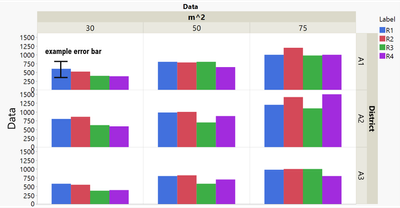
To illustrate my question I have attached a screenshot of the column chart and error bars I would like to generate.

The dataset has 4 replicates denoted R1-R4. I would like to calculate the mean of R1&2 and separately calculate the mean of R3&R4.

The resulting graph should have the same layout as the attached one except for representing the means.

I would also like to have the error of that calculated mean shown for each column.

How would I go about that? I have been trying numerous ways to stack data and plot but I can never seem to get to my desired result. Not to mentioned I have not found out yet how to actually plot the error bars on top of my columns.


I have also attached the dataset which was used to generate the figure.


Any input is appreciated!

Thanks,

censoredcactus :)
Imagefinal.png

1 ACCEPTED SOLUTION

Accepted Solutions

Re: How to graph a column chart with error bars calculated in JMP

Oh, now I can see the picture your shared.


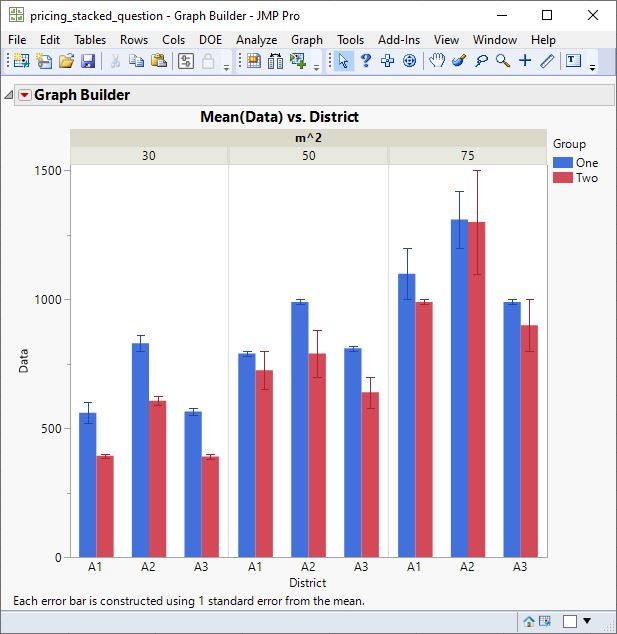
You need to create a new grouping variable that indicates if the row belongs to R1 or R2, or if it belongs to R3 or R4. Then you can use Graph Builder. Drag Data to Y and District to X. Drag m^2 to Group X. Drag Group to Overlay. Select the Bar element. Then change the error bar in the property list on the left.
 

area.JPG

View solution in original post

3 REPLIES 3

Re: How to graph a column chart with error bars calculated in JMP

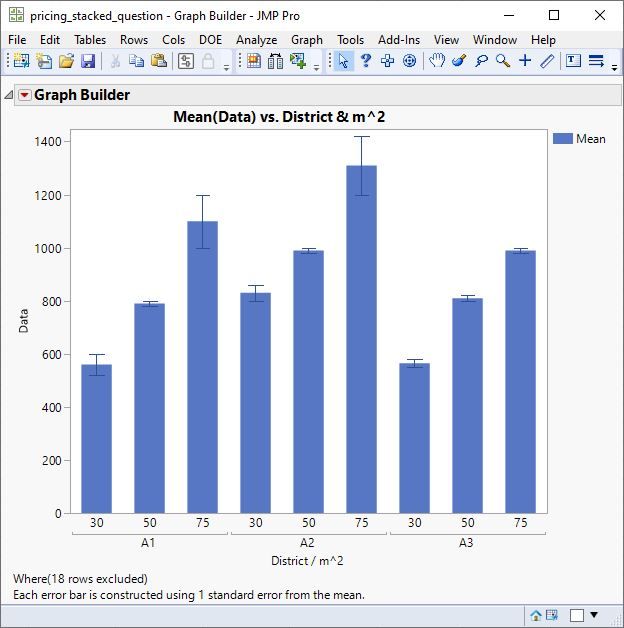
I cannot open your picture. Do you desire a bar chart like this?
 

area.JPG

Re: How to graph a column chart with error bars calculated in JMP

Oh, now I can see the picture your shared.


You need to create a new grouping variable that indicates if the row belongs to R1 or R2, or if it belongs to R3 or R4. Then you can use Graph Builder. Drag Data to Y and District to X. Drag m^2 to Group X. Drag Group to Overlay. Select the Bar element. Then change the error bar in the property list on the left.


area.JPG

Re: How to graph a column chart with error bars calculated in JMP

Hi Mark,

thanks for your answer. I will have a go at it. Your explanation makes sense though!


Cheers,

censoredcactus

Recommended Articles
