- Image to Table JMP extension imports single or batch images as data tables. Useful to extract curves from pictures or convert image data to curve data to use in analyses like Functional Data Explorer. Download and install the extension.
- Subscribe to RSS Feed
- Mark Topic as New
- Mark Topic as Read
- Float this Topic for Current User
- Bookmark
- Subscribe
- Mute
- Printer Friendly Page
Discussions
Solve problems, and share tips and tricks with other JMP users.- User Community
- :
- Discussions
- :
- Re: How to graph a column chart with error bars calculated in JMP

- Mark as New
- Bookmark
- Subscribe
- Mute
- Subscribe to RSS Feed
- Get Direct Link
- Report Inappropriate Content
How to graph a column chart with error bars calculated in JMP
Hello all,
I am a new to JMP and am trying to understand or figure out how to plot a column chart and include error bars calculated in JMP.
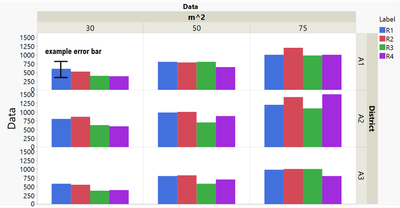
To illustrate my question I have attached a screenshot of the column chart and error bars I would like to generate.
The dataset has 4 replicates denoted R1-R4. I would like to calculate the mean of R1&2 and separately calculate the mean of R3&R4.
The resulting graph should have the same layout as the attached one except for representing the means.
I would also like to have the error of that calculated mean shown for each column.
How would I go about that? I have been trying numerous ways to stack data and plot but I can never seem to get to my desired result. Not to mentioned I have not found out yet how to actually plot the error bars on top of my columns.
I have also attached the dataset which was used to generate the figure.
Any input is appreciated!
Thanks,
censoredcactus :)
Accepted Solutions


- Mark as New
- Bookmark
- Subscribe
- Mute
- Subscribe to RSS Feed
- Get Direct Link
- Report Inappropriate Content
Re: How to graph a column chart with error bars calculated in JMP
Oh, now I can see the picture your shared.
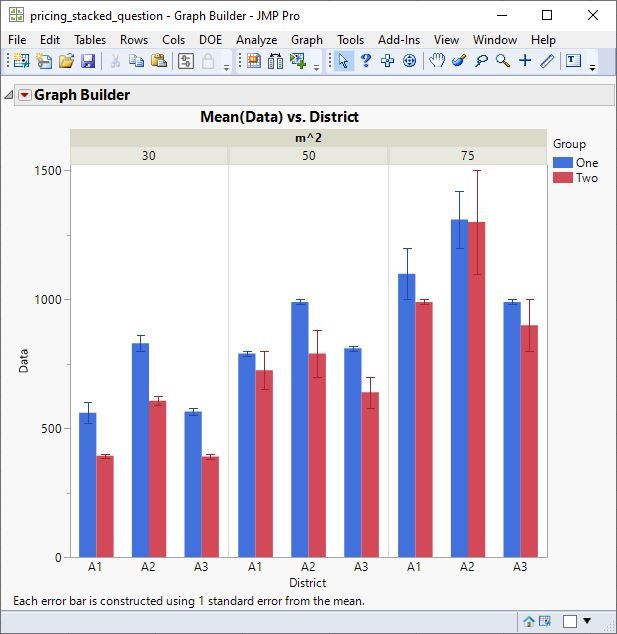
You need to create a new grouping variable that indicates if the row belongs to R1 or R2, or if it belongs to R3 or R4. Then you can use Graph Builder. Drag Data to Y and District to X. Drag m^2 to Group X. Drag Group to Overlay. Select the Bar element. Then change the error bar in the property list on the left.
- Mark as New
- Bookmark
- Subscribe
- Mute
- Subscribe to RSS Feed
- Get Direct Link
- Report Inappropriate Content
Re: How to graph a column chart with error bars calculated in JMP
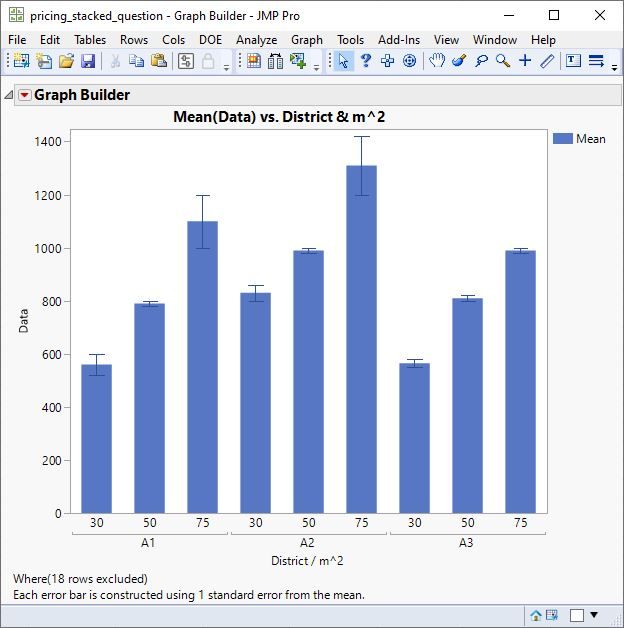
I cannot open your picture. Do you desire a bar chart like this?
- Mark as New
- Bookmark
- Subscribe
- Mute
- Subscribe to RSS Feed
- Get Direct Link
- Report Inappropriate Content
Re: How to graph a column chart with error bars calculated in JMP
Oh, now I can see the picture your shared.
You need to create a new grouping variable that indicates if the row belongs to R1 or R2, or if it belongs to R3 or R4. Then you can use Graph Builder. Drag Data to Y and District to X. Drag m^2 to Group X. Drag Group to Overlay. Select the Bar element. Then change the error bar in the property list on the left.
- Mark as New
- Bookmark
- Subscribe
- Mute
- Subscribe to RSS Feed
- Get Direct Link
- Report Inappropriate Content
Re: How to graph a column chart with error bars calculated in JMP
Hi Mark,
thanks for your answer. I will have a go at it. Your explanation makes sense though!
Cheers,
censoredcactus
Recommended Articles
- © 2026 JMP Statistical Discovery LLC. All Rights Reserved.
- Terms of Use
- Privacy Statement
- Contact Us