cancel
Showing results for 
Show  only  | Search instead for 
Did you mean: 
  • JMP will suspend normal business operations for our Winter Holiday beginning on Wednesday, Dec. 24, 2025, at 5:00 p.m. ET (2:00 p.m. ET for JMP Accounts Receivable).
    Regular business hours will resume at 9:00 a.m. EST on Friday, Jan. 2, 2026.
  • We’re retiring the File Exchange at the end of this year. The JMP Marketplace is now your destination for add-ins and extensions.

Discussions

Solve problems, and share tips and tricks with other JMP users.
%3CLINGO-SUB%20id%3D%22lingo-sub-209011%22%20slang%3D%22en-US%22%20mode%3D%22NONE%22%3E%E5%A6%82%E4%BD%95%E5%9C%A8%E9%A1%B5%E9%9D%A2%E8%AE%BE%E7%BD%AE%E4%B8%AD%E8%87%AA%E5%AE%9A%E4%B9%89%E7%BA%B8%E5%BC%A0%E5%A4%A7%E5%B0%8F%E4%BB%A5%E7%94%9F%E6%88%90%20Beamer%20%E5%B9%BB%E7%81%AF%E7%89%87%E7%9A%84%20pdf%20%E5%9B%BE%E8%A1%A8%EF%BC%9F%3C%2FLINGO-SUB%3E%3CLINGO-BODY%20id%3D%22lingo-body-209011%22%20slang%3D%22en-US%22%20mode%3D%22NONE%22%3E%3CP%3E%E4%BD%A0%E5%A5%BD%EF%BC%8C%3C%2FP%3E%3CP%3E%26nbsp%3B%3C%2FP%3E%3CP%3E%E6%88%91%E6%AD%A3%E5%9C%A8%E5%B0%9D%E8%AF%95%E8%87%AA%E5%AE%9A%E4%B9%89%E9%A1%B5%E9%9D%A2%E8%AE%BE%E7%BD%AE%E5%B9%B6%E6%9B%B4%E6%94%B9%E7%BA%B8%E5%BC%A0%E5%A4%A7%E5%B0%8F%EF%BC%8C%E4%BB%A5%E5%B0%86%20Graph%20Builder%20%E8%BE%93%E5%87%BA%E4%BF%9D%E5%AD%98%E4%B8%BA%20PDF%20%E5%9B%BE%EF%BC%8C%E4%BB%A5%E4%BE%BF%E5%9C%A8%20Beamer%20Slides%20%E4%B8%AD%E4%BD%BF%E7%94%A8%E5%AE%83%E4%BB%AC%E3%80%82%3CSPAN%3E%E5%B0%BA%E5%AF%B8%3C%2FSPAN%3E%3CSPAN%3E%E7%9A%84%3C%2FSPAN%3E%3CSTRONG%3E%E9%BB%98%3C%2FSTRONG%3E%3CSPAN%3E%E5%B9%BB%E7%81%AF%E7%89%87%E4%B8%BA%20128%20%E6%AF%AB%E7%B1%B3%20x%2096%20%E6%AF%AB%E7%B1%B3%E3%80%82%20%E6%88%91%E6%B2%A1%E6%9C%89%E4%BD%BF%E7%94%A8%E5%8A%9F%E8%83%BD%E9%9B%86%E9%A1%B5%E9%9D%A2%E8%AE%BE%E7%BD%AE%EF%BC%8C%E5%9B%A0%E4%B8%BA%E6%88%91%E8%AE%A4%E4%B8%BA%E5%8F%AA%E8%83%BD%E4%BD%BF%E7%94%A8%E5%B7%B2%E7%BB%8F%E6%8C%87%E5%AE%9A%E7%9A%84%E5%B0%BA%E5%AF%B8%E3%80%82%3C%2FSPAN%3E%3C%2FP%3E%3CP%3E%3CSPAN%3E%E5%AF%B9%E6%88%91%E5%A6%82%E4%BD%95%E8%BF%9B%E8%A1%8C%E8%BF%99%E4%B8%80%E6%AD%A5%E6%9C%89%E4%BB%80%E4%B9%88%E6%83%B3%E6%B3%95%E5%90%97%EF%BC%9F%3C%2FSPAN%3E%3C%2FP%3E%3CP%3E%26nbsp%3B%3C%2FP%3E%3CP%3E%3CSPAN%3E%E9%9D%9E%E5%B8%B8%E6%84%9F%E8%B0%A2%EF%BC%81%3C%2FSPAN%3E%3C%2FP%3E%3C%2FLINGO-BODY%3E%3CLINGO-SUB%20id%3D%22lingo-sub-210353%22%20slang%3D%22en-US%22%20mode%3D%22NONE%22%3E%E5%9B%9E%E5%A4%8D%EF%BC%9A%E5%A6%82%E4%BD%95%E5%9C%A8%E9%A1%B5%E9%9D%A2%E8%AE%BE%E7%BD%AE%E4%B8%AD%E8%87%AA%E5%AE%9A%E4%B9%89%E7%BA%B8%E5%BC%A0%E5%A4%A7%E5%B0%8F%E4%BB%A5%E7%94%9F%E6%88%90%20Beamer%20%E5%B9%BB%E7%81%AF%E7%89%87%E7%9A%84%20pdf%20%E5%9B%BE%EF%BC%9F%3C%2FLINGO-SUB%3E%3CLINGO-BODY%20id%3D%22lingo-body-210353%22%20slang%3D%22en-US%22%20mode%3D%22NONE%22%3E%3CP%3E%E8%B0%A2%E8%B0%A2%E4%BD%A0%EF%BC%8C%3CA%20href%3D%22https%3A%2F%2Fcommunity.jmp.com%2Ft5%2Fuser%2Fviewprofilepage%2Fuser-id%2F2026%22%20target%3D%22_blank%22%3E%20%40%E6%9C%B1%E5%88%A9%E5%AE%89%3C%2FA%3E%EF%BC%8C%E5%AE%83%E5%B7%A5%E4%BD%9C%E6%AD%A3%E5%B8%B8%EF%BC%81%20%E6%88%91%E5%8F%88%E5%AD%A6%E5%88%B0%E6%96%B0%E4%B8%9C%E8%A5%BF%E4%BA%86%EF%BC%81%EF%BC%81%EF%BC%81%20%3AD%3C%2Fimg%3E%3C%2FP%3E%3C%2FLINGO-BODY%3E%3CLINGO-SUB%20id%3D%22lingo-sub-209701%22%20slang%3D%22en-US%22%20mode%3D%22NONE%22%3E%E5%9B%9E%E5%A4%8D%EF%BC%9A%E5%A6%82%E4%BD%95%E5%9C%A8%E9%A1%B5%E9%9D%A2%E8%AE%BE%E7%BD%AE%E4%B8%AD%E8%87%AA%E5%AE%9A%E4%B9%89%E7%BA%B8%E5%BC%A0%E5%A4%A7%E5%B0%8F%E4%BB%A5%E7%94%9F%E6%88%90%20Beamer%20%E5%B9%BB%E7%81%AF%E7%89%87%E7%9A%84%20pdf%20%E5%9B%BE%EF%BC%9F%3C%2FLINGO-SUB%3E%3CLINGO-BODY%20id%3D%22lingo-body-209701%22%20slang%3D%22en-US%22%20mode%3D%22NONE%22%3E%3CP%3E%E4%BD%A0%E5%A5%BD%3CA%20href%3D%22https%3A%2F%2Fcommunity.jmp.com%2Ft5%2Fuser%2Fviewprofilepage%2Fuser-id%2F10796%22%20target%3D%22_blank%22%3E%40%E9%98%BF%E9%BD%90%E6%89%8E%3C%2FA%3E%2C%3C%2FP%3E%0A%3CP%3E%E5%BE%88%E9%AB%98%E5%85%B4%E6%82%A8%E8%83%BD%E5%A4%9F%E5%88%9B%E5%BB%BA%E6%96%B0%E7%9A%84%E7%BA%B8%E5%BC%A0%E5%B0%BA%E5%AF%B8%EF%BC%81%20%E5%9C%A8%E8%BF%99%E7%A7%8D%E6%83%85%E5%86%B5%E4%B8%8B%E2%80%9Cobj%E2%80%9D%E6%98%AF%E4%BB%80%E4%B9%88%EF%BC%9F%20%E6%97%A5%E5%BF%97%E5%92%8C%E6%8A%A5%E5%91%8A%E5%8F%AF%E4%BB%A5%E6%8E%A5%E6%94%B6%20Set%20Page%20Setup%20%E6%B6%88%E6%81%AF%EF%BC%8C%E5%9B%A0%E6%AD%A4%E5%A6%82%E6%9E%9C%E6%82%A8%E5%B0%86%E5%B9%B3%E5%8F%B0%E8%B0%83%E7%94%A8%E7%9A%84%E7%BB%93%E6%9E%9C%E4%BD%9C%E4%B8%BA%E2%80%9Cobj%E2%80%9D%EF%BC%8C%E5%88%99%E9%9C%80%E8%A6%81%E5%B0%86%E5%85%B6%E5%8C%85%E8%A3%85%E5%9C%A8%20Report()%20%E4%B8%AD%E4%BB%A5%E5%B0%86%E6%B6%88%E6%81%AF%E5%8F%91%E9%80%81%E5%88%B0%E6%8A%A5%E5%91%8A%E5%B1%82%E3%80%82%3C%2FP%3E%0A%3CP%3E%26nbsp%3B%3C%2FP%3E%0A%3CP%3E%E6%AD%A4%E5%A4%96%EF%BC%8C%E6%8D%AE%E6%88%91%E4%BA%86%E8%A7%A3%EF%BC%8CSet%20Page%20Setup()%20%E6%98%AF%E6%8C%87%E4%BD%BF%E7%94%A8%20%26lt%3B%3CSAVE%20pdf%3D%22%22%20%E6%97%B6%E4%BD%BF%E7%94%A8%E7%9A%84%E8%AE%BE%E7%BD%AE%3D%22%22%3E%20%E9%A1%B5%E9%9D%A2%E8%AE%BE%E7%BD%AE%E4%B8%AD%EF%BC%8C%E4%BD%86%E4%BC%9A%E5%9C%A8%E4%BD%BF%E7%94%A8%20%26lt%3B%26lt%3B%20%E4%BF%9D%E5%AD%98%20PDF%20%E6%97%B6%E4%BD%BF%E7%94%A8%E3%80%82%20%E8%BF%99%E6%98%AF%E5%B7%A5%E4%BD%9C%E6%B5%81%E7%A8%8B%E7%9A%84%E7%A4%BA%E4%BE%8B%EF%BC%9A%3C%2FSAVE%3E%3C%2FP%3E%0A%3CP%3E%26nbsp%3B%3C%2FP%3E%0A%3CPRE%3E%3CCODE%20class%3D%22%20language-jsl%22%3EOpen(%22%24SAMPLE_DATA%5CBig%20Class.jmp%22)%3B%0A%0A%2F%2FCreate%20some%20output%0Aobj%20%3D%20Distribution(%20Column(%20%3Aheight%20))%3B%0A%0A%2F%2FSet%20the%20page%20settings%20for%20the%20report%20containing%20the%20distribution%20output%0Areport(obj)%20%26lt%3B%26lt%3B%20Set%20page%20setup(margins(%200.2%2C%200.4%2C%200%2C%200%20)%2Cscale(%200.75)%2Cportrait(%200%20)%2C%20paper%20size(%20%22Beamer%22%20))%3B%0A%0A%2F%2FTo%20view%20the%20settings%20use%20Get%20Page%20Setup()%0A%2F%2Freport(obj)%20%26lt%3B%26lt%3B%20Get%20Page%20Setup%0A%0A%2F%2FSave%20the%20PDF%0Areport(obj)%20%26lt%3B%26lt%3B%20Save%20PDF(%20%22%24DOCUMENTS%5Cexample.pdf%22%20)%3B%3C%2FCODE%3E%3C%2FPRE%3E%3C%2FLINGO-BODY%3E%3CLINGO-SUB%20id%3D%22lingo-sub-209684%22%20slang%3D%22en-US%22%20mode%3D%22NONE%22%3E%E5%9B%9E%E5%A4%8D%EF%BC%9A%E5%A6%82%E4%BD%95%E5%9C%A8%E9%A1%B5%E9%9D%A2%E8%AE%BE%E7%BD%AE%E4%B8%AD%E8%87%AA%E5%AE%9A%E4%B9%89%E7%BA%B8%E5%BC%A0%E5%A4%A7%E5%B0%8F%E4%BB%A5%E7%94%9F%E6%88%90%20Beamer%20%E5%B9%BB%E7%81%AF%E7%89%87%E7%9A%84%20pdf%20%E5%9B%BE%EF%BC%9F%3C%2FLINGO-SUB%3E%3CLINGO-BODY%20id%3D%22lingo-body-209684%22%20slang%3D%22en-US%22%20mode%3D%22NONE%22%3E%3CP%3E%E4%BD%A0%E5%A5%BD%3CA%20href%3D%22https%3A%2F%2Fcommunity.jmp.com%2Ft5%2Fuser%2Fviewprofilepage%2Fuser-id%2F2026%22%20target%3D%22_blank%22%3E%40%E6%9C%B1%E5%88%A9%E5%AE%89%3C%2FA%3E%EF%BC%8C%20%E6%84%9F%E8%B0%A2%E6%82%A8%E7%9A%84%E5%B8%AE%E5%8A%A9%E3%80%82%20%E6%88%91%E6%98%AF%20Windows%20%E7%94%A8%E6%88%B7%E3%80%82%20%E6%88%91%E8%83%BD%E5%A4%9F%E6%8C%89%E7%85%A7%E6%82%A8%E7%9A%84%E6%8C%87%E7%A4%BA%E5%88%9B%E5%BB%BA%E4%B8%80%E4%B8%AA%E2%80%9CBeamer%E2%80%9D%E8%A1%A8%E5%8D%95%E3%80%82%20%E8%BF%99%E5%B9%B6%E4%B8%8D%E6%98%8E%E6%98%BE%EF%BC%8C%E5%9B%A0%E4%B8%BA%E6%88%91%E4%BD%BF%E7%94%A8%E7%9A%84%E6%98%AF%20Windows%2010%E3%80%82%20%E6%97%A0%E8%AE%BA%E5%A6%82%E4%BD%95%EF%BC%8C%E6%88%91%E7%8E%B0%E5%9C%A8%E5%8F%AF%E4%BB%A5%E6%89%8B%E5%8A%A8%E9%80%89%E6%8B%A9%E5%AE%83%E5%B9%B6%E4%BB%8E%E6%96%87%E4%BB%B6%E8%8F%9C%E5%8D%95%E4%B8%AD%E8%BF%9B%E8%A1%8C%E8%AE%BE%E7%BD%AE%E3%80%82%20%E4%BD%86%E6%98%AF%EF%BC%8C%E5%BD%93%E6%88%91%E4%BD%BF%E7%94%A8%E2%80%9CBeamer%E2%80%9D%E6%97%B6%EF%BC%8C%E8%84%9A%E6%9C%AC%E6%B2%A1%E6%9C%89%E5%93%8D%E5%BA%94%E3%80%82%20%E4%BD%A0%E7%9F%A5%E9%81%93%E6%88%91%E5%81%9A%E9%94%99%E4%BA%86%E4%BB%80%E4%B9%88%E5%90%97%EF%BC%9F%20%E8%B0%A2%E8%B0%A2%E3%80%82%3C%2FP%3E%3CPRE%3E%3CCODE%20class%3D%22%20language-jsl%22%3Eobj%26lt%3B%26lt%3B%20Set%20page%20setup(margins(%200.2%2C%200.4%2C%200%2C%200%20)%2Cscale(%200.75)%2Cportrait(%200%20)%2C%20paper%20size(%20%22Beamer%22%20))%3B%3C%2FCODE%3E%3C%2FPRE%3E%3C%2FLINGO-BODY%3E%3CLINGO-SUB%20id%3D%22lingo-sub-209055%22%20slang%3D%22en-US%22%20mode%3D%22NONE%22%3E%E5%9B%9E%E5%A4%8D%EF%BC%9A%E5%A6%82%E4%BD%95%E5%9C%A8%E9%A1%B5%E9%9D%A2%E8%AE%BE%E7%BD%AE%E4%B8%AD%E8%87%AA%E5%AE%9A%E4%B9%89%E7%BA%B8%E5%BC%A0%E5%A4%A7%E5%B0%8F%E4%BB%A5%E7%94%9F%E6%88%90%20Beamer%20%E5%B9%BB%E7%81%AF%E7%89%87%E7%9A%84%20pdf%20%E5%9B%BE%EF%BC%9F%3C%2FLINGO-SUB%3E%3CLINGO-BODY%20id%3D%22lingo-body-209055%22%20slang%3D%22en-US%22%20mode%3D%22NONE%22%3E%3CP%3E%E4%BD%A0%E5%A5%BD%3CA%20href%3D%22https%3A%2F%2Fcommunity.jmp.com%2Ft5%2Fuser%2Fviewprofilepage%2Fuser-id%2F10796%22%20target%3D%22_blank%22%3E%40%E9%98%BF%E9%BD%90%E6%89%8E%3C%2FA%3E%2C%3C%2FP%3E%0A%3CP%3E%E6%82%A8%E4%BD%BF%E7%94%A8%E7%9A%84%E6%98%AF%20Mac%20%E8%BF%98%E6%98%AF%20Windows%20%E8%AE%A1%E7%AE%97%E6%9C%BA%EF%BC%9F%3C%2FP%3E%0A%3CP%3E%26nbsp%3B%3C%2FP%3E%0A%3CP%3E%E5%A6%82%E6%9E%9C%E5%9C%A8%20Mac%20%E4%B8%8A%EF%BC%8C%E6%82%A8%E5%8F%AF%E4%BB%A5%E5%9C%A8%20jmp%20%E4%B8%AD%E8%BD%AC%E5%88%B0%E2%80%9C%E6%96%87%E4%BB%B6%E2%80%9D%26gt%3B%E2%80%9C%E9%A1%B5%E9%9D%A2%E8%AE%BE%E7%BD%AE%E2%80%9D%E5%90%8E%E6%B7%BB%E5%8A%A0%E8%87%AA%E5%AE%9A%E4%B9%89%E7%BA%B8%E5%BC%A0%E5%B0%BA%E5%AF%B8%E3%80%82%20%E5%8D%95%E5%87%BB%E7%BA%B8%E5%BC%A0%E5%B0%BA%E5%AF%B8%E4%B8%8B%E6%8B%89%E5%88%97%E8%A1%A8%EF%BC%8C%E7%84%B6%E5%90%8E%E9%80%89%E6%8B%A9%E7%AE%A1%E7%90%86%E8%87%AA%E5%AE%9A%E4%B9%89%E5%B0%BA%E5%AF%B8%EF%BC%9A%3CSPAN%20class%3D%22lia-inline-image-display-wrapper%20lia-image-align-center%22%20image-alt%3D%22Screen%20Shot%202019-05-20%20at%209.15.50%20AM.png%22%20style%3D%22width%3A%20400px%3B%22%3E%3CSPAN%20class%3D%22lia-inline-image-display-wrapper%22%20image-alt%3D%22Screen%20Shot%202019-05-20%20at%209.15.50%20AM.png%22%20style%3D%22width%3A%20400px%3B%22%3E%3Cspan%20class%3D%22lia-inline-image-display-wrapper%22%20image-alt%3D%22Screen%20Shot%202019-05-20%20at%209.15.50%20AM.png%22%20style%3D%22width%3A%20400px%3B%22%3E%3Cimg%20src%3D%22https%3A%2F%2Fcommunity.jmp.com%2Ft5%2Fimage%2Fserverpage%2Fimage-id%2F17278i0AA4C529E2DB9019%2Fimage-size%2Fmedium%3Fv%3Dv2%26amp%3Bpx%3D400%22%20role%3D%22button%22%20title%3D%22Screen%20Shot%202019-05-20%20at%209.15.50%20AM.png%22%20alt%3D%22Screen%20Shot%202019-05-20%20at%209.15.50%20AM.png%22%20%2F%3E%3C%2Fspan%3E%3C%2FSPAN%3E%3C%2FSPAN%3E%3C%2FP%3E%0A%3CP%3E%26nbsp%3B%3C%2FP%3E%0A%3CP%3E%E5%9C%A8%20Windows%20%E6%9C%BA%E5%99%A8%E4%B8%8A%EF%BC%8C%E8%BF%99%E4%B8%AA%E8%BF%87%E7%A8%8B%E6%9C%89%E7%82%B9%E5%A4%8D%E6%9D%82%E3%80%82%20%E6%89%93%E5%BC%80%E8%AE%BE%E5%A4%87%E5%92%8C%E6%89%93%E5%8D%B0%E6%9C%BA%E6%8E%A7%E5%88%B6%E9%9D%A2%E6%9D%BF%E5%BA%94%E7%94%A8%E7%A8%8B%E5%BA%8F%EF%BC%8C%E9%80%89%E6%8B%A9%E6%82%A8%E7%9A%84%E6%89%93%E5%8D%B0%E6%9C%BA%2F%E8%AE%BE%E5%A4%87%EF%BC%88%E6%88%91%E7%8C%9C%E6%82%A8%E6%AD%A3%E5%9C%A8%E4%BD%BF%E7%94%A8%20Adobe%20PDF%20%E6%B8%B2%E6%9F%93%E5%99%A8%E6%88%96%E5%85%B6%E4%BB%96%E6%89%93%E5%8D%B0%E5%88%B0%20PDF%20%E7%9A%84%E8%AE%BE%E5%A4%87%EF%BC%89%EF%BC%8C%E7%84%B6%E5%90%8E%E5%9C%A8%E8%8F%9C%E5%8D%95%E6%A0%8F%E4%B8%AD%E9%80%89%E6%8B%A9%E6%89%93%E5%8D%B0%E6%9C%8D%E5%8A%A1%E5%99%A8%E5%B1%9E%E6%80%A7%E3%80%82%20%E5%88%B0%E8%BE%BE%E9%82%A3%E9%87%8C%E5%90%8E%EF%BC%8C%E9%80%89%E4%B8%AD%E2%80%9C%E5%88%9B%E5%BB%BA%E6%96%B0%E8%A1%A8%E6%A0%BC%E2%80%9D%E6%A1%86%EF%BC%8C%E7%84%B6%E5%90%8E%E6%82%A8%E5%8F%AF%E4%BB%A5%E8%BE%93%E5%85%A5%E5%B0%BA%E5%AF%B8%E3%80%82%3C%2FP%3E%0A%3CP%3E%3CSPAN%20class%3D%22lia-inline-image-display-wrapper%20lia-image-align-center%22%20image-alt%3D%22Screen%20Shot%202019-05-20%20at%209.21.39%20AM.png%22%20style%3D%22width%3A%20318px%3B%22%3E%3CSPAN%20class%3D%22lia-inline-image-display-wrapper%22%20image-alt%3D%22Screen%20Shot%202019-05-20%20at%209.21.39%20AM.png%22%20style%3D%22width%3A%20318px%3B%22%3E%3Cspan%20class%3D%22lia-inline-image-display-wrapper%22%20image-alt%3D%22Screen%20Shot%202019-05-20%20at%209.21.39%20AM.png%22%20style%3D%22width%3A%20318px%3B%22%3E%3Cimg%20src%3D%22https%3A%2F%2Fcommunity.jmp.com%2Ft5%2Fimage%2Fserverpage%2Fimage-id%2F17283iB15E721FDF263495%2Fimage-size%2Fmedium%3Fv%3Dv2%26amp%3Bpx%3D400%22%20role%3D%22button%22%20title%3D%22Screen%20Shot%202019-05-20%20at%209.21.39%20AM.png%22%20alt%3D%22Screen%20Shot%202019-05-20%20at%209.21.39%20AM.png%22%20%2F%3E%3C%2Fspan%3E%3C%2FSPAN%3E%3C%2FSPAN%3E%3C%2FP%3E%0A%3CP%3E%26nbsp%3B%3C%2FP%3E%3C%2FLINGO-BODY%3E
Choose Language Hide Translation Bar
Aziza
Level IV

How to customize Paper Size in Page Setup to generate pdf plots for Beamer slides?

Hi, 


I am trying to customize the page setup and change the paper size to save the Graph Builder output as PDF plots for using them in Beamer Slides. The size of a Beamer slide is 128mm by 96mm. I failed to use the function set page setup, since I think one can use only the sizes which are already specified. 

Are there any thoughts on how I could proceed this step?


Many thanks! 

Greetings
2 ACCEPTED SOLUTIONS

Accepted Solutions
julian
Community Manager Community Manager

Re: How to customize Paper Size in Page Setup to generate pdf plots for Beamer slides?

Hi @Aziza,

Are you using a Mac or Windows computer?


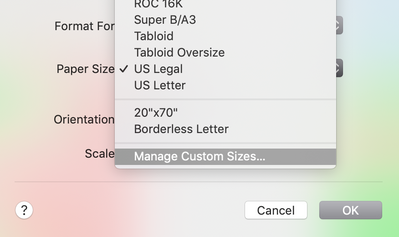
If on a mac, you can add a custom paper size after going to File > Page Setup right inside jmp. Click on the Paper Size drop-down list, and select Manage Custom Sizes:Screen Shot 2019-05-20 at 9.15.50 AM.png


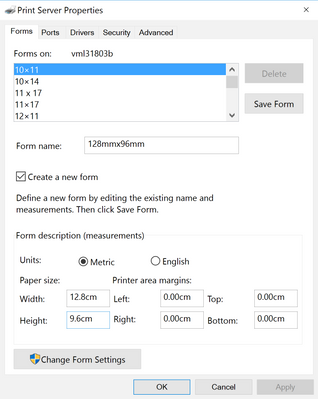
On a Windows machine the process is a little bit more complicated. Open the Devices and Printers control panel app, select your printer/device (I'm guessing you're using an Adobe PDF renderer or another print-to-pdf device), then select Print Server Properties in the menu bar. Once there, check the box for Create New Form, and you can enter your dimensions. 
Screen Shot 2019-05-20 at 9.21.39 AM.png


View solution in original post

julian
Community Manager Community Manager

Re: How to customize Paper Size in Page Setup to generate pdf plots for Beamer slides?

Hi @Aziza,

I'm glad you were able to create the new paper size! What is "obj" in this situation? Journals and reports can receive a Set Page Setup message, so if you have the result of a platform call as "obj" you will need to wrap it in Report() to send the message to the report layer.


Additionally, as I understand it, Set Page Setup() refers to the settings used when using <<Save PDF.  So, your changes won't be reflected in File > Page Setup, but will be used when using << Save PDF. Here's an example of the workflow:


Open("$SAMPLE_DATA\Big Class.jmp");

//Create some output
obj = Distribution( Column( :height ));

//Set the page settings for the report containing the distribution output
report(obj) << Set page setup(margins( 0.2, 0.4, 0, 0 ),scale( 0.75),portrait( 0 ), paper size( "Beamer" ));

//To view the settings use Get Page Setup()
//report(obj) << Get Page Setup

//Save the PDF
report(obj) << Save PDF( "$DOCUMENTS\example.pdf" );

View solution in original post

4 REPLIES 4
julian
Community Manager Community Manager

Re: How to customize Paper Size in Page Setup to generate pdf plots for Beamer slides?

Hi @Aziza,

Are you using a Mac or Windows computer?


If on a mac, you can add a custom paper size after going to File > Page Setup right inside jmp. Click on the Paper Size drop-down list, and select Manage Custom Sizes:Screen Shot 2019-05-20 at 9.15.50 AM.png


On a Windows machine the process is a little bit more complicated. Open the Devices and Printers control panel app, select your printer/device (I'm guessing you're using an Adobe PDF renderer or another print-to-pdf device), then select Print Server Properties in the menu bar. Once there, check the box for Create New Form, and you can enter your dimensions. 

Screen Shot 2019-05-20 at 9.21.39 AM.png


Aziza
Level IV

Re: How to customize Paper Size in Page Setup to generate pdf plots for Beamer slides?

Hi @julian , thank you for your help. I am a Windows user. I was able to create a "Beamer" form following your instructions. It was not obvious, since I am using Windows 10. Anyway, I can now choose it manually and set it up from the File Menu. The script is not responding though, when I use "Beamer". Do you know what am I doing wrong? Thank you. 

obj<< Set page setup(margins( 0.2, 0.4, 0, 0 ),scale( 0.75),portrait( 0 ), paper size( "Beamer" ));
Greetings
julian
Community Manager Community Manager

Re: How to customize Paper Size in Page Setup to generate pdf plots for Beamer slides?

Hi @Aziza,

I'm glad you were able to create the new paper size! What is "obj" in this situation? Journals and reports can receive a Set Page Setup message, so if you have the result of a platform call as "obj" you will need to wrap it in Report() to send the message to the report layer.


Additionally, as I understand it, Set Page Setup() refers to the settings used when using <<Save PDF.  So, your changes won't be reflected in File > Page Setup, but will be used when using << Save PDF. Here's an example of the workflow:


Open("$SAMPLE_DATA\Big Class.jmp");

//Create some output
obj = Distribution( Column( :height ));

//Set the page settings for the report containing the distribution output
report(obj) << Set page setup(margins( 0.2, 0.4, 0, 0 ),scale( 0.75),portrait( 0 ), paper size( "Beamer" ));

//To view the settings use Get Page Setup()
//report(obj) << Get Page Setup

//Save the PDF
report(obj) << Save PDF( "$DOCUMENTS\example.pdf" );
Aziza
Level IV

Re: How to customize Paper Size in Page Setup to generate pdf plots for Beamer slides?

Thank you, @julian, it worked fine! I learned smth new again!!! :D 

Greetings

Recommended Articles