- JMP will suspend normal business operations for our Winter Holiday beginning on Wednesday, Dec. 24, 2025, at 5:00 p.m. ET (2:00 p.m. ET for JMP Accounts Receivable).
Regular business hours will resume at 9:00 a.m. EST on Friday, Jan. 2, 2026. - We’re retiring the File Exchange at the end of this year. The JMP Marketplace is now your destination for add-ins and extensions.
- Subscribe to RSS Feed
- Mark Topic as New
- Mark Topic as Read
- Float this Topic for Current User
- Bookmark
- Subscribe
- Mute
- Printer Friendly Page
Discussions
Solve problems, and share tips and tricks with other JMP users.- JMP User Community
- :
- Discussions
- :
- How to create a calculated column similar to pivot table in Excel?

- Mark as New
- Bookmark
- Subscribe
- Mute
- Subscribe to RSS Feed
- Get Direct Link
- Report Inappropriate Content
How to create a calculated column similar to pivot table in Excel?
I want to use graph builder to slice and dice attrition data. In Excel I would use what is called a calculated field within a pivot table.
My data would look like the attached, where I can select any field as row(s)s or column(s) and the attrition rate would update dynamically since its a caculated field.
How do I do this in JMP? I tried HC/TER and sum(HC)/sum(TER). I did this in the data detail as as a separate column. Neither worked since they only caculate once at the individual level. I need something that will
perform the caculation on update.
Accepted Solutions


- Mark as New
- Bookmark
- Subscribe
- Mute
- Subscribe to RSS Feed
- Get Direct Link
- Report Inappropriate Content
Re: How to create a calculated column similar to pivot table in Excel?
I don't think JMP can do exactly that, with an arbitrary formula evaluated over the dynamic grouping.
If you know the grouping and can create a formula, be sure to use the Col functions and provide the grouping column(s) as BY variable(s): Col Sum( :HC, :KeyEE ) / Col Sum( :TER, :KeyEE )
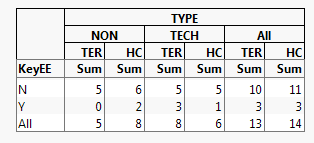
Otherwise you can compare sums (inferring the ratio) with a table in Tabulate:
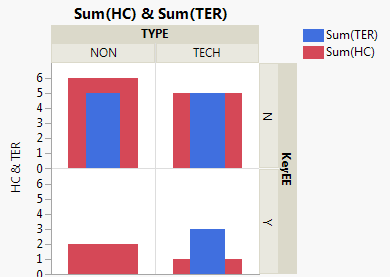
Or graphically in Graph Builder:
- Mark as New
- Bookmark
- Subscribe
- Mute
- Subscribe to RSS Feed
- Get Direct Link
- Report Inappropriate Content
Re: How to create a calculated column similar to pivot table in Excel?
I don't think JMP can do exactly that, with an arbitrary formula evaluated over the dynamic grouping.
If you know the grouping and can create a formula, be sure to use the Col functions and provide the grouping column(s) as BY variable(s): Col Sum( :HC, :KeyEE ) / Col Sum( :TER, :KeyEE )
Otherwise you can compare sums (inferring the ratio) with a table in Tabulate:
Or graphically in Graph Builder:
Recommended Articles
- © 2025 JMP Statistical Discovery LLC. All Rights Reserved.
- Terms of Use
- Privacy Statement
- Contact Us