cancel
Showing results for 
Show  only  | Search instead for 
Did you mean: 
  • JMP will suspend normal business operations for our Winter Holiday beginning on Wednesday, Dec. 24, 2025, at 5:00 p.m. ET (2:00 p.m. ET for JMP Accounts Receivable).
    Regular business hours will resume at 9:00 a.m. EST on Friday, Jan. 2, 2026.
  • We’re retiring the File Exchange at the end of this year. The JMP Marketplace is now your destination for add-ins and extensions.

Discussions

Solve problems, and share tips and tricks with other JMP users.
%3CLINGO-SUB%20id%3D%22lingo-sub-47344%22%20slang%3D%22en-US%22%20mode%3D%22NONE%22%3ESo%20f%C3%A4rben%20Sie%20einen%20GUI-Hintergrund%20und%20Schaltfl%C3%A4chen%20ein%3C%2FLINGO-SUB%3E%3CLINGO-BODY%20id%3D%22lingo-body-47344%22%20slang%3D%22en-US%22%20mode%3D%22NONE%22%3E%3CP%3EHallo%2C%3C%2FP%3E%3CP%3EIch%20versuche%2C%20eine%20M%C3%B6glichkeit%20zu%20finden%2C%20das%20Aussehen%20meiner%20GUI%20zu%20%C3%A4ndern.%20Mir%20ist%20aufgefallen%2C%20dass%20die%20Standardhintergrundfarbe%20von%20GUIs%20in%20JMP%20GRAU%20ist%2C%20was%20ziemlich%20monochromatisch%20ist.%3C%2FP%3E%3CP%3EWie%20kann%20ich%20mich%20%C3%A4ndern%3C%2FP%3E%3CUL%3E%3CLI%3EDie%20Hintergrundfarbe%20der%20GUI%3C%2FLI%3E%3CLI%3EDie%20Hintergrundfarbe%20der%20Schaltfl%C3%A4chen%20in%20der%20GUI%3C%2FLI%3E%3CLI%3EF%C3%BCgen%20Sie%20ein%20Bild%20oder%20Logo%20in%20die%20GUI%20ein%3C%2FLI%3E%3CLI%3E...%3C%2FLI%3E%3C%2FUL%3E%3CP%3EBin%20gespannt%2C%20wie%20das%20geht%20%3A)%3C%2Fimg%3E%3C%2FP%3E%3CP%3EDanke.%3C%2FP%3E%3C%2FLINGO-BODY%3E%3CLINGO-SUB%20id%3D%22lingo-sub-47473%22%20slang%3D%22en-US%22%20mode%3D%22NONE%22%3EBetreff%3A%20So%20f%C3%A4rben%20Sie%20einen%20GUI-Hintergrund%20und%20Schaltfl%C3%A4chen%20ein%3C%2FLINGO-SUB%3E%3CLINGO-BODY%20id%3D%22lingo-body-47473%22%20slang%3D%22en-US%22%20mode%3D%22NONE%22%3E%3CP%3ESeltsam%2C%3C%2FP%3E%3CP%3EWas%20ich%20bekomme%2C%20wenn%20ich%20den%20Code%20ausf%C3%BChre%2C%20ist%20(ich%20habe%20auch%20ein%20PNG-Bild%20dort%20platziert%2C%20wo%20es%20sein%20sollte)%3A%3C%2FP%3E%3CP%3E%3CSPAN%20class%3D%22lia-inline-image-display-wrapper%20lia-image-align-inline%22%20image-alt%3D%22Capture.PNG%22%20style%3D%22width%3A%20290px%3B%22%3E%3CSPAN%20class%3D%22lia-inline-image-display-wrapper%22%20image-alt%3D%22Capture.PNG%22%20style%3D%22width%3A%20290px%3B%22%3E%3Cspan%20class%3D%22lia-inline-image-display-wrapper%22%20image-alt%3D%22Capture.PNG%22%20style%3D%22width%3A%20290px%3B%22%3E%3Cimg%20src%3D%22https%3A%2F%2Fcommunity.jmp.com%2Ft5%2Fimage%2Fserverpage%2Fimage-id%2F8364iDB854DFCDB822A95%2Fimage-size%2Flarge%3Fv%3Dv2%26amp%3Bpx%3D999%22%20role%3D%22button%22%20title%3D%22Capture.PNG%22%20alt%3D%22Capture.PNG%22%20%2F%3E%3C%2Fspan%3E%3C%2FSPAN%3E%3C%2FSPAN%3E%3C%2FP%3E%3CP%3EIch%20verwende%20JMP11.%20K%C3%B6nnte%20das%20das%20Problem%20sein%3F%3C%2FP%3E%3C%2FLINGO-BODY%3E%3CLINGO-SUB%20id%3D%22lingo-sub-47467%22%20slang%3D%22en-US%22%20mode%3D%22NONE%22%3EBetreff%3A%20So%20f%C3%A4rben%20Sie%20einen%20GUI-Hintergrund%20und%20Schaltfl%C3%A4chen%20ein%3C%2FLINGO-SUB%3E%3CLINGO-BODY%20id%3D%22lingo-body-47467%22%20slang%3D%22en-US%22%20mode%3D%22NONE%22%3E%3CP%3EBez%C3%BCglich%20der%20Schaltfl%C3%A4chen%20k%C3%B6nnen%20Sie%20Jims%20Ansatz%20verwenden%3A%3C%2FP%3E%0A%3CPRE%3E%3CCODE%20class%3D%22%20language-jsl%22%3ENames%20Default%20To%20Here(%201%20)%3B%0ANew%20Window(%20%22Example%22%2C%20ex%20%3D%20Button%20Box(%20%22%22%2C%20Beep()%20)%20)%3B%0Aex%20%26lt%3B%26lt%3B%20Set%20Icon(%20%22%24DESKTOP%2FScreen%20Shot%202017-11-21%20at%2015.27.12.png%22%20)%3B%3C%2FCODE%3E%3C%2FPRE%3E%0A%3CP%3Ewo%20ich%20die%20.png-Datei%20erstellt%20habe%2C%20indem%20ich%20einen%20Screenshot%20aus%20einem%20Zeichenpaket%20angeheftet%20habe.%20Das%20gibt%3A%3C%2FP%3E%0A%3CP%3E%3CSPAN%20class%3D%22lia-inline-image-display-wrapper%20lia-image-align-inline%22%20image-alt%3D%22Screen%20Shot%202017-11-21%20at%2015.29.25.png%22%20style%3D%22width%3A%20163px%3B%22%3E%3CSPAN%20class%3D%22lia-inline-image-display-wrapper%22%20image-alt%3D%22Screen%20Shot%202017-11-21%20at%2015.29.25.png%22%20style%3D%22width%3A%20163px%3B%22%3E%3Cspan%20class%3D%22lia-inline-image-display-wrapper%22%20image-alt%3D%22Screen%20Shot%202017-11-21%20at%2015.29.25.png%22%20style%3D%22width%3A%20163px%3B%22%3E%3Cimg%20src%3D%22https%3A%2F%2Fcommunity.jmp.com%2Ft5%2Fimage%2Fserverpage%2Fimage-id%2F8363i9903F7BA302F8DF7%2Fimage-size%2Flarge%3Fv%3Dv2%26amp%3Bpx%3D999%22%20role%3D%22button%22%20title%3D%22Screen%20Shot%202017-11-21%20at%2015.29.25.png%22%20alt%3D%22Screen%20Shot%202017-11-21%20at%2015.29.25.png%22%20%2F%3E%3C%2Fspan%3E%3C%2FSPAN%3E%3C%2FSPAN%3E%3C%2FP%3E%3C%2FLINGO-BODY%3E%3CLINGO-SUB%20id%3D%22lingo-sub-47464%22%20slang%3D%22en-US%22%20mode%3D%22NONE%22%3EBetreff%3A%20So%20f%C3%A4rben%20Sie%20einen%20GUI-Hintergrund%20und%20Schaltfl%C3%A4chen%20ein%3C%2FLINGO-SUB%3E%3CLINGO-BODY%20id%3D%22lingo-body-47464%22%20slang%3D%22en-US%22%20mode%3D%22NONE%22%3E%3CP%3EHallo%3CA%20href%3D%22https%3A%2F%2Fcommunity.jmp.com%2Ft5%2Fuser%2Fviewprofilepage%2Fuser-id%2F3605%22%20target%3D%22_blank%22%3E%20%40ian_jmp%3C%2FA%3E%20%2C%3CA%20href%3D%22https%3A%2F%2Fcommunity.jmp.com%2Ft5%2Fuser%2Fviewprofilepage%2Fuser-id%2F2687%22%20target%3D%22_blank%22%3E%20%40txnelson%3C%2FA%3E%20%2C%3CA%20href%3D%22https%3A%2F%2Fcommunity.jmp.com%2Ft5%2Fuser%2Fviewprofilepage%2Fuser-id%2F5358%22%20target%3D%22_blank%22%3E%20%40Mark_Bailey%3C%2FA%3E%20%2C%3CA%20href%3D%22https%3A%2F%2Fcommunity.jmp.com%2Ft5%2Fuser%2Fviewprofilepage%2Fuser-id%2F182%22%20target%3D%22_blank%22%3E%20%40MS%3C%2FA%3E%20%2C%3C%2FP%3E%3CP%3EBisher%20konnte%20ich%20die%20Farbe%20nicht%20%C3%A4ndern%3A%3C%2FP%3E%3COL%3E%3CLI%3ESchaltfl%C3%A4chen-Hintergrund%3C%2FLI%3E%3CLI%3EGUI-Fensterhintergrund%3C%2FLI%3E%3C%2FOL%3E%3CP%3EIch%20vermute%2C%20dass%20diese%20Optionen%20in%20JMP%20nicht%20existieren%20%3A(%3C%2Fimg%3E%3C%2FP%3E%3C%2FLINGO-BODY%3E%3CLINGO-SUB%20id%3D%22lingo-sub-47369%22%20slang%3D%22en-US%22%20mode%3D%22NONE%22%3EBetreff%3A%20So%20f%C3%A4rben%20Sie%20einen%20GUI-Hintergrund%20und%20Schaltfl%C3%A4chen%20ein%3C%2FLINGO-SUB%3E%3CLINGO-BODY%20id%3D%22lingo-body-47369%22%20slang%3D%22en-US%22%20mode%3D%22NONE%22%3E%3CP%3EProbieren%20Sie%20verschiedene%20Einstellungen%20aus%3CEM%3E%20Einstellungen%2FStile%3C%2FEM%3E%20um%20der%20GUI%20global%20etwas%20Farbe%20zu%20verleihen.%3C%2FP%3E%3C%2FLINGO-BODY%3E%3CLINGO-SUB%20id%3D%22lingo-sub-47364%22%20slang%3D%22en-US%22%20mode%3D%22NONE%22%3EBetreff%3A%20So%20f%C3%A4rben%20Sie%20einen%20GUI-Hintergrund%20und%20Schaltfl%C3%A4chen%20ein%3C%2FLINGO-SUB%3E%3CLINGO-BODY%20id%3D%22lingo-body-47364%22%20slang%3D%22en-US%22%20mode%3D%22NONE%22%3E%3CP%3EDie%20einzige%20M%C3%B6glichkeit%2C%20die%20ich%20sehe%2C%20dass%20Sie%20den%20Hintergrund%20einer%20Button%20Box()%20einf%C3%A4rben%20k%C3%B6nnen%2C%20besteht%20darin%2C%20ein%20Bild%20des%20farbigen%20Hintergrunds%20und%20des%20%C3%BCberlagerten%20Textes%20zu%20erstellen%20und%20es%20dann%20der%20Button%20Box()%20als%20anzuzeigendes%20Element%20anzugeben.Unten%20sehen%20Sie%20ein%20Skript%2C%20das%20ein%20integriertes%20Symbol%20verwendet%2C%20aber%20die%20Set%20Icon()-Nachricht%20kann%20auch%20auf%20ein%20Imate%20verweisen%3C%2FP%3E%0A%3CPRE%3E%3CCODE%20class%3D%22%20language-jsl%22%3ENames%20Default%20To%20Here(%201%20)%3B%0ANew%20Window(%20%22Example%22%2C%20ex%20%3D%20Button%20Box(%20%22%22%20)%20)%3B%0Aex%20%26lt%3B%26lt%3B%20Set%20Icon(%20%22Go%22%20)%3B%3C%2FCODE%3E%3C%2FPRE%3E%3C%2FLINGO-BODY%3E%3CLINGO-SUB%20id%3D%22lingo-sub-47362%22%20slang%3D%22en-US%22%20mode%3D%22NONE%22%3EBetreff%3A%20So%20f%C3%A4rben%20Sie%20einen%20GUI-Hintergrund%20und%20Schaltfl%C3%A4chen%20ein%3C%2FLINGO-SUB%3E%3CLINGO-BODY%20id%3D%22lingo-body-47362%22%20slang%3D%22en-US%22%20mode%3D%22NONE%22%3E%3CP%3EDie%20Meldung%20%26lt%3B%26lt%3B%20Background%20Color()%20hat%20keine%20Auswirkung%20auf%20das%20Schaltfl%C3%A4chenfeld.%3C%2FP%3E%3C%2FLINGO-BODY%3E%3CLINGO-SUB%20id%3D%22lingo-sub-47347%22%20slang%3D%22en-US%22%20mode%3D%22NONE%22%3EBetreff%3A%20So%20f%C3%A4rben%20Sie%20einen%20GUI-Hintergrund%20und%20Schaltfl%C3%A4chen%20ein%3C%2FLINGO-SUB%3E%3CLINGO-BODY%20id%3D%22lingo-body-47347%22%20slang%3D%22en-US%22%20mode%3D%22NONE%22%3E%3CP%3EDas%20k%C3%B6nnte%20Ihnen%20den%20Einstieg%20erleichtern%3A%3C%2FP%3E%0A%3CPRE%3E%3CCODE%20class%3D%22%20language-jsl%22%3ENamesDefaultToHere(1)%3B%0A%0Anw%20%3D%20NewWindow(%22W%22%2C%20%0A%20%20vlb%20%3D%20VListBox(%0A%20%20%20bb%20%3D%20ButtonBox(%22Press%20Me%22)%2C%0A%20%20%20sb%20%3D%20SpacerBox(Size(10%2C%20100))%0A%20%20%20)%3B%0A%20%20)%3B%0A%0AWait(2)%3B%0Avlb%20%26lt%3B%26lt%3B%20backgroundColor(%22Blue%22)%3B%0AWait(2)%3B%0Abb%20%26lt%3B%26lt%3B%20backgroundColor(%22Red%22)%3B%0AWait(2)%3B%0Abb%20%26lt%3B%26lt%3B%20setIcon(%22%24SAMPLE_IMAGES%2Fpi.gif%22)%3B%0Abb%20%26lt%3B%26lt%3B%20setIconLocation(%22Left%22)%3B%3C%2FCODE%3E%3C%2FPRE%3E%0A%3CP%3ESie%20m%C3%BCssen%20in%20%E2%80%9EHilfe%20%26gt%3B%20Skriptindex%E2%80%9C%20nachsehen%2C%20um%20die%20verschiedenen%20Anzeigefelder%20und%20die%20Meldungen%20zu%20sehen%2C%20auf%20die%20sie%20reagieren%20(wenn%20Sie%20jedoch%20eine%20GUI%20geschrieben%20haben%2C%20werden%20Sie%20damit%20ohnehin%20einigerma%C3%9Fen%20vertraut%20sein).%20Suchen%20Sie%20f%C3%BCr%20Bilder%20nach%20%E2%80%9EPictureBox()%E2%80%9C.%3C%2FP%3E%3C%2FLINGO-BODY%3E
Choose Language Hide Translation Bar
samir
Level IV

How to color a GUI background and buttons

Hello,

I am trying to find a way to change the look of my GUI...I noticed the standard background color of GUIs in JMP is GREY which is quite monocromatic...

How can I change  

  • The background color of the GUI
  • The background color of the buttons in the GUI
  • Insert a picture or logo in the GUI
  • ...

Curious to see how this can be done :)

Thanks.

7 REPLIES 7
ian_jmp
Level X

Re: How to color a GUI background and buttons

This might get you started:

NamesDefaultToHere(1);

nw = NewWindow("W", 
		vlb = VListBox(
			bb = ButtonBox("Press Me"),
			sb = SpacerBox(Size(10, 100))
			);
		);

Wait(2);
vlb << backgroundColor("Blue");
Wait(2);
bb << backgroundColor("Red");
Wait(2);
bb << setIcon("$SAMPLE_IMAGES/pi.gif");
bb << setIconLocation("Left");

You need to look in 'Help > Scripting Index' to see the different display boxes and the messages they respond to (but if you have written a GUI you will be somewhat familiar with this anyway). For images, search for 'PictureBox()'.

Re: How to color a GUI background and buttons

The << Background Color() message does not have an effect on the button box.

txnelson
Super User

Re: How to color a GUI background and buttons

The only way that I see that you could color the background of a Button Box() is to create and image of the color background, and overlayed text, and then to specify it to the Button Box() as what to display.  Below is a script using a builtin Icon, but the Set Icon() message can also point to an imate

Names Default To Here( 1 );
New Window( "Example", ex = Button Box( "" ) );
ex << Set Icon( "Go" );

Jim
ms
Super User (Alumni) ms
Super User (Alumni)

Re: How to color a GUI background and buttons

Try different settings in Preferences/Styles to globally add some color to the GUI.

samir
Level IV

Re: How to color a GUI background and buttons

Hello @ian_jmp, @txnelson, @Mark_Bailey, @ms,

So far I was not able to change the color of the:

  1. Buttons background
  2. GUI-window background

I guess these options do not exist in JMP :(

ian_jmp
Level X

Re: How to color a GUI background and buttons

Regarding the buttons, you can use Jim's approach:

Names Default To Here( 1 );
New Window( "Example", ex = Button Box( "", Beep() ) );
ex << Set Icon( "$DESKTOP/Screen Shot 2017-11-21 at 15.27.12.png" );

where I made the .png file by tacking a screenshot from a drawing package. This gives:
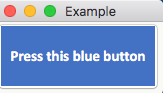
Screen Shot 2017-11-21 at 15.29.25.png

samir
Level IV

Re: How to color a GUI background and buttons

Strange,

What I get by running the code is (I also placed a .png picture where it should be):
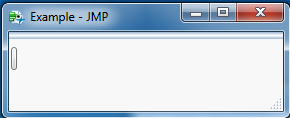
Capture.PNG

I am using JMP11. Could this be the problem ?

Recommended Articles