- Don’t miss your chance to experience Discovery Summit Europe at our best available rate! Early bird registration through 31 Oct.
- Graph Builder Toolbar streamlines interactive graphing. Creates shortcuts on Report and GraphBuilder Helpers toolbars. Download and install the extension.
- Subscribe to RSS Feed
- Mark Topic as New
- Mark Topic as Read
- Float this Topic for Current User
- Bookmark
- Subscribe
- Mute
- Printer Friendly Page
Discussions
Solve problems, and share tips and tricks with other JMP users.- User Community
- :
- Discussions
- :
- How to change line color in CDF or Quantile plot?

- Mark as New
- Bookmark
- Subscribe
- Mute
- Subscribe to RSS Feed
- Get Direct Link
- Report Inappropriate Content
How to change line color in CDF or Quantile plot?
Hi,
I am generating cummulative plots like the example below.
However, I want to color of the lines not to be determined by col2 but by col3.
Adding Color ( :col3 ) didn't do the trick...
Thx, Phil
Oneway(
Y( :col1), X( :col2),
All Graphs( 0 ), Plot Quantile by Actual( 1 ), Line of Fit( 0 ), X Axis Proportional( 0 ), Grand Mean( 0 ), Color ( :col3 )
)


- Mark as New
- Bookmark
- Subscribe
- Mute
- Subscribe to RSS Feed
- Get Direct Link
- Report Inappropriate Content
Re: How to change line color in CDF or Quantile plot?
I can understand how you could color data points by a different column
Names Default To Here( 1 );
dt = Open( "$SAMPLE_DATA\big class.jmp" );
dt << Oneway(
	Y( :weight ),
	X( :sex ),
	All Graphs( 0 ),
	Plot Quantile by Actual( 1 ),
	Line of Fit( 0(1) ),
	X Axis Proportional( 0 ),
	Grand Mean( 0 )
);
dt << color by( :age );
but I don't see how you directly do it with the line segments, since each segment is linked between 2 values that may have 2 different values of the 3rd color. Could you provide a mockup of what you are thinking?
- Mark as New
- Bookmark
- Subscribe
- Mute
- Subscribe to RSS Feed
- Get Direct Link
- Report Inappropriate Content
Re: How to change line color in CDF or Quantile plot?
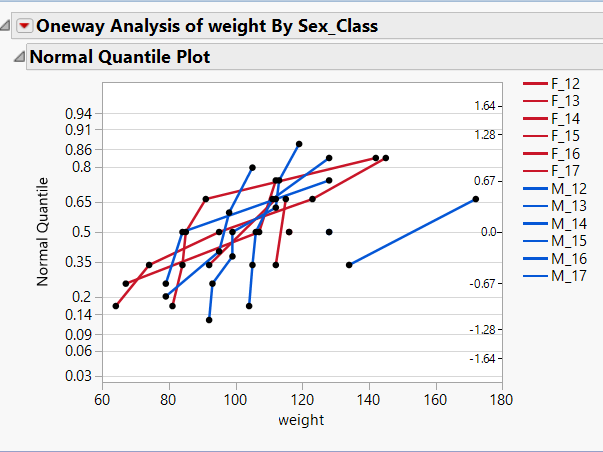
Attached is an example with several classes M/F. Each class has its line
but colors defined by sex.
Icing on the cake would be color by sex and dash type by class :)
Philipp
Oneway(
Y( :Weight ),
X( :Sex_Class),
All Graphs( 0 ), Plot Quantile by Actual( 1 ), Line of Fit( 0 ), X Axis
Proportional( 0 ), Grand Mean( 0 ), Color ( :sex ),
SendToReport(
Dispatch( {"Normal Quantile Plot"}, "Oneway QuantilePlot", FrameBox, {Line
Width Scale( 3 ), Transparency( 0 )} ),
)
)
- Mark as New
- Bookmark
- Subscribe
- Mute
- Subscribe to RSS Feed
- Get Direct Link
- Report Inappropriate Content
Re: How to change line color in CDF or Quantile plot?
You can achieve what you want by setting the Value Colors you want for the :Sex_Class column you are working with. Here is the JSL to do it, but it can easily be done interactively
Names Default To Here( 1 );
dt = Open( "$SAMPLE_DATA\big class.jmp" );
// Create a new column
dt << new column("Sex_Class", character,
	formula(:Sex || "_" || char(:Age))
);

// Determine how many groups in the :Sex_Class
summarize(dt,groups=by(:Sex_Class));

// Create the value colors list
colorlist={};
For(i=1,i<=n items(groups),i++,
	If(substr(groups[i],1,1)=="F",
		color=19,
		color=21
	);
	Eval(
		Substitute(
			Expr(
				insert into(colorlist, __group__  )),
				expr( __group__ ), parse("{\!""||groups[i]||"\!""||"="||char(color)||"}")
		)
	)
);

// Set the Value Colors property for the Sex_Class column
dt:sex_CLASS<<set property("value colors",eval(colorlist));

dt << Oneway(
	Y( :weight ),
	X( :sex_class ),
	All Graphs( 0 ),
	Plot Quantile by Actual( 1 ),
	Line of Fit( 0(1) ),
	X Axis Proportional( 0 ),
	Grand Mean( 0 )
);
- Mark as New
- Bookmark
- Subscribe
- Mute
- Subscribe to RSS Feed
- Get Direct Link
- Report Inappropriate Content
Re: How to change line color in CDF or Quantile plot?
the case of more than 2 colors:
// Determine colors for lots
summarize(dt,groups=by(:sex_class));
colorlist={}; color=3; Sxcnt=Word(1,groups[1],"_");
For(j=1,j<=n items(groups),j++,
If(Not(Word(1,groups[j],"_")==Sxcnt),color=color+1;Sxcnt=Word(1,groups[j],"_"));
Eval(Substitute(Expr(insert into(colorlist, __group__ )), expr( __group__
), parse("{\!""||groups[j]||"\!""||"="||char(color)||"}") ) );
);
dt:sex_class<
Thanks a lot, but now I got greedy. What about changing dash style by class?
Thanks, Philipp
- Mark as New
- Bookmark
- Subscribe
- Mute
- Subscribe to RSS Feed
- Get Direct Link
- Report Inappropriate Content
Re: How to change line color in CDF or Quantile plot?
Try this on for size
Names Default To Here( 1 );
dt = Open( "$SAMPLE_DATA\big class.jmp" );
// Create a new column
dt << New Column( "Sex_Class", character, formula( :Sex || "_" || Char( :Age ) ) );

// Determine how many groups in the :Sex_Class
Summarize( dt, groups = by( :Sex_Class ) );

// Create the value colors list
colorlist = {};
For( i = 1, i <= N Items( groups ), i++,
	If( Substr( groups[i], 1, 1 ) == "F",
		color = 19,
		color = 21
	);
	Eval(
		Substitute(
				Expr(
					Insert Into( colorlist, __group__ )
				),
			Expr( __group__ ), Parse( "{\!"" || groups[i] || "\!"" || "=" || Char( color ) || "}" )
		)
	);
);

// Set the Value Colors property for the Sex_Class column
dt:sex_CLASS << set property( "value colors", Eval( colorlist ) );

linetype = {"Solid", "Dotted", "DashDot", "DashDotDot", "Dashed"};

TheExpr =
"Oneway(
	Y( :weight ),
	X( :Sex_Class ),
	All Graphs( 0 ),
	Plot Quantile by Actual( 1 ),
	Line of Fit( 0 ),
	X Axis Proportional( 0 ),
	Grand Mean( 0 ),
	SendToReport(
		Dispatch(
			{},
			\!"222\!",
			ScaleBox,
			{Legend Model(
				1,";
For( i = 1, i <= N Items( groups ), i++,
	If( i > 1,
		TheExpr = TheExpr || ","
	);
	TheExpr = TheExpr || "Properties(" || Char( i ) || ", {Line Style(\!"" || linetype[Mod( i, 5 ) + 1] || "\!" )} )";
);
TheExpr = TheExpr || "),
			)}

	)";

Eval( Parse( theexpr ) );
There are only 5 line styles available
- Mark as New
- Bookmark
- Subscribe
- Mute
- Subscribe to RSS Feed
- Get Direct Link
- Report Inappropriate Content
Re: How to change line color in CDF or Quantile plot?
I believe there were a few syntax errors in your script suggestion, which I
fixed. See below. However, I keep getting error messages like "Cannot find
ScaleBox[ "400" ] at {}", even if I go with "222" as you suggested. (BTW,
never understood what that number means) And the line styles are not
adjusted. Colors work ok as before.
thanks, Philipp
Expr =
"Oneway(
Y( :weight ),
X( :Sex_Class ),
All Graphs( 0 ),
Plot Quantile by Actual( 1 ),
Line of Fit( 0 ),
X Axis Proportional( 0 ),
Grand Mean( 0 ),
SendToReport(
Dispatch({},\!"400\!",
ScaleBox,
{Legend Model(1";
For( i = 1, i <= N Items( groups ), i++,
Expr = Expr || ",Properties(" || Char( i ) || ", {Line Style(\!"" ||
linetype[Mod( i, 5 ) + 1] || "\!" )} )";
);
Expr = Expr || ")})))";
Eval( Parse( Expr ) );
Recommended Articles
- © 2026 JMP Statistical Discovery LLC. All Rights Reserved.
- Terms of Use
- Privacy Statement
- Contact Us