cancel
Showing results for 
Show  only  | Search instead for 
Did you mean: 
  • JMP will suspend normal business operations for our Winter Holiday beginning on Wednesday, Dec. 24, 2025, at 5:00 p.m. ET (2:00 p.m. ET for JMP Accounts Receivable).
    Regular business hours will resume at 9:00 a.m. EST on Friday, Jan. 2, 2026.
  • We’re retiring the File Exchange at the end of this year. The JMP Marketplace is now your destination for add-ins and extensions.

Discussions

Solve problems, and share tips and tricks with other JMP users.
%3CLINGO-SUB%20id%3D%22lingo-sub-232088%22%20slang%3D%22en-US%22%20mode%3D%22NONE%22%3E%E5%A6%82%E4%BD%95%E5%9C%A8%E6%A6%82%E7%8E%87%E5%9B%BE%E4%B8%AD%E6%B7%BB%E5%8A%A0%E7%99%BE%E5%88%86%E4%BD%8D%E6%95%B0%E7%BA%BF%EF%BC%9F%3C%2FLINGO-SUB%3E%3CLINGO-BODY%20id%3D%22lingo-body-232088%22%20slang%3D%22en-US%22%20mode%3D%22NONE%22%3E%3CP%3E%E7%A4%BA%E4%BE%8B%EF%BC%9A%E5%81%87%E8%AE%BE%E6%88%91%E6%83%B3%E5%9C%A8%20Y%20%E8%BD%B4%E4%B8%8A%E6%A0%87%E8%AE%B0%E7%AC%AC%2090%20%E4%B8%AA%E7%99%BE%E5%88%86%E4%BD%8D%EF%BC%8C%E5%B9%B6%E5%B0%86%E5%85%B6%E9%93%BE%E6%8E%A5%E5%88%B0%E6%A6%82%E7%8E%87%E5%9B%BE%E4%B8%8A%20X%20%E8%BD%B4%E4%B8%8A%E7%9A%84%E7%9B%B8%E5%BA%94%E5%80%BC%E3%80%82%3C%2FP%3E%3CP%3E%E5%A6%82%E4%BD%95%E6%89%8D%E8%83%BD%E5%81%9A%E5%88%B0%E8%BF%99%E4%B8%80%E7%82%B9%EF%BC%9F%20%E8%B0%A2%E8%B0%A2%3C%2FP%3E%3C%2FLINGO-BODY%3E%3CLINGO-SUB%20id%3D%22lingo-sub-482177%22%20slang%3D%22en-US%22%20mode%3D%22NONE%22%3E%E5%9B%9E%E5%A4%8D%EF%BC%9A%E5%A6%82%E4%BD%95%E5%9C%A8%E6%A6%82%E7%8E%87%E5%9B%BE%E4%B8%AD%E6%B7%BB%E5%8A%A0%E7%99%BE%E5%88%86%E4%BD%8D%E7%BA%BF%EF%BC%9F%3C%2FLINGO-SUB%3E%3CLINGO-BODY%20id%3D%22lingo-body-482177%22%20slang%3D%22en-US%22%20mode%3D%22NONE%22%3E%3CP%3E%E5%A6%82%E6%9E%9C%E6%82%A8%E9%9C%80%E8%A6%81%E4%B8%BA%20X%20%E8%BD%B4%E4%B8%8A%E7%9A%84%E6%AF%8F%E4%B8%AA%E5%88%86%E7%B1%BB%E5%80%BC%E7%94%BB%E4%B8%80%E6%9D%A1%E7%BA%BF%E6%80%8E%E4%B9%88%E5%8A%9E%EF%BC%9F%20%E8%87%AA%E5%AE%9A%E4%B9%89%E8%84%9A%E6%9C%AC%E4%B8%8D%E4%BC%9A%E4%BB%A5%E8%BF%99%E7%A7%8D%E6%96%B9%E5%BC%8F%E5%B7%A5%E4%BD%9C%E3%80%82%20%E6%AD%A4%E5%A4%96%EF%BC%8C%E6%9D%A1%E5%BD%A2%E6%88%96%E7%BA%BF%E6%9D%A1%E4%B8%8B%E6%8B%89%E8%8F%9C%E5%8D%95%EF%BC%88%E7%BA%A2%E8%89%B2%E4%B8%89%E8%A7%92%E5%BD%A2%EF%BC%89%E4%B8%8D%E5%8C%85%E5%90%AB%E5%B0%86%E6%B1%87%E6%80%BB%E7%BB%9F%E8%AE%A1%E6%95%B0%E6%8D%AE%E4%BD%9C%E4%B8%BA%E5%88%86%E4%BD%8D%E6%95%B0%E7%9A%84%E9%80%89%E9%A1%B9%E3%80%82%3C%2FP%3E%3C%2FLINGO-BODY%3E%3CLINGO-SUB%20id%3D%22lingo-sub-232154%22%20slang%3D%22en-US%22%20mode%3D%22NONE%22%3E%E5%9B%9E%E5%A4%8D%EF%BC%9A%E5%A6%82%E4%BD%95%E5%9C%A8%E6%A6%82%E7%8E%87%E5%9B%BE%E4%B8%AD%E6%B7%BB%E5%8A%A0%E7%99%BE%E5%88%86%E4%BD%8D%E7%BA%BF%EF%BC%9F%3C%2FLINGO-SUB%3E%3CLINGO-BODY%20id%3D%22lingo-body-232154%22%20slang%3D%22en-US%22%20mode%3D%22NONE%22%3E%3CP%3E%E6%9C%89%E5%85%B3%E6%9B%B4%E5%A4%9A%E8%AF%A6%E7%BB%86%E4%BF%A1%E6%81%AF%EF%BC%8C%E8%AF%B7%E5%8F%82%E9%98%85%E2%80%9C%E5%B8%AE%E5%8A%A9%E2%80%9D%26gt%3B%E2%80%9C%E4%B9%A6%E7%B1%8D%E2%80%9D%26gt%3B%E2%80%9C%E5%9F%BA%E6%9C%AC%E7%BB%98%E5%9B%BE%E2%80%9D%E3%80%82%3C%2FP%3E%0A%3CP%3E%26nbsp%3B%3C%2FP%3E%0A%3CP%3E%E6%82%A8%E5%8F%AF%E4%BB%A5%E4%BD%BF%E7%94%A8%E7%BA%BF%E6%9D%A1%E5%92%8C%E6%B3%A8%E9%87%8A%E5%B7%A5%E5%85%B7%E9%80%9A%E8%BF%87%E9%BC%A0%E6%A0%87%E5%B0%86%E8%BF%99%E4%BA%9B%E5%9B%BE%E5%BD%A2%E5%85%83%E7%B4%A0%E6%B7%BB%E5%8A%A0%E5%88%B0%E7%BB%98%E5%9B%BE%E4%B8%AD%E3%80%82%3C%2FP%3E%0A%3CP%3E%26nbsp%3B%3C%2FP%3E%0A%3CP%3E%E6%88%96%E8%80%85%EF%BC%8C%E6%82%A8%E5%8F%AF%E4%BB%A5%E5%9C%A8%E5%9B%BE%E6%A1%86%E5%86%85%E5%8F%B3%E9%94%AE%E5%8D%95%E5%87%BB%E5%B9%B6%E9%80%89%E6%8B%A9%E8%87%AA%E5%AE%9A%E4%B9%89%E3%80%82%20%E6%82%A8%E5%BF%85%E9%A1%BB%E6%B7%BB%E5%8A%A0%E4%B8%80%E4%BA%9B%E8%84%9A%E6%9C%AC%E8%A1%A8%E8%BE%BE%E5%BC%8F%E3%80%82%20%E8%BF%99%3CSTRONG%3E%E7%AC%94%E9%A2%9C%E8%89%B2%EF%BC%88%E2%80%9C%E7%BA%A2%E8%89%B2%E2%80%9D%EF%BC%89%3C%2FSTRONG%3E%20%2C%3CSTRONG%3E%E6%B0%B4%E5%B9%B3%E7%BA%BF(%20x%20%E6%9C%80%E5%B0%8F%E5%80%BC%2C%20x%20%E6%9C%80%E5%A4%A7%E5%80%BC%2C%2090%20)%3C%2FSTRONG%3E%20%2C%3CSTRONG%3E%20V%20%E7%BA%BF%EF%BC%88%E5%88%86%E4%BD%8D%E6%95%B0%EF%BC%8Cy%20%E6%9C%80%E5%B0%8F%E5%80%BC%EF%BC%8Cy%20%E6%9C%80%E5%A4%A7%E5%80%BC%EF%BC%89%3C%2FSTRONG%3E%20%EF%BC%8C%20%E5%92%8C%3CSTRONG%3E%E6%96%87%E6%9C%AC%EF%BC%88%E9%80%86%E6%97%B6%E9%92%88%EF%BC%8C%E2%80%9C%E5%88%86%E4%BD%8D%E6%95%B0%E2%80%9D%EF%BC%89%3C%2FSTRONG%3E%E5%B0%86%E6%98%AF%E4%BD%A0%E6%89%80%E9%9C%80%E8%A6%81%E7%9A%84%E3%80%82%3C%2FP%3E%3C%2FLINGO-BODY%3E%3CLINGO-SUB%20id%3D%22lingo-sub-232146%22%20slang%3D%22en-US%22%20mode%3D%22NONE%22%3E%E5%9B%9E%E5%A4%8D%EF%BC%9A%E5%A6%82%E4%BD%95%E5%9C%A8%E6%A6%82%E7%8E%87%E5%9B%BE%E4%B8%AD%E6%B7%BB%E5%8A%A0%E7%99%BE%E5%88%86%E4%BD%8D%E7%BA%BF%EF%BC%9F%3C%2FLINGO-SUB%3E%3CLINGO-BODY%20id%3D%22lingo-body-232146%22%20slang%3D%22en-US%22%20mode%3D%22NONE%22%3E%3CP%3E1.%E6%88%91100%25%E4%BA%A4%E4%BA%92%E5%B7%A5%E4%BD%9C%3C%2FP%3E%0A%3CP%3E2.%20%E4%BD%BF%E7%94%A8%E5%86%85%E7%BD%AE%E7%BB%98%E5%9B%BE%3CSPAN%3E%EF%BC%88%E4%BE%8B%E5%A6%82%EF%BC%8C%E5%88%86%E5%B8%83%E4%B8%AD%E7%9A%84%E6%AD%A3%E6%80%81%E5%88%86%E4%BD%8D%E6%95%B0%E5%9B%BE%EF%BC%89%3C%2FSPAN%3E%3C%2FP%3E%0A%3CP%3E3.%20%E4%BB%8E%20Y%20%E8%BD%B4%E4%B8%8A%E7%9A%84%E7%AC%AC%2090%20%E4%B8%AA%E7%99%BE%E5%88%86%E4%BD%8D%E5%BC%80%E5%A7%8B%E5%B9%B6%E8%BF%9E%E6%8E%A5%E5%88%B0%20X%20%E8%BD%B4%E4%B8%8A%E7%9A%84%E7%9B%B8%E5%BA%94%E5%80%BC%E7%9A%84%E7%BA%BF%EF%BC%88L%20%E5%BD%A2%EF%BC%89%3C%2FP%3E%0A%3CP%3E4.%20%E9%80%89%E6%8B%A9%E7%99%BE%E5%88%86%E4%BD%8D%E6%95%B0%3C%2FP%3E%0A%3CP%3E%E8%AF%B7%E5%8F%82%E9%98%85%E9%99%84%E4%BB%B6%20JPG%20%E4%BB%A5%E4%BE%9B%E5%8F%82%E8%80%83..%E8%B0%A2%E8%B0%A2%3C%2FP%3E%0A%3CP%3E%3CSPAN%20class%3D%22lia-inline-image-display-wrapper%20lia-image-align-inline%22%20image-alt%3D%22Probability%20Plot%20of%20Cycle%20Time%20(days).jpg%22%20style%3D%22width%3A%20576px%3B%22%3E%3CSPAN%20class%3D%22lia-inline-image-display-wrapper%22%20image-alt%3D%22Probability%20Plot%20of%20Cycle%20Time%20(days).jpg%22%20style%3D%22width%3A%20576px%3B%22%3E%3Cspan%20class%3D%22lia-inline-image-display-wrapper%22%20image-alt%3D%22Probability%20Plot%20of%20Cycle%20Time%20(days).jpg%22%20style%3D%22width%3A%20576px%3B%22%3E%3Cimg%20src%3D%22https%3A%2F%2Fcommunity.jmp.com%2Ft5%2Fimage%2Fserverpage%2Fimage-id%2F20046i64EA7A87A7BA8A9D%2Fimage-size%2Flarge%3Fv%3Dv2%26amp%3Bpx%3D999%22%20role%3D%22button%22%20title%3D%22Probability%20Plot%20of%20Cycle%20Time%20(days).jpg%22%20alt%3D%22Probability%20Plot%20of%20Cycle%20Time%20(days).jpg%22%20%2F%3E%3C%2Fspan%3E%3C%2FSPAN%3E%3C%2FSPAN%3E%3C%2FP%3E%3C%2FLINGO-BODY%3E%3CLINGO-SUB%20id%3D%22lingo-sub-232144%22%20slang%3D%22en-US%22%20mode%3D%22NONE%22%3E%E5%9B%9E%E5%A4%8D%EF%BC%9A%E5%A6%82%E4%BD%95%E5%9C%A8%E6%A6%82%E7%8E%87%E5%9B%BE%E4%B8%AD%E6%B7%BB%E5%8A%A0%E7%99%BE%E5%88%86%E4%BD%8D%E7%BA%BF%EF%BC%9F%3C%2FLINGO-SUB%3E%3CLINGO-BODY%20id%3D%22lingo-body-232144%22%20slang%3D%22en-US%22%20mode%3D%22NONE%22%3E%3CP%3E%E7%AD%94%E6%A1%88%E5%8F%96%E5%86%B3%E4%BA%8E%E5%BE%88%E5%A4%9A%E5%9B%A0%E7%B4%A0%E3%80%82%20%E4%BE%8B%E5%A6%82%EF%BC%8C%3C%2FP%3E%0A%3CP%3E%26nbsp%3B%3C%2FP%3E%0A%3CUL%3E%0A%3CLI%3E%E6%82%A8%E6%83%B3%E8%A6%81%E4%BA%A4%E4%BA%92%E5%BC%8F%E5%B7%A5%E4%BD%9C%E8%BF%98%E6%98%AF%E4%BD%BF%E7%94%A8%E8%84%9A%E6%9C%AC%EF%BC%9F%3C%2FLI%3E%0A%3CLI%3E%E6%82%A8%E4%BD%BF%E7%94%A8%E7%9A%84%E6%98%AF%E5%86%85%E7%BD%AE%E5%9B%BE%EF%BC%88%E4%BE%8B%E5%A6%82%EF%BC%8C%E5%88%86%E5%B8%83%E4%B8%AD%E7%9A%84%E6%AD%A3%E6%80%81%E5%88%86%E4%BD%8D%E6%95%B0%E5%9B%BE%EF%BC%89%E8%BF%98%E6%98%AF%E8%87%AA%E5%AE%9A%E4%B9%89%E5%9B%BE%EF%BC%88%E4%BE%8B%E5%A6%82%EF%BC%8CPicture%20Box%20%E5%AF%B9%E8%B1%A1%EF%BC%89%EF%BC%9F%3C%2FLI%3E%0A%3CLI%3E%E6%82%A8%E6%83%B3%E5%A6%82%E4%BD%95%E6%A0%87%E8%AE%B0%E7%AC%AC%2090%20%E4%B8%AA%E7%99%BE%E5%88%86%E4%BD%8D%E6%95%B0%EF%BC%9F%20%E4%B8%80%E6%9D%A1%E7%BA%BF%EF%BC%9F%3C%2FLI%3E%0A%3CLI%3E%E7%99%BE%E5%88%86%E4%BD%8D%E6%95%B0%E6%98%AF%E5%A6%82%E4%BD%95%E7%A1%AE%E5%AE%9A%E7%9A%84%EF%BC%9F%20%E5%AE%83%E6%98%AF%E7%BB%8F%E9%AA%8C%E5%88%86%E5%B8%83%E5%90%97%EF%BC%8C%E4%BE%8B%E5%A6%82%E5%88%86%E5%B8%83%E4%B8%AD%E7%9A%84%E5%88%86%E4%BD%8D%E6%95%B0%E6%8A%A5%E5%91%8A%E4%B8%AD%E4%BD%BF%E7%94%A8%E7%9A%84%E5%88%86%E5%B8%83%EF%BC%9F%20%E6%98%AF%E6%9D%A5%E8%87%AA%E6%8B%9F%E5%90%88%E5%88%86%E5%B8%83%E6%A8%A1%E5%9E%8B%E5%90%97%EF%BC%9F%3C%2FLI%3E%0A%3C%2FUL%3E%3C%2FLINGO-BODY%3E
Choose Language Hide Translation Bar
tajrida
Level III

How to add percentile lines in probability plot?

example: suppose I want to mark the 90th percentile on Y axis and link it to its corresponding value on x-axis on a probability plot.

How can this  be done? Thanks

Mohammed Ahmed
1 ACCEPTED SOLUTION

Accepted Solutions

Re: How to add percentile lines in probability plot?

See Help > Books > Essential Graphing for more details.


You can use the Line and Annotation tools to add these graphic elements to your plot with the mouse.


Alternatively, you can right-click inside the plot frame and select Customize. You will have to add some scripting expressions. The Pen Color( "red" ), H Line( x min, x max, 90 ), V Line( quantile, y min, y max ), and Text( CounterClockwise, "quantile" ) would be all you need.

View solution in original post

4 REPLIES 4

Re: How to add percentile lines in probability plot?

The answer depends on many things. For example,


  • Do you want to work interactively or use a script?
  • Are you using a built-in plot (e.g., Normal Quantile Plot in Distribution) or a custom plot (e.g., Picture Box object)?
  • How do you want to mark the 90th percentile? A line?
  • How is the percentile determined? Is it the empirical distribution, such as used in Quantiles report from Distribution? Is it from a fitted distribution model?
tajrida
Level III

Re: How to add percentile lines in probability plot?

1. I work interactively 100%

2. Using a built in plot (e.g., Normal Quantile Plot in Distribution)

3. A line (L - shaped) going from 90th percentile on Y axis and connecting to corresponding value on X axis

4. The percentile is choosen

Please see attached JPG for reference.. thanks
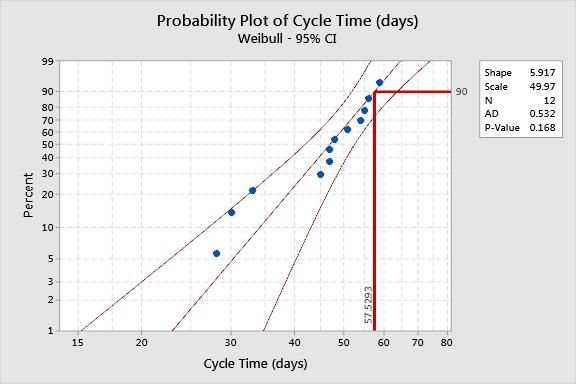
Probability Plot of Cycle Time (days).jpg

Mohammed Ahmed

Re: How to add percentile lines in probability plot?

See Help > Books > Essential Graphing for more details.


You can use the Line and Annotation tools to add these graphic elements to your plot with the mouse.


Alternatively, you can right-click inside the plot frame and select Customize. You will have to add some scripting expressions. The Pen Color( "red" ), H Line( x min, x max, 90 ), V Line( quantile, y min, y max ), and Text( CounterClockwise, "quantile" ) would be all you need.

Re: How to add percentile lines in probability plot?

What if you need to draw a line for each categorical value you have in the X AXIS? The customized scripting does not work that way. Additionally the bar or line drop down menu (red triangle) doesn't include an option for the summary statistic to be a quantile. 

M. Dereviankin

Recommended Articles
