- Don’t miss your chance to experience Discovery Summit Europe at our best available rate! Early bird registration through 31 Oct.
- Graph Builder Toolbar streamlines interactive graphing. Creates shortcuts on Report and GraphBuilder Helpers toolbars. Download and install the extension.
- JMP will suspend normal business operations for our Rest and Recharge Day on Friday, October 2, 2026.
Regular business hours will resume on Monday, October 5, 2026.
- Subscribe to RSS Feed
- Mark Topic as New
- Mark Topic as Read
- Float this Topic for Current User
- Bookmark
- Subscribe
- Mute
- Printer Friendly Page
Discussions
Solve problems, and share tips and tricks with other JMP users.- User Community
- :
- Discussions
- :
- Re: How do I use the Col Maximum Formula with a "where" condition

- Mark as New
- Bookmark
- Subscribe
- Mute
- Subscribe to RSS Feed
- Get Direct Link
- Report Inappropriate Content
How do I use the Col Maximum Formula with a "where" condition
Hi, I have a problem where I want to formulate a new column as a benchmark to all other countries. If there are more rows for the country, I want to take the max value of it as the benchmark. See the example below for clarification.
Data kind of looks like this:
Country Value period
A 10 201301
A 30 201301
B 20 201301
C 50 201301
D 40 201301
What I want to achieve (with cell formula): Col Maximum (:value, :period, :country) where :country == "A"
Output:
Country Value period BenchMark
A 10 201301 30
A 30 201301 30
B 20 201301 30
C 50 201301 30
D 40 201301 30
As you can see, I want to benchmark the max value of only country A.
I tried Col Maximum (:value, :period, :country == "A") and it will return "50"
Col Maximum (:value, :period, :country) and Col Maximum (:value, :period, :country == "A") both returns "50"
I am pretty sure there's a simple solution for this!
Hope you guys can help!
Thanks thanks!


- Mark as New
- Bookmark
- Subscribe
- Mute
- Subscribe to RSS Feed
- Get Direct Link
- Report Inappropriate Content
Re: How do I use the Col Maximum Formula with a "where" condition
Col Maximum() is only viable in a formula, where a separage result per row is the output. To do what you want, use the Summarize() function.
See:
Help==>Scripting Index==>Summarize

- Mark as New
- Bookmark
- Subscribe
- Mute
- Subscribe to RSS Feed
- Get Direct Link
- Report Inappropriate Content
Re: How do I use the Col Maximum Formula with a "where" condition

- Mark as New
- Bookmark
- Subscribe
- Mute
- Subscribe to RSS Feed
- Get Direct Link
- Report Inappropriate Content
Re: How do I use the Col Maximum Formula with a "where" condition
Interesting question - sill waiting for an answer?
There is a set of posts with similar questions how to restrict the Col ... aggregation functions to a specific subset.
(mainly: restrict them to the subset of non-excluded rows)
Compute Column Mean while restricting observations used
JMP10: Col Max() and Col Min() functions returned the data from excluded row
The idea:
If one is interested in the mean height, one can aggregate over all rows - or one can aggreate male and female entries separately.
For the second one the solution is almost as easy as for the first one: just use an additional GroupBy variable to split between wanted and unwanted data.
But, what a user often needs in addition: the values should show up in all respective rows (i.e. also for female).
[The example with the benchmark column in the original post illustrates why such a behavior could make sense.]
With the GroupBy, it's easy to get the correct values - but how to distribute them over ALL rows.
If there is something like a lookup table behinde a Col ... aggregation function, the function uses the same identifier
1) to split rows to different groups for aggregation ("M" / "F"):
Judy is female, the weight in Judy's row should be included in female mean weight
2) as index when reading an entry from the lookup table ("M" / "F"):
Judy is female, the new column should contain female mean weight in Judy's row
So, either male and female get the same values, because the identifier is the same (mean1) - or they get different values because the identifier is different (mean2).
ergo:
A Jmp user can use the GroupBy feature to remove values from the calculation via:
- calculate different values for different subgroups
- dump the unwanted results
but then he gets
- get different values for different subgroups
for free - even if the he did not order this option (OK, the code tells another story - but let's think about what the user wanted) :)
Is there a one-line command to remove female from the mean calculation, but to write the values into the respective rows with "female"?
Names Default to Here(1);
dt = Open( "$SAMPLE_DATA/Big Class.jmp" );

dt << New Column("mean1", Formula(Col Mean(:weight, :age)));
dt << New Column("mean2", Formula(Col Mean(:weight, :age, :sex)));
dt << New Column("mean2", Formula(If(:sex=="M", Col Mean(:weight, :age, :sex))));

dtM = dt << subset( Rows( dt << get rows where( :sex== "M" ) ), selected columns( 0 ));
dtM << New Column("mean_M", Formula(Col Mean(:weight, :age)));
dt << Update(
	With( dtM ),
	Match Columns(:age = :age ),
	Add Columns from Update Table( :mean_M ),
	Replace Columns in Main Table( None )
);
- Mark as New
- Bookmark
- Subscribe
- Mute
- Subscribe to RSS Feed
- Get Direct Link
- Report Inappropriate Content
Re: How do I use the Col Maximum Formula with a "where" condition
@hogi wrote:Is there a one-line command to remove female from the mean calculation, but to write the values into the respective rows with "female"?
I mean, something like:
Col Mean( :weight, :age, where( :sex == "M" ) )?
- Mark as New
- Bookmark
- Subscribe
- Mute
- Subscribe to RSS Feed
- Get Direct Link
- Report Inappropriate Content
Re: How do I use the Col Maximum Formula with a "where" condition
Apply an If() to the :weight column in the equation
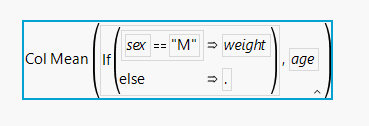
col Mean( if(:sex=="M", :weight,.), :age)
- Mark as New
- Bookmark
- Subscribe
- Mute
- Subscribe to RSS Feed
- Get Direct Link
- Report Inappropriate Content
Re: How do I use the Col Maximum Formula with a "where" condition
Fantastic!
And so logic - when you see it!
I am very disappointed with myself that I did not find this solution on my own.
- Mark as New
- Bookmark
- Subscribe
- Mute
- Subscribe to RSS Feed
- Get Direct Link
- Report Inappropriate Content
Re: How do I use the Col Maximum Formula with a "where" condition
Hm, after some enthusiasm, I got a little grounded.
Seems that the if inside the Col Aggregation makes it very slow - especially if there is a character comparison inside the if - and especially x 2 if there is a char(num) conversion. Then the time scales ~ quadratic with increasing table size.
The good thing: Col Median (which I use most of the time) is not affected by this "bug" :)
Is there any easy solution for Col Min, max, mean ...?
If not, I will write a wish to implement an official way to calculate Col xyz with a where condition ...
Would be much faster if the data set was first reduced (where) and then aggregated (Col xyz) and then the values distributed over all respective rows.
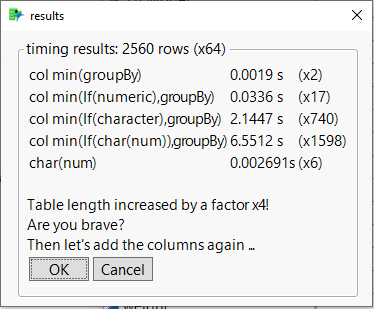
Names Default To Here( 1 );
If( Is Empty( mydt ),
	mydt = Open( "$SAMPLE_DATA/Big Class.jmp" )
);
trialRun = 0;
tryAgain = Function( {},
	trialRun += 1;
	Rownumbers = N Rows( mydt );
	t1 = HP Time();
	mydt << New Column( "col A", Formula( Col Mean( :weight ), :sex ) );
	t2 = HP Time();
	mydt << New Column( "col B", Formula( Col Mean( If( :age == 12, :weight, . ), :sex ) ) );
	t3 = HP Time();
	mydt << New Column( "col C", Formula( Col Mean( If( :sex == "M", :weight, . ), :age ) ) );
	t4 = HP Time();
	mydt << New Column( "col D", Formula( Col Mean( If( Char( :age ) == "12", :weight, . ), :age ) ) );
	t5 = HP Time();
	mydt << New Column( "col E", Formula( Char( :age ) == "12" ) );
	t6 = HP Time();

	tt1 = Round( (t2 - t1) / 1000000, 4 );
	tt2 = Round( (t3 - t2) / 1000000, 4 );
	tt3 = Round( (t4 - t3) / 1000000, 4 );
	tt4 = Round( (t5 - t4) / 1000000, 4 );
	tt5 = Round( (t6 - t5) / 1000000, 6 );

	If( trialRun == 1,
		tt1Ref = tt1;
		tt2Ref = tt2;
		tt3Ref = tt3;
		tt4Ref = tt4;
		tt5Ref = tt5;
		RNref = Rownumbers;
	);
	tr1 = Round( tt1 / tt1Ref );
	tr2 = Round( tt2 / tt2Ref );
	tr3 = Round( tt3 / tt3Ref );
	tr4 = Round( tt4 / tt4Ref );
	tr5 = Round( tt5 / tt5Ref );
	RNratio = Round( RowNumbers / RNref );

	Wait( 0.1 );
	Try( mydt << delete columns( "col A", "col B", "col C", "col D", "col E" ) );
	Wait( 0.1 );
	mydt = mydt << Concatenate( mydt, mydt, mydt );
	Wait( 0.1 );
	If(
		ex = New Window( "results",
			<<Type( "Modal Dialog" ),
			<<Return Result,
			V List Box(
				Panel Box( "timing results: " || Char( Rownumbers ) || " rows (x" || Char( RNratio ) || ")",
					Lineup Box( N Col( 3 ),
						Text Box( "col min(groupBy)" ),
						Text Box( Char( tt1 ) || " s" ),
						Text Box( "(x" || Char( tr1 ) || ")" ),
						Text Box( "col min(If(numeric),groupBy)" ),
						Text Box( Char( tt2 ) || " s" ),
						Text Box( "(x" || Char( tr2 ) || ")" ),
						Text Box( "col min(If(character),groupBy)" ),
						Text Box( Char( tt3 ) || " s" ),
						Text Box( "(x" || Char( tr3 ) || ")" ),
						Text Box( "col min(If(char(num)),groupBy)" ),
						Text Box( Char( tt4 ) || " s" ),
						Text Box( "(x" || Char( tr4 ) || ")" ),
						Text Box( "char(num)" ),
						Text Box( Char( tt5 ) || "s" ),
						Text Box( "(x" || Char( tr5 ) || ")" ),

					),
					Text Box( "\!nTable length increased by a factor x4!\!nAre you brave?\!nThen let's add the rows again ..." ),
					H List Box( Button Box( "OK" ), Button Box( "Cancel" ) )
				)
			)
		);
		ex["button"] == 1;
	,
		tryAgain()
	);
);

tryAgain();
In a previous version I had "ms" in the table instead of seconds. Unfortunately, it's 1000x more severe ...
- Mark as New
- Bookmark
- Subscribe
- Mute
- Subscribe to RSS Feed
- Get Direct Link
- Report Inappropriate Content
Re: How do I use the Col Maximum Formula with a "where" condition
An approach to speed things up by orders of magnitudes (!!!):
Instead of the very slow Col Mean with the character comparison inside the if statement:
mydt << New Column( "col C", Formula( Col Mean( If( :name=="ROBERT", :weight, . ), :age ) ) );use @cwillden 's trick: use the comparison as a GroupBy argument:
Solved: Re: Get Rows that satisfy a condition within a column formula - JMP User Community
mydt << New Column( "col C", Formula(if(:name=="ROBERT" , Col Mean( :weight, :age, :name=="Robert" ),. ) );to split the data in 2 groups: wanted and unwanted data (screenshot below with @10k rows -> Factor 2000 faster :)
.. and then remove the unwanted results via the if statement outside of the Col Mean aggregation.
With the comparison for the column :sex this approach would be over-engineered; this is why I switched to the :name comparison to illustrate the concept.
This is also kind of over-engineered, but I hope the idea gets clear :)
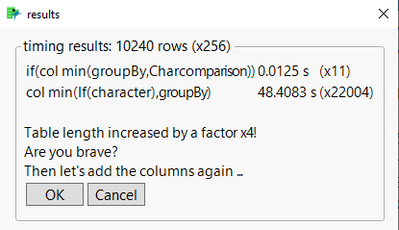
Names Default To Here( 1 );
If( Is Empty( mydt ),
	mydt = Open( "$SAMPLE_DATA/Big Class.jmp" )
);
trialRun = 0;
tryAgain = Function( {},
	trialRun += 1;
	Rownumbers = N Rows( mydt );
	t2 = HP Time();
	mydt << New Column( "col B", Formula(If(:name=="ROBERT" , Col Mean( :weight,  :age, :name=="ROBERT" ),.) ) );
	t3 = HP Time();
	mydt << New Column( "col C", Formula( Col Mean( If( :name == "ROBERT", :weight, . ), :age ) ) );
	t4 = HP Time();


	tt2 = Round( (t3 - t2) / 1000000, 4 );
	tt3 = Round( (t4 - t3) / 1000000, 4 );

	If( trialRun == 1,
		tt2Ref = tt2;
		tt3Ref = tt3;
		RNref = Rownumbers;
	);
	tr2 = Round( tt2 / tt2Ref );
	tr3 = Round( tt3 / tt3Ref );

	RNratio = Round( RowNumbers / RNref );

	Wait( 0.1 );
	Try( mydt << delete columns( "col B", "col C") );
	Wait( 0.1 );
	mydt = mydt << Concatenate( mydt, mydt, mydt );
	Wait( 0.1 );
	If(
		ex = New Window( "results",
			<<Type( "Modal Dialog" ),
			<<Return Result,
			V List Box(
				Panel Box( "timing results: " || Char( Rownumbers ) || " rows (x" || Char( RNratio ) || ")",
					Lineup Box( N Col( 3 ),
						Text Box( "if(col min(groupBy,Charcomparison))" ),
						Text Box( Char( tt2 ) || " s" ),
						Text Box( "(x" || Char( tr2 ) || ")" ),
						Text Box( "col min(If(character),groupBy)" ),
						Text Box( Char( tt3 ) || " s" ),
						Text Box( "(x" || Char( tr3 ) || ")" )

					),
					Text Box( "\!nTable length increased by a factor x4!\!nAre you brave?\!nThen let's add the rows again ..." ),
					H List Box( Button Box( "OK" ), Button Box( "Cancel" ) )
				)
			)
		);
		ex["button"] == 1;
	,
		tryAgain()
	);
);

tryAgain();- Mark as New
- Bookmark
- Subscribe
- Mute
- Subscribe to RSS Feed
- Get Direct Link
- Report Inappropriate Content
Re: How do I use the Col Maximum Formula with a "where" condition
the topic got some attention from the Jmp Development team:
Col Median (and others): add "Where" option
@SamGardner wrote:
Status changed to: We like it! (in the queue)... we work on ways to improve how Where( ) clauses are used throughout JMP.
Seems that soon there will be a much easier solution for the problem :)
- Mark as New
- Bookmark
- Subscribe
- Mute
- Subscribe to RSS Feed
- Get Direct Link
- Report Inappropriate Content
Re: How do I use the Col Maximum Formula with a "where" condition
Fun Fact:
searching for "M" in a list of strings is orders of magnitude faster than comparing "M" with a string:

Names Default To Here( 1 );
If( Is Empty( mydt ),
	mydt = Open( "$SAMPLE_DATA/Big Class.jmp" )
);

tryAgain = Function( {},

	write ("\!nrows: ", nrows(mydt),"\!n");
	t0 = HP Time();
	mydt << New Column( "char=char", Formula( Col Mean( If( :sex == "M", :weight, . ), :age ) ) );
	t=(HP Time()- t0)/1000000;
	write("char=char: ",t,"\!n");

	t0 = HP Time();
	mydt << New Column( "contains", Formula( Col Mean( If( contains(Eval List({:sex[]}) ,"M"), :weight, . ), :age ) ) );
	t=(HP Time()- t0)/1000000;
	write("contains: ",t,"\!n");


	If(
		ex = New Window( "",
			<<Type( "Modal Dialog" ),
			<<Return Result,
			V List Box(

					Text Box( "\!nTable length increased by a factor x4!\!nAnother step - are you brave ?" ),
					H List Box( Button Box( "OK" ), Button Box( "Cancel" ) )
				)
		);
		ex["button"] == 1;
	,
		mydt = mydt << Concatenate( mydt, mydt, mydt );
		tryAgain()
	);
);

tryAgain();
why?!?
Which secret is behind this finding?
Recommended Articles
- © 2026 JMP Statistical Discovery LLC. All Rights Reserved.
- Terms of Use
- Privacy Statement
- Contact Us