Turn on suggestions
Auto-suggest helps you quickly narrow down your search results by suggesting possible matches as you type.
- Don’t miss your chance to experience Discovery Summit Europe at our best available rate! Early bird registration through 31 Oct.
- Graph Builder Toolbar streamlines interactive graphing. Creates shortcuts on Report and GraphBuilder Helpers toolbars. Download and install the extension.
Options
- Subscribe to RSS Feed
- Mark Topic as New
- Mark Topic as Read
- Float this Topic for Current User
- Bookmark
- Subscribe
- Mute
- Printer Friendly Page
Discussions
Solve problems, and share tips and tricks with other JMP users.- User Community
- :
- Discussions
- :
- Re: Graphic Builder Area: How to show results in percent without creating new co...

Level III
- Mark as New
- Bookmark
- Subscribe
- Mute
- Subscribe to RSS Feed
- Get Direct Link
- Report Inappropriate Content
Graphic Builder Area: How to show results in percent without creating new columns?
Created:
Jun 14, 2016 08:25 AM
| Last Modified: Oct 18, 2016 8:04 PM
(11236 views)
Hello,
I have a beginner question. I'm using Graphic Builder (stack bars or areas). Suppose I have 3 columns: Year, Country and Population. What is the simplest way (without creating new columns) to show distribution of population among countries over time in percent like this:
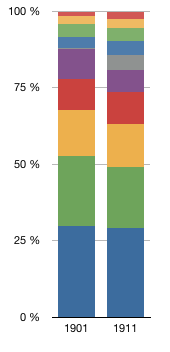
I'm doing that kind of graphic routinely with other software.
Thanks,
Claude
1 ACCEPTED SOLUTION
Accepted Solutions


Super User
Solution
- Mark as New
- Bookmark
- Subscribe
- Mute
- Subscribe to RSS Feed
- Get Direct Link
- Report Inappropriate Content
Re: Graphic Builder Area: How to show results in percent without creating new columns?
Created:
Jun 14, 2016 11:35 AM
| Last Modified: Oct 18, 2016 8:05 PM
(13495 views)
| Posted in reply to message from claude_bellavan 06-14-2016
Use a Mosaic plot, rather than a stacked bar, and you will get what you want.
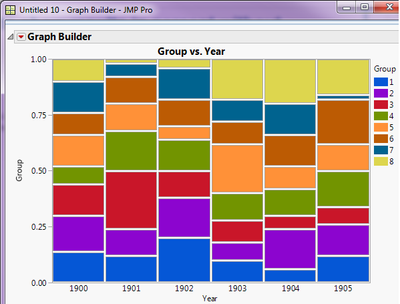
Jim
4 REPLIES 4
Super User
Solution
- Mark as New
- Bookmark
- Subscribe
- Mute
- Subscribe to RSS Feed
- Get Direct Link
- Report Inappropriate Content
Re: Graphic Builder Area: How to show results in percent without creating new columns?
Created:
Jun 14, 2016 11:35 AM
| Last Modified: Oct 18, 2016 8:05 PM
(13496 views)
| Posted in reply to message from claude_bellavan 06-14-2016
Use a Mosaic plot, rather than a stacked bar, and you will get what you want.
Jim
Level III
- Mark as New
- Bookmark
- Subscribe
- Mute
- Subscribe to RSS Feed
- Get Direct Link
- Report Inappropriate Content
Re: Graphic Builder Area: How to show results in percent without creating new columns?
I think I get the point. But…
Since mosaic plot computes the number of observations, I suppose I have to put the population in the frequency's square (bottom right corner)? Am I right?
Super User
- Mark as New
- Bookmark
- Subscribe
- Mute
- Subscribe to RSS Feed
- Get Direct Link
- Report Inappropriate Content
Re: Graphic Builder Area: How to show results in percent without creating new columns?
correct
Jim
Level III
- Mark as New
- Bookmark
- Subscribe
- Mute
- Subscribe to RSS Feed
- Get Direct Link
- Report Inappropriate Content
Re: Graphic Builder Area: How to show results in percent without creating new columns?
Thanks a lot Jim!!
CB
Recommended Articles
- © 2026 JMP Statistical Discovery LLC. All Rights Reserved.
- Terms of Use
- Privacy Statement
- Contact Us