JMP Security Notice: CVE-2026-109618 and CVE-2026-109619
JMP promptly initiated a review of its products, services, and relevant infrastructure for exposure to CVE-2026-109618 and CVE-2026-109619.
Our assessment of JMP products has not identified exposure to these vulnerabilities. Where remediation was required within supporting environments, appropriate security updates and controls have been applied and validated.
We have identified no evidence of successful exploitation or unauthorized access to JMP systems or customer information associated with these vulnerabilities.
JMP continues to monitor the issue and relevant vendor guidance. No action is required by JMP customers at this time.
- Don’t miss your chance to experience Discovery Summit Europe at our best available rate! Early bird registration through 31 Oct.
- Graph Builder Toolbar streamlines interactive graphing. Creates shortcuts on Report and GraphBuilder Helpers toolbars. Download and install the extension.
- Subscribe to RSS Feed
- Mark Topic as New
- Mark Topic as Read
- Float this Topic for Current User
- Bookmark
- Subscribe
- Mute
- Printer Friendly Page
Discussions
Solve problems, and share tips and tricks with other JMP users.- User Community
- :
- Discussions
- :
- Re: Creating multiple graphs from a JMP file stored in SharePoint leaves modal w...

- Mark as New
- Bookmark
- Subscribe
- Mute
- Subscribe to RSS Feed
- Get Direct Link
- Report Inappropriate Content
Creating multiple graphs from a JMP file stored in SharePoint leaves modal window open
Hi!
I have multiple files (Excel and JMP) stored in SharePoint and this script will open the JMP file and create graphs, copy to a Journal and save as a .doc file.
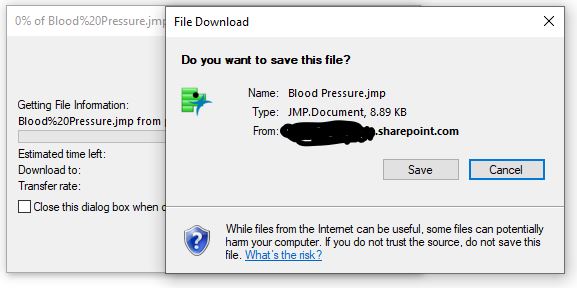
Everything works fine except for a Windows modal that I cannot seem to close using JSL.
Anyone have suggestions?
Cheers!
Onjai
Using JMP 16.1.
//save blood pressure.jmp file to SharePoint
//In SharePoint, click on the jmp file and select "copy link"
//for the Sharepoint PATH you need to remove all characters after "...../Blood%20Pressure.jmp?"
//for the SharePoint FILE you need to ADD "download=1" after "...../Blood%20Pressure.jmp?"

Names Default To Here( 1 );

Batch Interactive = (1);
Web("<<LINK>>",JMP Window);
dt=Open("<<LINK>>");
// Setup an Example Data table
dataCols = dt << get column names( continuous );
dt:Dose << set name( "WhichTest" );
dt << set name( "Filtered_raw" );
// Run the charts
OWA = Data Table( "Filtered_raw" ) << Oneway(
	Y( Eval( dataCols ) ),
	X( "WhichTest" ),
	Each Pair( 0 ),
	Means( 0 ),
	Plot Actual by Quantile( 0 ),
	Plot Quantile by Actual( 1 ),
	Mean Diamonds( 1 )
);
// Create a journal containing each Oneway
OWA << Journal;
// Obtain a reference to the journal
jj = Current Journal();
// Save the journal to disk
jj << Save MSWord( "$DOCUMENTS\Oneway_normalQ.doc" );
jj << Close Window;
Close (dt, No Save);
Window( "Web Browser" ) << close window;	//closes JMP web window
Batch Interactive = (0)

- Mark as New
- Bookmark
- Subscribe
- Mute
- Subscribe to RSS Feed
- Get Direct Link
- Report Inappropriate Content
Re: Creating multiple graphs from a JMP file stored in SharePoint leaves modal window open
What's the example of the Windows modal window? Is it just the window with the sharepoint site?
I have a similar setup where I need to grab a table from an excel spreadsheet on a sharepoint site. Once I'm done with everything, I just close the variable for the window. I hope this helps.
wbcheck = New Window("Web Check", wb = Web Browser Box() );
wb << Navigate("link to the sharepoint folder that the file is located");
wbcheck << Show Window(0); //for me, I like to hide this window from the user not necessary if you want them to see it
Wait(3); //I wait because sometimes it doesn't load properly

Open("link to the actual file with download=1")- Mark as New
- Bookmark
- Subscribe
- Mute
- Subscribe to RSS Feed
- Get Direct Link
- Report Inappropriate Content
Re: Creating multiple graphs from a JMP file stored in SharePoint leaves modal window open
I added your script. The window still shows up after the script is run.
I figured out that these 2 windows open after the wb<< Navigate OR Web(" statements.
I have attached a screenshot of the windows that are left open.
Recommended Articles
- © 2026 JMP Statistical Discovery LLC. All Rights Reserved.
- Terms of Use
- Privacy Statement
- Contact Us