- Don’t miss your chance to experience Discovery Summit Europe at our best available rate! Early bird registration through 31 Oct.
- Graph Builder Toolbar streamlines interactive graphing. Creates shortcuts on Report and GraphBuilder Helpers toolbars. Download and install the extension.
- Subscribe to RSS Feed
- Mark Topic as New
- Mark Topic as Read
- Float this Topic for Current User
- Bookmark
- Subscribe
- Mute
- Printer Friendly Page
Discussions
Solve problems, and share tips and tricks with other JMP users.- User Community
- :
- Discussions
- :
- Re: Creating multiple graphs from a JMP file stored in SharePoint leaves modal w...

- Mark as New
- Bookmark
- Subscribe
- Mute
- Subscribe to RSS Feed
- Get Direct Link
- Report Inappropriate Content
Creating multiple graphs from a JMP file stored in SharePoint leaves modal window open
Hi!
I have multiple files (Excel and JMP) stored in SharePoint and this script will open the JMP file and create graphs, copy to a Journal and save as a .doc file.
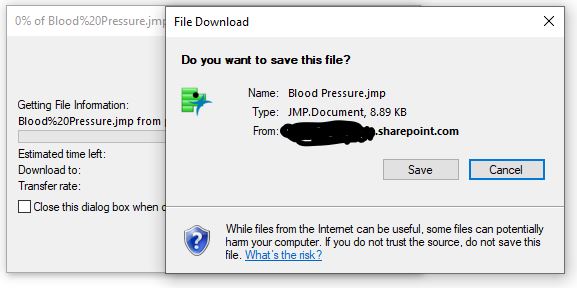
Everything works fine except for a Windows modal that I cannot seem to close using JSL.
Anyone have suggestions?
Cheers!
Onjai
Using JMP 16.1.
//save blood pressure.jmp file to SharePoint
//In SharePoint, click on the jmp file and select "copy link"
//for the Sharepoint PATH you need to remove all characters after "...../Blood%20Pressure.jmp?"
//for the SharePoint FILE you need to ADD "download=1" after "...../Blood%20Pressure.jmp?"

Names Default To Here( 1 );

Batch Interactive = (1);
Web("<<LINK>>",JMP Window);
dt=Open("<<LINK>>");
// Setup an Example Data table
dataCols = dt << get column names( continuous );
dt:Dose << set name( "WhichTest" );
dt << set name( "Filtered_raw" );
// Run the charts
OWA = Data Table( "Filtered_raw" ) << Oneway(
	Y( Eval( dataCols ) ),
	X( "WhichTest" ),
	Each Pair( 0 ),
	Means( 0 ),
	Plot Actual by Quantile( 0 ),
	Plot Quantile by Actual( 1 ),
	Mean Diamonds( 1 )
);
// Create a journal containing each Oneway
OWA << Journal;
// Obtain a reference to the journal
jj = Current Journal();
// Save the journal to disk
jj << Save MSWord( "$DOCUMENTS\Oneway_normalQ.doc" );
jj << Close Window;
Close (dt, No Save);
Window( "Web Browser" ) << close window;	//closes JMP web window
Batch Interactive = (0)

- Mark as New
- Bookmark
- Subscribe
- Mute
- Subscribe to RSS Feed
- Get Direct Link
- Report Inappropriate Content
Re: Creating multiple graphs from a JMP file stored in SharePoint leaves modal window open
What's the example of the Windows modal window? Is it just the window with the sharepoint site?
I have a similar setup where I need to grab a table from an excel spreadsheet on a sharepoint site. Once I'm done with everything, I just close the variable for the window. I hope this helps.
wbcheck = New Window("Web Check", wb = Web Browser Box() );
wb << Navigate("link to the sharepoint folder that the file is located");
wbcheck << Show Window(0); //for me, I like to hide this window from the user not necessary if you want them to see it
Wait(3); //I wait because sometimes it doesn't load properly

Open("link to the actual file with download=1")- Mark as New
- Bookmark
- Subscribe
- Mute
- Subscribe to RSS Feed
- Get Direct Link
- Report Inappropriate Content
Re: Creating multiple graphs from a JMP file stored in SharePoint leaves modal window open
I added your script. The window still shows up after the script is run.
I figured out that these 2 windows open after the wb<< Navigate OR Web(" statements.
I have attached a screenshot of the windows that are left open.
Recommended Articles
- © 2026 JMP Statistical Discovery LLC. All Rights Reserved.
- Terms of Use
- Privacy Statement
- Contact Us