cancel
Showing results for 
Show  only  | Search instead for 
Did you mean: 
  • JMP will suspend normal business operations for our Winter Holiday beginning on Wednesday, Dec. 24, 2025, at 5:00 p.m. ET (2:00 p.m. ET for JMP Accounts Receivable).
    Regular business hours will resume at 9:00 a.m. EST on Friday, Jan. 2, 2026.
  • We’re retiring the File Exchange at the end of this year. The JMP Marketplace is now your destination for add-ins and extensions.

Discussions

Solve problems, and share tips and tricks with other JMP users.
%3CLINGO-SUB%20id%3D%22lingo-sub-52571%22%20slang%3D%22en-US%22%20mode%3D%22NONE%22%3EModification%20des%20%C3%A9chelles%20d'une%20zone%20graphique%3C%2FLINGO-SUB%3E%3CLINGO-BODY%20id%3D%22lingo-body-52571%22%20slang%3D%22en-US%22%20mode%3D%22NONE%22%3E%3CP%3ESalut%3C%2FP%3E%3CP%3E%26nbsp%3B%3C%2FP%3E%3CP%3EJe%20travaille%20sur%20un%20graphique%20personnalis%C3%A9.%20Je%20veux%20dessiner%20le%20graphique%20semblable%20%C3%A0%20celui-ci%3A%3C%2FP%3E%3CP%3E%3CFONT%20face%3D%22courier%20new%2Ccourier%22%3Enw%20%3D%20Nouvelle%20fen%C3%AAtre(%22Tester%22%2C%3C%2FFONT%3E%3CBR%20%2F%3E%3CFONT%20face%3D%22courier%20new%2Ccourier%22%3E%20Bo%C3%AEte%20de%20contour(%20%22Contour%22%2C%3C%2FFONT%3E%3CBR%20%2F%3E%3CFONT%20face%3D%22courier%20new%2Ccourier%22%3E%20gb%20%3D%20Bo%C3%AEte%20graphique(%3C%2FFONT%3E%3CBR%20%2F%3E%3CFONT%20face%3D%22courier%20new%2Ccourier%22%3E%20Taille%20de%20trame(%20600%2C%20300)%2C%3C%2FFONT%3E%3CBR%20%2F%3E%3CFONT%20face%3D%22courier%20new%2Ccourier%22%3E%20XName(%22Axe%20X%22)%2C%3C%2FFONT%3E%3CBR%20%2F%3E%3CFONT%20face%3D%22courier%20new%2Ccourier%22%3E%20YName(%22Axe%20Y%22)%2C%3C%2FFONT%3E%3CBR%20%2F%3E%3CFONT%20face%3D%22courier%20new%2Ccourier%22%3E%20%C3%89chelle%20X(%200%2C%205*Pi()%20)%2C%3C%2FFONT%3E%3CBR%20%2F%3E%3CFONT%20face%3D%22courier%20new%2Ccourier%22%3E%20%C3%89chelle%20Y%20(-1%2C%201)%3C%2FFONT%3E%3CBR%20%2F%3E%3CFONT%20face%3D%22courier%20new%2Ccourier%22%3E%20)%3C%2FFONT%3E%3CBR%20%2F%3E%3CFONT%20face%3D%22courier%20new%2Ccourier%22%3E%20)%3C%2FFONT%3E%3CBR%20%2F%3E%3CFONT%20face%3D%22courier%20new%2Ccourier%22%3E%20)%3B%3C%2FFONT%3E%3C%2FP%3E%3CP%3E%3CFONT%20face%3D%22courier%20new%2Ccourier%22%3Egb%20%26lt%3B%26lt%3B%20D%C3%A9finir%20le%20script%20graphique%20(fonction%20Y%20(Sin%20(x)%2C%20x))%3B%3C%2FFONT%3E%3C%2FP%3E%3CP%3E%26nbsp%3B%3C%2FP%3E%3CP%3EMaintenant%2C%20je%20veux%20changer%20les%20%C3%A9chelles%20du%20graphique.%20Je%20peux%20faire%20glisser%20pour%20modifier%20la%20taille%20et%20l'%C3%A9chelle%20du%20graphique%2C%20mais%20comment%20modifier%20des%20propri%C3%A9t%C3%A9s%20telles%20que%20%22FrameSize%22%20ou%20%22XName%22%20par%20script%2C%3CEM%3E%20apr%C3%A8s%3C%2FEM%3E%20J'ai%20fait%20le%20graphique%3F%3C%2FP%3E%3CP%3E%26nbsp%3B%3C%2FP%3E%3CP%3EBR%3C%2FP%3E%3CP%3EJesper%3C%2FP%3E%3C%2FLINGO-BODY%3E%3CLINGO-SUB%20id%3D%22lingo-sub-52582%22%20slang%3D%22en-US%22%20mode%3D%22NONE%22%3ERe%20%3A%20Changer%20les%20%C3%A9chelles%20d'un%20graphique%3C%2FLINGO-SUB%3E%3CLINGO-BODY%20id%3D%22lingo-body-52582%22%20slang%3D%22en-US%22%20mode%3D%22NONE%22%3EMerci.%20Exactement%20ce%20que%20je%20cherchais%20%3A)%3C%2Fimg%3E%3C%2FLINGO-BODY%3E%3CLINGO-SUB%20id%3D%22lingo-sub-52579%22%20slang%3D%22en-US%22%20mode%3D%22NONE%22%3ERe%20%3A%20Changer%20les%20%C3%A9chelles%20d'un%20graphique%3C%2FLINGO-SUB%3E%3CLINGO-BODY%20id%3D%22lingo-body-52579%22%20slang%3D%22en-US%22%20mode%3D%22NONE%22%3E%3CP%3EJe%20ne%20sais%20pas%20pourquoi%20les%20messages%20gb%26lt%3B%3CFRAMESIZE%20et%3D%22%22%20gb%3D%22%22%3E%26lt%3B%3CXSCALE%20et%3D%22%22%20gb%3D%22%22%3E%26lt%3B%3CXNAME%20ne%3D%22%22%20fonctionneront%3D%22%22%20pas%3D%22%22%3E%0A%3CPRE%3E%3CCODE%20class%3D%22%20language-jsl%22%3Egb%26lt%3B%3CSETWIDTH%3E%3C%2FSETWIDTH%3E%3C%2FCODE%3E%3C%2FPRE%3E%0A%3C%2FXNAME%3E%3C%2FXSCALE%3E%3C%2FFRAMESIZE%3E%3C%2FP%3E%3CP%3ELe%20message%20setXaxis%20contr%C3%B4le%20tous%20les%20param%C3%A8tres%20d'axe%20%3B%20voici%20ce%20que%20getXaxis%20a%20renvoy%C3%A9%26nbsp%3B%3A%3C%2FP%3E%0A%3CPRE%3E%3CCODE%20class%3D%22%20language-jsl%22%3E%7BScale(%20%22Linear%22%20)%2C%20Format(%20%22Fixed%20Dec%22%2C%2012%2C%200%20)%2C%20Min(%200%20)%2C%20Max(%2015.707963267949%20)%2C%0AInterval(%20%22Numeric%22%20)%2C%20Inc(%205%20)%2C%20Minor%20Ticks(%201%20)%2C%20Label%20Row%20Nesting(%201%20)%2C%0ALabel%20Row(%0A%20%20%20%20%7BAutomatic%20Font%20Size(%200%20)%2C%20Automatic%20Tick%20Marks(%200%20)%2C%20Inside%20Ticks(%200%20)%2C%0A%20%20%20%20Label%20Orientation(%20%22Horizontal%22%20)%2C%20Major%20Grid%20Line%20Color(%20-14145495%20)%2C%0A%20%20%20%20Minor%20Grid%20Line%20Color(%20-15790320%20)%2C%20Show%20Major%20Grid(%200%20)%2C%20Show%20Major%20Labels(%201%20)%2C%0A%20%20%20%20Show%20Major%20Ticks(%201%20)%2C%20Show%20Minor%20Grid(%200%20)%2C%20Show%20Minor%20Labels(%200%20)%2C%0A%20%20%20%20Show%20Minor%20Ticks(%201%20)%2C%20Tick%20Offset(%200%20)%7D%0A)%7D%3C%2FCODE%3E%3C%2FPRE%3E%0A%3CP%3E(Avec%20JMP%2013%2C%20il%20peut%20y%20avoir%20moins%20d'options%20dans%20les%20versions%20ant%C3%A9rieures.)%3C%2FP%3E%0A%3CP%3E%26nbsp%3B%3C%2FP%3E%3C%2FLINGO-BODY%3E%3CLINGO-SUB%20id%3D%22lingo-sub-594592%22%20slang%3D%22en-US%22%20mode%3D%22NONE%22%3ERe%20%3A%20Changer%20les%20%C3%A9chelles%20d'un%20graphique%3C%2FLINGO-SUB%3E%3CLINGO-BODY%20id%3D%22lingo-body-594592%22%20slang%3D%22en-US%22%20mode%3D%22NONE%22%3E%3CP%3Eune%20approche%20alternative%20%3A%20Envoyer%20un%20message%20%C3%A0%20l'AxisBox%3C%2FP%3E%3CPRE%3E%3CCODE%20class%3D%22%20language-jsl%22%3Egb%5BAxisbox(%201%20)%5D%20%26lt%3B%26lt%3B%20%7BMin(%201%20)%2C%20Max(%203%20)%7D%3B%3C%2FCODE%3E%3C%2FPRE%3E%3CP%3E...%20qui%2C%20malheureusement%2C%20n'est%20pas%20disponible%20si%20l'axe%20n'est%20pas%20disponible%20en%20raison%20de%3CFONT%20face%3D%22courier%20new%2Ccourier%22%3E%20Supprimer%20les%20axes.%3CBR%20%2F%3E%3CFONT%20face%3D%22arial%2Chelvetica%2Csans-serif%22%3E%20Et%20je%20ne%20voulais%20pas%3CEM%3E%20Afficher%3C%2FEM%3E%20%2C%3CEM%3E%20monnaie%3C%2FEM%3E%20et%3CEM%3E%20cacher%20%C3%A0%20nouveau%3C%2FEM%3E%20l'axe.%3C%2FFONT%3E%3C%2FFONT%3E%3C%2FP%3E%3CP%3E%3CFONT%20face%3D%22arial%2Chelvetica%2Csans-serif%22%3EAlors%2C%20merci%20beaucoup%20pour%20cet%20EasterEgg%20%3A)%3C%2Fimg%3E%3C%2FFONT%3E%3C%2FP%3E%3CP%3E%26nbsp%3B%3C%2FP%3E%3CP%3E%3CFONT%20face%3D%22arial%2Chelvetica%2Csans-serif%22%3Ed'ailleurs.%3CBR%20%2F%3E%20semble%20que%20les%20accolades%20sont%20n%C3%A9cessaires%20pour%20obtenir%20le%3CEM%3E%20seconde%3C%2FEM%3E%20argument%20ex%C3%A9cut%C3%A9%20%C3%A9galement%26nbsp%3B%3A%3C%2FFONT%3E%3C%2FP%3E%3CP%3E%26nbsp%3B%3C%2FP%3E%3CPRE%3E%3CCODE%20class%3D%22%20language-jsl%22%3Egb%26lt%3B%3CSETXAXIS%3E%3C%2FSETXAXIS%3E%3C%2FCODE%3E%3C%2FPRE%3E%3C%2FLINGO-BODY%3E%3CLINGO-SUB%20id%3D%22lingo-sub-594605%22%20slang%3D%22en-US%22%20mode%3D%22NONE%22%3ERe%20%3A%20Changer%20les%20%C3%A9chelles%20d'un%20graphique%3C%2FLINGO-SUB%3E%3CLINGO-BODY%20id%3D%22lingo-body-594605%22%20slang%3D%22en-US%22%20mode%3D%22NONE%22%3E%3CP%3EAie!%3C%2FP%3E%3CP%3E%3CBR%20%2F%3EAlors%20m%C3%AAme%3C%2FP%3E%3CPRE%3E%3CCODE%20class%3D%22%20language-jsl%22%3Egb%26lt%3B%3CSETXAXIS%3E%3C%2FSETXAXIS%3E%3C%2FCODE%3E%3C%2FPRE%3E%3CP%3Eparle%20%C3%A0%20l'AxisBox.%3CBR%20%2F%3E%20Apr%C3%A8s%20avoir%20r%C3%A9activ%C3%A9%20le%3CSPAN%3E%3CSTRONG%3E%20SupprimerAxes%3C%2FSTRONG%3E%20%2C%20la%20commande%20rescale%20ne%20fonctionnait%20plus%20%3A(%3C%2Fimg%3E%3CBR%20%2F%3E%20--%26gt%3B%20pas%20d'AxisBox%2C%20pas%20de%20redimensionnement%20possible.%3C%2FSPAN%3E%3C%2FP%3E%3C%2FLINGO-BODY%3E%3CLINGO-SUB%20id%3D%22lingo-sub-594630%22%20slang%3D%22en-US%22%20mode%3D%22NONE%22%3ERe%20%3A%20Changer%20les%20%C3%A9chelles%20d'un%20graphique%3C%2FLINGO-SUB%3E%3CLINGO-BODY%20id%3D%22lingo-body-594630%22%20slang%3D%22en-US%22%20mode%3D%22NONE%22%3E%3CBLOCKQUOTE%3E%3CHR%20%2F%3E%3CA%20href%3D%22https%3A%2F%2Fcommunity.jmp.com%2Ft5%2Fuser%2Fviewprofilepage%2Fuser-id%2F26800%22%20target%3D%22_blank%22%3E%40hogi%3C%2FA%3E%20%C3%A9crit%3A%3CBR%20%2F%3E%3CP%3E%3CSPAN%3EEt%20je%20ne%20voulais%20pas%3C%2FSPAN%3E%3CEM%3E%20montrer%3C%2FEM%3E%3CSPAN%3E%20%2C%3C%2FSPAN%3E%3CEM%3E%20changement%3C%2FEM%3E%3CSPAN%3E%20et%3C%2FSPAN%3E%3CEM%3E%20cacher%20%C3%A0%20nouveau%3C%2FEM%3E%3CSPAN%3E%20l'axe.%3C%2FSPAN%3E%3C%2FP%3E%3CHR%20%2F%3E%3C%2FBLOCKQUOTE%3E%3CP%3EMaintenant%2C%20avec%20le%20sentiment%20que%20je%20n'ai%20pas%20d'autre%20choix...%3CBR%20%2F%3E%20y%20a-t-il%20m%C3%AAme%20une%20possibilit%C3%A9%20de%20le%20faire%3F%3C%2FP%3E%3CP%3E%26nbsp%3B%3C%2FP%3E%3CP%3EComme%3CSTRONG%3E%20Taille%20du%20cadre%3C%2FSTRONG%3E%20%2C%3CSTRONG%3E%20SupprimerAxes%3C%2FSTRONG%3E%20ne%20semble%20pas%20fonctionner%20s'il%20est%20envoy%C3%A9%20%C3%A0%20une%20bo%C3%AEte%20graphique%20-%20bien%20que%20cela%20semble%20%C3%AAtre%20un%20message%20valide%20%C3%A0%20envoyer%20%C3%A0%20une%20bo%C3%AEte%20graphique%26nbsp%3B%3A%3CSTRONG%3E%3CBR%20%2F%3E%3C%2FSTRONG%3E%3C%2FP%3E%3CP%3E%3CSPAN%20class%3D%22lia-inline-image-display-wrapper%20lia-image-align-inline%22%20image-alt%3D%22hogi_1-1675001398829.png%22%20style%3D%22width%3A%20400px%3B%22%3E%3CSPAN%20class%3D%22lia-inline-image-display-wrapper%22%20image-alt%3D%22hogi_1-1675001398829.png%22%20style%3D%22width%3A%20302px%3B%22%3E%3Cspan%20class%3D%22lia-inline-image-display-wrapper%22%20image-alt%3D%22hogi_1-1675001398829.png%22%20style%3D%22width%3A%20302px%3B%22%3E%3Cimg%20src%3D%22https%3A%2F%2Fcommunity.jmp.com%2Ft5%2Fimage%2Fserverpage%2Fimage-id%2F49589i207A5177E3040ACD%2Fimage-size%2Fmedium%3Fv%3Dv2%26amp%3Bpx%3D400%22%20role%3D%22button%22%20title%3D%22hogi_1-1675001398829.png%22%20alt%3D%22hogi_1-1675001398829.png%22%20%2F%3E%3C%2Fspan%3E%3C%2FSPAN%3E%3C%2FSPAN%3E%26nbsp%3B%20%26nbsp%3B%20%26nbsp%3B%20%26nbsp%3B%20%26nbsp%3B%20%26nbsp%3B%20%26nbsp%3B%20%26nbsp%3B%20%26nbsp%3B%20%26nbsp%3B%20%26nbsp%3B%3CSPAN%20class%3D%22lia-inline-image-display-wrapper%20lia-image-align-inline%22%20image-alt%3D%22hogi_0-1675001342958.png%22%20style%3D%22width%3A%20400px%3B%22%3E%3CSPAN%20class%3D%22lia-inline-image-display-wrapper%22%20image-alt%3D%22hogi_0-1675001342958.png%22%20style%3D%22width%3A%20310px%3B%22%3E%3Cspan%20class%3D%22lia-inline-image-display-wrapper%22%20image-alt%3D%22hogi_0-1675001342958.png%22%20style%3D%22width%3A%20310px%3B%22%3E%3Cimg%20src%3D%22https%3A%2F%2Fcommunity.jmp.com%2Ft5%2Fimage%2Fserverpage%2Fimage-id%2F49588iCE1361D3F5108409%2Fimage-size%2Fmedium%3Fv%3Dv2%26amp%3Bpx%3D400%22%20role%3D%22button%22%20title%3D%22hogi_0-1675001342958.png%22%20alt%3D%22hogi_0-1675001342958.png%22%20%2F%3E%3C%2Fspan%3E%3C%2FSPAN%3E%3C%2FSPAN%3E%3C%2FP%3E%3CP%3E%26nbsp%3B%3C%2FP%3E%3CP%3E%3CSTRONG%3E%26nbsp%3B%3C%2FSTRONG%3E%3C%2FP%3E%3CP%3E%26nbsp%3B%3C%2FP%3E%3C%2FLINGO-BODY%3E
Choose Language Hide Translation Bar
JesperJohansen
Level IV

Changing the scales of a graph box

Hi


I am wirking on a custom graph. I want to draw the graph similar to this:

nw = New Window("Test",
Outline Box( "Outline",
gb = Graph Box(
FrameSize( 600, 300),
XName("X axis"),
YName("Y axis"),
X Scale( 0, 5*Pi() ),
Y Scale( -1, 1 )
)
)
);

gb << Set Graphics Script(Y Function(Sin(x), x));


Now I want to change the scales of the graph. I can drag to change the size and scale of the graph, but how do I change properties like "FrameSize" or "XName" by script, after I made the graph?


BR

Jesper

BR
Jesper
1 ACCEPTED SOLUTION

Accepted Solutions
Craige_Hales
Super User

Re: Changing the scales of a graph box

I'm not sure why the gb<<framesize and gb<<xscale and gb<<Xname messages won't work (added to my list, thanks!), but these messages do:

gb<<setWidth(500); // or Height
gb<<getXaxis; // try this to see the syntax
gb<<setXaxis(min(1),max(3)); // uses same syntax
gb[textbox(1)]<<settext("Ralph"); // text box 1 is Y, 2 is X

The setXaxis message controls all of the axis parameters; here's what getXaxis returned:

{Scale( "Linear" ), Format( "Fixed Dec", 12, 0 ), Min( 0 ), Max( 15.707963267949 ),
Interval( "Numeric" ), Inc( 5 ), Minor Ticks( 1 ), Label Row Nesting( 1 ),
Label Row(
    {Automatic Font Size( 0 ), Automatic Tick Marks( 0 ), Inside Ticks( 0 ),
    Label Orientation( "Horizontal" ), Major Grid Line Color( -14145495 ),
    Minor Grid Line Color( -15790320 ), Show Major Grid( 0 ), Show Major Labels( 1 ),
    Show Major Ticks( 1 ), Show Minor Grid( 0 ), Show Minor Labels( 0 ),
    Show Minor Ticks( 1 ), Tick Offset( 0 )}
)}

(Using JMP 13, might be fewer options in earlier versions.)


Craige

View solution in original post

5 REPLIES 5
Craige_Hales
Super User

Re: Changing the scales of a graph box

I'm not sure why the gb<<framesize and gb<<xscale and gb<<Xname messages won't work (added to my list, thanks!), but these messages do:

gb<<setWidth(500); // or Height
gb<<getXaxis; // try this to see the syntax
gb<<setXaxis(min(1),max(3)); // uses same syntax
gb[textbox(1)]<<settext("Ralph"); // text box 1 is Y, 2 is X

The setXaxis message controls all of the axis parameters; here's what getXaxis returned:

{Scale( "Linear" ), Format( "Fixed Dec", 12, 0 ), Min( 0 ), Max( 15.707963267949 ),
Interval( "Numeric" ), Inc( 5 ), Minor Ticks( 1 ), Label Row Nesting( 1 ),
Label Row(
    {Automatic Font Size( 0 ), Automatic Tick Marks( 0 ), Inside Ticks( 0 ),
    Label Orientation( "Horizontal" ), Major Grid Line Color( -14145495 ),
    Minor Grid Line Color( -15790320 ), Show Major Grid( 0 ), Show Major Labels( 1 ),
    Show Major Ticks( 1 ), Show Minor Grid( 0 ), Show Minor Labels( 0 ),
    Show Minor Ticks( 1 ), Tick Offset( 0 )}
)}

(Using JMP 13, might be fewer options in earlier versions.)


Craige
JesperJohansen
Level IV

Re: Changing the scales of a graph box

Thank you. Just what I was looking for :)
BR
Jesper
hogi
Level XIII

Re: Changing the scales of a graph box

an alternative approach: Send a message to the AxisBox 

gb[Axisbox( 1 )] << {Min( 1 ), Max( 3 )};

... which, unfortunately, is not available if the axis is not available due to SuppressAxes.
And I didn't want to show, change and hide again the axis. 

So, thanks a lot for this EasterEgg :)


btw.
seems that curly brackets are necessary to get the second argument executed as well:


gb<<setXaxis({min(1),max(3)});
hogi
Level XIII

Re: Changing the scales of a graph box

Ouch!


So even 

gb<<setXaxis({min(1),max(3)});

talks to the AxisBox.
After re-enabling the SuppressAxes, the rescale command didn't wok anymore :(
--> no AxisBox, no rescale possible.

hogi
Level XIII

Re: Changing the scales of a graph box


@hogi wrote:

And I didn't want to showchange and hide again the axis.


Now, with the feeling that I do not have another choice  ...
is there even a possibility to do so?


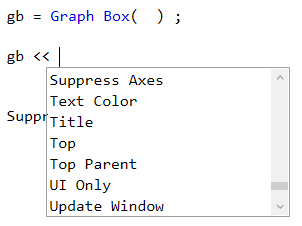
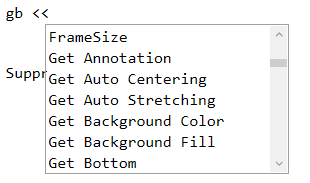
Like FrameSize, SuppressAxes doesn't seem to work if sent to a Graph Box - although it seems to be a valid message to be sent to a Graph Box:
hogi_1-1675001398829.png                     hogi_0-1675001342958.png


Recommended Articles