- Don’t miss your chance to experience Discovery Summit Europe at our best available rate! Early bird registration through 31 Oct.
- Graph Builder Toolbar streamlines interactive graphing. Creates shortcuts on Report and GraphBuilder Helpers toolbars. Download and install the extension.
- JMP will suspend normal business operations for our Rest and Recharge Day on Friday, October 2, 2026.
Regular business hours will resume on Monday, October 5, 2026.
- Subscribe to RSS Feed
- Mark Topic as New
- Mark Topic as Read
- Float this Topic for Current User
- Bookmark
- Subscribe
- Mute
- Printer Friendly Page
Discussions
Solve problems, and share tips and tricks with other JMP users.- User Community
- :
- Discussions
- :
- Re: Changing the scales of a graph box

- Mark as New
- Bookmark
- Subscribe
- Mute
- Subscribe to RSS Feed
- Get Direct Link
- Report Inappropriate Content
Changing the scales of a graph box
Hi
I am wirking on a custom graph. I want to draw the graph similar to this:
nw = New Window("Test",
Outline Box( "Outline",
gb = Graph Box(
FrameSize( 600, 300),
XName("X axis"),
YName("Y axis"),
X Scale( 0, 5*Pi() ),
Y Scale( -1, 1 )
)
)
);
gb << Set Graphics Script(Y Function(Sin(x), x));
Now I want to change the scales of the graph. I can drag to change the size and scale of the graph, but how do I change properties like "FrameSize" or "XName" by script, after I made the graph?
BR
Jesper
Jesper
Accepted Solutions


- Mark as New
- Bookmark
- Subscribe
- Mute
- Subscribe to RSS Feed
- Get Direct Link
- Report Inappropriate Content
Re: Changing the scales of a graph box
I'm not sure why the gb<<framesize and gb<<xscale and gb<<Xname messages won't work (added to my list, thanks!), but these messages do:
gb<<setWidth(500); // or Height
gb<<getXaxis; // try this to see the syntax
gb<<setXaxis(min(1),max(3)); // uses same syntax
gb[textbox(1)]<<settext("Ralph"); // text box 1 is Y, 2 is X
The setXaxis message controls all of the axis parameters; here's what getXaxis returned:
{Scale( "Linear" ), Format( "Fixed Dec", 12, 0 ), Min( 0 ), Max( 15.707963267949 ),
Interval( "Numeric" ), Inc( 5 ), Minor Ticks( 1 ), Label Row Nesting( 1 ),
Label Row(
    {Automatic Font Size( 0 ), Automatic Tick Marks( 0 ), Inside Ticks( 0 ),
    Label Orientation( "Horizontal" ), Major Grid Line Color( -14145495 ),
    Minor Grid Line Color( -15790320 ), Show Major Grid( 0 ), Show Major Labels( 1 ),
    Show Major Ticks( 1 ), Show Minor Grid( 0 ), Show Minor Labels( 0 ),
    Show Minor Ticks( 1 ), Tick Offset( 0 )}
)}
(Using JMP 13, might be fewer options in earlier versions.)
- Mark as New
- Bookmark
- Subscribe
- Mute
- Subscribe to RSS Feed
- Get Direct Link
- Report Inappropriate Content
Re: Changing the scales of a graph box
I'm not sure why the gb<<framesize and gb<<xscale and gb<<Xname messages won't work (added to my list, thanks!), but these messages do:
gb<<setWidth(500); // or Height
gb<<getXaxis; // try this to see the syntax
gb<<setXaxis(min(1),max(3)); // uses same syntax
gb[textbox(1)]<<settext("Ralph"); // text box 1 is Y, 2 is X
The setXaxis message controls all of the axis parameters; here's what getXaxis returned:
{Scale( "Linear" ), Format( "Fixed Dec", 12, 0 ), Min( 0 ), Max( 15.707963267949 ),
Interval( "Numeric" ), Inc( 5 ), Minor Ticks( 1 ), Label Row Nesting( 1 ),
Label Row(
    {Automatic Font Size( 0 ), Automatic Tick Marks( 0 ), Inside Ticks( 0 ),
    Label Orientation( "Horizontal" ), Major Grid Line Color( -14145495 ),
    Minor Grid Line Color( -15790320 ), Show Major Grid( 0 ), Show Major Labels( 1 ),
    Show Major Ticks( 1 ), Show Minor Grid( 0 ), Show Minor Labels( 0 ),
    Show Minor Ticks( 1 ), Tick Offset( 0 )}
)}
(Using JMP 13, might be fewer options in earlier versions.)
- Mark as New
- Bookmark
- Subscribe
- Mute
- Subscribe to RSS Feed
- Get Direct Link
- Report Inappropriate Content
Re: Changing the scales of a graph box
Jesper

- Mark as New
- Bookmark
- Subscribe
- Mute
- Subscribe to RSS Feed
- Get Direct Link
- Report Inappropriate Content
Re: Changing the scales of a graph box
an alternative approach: Send a message to the AxisBox
gb[Axisbox( 1 )] << {Min( 1 ), Max( 3 )};... which, unfortunately, is not available if the axis is not available due to SuppressAxes.
And I didn't want to show, change and hide again the axis.
So, thanks a lot for this EasterEgg :)
btw.
seems that curly brackets are necessary to get the second argument executed as well:
gb<<setXaxis({min(1),max(3)});- Mark as New
- Bookmark
- Subscribe
- Mute
- Subscribe to RSS Feed
- Get Direct Link
- Report Inappropriate Content
Re: Changing the scales of a graph box
Ouch!
So even
gb<<setXaxis({min(1),max(3)});talks to the AxisBox.
After re-enabling the SuppressAxes, the rescale command didn't wok anymore :(
--> no AxisBox, no rescale possible.
- Mark as New
- Bookmark
- Subscribe
- Mute
- Subscribe to RSS Feed
- Get Direct Link
- Report Inappropriate Content
Re: Changing the scales of a graph box
@hogi wrote:And I didn't want to show, change and hide again the axis.
Now, with the feeling that I do not have another choice ...
is there even a possibility to do so?
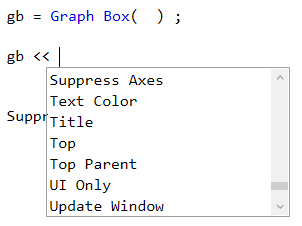
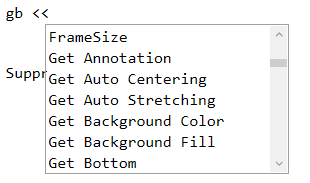
Like FrameSize, SuppressAxes doesn't seem to work if sent to a Graph Box - although it seems to be a valid message to be sent to a Graph Box:
- Mark as New
- Bookmark
- Subscribe
- Mute
- Subscribe to RSS Feed
- Get Direct Link
- Report Inappropriate Content
Re: Changing the scales of a graph box
@Craige_Hales wrote:
I'm not sure why the gb<<framesize and gb<<xscale and gb<<Xname messages won't work (added to my list, thanks!),
ah, maybe because they are no messages, but "named property arguments" - which have to be used as argument, and cannot be used as message:

Add-On questions:
- Is Graph Box a Display Box - where can I find it in the Scripting Index?

- How can I activate the documentation for Set X Axis?

- Mark as New
- Bookmark
- Subscribe
- Mute
- Subscribe to RSS Feed
- Get Direct Link
- Report Inappropriate Content
Re: Changing the scales of a graph box
GraphBox() is a function that returns a more complicated nest of display boxes than the other xxxBox() functions.

- Mark as New
- Bookmark
- Subscribe
- Mute
- Subscribe to RSS Feed
- Get Direct Link
- Report Inappropriate Content
Re: Changing the scales of a graph box
I mean, in analogy to a Graph Builder Box, which is generated by Graph Builder().

The recipient of << set X Axis()is a "Custom Box"?

In the Scripting Index, Custom Box doesn't know a message << set X Axis():

OwnerBox?

- Mark as New
- Bookmark
- Subscribe
- Mute
- Subscribe to RSS Feed
- Get Direct Link
- Report Inappropriate Content
Re: Changing the scales of a graph box
Yes, I saw that too. The OwnerBox is a very thin wrapper box used to attach a scriptable interface (with commands in addition to the scripting a box normally has.) My quick test did not convince me that the custombox was that scriptable interface. Probably it just forwards some commands to the appropriate grandchild box.
Recommended Articles
- © 2026 JMP Statistical Discovery LLC. All Rights Reserved.
- Terms of Use
- Privacy Statement
- Contact Us