cancel
Showing results for 
Show  only  | Search instead for 
Did you mean: 
  • JMP will suspend normal business operations for our Winter Holiday beginning on Wednesday, Dec. 24, 2025, at 5:00 p.m. ET (2:00 p.m. ET for JMP Accounts Receivable).
    Regular business hours will resume at 9:00 a.m. EST on Friday, Jan. 2, 2026.
  • We’re retiring the File Exchange at the end of this year. The JMP Marketplace is now your destination for add-ins and extensions.

Discussions

Solve problems, and share tips and tricks with other JMP users.
%3CLINGO-SUB%20id%3D%22lingo-sub-337332%22%20slang%3D%22en-US%22%20mode%3D%22NONE%22%3EX%E3%83%97%E3%83%AD%E3%83%83%E3%83%88%E3%81%A7%E8%A4%87%E6%95%B0%E3%81%AEFitY%E3%82%92%E3%83%97%E3%83%AD%E3%83%83%E3%83%88%E3%81%99%E3%82%8B%E3%81%9F%E3%82%81%E3%81%AE%E3%82%88%E3%82%8A%E8%89%AF%E3%81%84%E6%96%B9%E6%B3%95%3C%2FLINGO-SUB%3E%3CLINGO-BODY%20id%3D%22lingo-body-337332%22%20slang%3D%22en-US%22%20mode%3D%22NONE%22%3E%3CP%3E%E7%A7%81%E3%81%AE%E5%85%83%E3%81%AE%E3%82%BD%E3%83%BC%E3%82%B9%E3%83%86%E3%83%BC%E3%83%96%E3%83%AB%E3%81%AF%E3%80%81ID%E3%80%81%E3%82%B0%E3%83%AB%E3%83%BC%E3%83%97%E3%80%81%E3%81%8A%E3%82%88%E3%81%B3%E5%A4%A7%E9%87%8F%E3%81%AE%E3%83%91%E3%83%A9%E3%83%A1%E3%83%BC%E3%82%BF%E3%82%92%E5%90%AB%E3%82%80%E8%83%8C%E3%81%AE%E9%AB%98%E3%81%84%E3%83%86%E3%83%BC%E3%83%96%E3%83%AB%E3%81%A7%E3%81%99%E3%80%82%20%E3%81%99%E3%81%B9%E3%81%A6%E3%81%AE%E3%83%91%E3%83%A9%E3%83%A1%E3%83%BC%E3%82%BF%E3%82%92X%E3%81%A7Y%E3%81%AB%E5%90%88%E3%82%8F%E3%81%9B%E3%82%8B%EF%BC%88%E3%82%B0%E3%83%AB%E3%83%BC%E3%83%97A%E3%81%A8%E3%82%B0%E3%83%AB%E3%83%BC%E3%83%97B%E3%81%AE%E3%82%B0%E3%83%AB%E3%83%BC%E3%83%97%E3%82%92ID%E3%81%A7%EF%BC%89%E3%83%97%E3%83%AD%E3%83%83%E3%83%88%E3%81%97%E3%81%9F%E3%81%84%E3%81%A8%E6%80%9D%E3%81%84%E3%81%BE%E3%81%99%E3%80%82%20%E7%A7%81%E3%81%8C%E8%A1%8C%E3%81%86%E5%BE%93%E6%9D%A5%E3%81%AE%E6%96%B9%E6%B3%95%E3%81%AF%E3%80%81%E8%83%8C%E3%81%AE%E9%AB%98%E3%81%84%E3%83%86%E3%83%BC%E3%83%96%E3%83%AB%E3%82%92%E5%B9%85%E3%81%AE%E5%BA%83%E3%81%84%E3%83%86%E3%83%BC%E3%83%96%E3%83%AB%E3%81%AB%E5%A4%89%E6%9B%B4%E3%81%97%E3%80%81%E4%B8%80%E5%BA%A6%E3%81%AB1%E3%81%A4%E3%81%AE%E3%83%91%E3%83%A9%E3%83%A1%E3%83%BC%E3%82%BF%E3%83%BC%E3%82%92%E3%83%97%E3%83%AD%E3%83%83%E3%83%88%E3%81%99%E3%82%8B%E3%81%93%E3%81%A8%E3%81%A7%E3%81%99%E3%80%82%20%E3%81%97%E3%81%8B%E3%81%97%E3%80%81%E7%A7%81%E3%81%8C%E4%BD%95%E7%99%BE%E3%82%82%E3%81%AE%E3%83%91%E3%83%A9%E3%83%A1%E3%83%BC%E3%82%BF%E3%82%92%E6%8C%81%E3%81%A3%E3%81%A6%E3%81%84%E3%82%8B%E5%A0%B4%E5%90%88%E3%80%81%E3%81%9D%E3%82%8C%E3%81%AF%E8%89%AF%E3%81%84%E8%A7%A3%E6%B1%BA%E7%AD%96%E3%81%A7%E3%81%AF%E3%81%82%E3%82%8A%E3%81%BE%E3%81%9B%E3%82%93%E3%80%82%20%E3%81%93%E3%82%8C%E3%82%92%E8%A1%8C%E3%81%86%E3%81%9F%E3%82%81%E3%81%AE%E3%82%88%E3%82%8A%E8%89%AF%E3%81%84%E3%81%BE%E3%81%9F%E3%81%AF%E3%82%88%E3%82%8A%E3%82%B9%E3%83%9E%E3%83%BC%E3%83%88%E3%81%AA%E6%96%B9%E6%B3%95%E3%81%AF%E3%81%82%E3%82%8A%E3%81%BE%E3%81%99%E3%81%8B%EF%BC%9F%3C%2FP%3E%3CP%3E%E6%B7%BB%E4%BB%98%E3%81%AE%E3%82%B5%E3%83%B3%E3%83%97%E3%83%ABjmp%E3%83%95%E3%82%A1%E3%82%A4%E3%83%AB%3C%2FP%3E%3CP%3E%E8%83%8C%E3%81%AE%E9%AB%98%E3%81%84%E3%83%86%E3%83%BC%E3%83%96%E3%83%AB%3C%2FP%3E%3CP%3E%3CSPAN%20class%3D%22lia-inline-image-display-wrapper%20lia-image-align-inline%22%20image-alt%3D%22image.png%22%20style%3D%22width%3A%20277px%3B%22%3E%3Cspan%20class%3D%22lia-inline-image-display-wrapper%22%20image-alt%3D%22image.png%22%20style%3D%22width%3A%20277px%3B%22%3E%3Cimg%20src%3D%22https%3A%2F%2Fcommunity.jmp.com%2Ft5%2Fimage%2Fserverpage%2Fimage-id%2F28599i931CCB53E5E50851%2Fimage-size%2Fmedium%3Fv%3Dv2%26amp%3Bpx%3D400%22%20role%3D%22button%22%20title%3D%22image.png%22%20alt%3D%22image.png%22%20%2F%3E%3C%2Fspan%3E%3C%2FSPAN%3E%3C%2FP%3E%3CP%3E%E3%83%AF%E3%82%A4%E3%83%89%E3%83%86%E3%83%BC%E3%83%96%E3%83%AB%E3%81%AB%E5%88%87%E3%82%8A%E6%9B%BF%E3%81%88%E3%82%8B%3C%2FP%3E%3CP%3E%3CSPAN%20class%3D%22lia-inline-image-display-wrapper%20lia-image-align-inline%22%20image-alt%3D%22image.png%22%20style%3D%22width%3A%20400px%3B%22%3E%3Cspan%20class%3D%22lia-inline-image-display-wrapper%22%20image-alt%3D%22image.png%22%20style%3D%22width%3A%20400px%3B%22%3E%3Cimg%20src%3D%22https%3A%2F%2Fcommunity.jmp.com%2Ft5%2Fimage%2Fserverpage%2Fimage-id%2F28598i323D2EBEB0E083CF%2Fimage-size%2Fmedium%3Fv%3Dv2%26amp%3Bpx%3D400%22%20role%3D%22button%22%20title%3D%22image.png%22%20alt%3D%22image.png%22%20%2F%3E%3C%2Fspan%3E%3C%2FSPAN%3E%3C%2FP%3E%3CP%3EparamAA%E3%81%A8ParamAB%E3%82%92%E3%83%97%E3%83%AD%E3%83%83%E3%83%88%E3%81%97%E3%81%BE%E3%81%99%3C%2FP%3E%3CP%3E%3CSPAN%20class%3D%22lia-inline-image-display-wrapper%20lia-image-align-inline%22%20image-alt%3D%22image.png%22%20style%3D%22width%3A%20400px%3B%22%3E%3Cspan%20class%3D%22lia-inline-image-display-wrapper%22%20image-alt%3D%22image.png%22%20style%3D%22width%3A%20400px%3B%22%3E%3Cimg%20src%3D%22https%3A%2F%2Fcommunity.jmp.com%2Ft5%2Fimage%2Fserverpage%2Fimage-id%2F28597i9F24D0428DA4B6AB%2Fimage-size%2Fmedium%3Fv%3Dv2%26amp%3Bpx%3D400%22%20role%3D%22button%22%20title%3D%22image.png%22%20alt%3D%22image.png%22%20%2F%3E%3C%2Fspan%3E%3C%2FSPAN%3E%3C%2FP%3E%3C%2FLINGO-BODY%3E%3CLINGO-LABS%20id%3D%22lingo-labs-337332%22%20slang%3D%22en-US%22%20mode%3D%22NONE%22%3E%3CLINGO-LABEL%3E%E3%83%87%E3%83%BC%E3%82%BF%E8%A1%A8%3C%2FLINGO-LABEL%3E%3CLINGO-LABEL%3E%E3%82%B0%E3%83%A9%E3%83%95%E3%82%A3%E3%83%83%E3%82%AF%E3%82%B9%3C%2FLINGO-LABEL%3E%3C%2FLINGO-LABS%3E%3CLINGO-SUB%20id%3D%22lingo-sub-337361%22%20slang%3D%22en-US%22%20mode%3D%22NONE%22%3ERe%EF%BC%9A%E8%A4%87%E6%95%B0%E3%81%AEFitY%20xX%E3%83%97%E3%83%AD%E3%83%83%E3%83%88%E3%82%92%E3%83%97%E3%83%AD%E3%83%83%E3%83%88%E3%81%99%E3%82%8B%E3%81%9F%E3%82%81%E3%81%AE%E3%82%88%E3%82%8A%E8%89%AF%E3%81%84%E6%96%B9%E6%B3%95%3C%2FLINGO-SUB%3E%3CLINGO-BODY%20id%3D%22lingo-body-337361%22%20slang%3D%22en-US%22%20mode%3D%22NONE%22%3E%3CP%3E%E3%82%B5%E3%83%B3%E3%83%97%E3%83%AB%E3%83%87%E3%83%BC%E3%82%BF%E3%82%92%E4%BD%BF%E7%94%A8%E3%81%97%E3%81%A6%E3%80%81%E6%9C%80%E5%88%9D%E3%81%AB%E3%83%87%E3%83%BC%E3%82%BF%E3%82%92%E3%83%AF%E3%82%A4%E3%83%89%E3%83%95%E3%82%A9%E3%83%BC%E3%83%A0%E3%81%AB%E5%88%86%E5%89%B2%E3%81%97%E3%80%81%E6%AC%A1%E3%81%AB%E3%81%9D%E3%81%AE%E3%83%87%E3%83%BC%E3%82%BF%E3%83%86%E3%83%BC%E3%83%96%E3%83%AB%E3%82%92%E5%8F%96%E5%BE%97%E3%81%97%E3%81%A6%E3%83%9E%E3%83%AB%E3%83%81%E3%82%B7%E3%83%AA%E3%83%BC%E3%82%BA%E3%82%B9%E3%82%BF%E3%83%83%E3%82%AF%E3%82%92%E5%AE%9F%E8%A1%8C%E3%81%97%E3%81%BE%E3%81%97%E3%81%9F%3C%2FP%3E%0A%3CP%3E%E3%83%86%E3%83%BC%E3%83%96%E3%83%AB%3D%26gt%3B%E3%82%B9%E3%82%BF%E3%83%83%E3%82%AF%3C%2FP%3E%0A%3CP%3E2%E5%88%97%E3%82%B9%E3%82%BF%E3%83%83%E3%82%AF%E3%82%92%E6%8C%87%E5%AE%9A%E3%81%99%E3%82%8B%3C%2FP%3E%0A%3CP%3E%3CSPAN%20class%3D%22lia-inline-image-display-wrapper%20lia-image-align-inline%22%20image-alt%3D%22multi1.PNG%22%20style%3D%22width%3A%20467px%3B%22%3E%3Cspan%20class%3D%22lia-inline-image-display-wrapper%22%20image-alt%3D%22multi1.PNG%22%20style%3D%22width%3A%20467px%3B%22%3E%3Cimg%20src%3D%22https%3A%2F%2Fcommunity.jmp.com%2Ft5%2Fimage%2Fserverpage%2Fimage-id%2F28602iFC2904E76D2A9A3D%2Fimage-size%2Flarge%3Fv%3Dv2%26amp%3Bpx%3D999%22%20role%3D%22button%22%20title%3D%22multi1.PNG%22%20alt%3D%22multi1.PNG%22%20%2F%3E%3C%2Fspan%3E%3C%2FSPAN%3E%3C%2FP%3E%0A%3CP%3E%E6%AC%A1%E3%81%AB%E3%80%81%E3%83%A9%E3%83%99%E3%83%AB%E5%88%97%E3%81%A8%E3%83%A9%E3%83%99%E3%83%AB2%E5%88%97%E3%82%92%E5%8D%98%E7%B4%94%E3%81%AB%E9%80%A3%E7%B5%90%E3%81%97%E3%81%9FAnalysis%E3%81%A8%E3%81%84%E3%81%86%E5%8D%98%E7%B4%94%E3%81%AA%E6%96%B0%E3%81%97%E3%81%84%E5%88%97%E3%82%92%E8%BF%BD%E5%8A%A0%E3%81%97%E3%81%BE%E3%81%97%E3%81%9F%E3%80%82%3C%2FP%3E%0A%3CP%3E%3CSPAN%20class%3D%22lia-inline-image-display-wrapper%20lia-image-align-inline%22%20image-alt%3D%22multi2.PNG%22%20style%3D%22width%3A%20604px%3B%22%3E%3Cspan%20class%3D%22lia-inline-image-display-wrapper%22%20image-alt%3D%22multi2.PNG%22%20style%3D%22width%3A%20604px%3B%22%3E%3Cimg%20src%3D%22https%3A%2F%2Fcommunity.jmp.com%2Ft5%2Fimage%2Fserverpage%2Fimage-id%2F28603iF33FE1BF00C58B71%2Fimage-size%2Flarge%3Fv%3Dv2%26amp%3Bpx%3D999%22%20role%3D%22button%22%20title%3D%22multi2.PNG%22%20alt%3D%22multi2.PNG%22%20%2F%3E%3C%2Fspan%3E%3C%2FSPAN%3E%3C%2FP%3E%0A%3CP%3E%E6%9C%80%E5%BE%8C%E3%81%AB%E3%80%81%E3%83%87%E3%83%BC%E3%82%BF%E3%81%A8%E3%83%87%E3%83%BC%E3%82%BF2%E3%82%92Y%E5%88%97%E3%81%A8X%E5%88%97%E3%81%A8%E3%81%97%E3%81%A6%E6%8C%87%E5%AE%9A%E3%81%97%E3%80%81%E5%88%86%E6%9E%90%E5%88%97%E3%82%92By%E5%88%97%E3%81%A8%E3%81%97%E3%81%A6%E8%A8%AD%E5%AE%9A%E3%81%97%E3%81%A6%E3%80%81Fit%20Y%20by%20X%E3%82%92%E5%AE%9F%E8%A1%8C%E3%81%97%E3%80%81%E4%BB%A5%E4%B8%8B%E3%81%AE%E7%B5%90%E6%9E%9C%E3%82%92%E7%A4%BA%E3%81%97%E3%81%BE%E3%81%97%E3%81%9F%E3%80%82%3C%2FP%3E%0A%3CP%3E%3CSPAN%20class%3D%22lia-inline-image-display-wrapper%20lia-image-align-inline%22%20image-alt%3D%22multi3.PNG%22%20style%3D%22width%3A%20510px%3B%22%3E%3Cspan%20class%3D%22lia-inline-image-display-wrapper%22%20image-alt%3D%22multi3.PNG%22%20style%3D%22width%3A%20510px%3B%22%3E%3Cimg%20src%3D%22https%3A%2F%2Fcommunity.jmp.com%2Ft5%2Fimage%2Fserverpage%2Fimage-id%2F28604iAADD9D08CE4F6BB7%2Fimage-size%2Flarge%3Fv%3Dv2%26amp%3Bpx%3D999%22%20role%3D%22button%22%20title%3D%22multi3.PNG%22%20alt%3D%22multi3.PNG%22%20%2F%3E%3C%2Fspan%3E%3C%2FSPAN%3E%3C%2FP%3E%3C%2FLINGO-BODY%3E%3CLINGO-SUB%20id%3D%22lingo-sub-337378%22%20slang%3D%22en-US%22%20mode%3D%22NONE%22%3ERe%EF%BC%9A%E8%A4%87%E6%95%B0%E3%81%AEFitY%20xX%E3%83%97%E3%83%AD%E3%83%83%E3%83%88%E3%82%92%E3%83%97%E3%83%AD%E3%83%83%E3%83%88%E3%81%99%E3%82%8B%E3%81%9F%E3%82%81%E3%81%AE%E3%82%88%E3%82%8A%E8%89%AF%E3%81%84%E6%96%B9%E6%B3%95%3C%2FLINGO-SUB%3E%3CLINGO-BODY%20id%3D%22lingo-body-337378%22%20slang%3D%22en-US%22%20mode%3D%22NONE%22%3E%E3%81%93%E3%82%93%E3%81%AB%E3%81%A1%E3%81%AF%E3%83%8D%E3%83%AB%E3%82%BD%E3%83%B3%E3%80%81%3CBR%20%2F%3E%3CBR%20%2F%3E%E6%9C%80%E5%88%9D%E3%81%AE%E3%82%B9%E3%83%86%E3%83%83%E3%83%97%E3%82%92%E3%81%A9%E3%81%AE%E3%82%88%E3%81%86%E3%81%AB%E8%A1%8C%E3%81%84%E3%81%BE%E3%81%99%E3%81%8B-2%E5%88%97%E3%81%AE%E3%82%B9%E3%82%BF%E3%83%83%E3%82%AF%E3%82%92%E6%8C%87%E5%AE%9A%E3%81%97%E3%81%BE%E3%81%99%E3%81%8B%EF%BC%9F%20%E3%81%95%E3%82%89%E3%81%AB%E8%A9%B3%E3%81%97%E3%81%8F%E8%AA%AC%E6%98%8E%E3%81%97%E3%81%A6%E3%81%84%E3%81%9F%E3%81%A0%E3%81%91%E3%81%BE%E3%81%99%E3%81%8B%EF%BC%9F%3C%2FLINGO-BODY%3E%3CLINGO-SUB%20id%3D%22lingo-sub-337386%22%20slang%3D%22en-US%22%20mode%3D%22NONE%22%3ERe%EF%BC%9A%E8%A4%87%E6%95%B0%E3%81%AEFitY%20xX%E3%83%97%E3%83%AD%E3%83%83%E3%83%88%E3%82%92%E3%83%97%E3%83%AD%E3%83%83%E3%83%88%E3%81%99%E3%82%8B%E3%81%9F%E3%82%81%E3%81%AE%E3%82%88%E3%82%8A%E8%89%AF%E3%81%84%E6%96%B9%E6%B3%95%3C%2FLINGO-SUB%3E%3CLINGO-BODY%20id%3D%22lingo-body-337386%22%20slang%3D%22en-US%22%20mode%3D%22NONE%22%3E%3CP%3E%3CA%20href%3D%22https%3A%2F%2Fcommunity.jmp.com%2Ft5%2Fuser%2Fviewprofilepage%2Fuser-id%2F2687%22%20target%3D%22_blank%22%3E%40txnelson%3C%2FA%3E%20'%E8%A4%87%E6%95%B0%E3%82%B7%E3%83%AA%E3%83%BC%E3%82%BA%E3%82%B9%E3%82%BF%E3%83%83%E3%82%AF'%E3%82%AA%E3%83%97%E3%82%B7%E3%83%A7%E3%83%B3%E3%82%92%E5%8F%82%E7%85%A7%E3%81%97%E3%81%A6%E3%81%84%E3%81%BE%E3%81%99%EF%BC%9A%3C%2FP%3E%0A%3CP%3E%3CSPAN%20class%3D%22lia-inline-image-display-wrapper%20lia-image-align-inline%22%20image-alt%3D%22Screenshot%202020-11-25%20at%2015.06.32.png%22%20style%3D%22width%3A%20400px%3B%22%3E%3Cspan%20class%3D%22lia-inline-image-display-wrapper%22%20image-alt%3D%22Screenshot%202020-11-25%20at%2015.06.32.png%22%20style%3D%22width%3A%20400px%3B%22%3E%3Cimg%20src%3D%22https%3A%2F%2Fcommunity.jmp.com%2Ft5%2Fimage%2Fserverpage%2Fimage-id%2F28610i32E1C259ADA6F689%2Fimage-size%2Fmedium%3Fv%3Dv2%26amp%3Bpx%3D400%22%20role%3D%22button%22%20title%3D%22Screenshot%202020-11-25%20at%2015.06.32.png%22%20alt%3D%22Screenshot%202020-11-25%20at%2015.06.32.png%22%20%2F%3E%3C%2Fspan%3E%3C%2FSPAN%3E%3C%2FP%3E%0A%3CP%3E%E2%80%83%3C%2FP%3E%3C%2FLINGO-BODY%3E
Choose Language Hide Translation Bar
OneNorthJMP
Level V

Better way to plot multiple FitY by X plots

My original source table is the tall table with ID, group and tons of params. I want to plot all params Fit Y by X (Group A vs Group B group by ID). The traditional way i do is i change the tall table to wide table and plot one params at a time. But if i have hundreds of params, it is not a good solution. Is there any better or smarter way to do this ? 

attached sample jmp files 

tall table
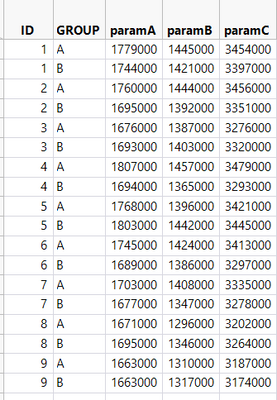
image.png

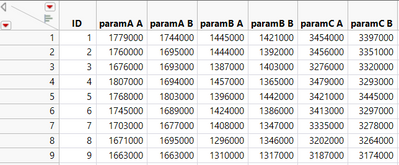
switch to wide table

image.png

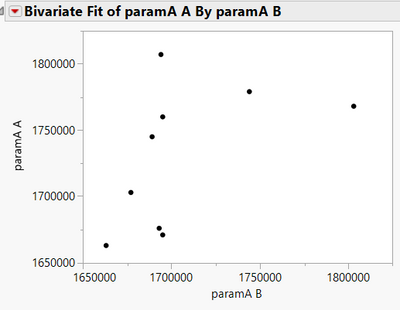
Plot paramA A vs ParamA B 

image.png

1 ACCEPTED SOLUTION

Accepted Solutions
txnelson
Super User

Re: Better way to plot multiple FitY by X plots

Taking your example data, I first split the data into your Wide form, and then I took that data table and did a multi series stack

     Tables=>Stack

specifying a 2 column stack
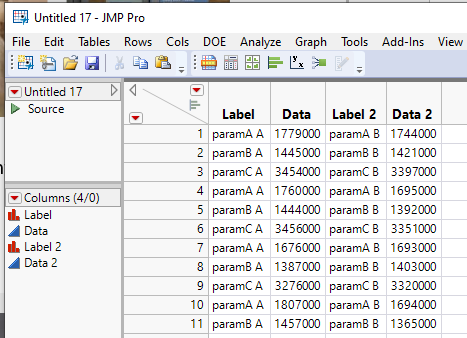
multi1.PNG

I then added a simple new column called Analysis which is a simple concatenation of the Label and Label 2 columns
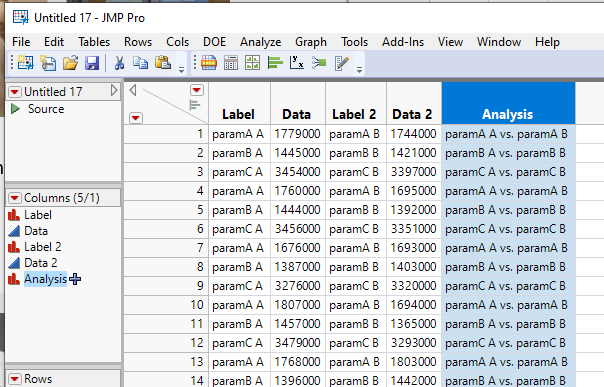
multi2.PNG

Finally, I ran the Fit Y by X specifying Data and Data 2 as the Y and X columns and then setting the Analysis column as the By column, giving the results below
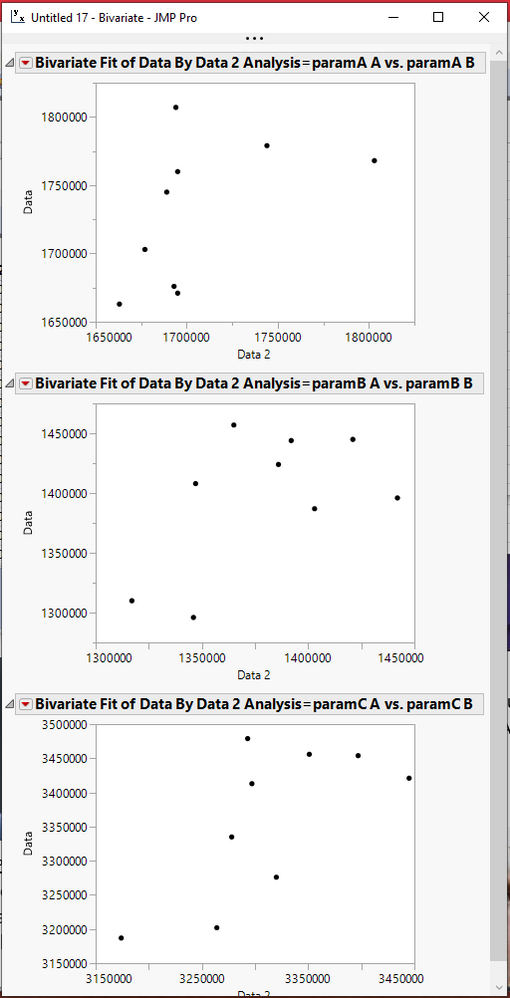
multi3.PNG

Jim

View solution in original post

5 REPLIES 5
txnelson
Super User

Re: Better way to plot multiple FitY by X plots

Taking your example data, I first split the data into your Wide form, and then I took that data table and did a multi series stack

     Tables=>Stack

specifying a 2 column stack

multi1.PNG

I then added a simple new column called Analysis which is a simple concatenation of the Label and Label 2 columns

multi2.PNG

Finally, I ran the Fit Y by X specifying Data and Data 2 as the Y and X columns and then setting the Analysis column as the By column, giving the results below

multi3.PNG

Jim
OneNorthJMP
Level V

Re: Better way to plot multiple FitY by X plots

Hi Nelson,

How you do the 1st step - specifying a 2 column stack? Can you further elaborate?

ian_jmp
Level X

Re: Better way to plot multiple FitY by X plots
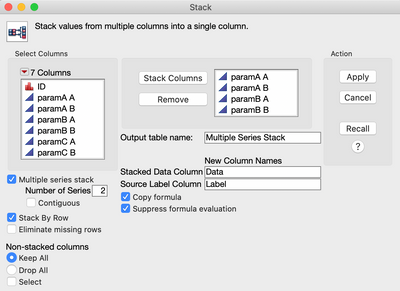
@txnelson is referencing the 'multiple series stack' option:

Screenshot 2020-11-25 at 15.06.32.png

ih
Super User (Alumni) ih
Super User (Alumni)

Re: Better way to plot multiple FitY by X plots

Same concept as @txnelson but I would arrange the table just a little differently by stacking to make a very long table, then splitting by the group column.  Finally use the parameter in the by column of a bivariate script:


names default to here(1);

Long = Data Table( "DEBUG" ) << Stack(
	columns( :paramA, :paramB, :paramC ),
	Source Label Column( "Parameter" ),
	Stacked Data Column( "Data" )
);

repivot = Long << Split(
	Split By( :GROUP ),
	Split( :Data ),
	Group( :Parameter, :ID ),
	Sort by Column Property
);

biv = Bivariate( Y( :A ), X( :B ), Summary Statistics( 1 ), By( :Parameter ) );

dtSum = (biv << XPath("//TableBox"))[1][1] << make combined data table;

dtSum << Select Where(:Column 1 != "Correlation");
dtSum << Delete Rows;
dtSum << Set Name( "Results" );

Then the resulting table can be sorted to find the interesting correlations.


The response screening platform certainly seems promising though.


KarenC
Super User (Alumni)

Re: Better way to plot multiple FitY by X plots

Another platform that you might explore is response screening. I find it a helpful tool for looking at many fit y by x's. See response screening documentation .

Recommended Articles