cancel
Showing results for 
Show  only  | Search instead for 
Did you mean: 
  • JMP will suspend normal business operations for our Winter Holiday beginning on Wednesday, Dec. 24, 2025, at 5:00 p.m. ET (2:00 p.m. ET for JMP Accounts Receivable).
    Regular business hours will resume at 9:00 a.m. EST on Friday, Jan. 2, 2026.
  • We’re retiring the File Exchange at the end of this year. The JMP Marketplace is now your destination for add-ins and extensions.

Discussions

Solve problems, and share tips and tricks with other JMP users.
%3CLINGO-SUB%20id%3D%22lingo-sub-51201%22%20slang%3D%22en-US%22%20mode%3D%22NONE%22%3EAsse%20nel%20diagramma%20di%20caricamento%20di%20PCA%20in%20JMP%3C%2FLINGO-SUB%3E%3CLINGO-BODY%20id%3D%22lingo-body-51201%22%20slang%3D%22en-US%22%20mode%3D%22NONE%22%3E%3CP%3ECiao%2C%20sono%20relativamente%20nuovo%20all'analisi%20PCA%20e%20a%20JMP.%20Come%20posso%20modificare%20i%20valori%20di%20caricamento%20della%20PCA%20sull'asse%20xey%20del%20grafico%20che%20JMP%20rovina%20quando%20si%20esegue%20un'analisi%20PCA%3F%20In%20questo%20momento%20l'impostazione%20predefinita%20%C3%A8%20PCA1%20su%20asse%20x%20e%20PCA%202%20su%20asse%20y.%20Vorrei%20tracciare%20PCA3%20sull'asse%20ye%20ottenere%20una%20trama%20simile%20con%20i%20vettori%20che%20mostrano%20in%20direzioni%20di%20diff%2C%20etichette%2C%20ecc.%3C%2FP%3E%3CP%3E%26nbsp%3B%3C%2FP%3E%3C%2FLINGO-BODY%3E%3CLINGO-SUB%20id%3D%22lingo-sub-51223%22%20slang%3D%22en-US%22%20mode%3D%22NONE%22%3ERi%3A%20Asse%20nel%20diagramma%20di%20caricamento%20di%20PCA%20in%20JMP%3C%2FLINGO-SUB%3E%3CLINGO-BODY%20id%3D%22lingo-body-51223%22%20slang%3D%22en-US%22%20mode%3D%22NONE%22%3E%3CP%3ES%C3%AC%2C%20%C3%A8%20una%20buona%20idea!%20Grazie%20mille%20ancora%20una%20volta.%3C%2FP%3E%3C%2FLINGO-BODY%3E%3CLINGO-SUB%20id%3D%22lingo-sub-51222%22%20slang%3D%22en-US%22%20mode%3D%22NONE%22%3ERi%3A%20Asse%20nel%20diagramma%20di%20caricamento%20di%20PCA%20in%20JMP%3C%2FLINGO-SUB%3E%3CLINGO-BODY%20id%3D%22lingo-body-51222%22%20slang%3D%22en-US%22%20mode%3D%22NONE%22%3E%3CP%3ESono%20felice%20che%20tu%20abbia%20trovato%20una%20soluzione.%3C%2FP%3E%0A%3CP%3E%26nbsp%3B%3C%2FP%3E%0A%3CP%3EPer%20aiutarti%20a%20ottenere%20risposte%20alle%20domande%20dalla%20comunit%C3%A0%20di%20discussione%2C%20ti%20suggerisco%20di%20includere%20la%20versione%20%23%20che%20stai%20utilizzando%2C%20quando%20fai%20le%20tue%20domande.%3C%2FP%3E%3C%2FLINGO-BODY%3E%3CLINGO-SUB%20id%3D%22lingo-sub-51221%22%20slang%3D%22en-US%22%20mode%3D%22NONE%22%3ERi%3A%20Asse%20nel%20diagramma%20di%20caricamento%20di%20PCA%20in%20JMP%3C%2FLINGO-SUB%3E%3CLINGO-BODY%20id%3D%22lingo-body-51221%22%20slang%3D%22en-US%22%20mode%3D%22NONE%22%3E%3CP%3ECiao%2C%20grazie%20mille%20ma%20come%20ho%20una%20versione%20precedente%20(JMP%209.02)%20non%20ho%20potuto%20vedere%20le%20stesse%20opzioni%20che%20hai%20mostrato%20nella%20trama%20dello%20schermo.%20tuttavia%2C%20comprendendo%20che%20pu%C3%B2%20essere%20fatto%2C%20ho%20guardato%20il%20menu%20a%20tendina%20dei%20Componenti%20principali%20(freccia%20rossa)%20e%20ho%20usato%20l'opzione%20Caricamento%20grafico%20ed%20%C3%A8%20stato%20in%20grado%20di%20ottenere%20grafici%20con%20PCa1%2C%202%2C%203%20come%20assi.%3C%2FP%3E%3C%2FLINGO-BODY%3E%3CLINGO-SUB%20id%3D%22lingo-sub-51205%22%20slang%3D%22en-US%22%20mode%3D%22NONE%22%3ERi%3A%20Asse%20nel%20diagramma%20di%20caricamento%20di%20PCA%20in%20JMP%3C%2FLINGO-SUB%3E%3CLINGO-BODY%20id%3D%22lingo-body-51205%22%20slang%3D%22en-US%22%20mode%3D%22NONE%22%3E%3CP%3ENell'area%20in%20basso%20a%20sinistra%20della%20finestra%20del%20display%20ci%20sono%20le%20opzioni%20per%20selezionare%20qualsiasi%20valore%20di%20visualizzazione%20xey%20che%20si%20desidera%20utilizzare%3C%2FP%3E%0A%3CP%3E%3CSPAN%20class%3D%22lia-inline-image-display-wrapper%20lia-image-align-inline%22%20style%3D%22width%3A%20999px%3B%22%3E%3Cspan%20class%3D%22lia-inline-image-display-wrapper%22%20image-alt%3D%22pca.PNG%22%20style%3D%22width%3A%20999px%3B%22%3E%3Cimg%20src%3D%22https%3A%2F%2Fcommunity.jmp.com%2Ft5%2Fimage%2Fserverpage%2Fimage-id%2F9325i59F491EDBEB2951A%2Fimage-size%2Flarge%3Fv%3Dv2%26amp%3Bpx%3D999%22%20role%3D%22button%22%20title%3D%22pca.PNG%22%20alt%3D%22pca.PNG%22%20%2F%3E%3C%2Fspan%3E%3C%2FSPAN%3E%3C%2FP%3E%3C%2FLINGO-BODY%3E
Choose Language Hide Translation Bar
helga55
Level I

Axis in Loading plot of PCA in JMP

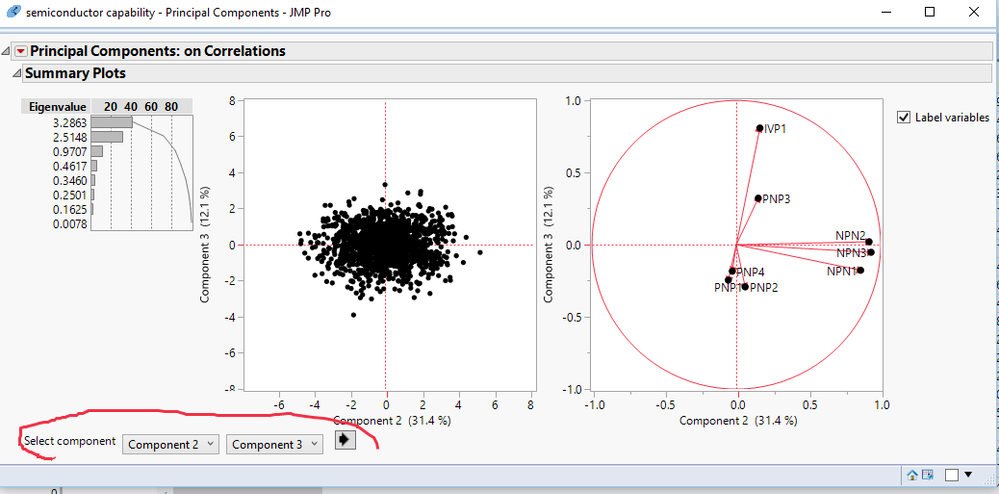
Hi, I am relatively new to PCA analysis as well as to JMP. How can I change the PCA loading values on the x and y axis of the plot that JMP rovides when you do a PCA analysis? Right now the default is PCA1 on x axis and PCA 2 on y axis. I would like to plot PCA3 on y axis and get a similar plot with the vectors showing in diff directions, labels etc.


4 REPLIES 4
txnelson
Super User

Re: Axis in Loading plot of PCA in JMP

In the lower left hand area of the display window there are the options to select whatever x and y display values you want to use
pca.PNG

Jim
helga55
Level I

Re: Axis in Loading plot of PCA in JMP

Hi, thanks a lot but as I have an older version (JMP 9.02) i couldnt see the same options as you have shown in your screen plot. however realizing that it can be done I looked at the drop down menu of the Principal Components (red arrow) and used the option of Loading plot and was able to get plots with PCa1, 2, 3 as  axes.

txnelson
Super User

Re: Axis in Loading plot of PCA in JMP

I am glad you figured out a solution.


To assist yourself in getting questions answered from the Discussion Community, I suggest that you include the version # you are using, when you ask you questions.

Jim
helga55
Level I

Re: Axis in Loading plot of PCA in JMP

Yes that is a good idea! Thanks a lot once again.

Recommended Articles
