- Don’t miss your chance to experience Discovery Summit Europe at our best available rate! Early bird registration through 31 Oct.
- Graph Builder Toolbar streamlines interactive graphing. Creates shortcuts on Report and GraphBuilder Helpers toolbars. Download and install the extension.
- Subscribe to RSS Feed
- Mark Topic as New
- Mark Topic as Read
- Float this Topic for Current User
- Bookmark
- Subscribe
- Mute
- Printer Friendly Page
Discussions
Solve problems, and share tips and tricks with other JMP users.- User Community
- :
- Discussions
- :
- Re: Axis in Loading plot of PCA in JMP

- Mark as New
- Bookmark
- Subscribe
- Mute
- Subscribe to RSS Feed
- Get Direct Link
- Report Inappropriate Content
Axis in Loading plot of PCA in JMP
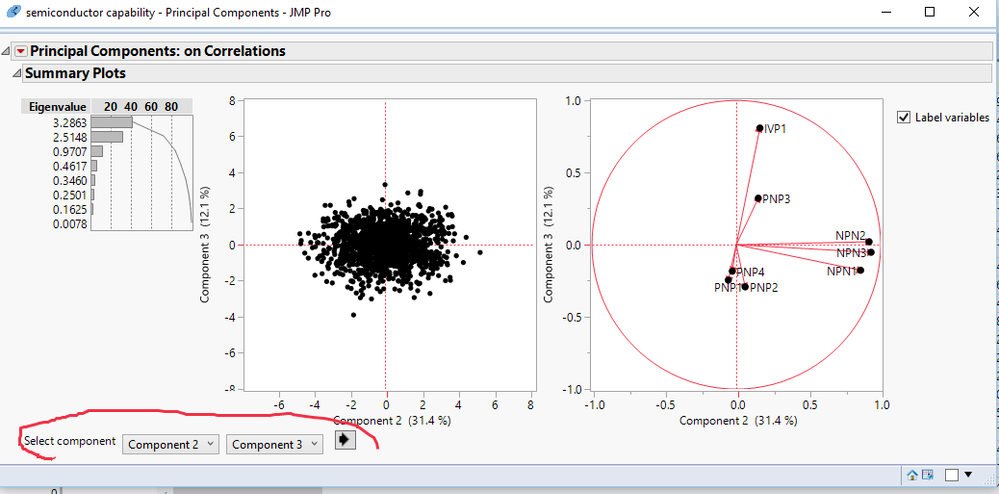
Hi, I am relatively new to PCA analysis as well as to JMP. How can I change the PCA loading values on the x and y axis of the plot that JMP rovides when you do a PCA analysis? Right now the default is PCA1 on x axis and PCA 2 on y axis. I would like to plot PCA3 on y axis and get a similar plot with the vectors showing in diff directions, labels etc.


- Mark as New
- Bookmark
- Subscribe
- Mute
- Subscribe to RSS Feed
- Get Direct Link
- Report Inappropriate Content
Re: Axis in Loading plot of PCA in JMP
In the lower left hand area of the display window there are the options to select whatever x and y display values you want to use
- Mark as New
- Bookmark
- Subscribe
- Mute
- Subscribe to RSS Feed
- Get Direct Link
- Report Inappropriate Content
Re: Axis in Loading plot of PCA in JMP
Hi, thanks a lot but as I have an older version (JMP 9.02) i couldnt see the same options as you have shown in your screen plot. however realizing that it can be done I looked at the drop down menu of the Principal Components (red arrow) and used the option of Loading plot and was able to get plots with PCa1, 2, 3 as axes.
- Mark as New
- Bookmark
- Subscribe
- Mute
- Subscribe to RSS Feed
- Get Direct Link
- Report Inappropriate Content
Re: Axis in Loading plot of PCA in JMP
I am glad you figured out a solution.
To assist yourself in getting questions answered from the Discussion Community, I suggest that you include the version # you are using, when you ask you questions.
- Mark as New
- Bookmark
- Subscribe
- Mute
- Subscribe to RSS Feed
- Get Direct Link
- Report Inappropriate Content
Re: Axis in Loading plot of PCA in JMP
Yes that is a good idea! Thanks a lot once again.
Recommended Articles
- © 2026 JMP Statistical Discovery LLC. All Rights Reserved.
- Terms of Use
- Privacy Statement
- Contact Us