- JMP will suspend normal business operations for our Winter Holiday beginning on Wednesday, Dec. 24, 2025, at 5:00 p.m. ET (2:00 p.m. ET for JMP Accounts Receivable).
Regular business hours will resume at 9:00 a.m. EST on Friday, Jan. 2, 2026. - We’re retiring the File Exchange at the end of this year. The JMP Marketplace is now your destination for add-ins and extensions.
- Subscribe to RSS Feed
- Mark Topic as New
- Mark Topic as Read
- Float this Topic for Current User
- Bookmark
- Subscribe
- Mute
- Printer Friendly Page
Discussions
Solve problems, and share tips and tricks with other JMP users.- JMP User Community
- :
- Discussions
- :
- Adding a line to a 3-D scatterplot

- Mark as New
- Bookmark
- Subscribe
- Mute
- Subscribe to RSS Feed
- Get Direct Link
- Report Inappropriate Content
Adding a line to a 3-D scatterplot
Hello!
I have created a lovely 3-D scatterplot and am trying to add some things that will help interpretation of the points.
1. I would like to add a line connect the 0,0,0 vertex to the 1,1,1 vertex (a diagonal line from corner to corner through the middle). There are very few points along this line, so using the contour options hasn't been working.
2. I would like to add a 2-tone gradient of background color to the walls so that it ranges from 1 shade on one end at 0, to a different shade at 1.
3. I would like to export this in its spinning glory. A post from 2014 says this is not possible, but hopefully that has been remedied by now?
Point 1 and 3 are the most important. I am interested in a non-scripting solution. Thanks for your assistance!
Jennifer
Accepted Solutions


- Mark as New
- Bookmark
- Subscribe
- Mute
- Subscribe to RSS Feed
- Get Direct Link
- Report Inappropriate Content
Re: Adding a line to a 3-D scatterplot
There really haven't been any JSL upgrades to the 3D Scatterplot Platform, however, I believe the following technique will work, and I believe that it actually was available in 2014. What I do to create the following display
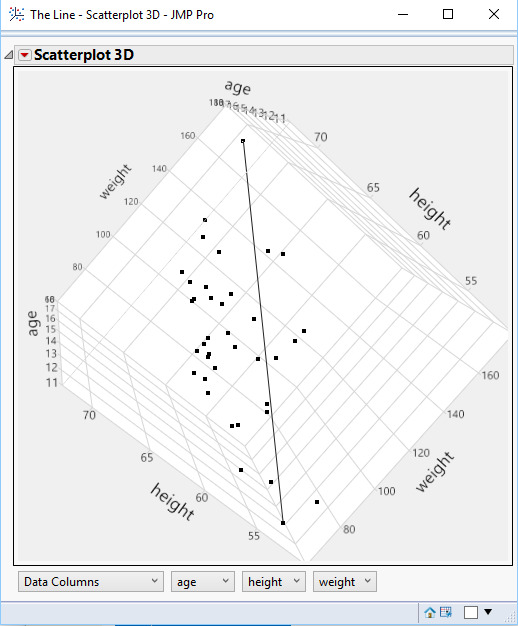
is to create a new column that only has a value for the 2 rows that I want to draw a line between, and then I use
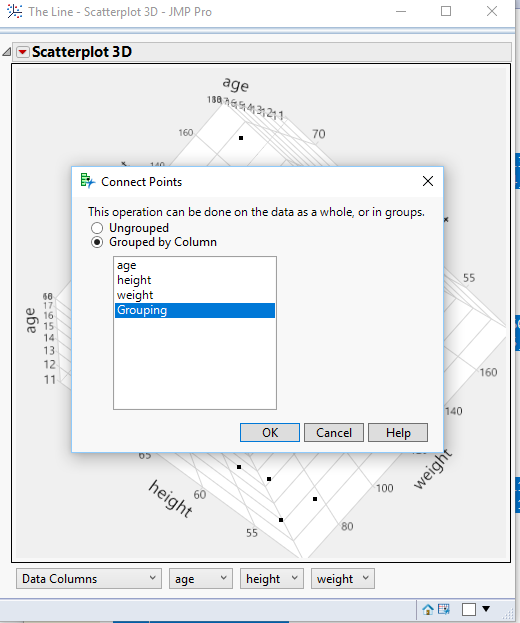
the Connect Points, grouped by the new column, and it draws a line just between those 2 points. Below is a sample script
Names Default To Here( 1 );
dt = New Table( "The Line",
	Add Rows( 40 ),
	New Column( "age",
		Numeric,
		"Ordinal",
		Format( "Fixed Dec", 5, 0 ),
		Set Values(
			[12, 12, 12, 13, 13, 13, 12, 12, 13, 16, 14, 13, 12, 12, 14, 14, 15, 15, 17, 14, 14,
			13, 14, 14, 14, 15, 13, 15, 16, 14, 14, 15, 15, 12, 15, 14, 16, 17, 14, 17]
		)
	),
	New Column( "height",
		Numeric,
		"Continuous",
		Format( "Fixed Dec", 5, 0 ),
		Set Values(
			[51, 52, 55, 56, 58, 59, 59, 60, 60, 60, 61, 61, 61, 61, 62, 62, 62, 62, 62, 63, 63,
			63, 64, 64, 64, 64, 65, 65, 65, 65, 65, 66, 66, 66, 67, 68, 68, 68, 69, 70]
		)
	),
	New Column( "weight",
		Numeric,
		"Continuous",
		Format( "Fixed Dec", 5, 0 ),
		Set Values(
			[79, 64, 74, 67, 95, 79, 95, 84, 112, 115, 81, 107, 123, 128, 85, 91, 92, 104, 116,
			84, 93, 105, 92, 99, 99, 112, 98, 111, 112, 119, 142, 105, 106, 145, 128, 112, 128,
			134, 113, 172]
		)
	),
	New Column( "Grouping",
		Character,
		"Nominal",
		Set Values(
			{"", "Line", "", "", "", "", "", "", "", "", "", "", "", "", "", "", "", "", "", "",
			"", "", "", "", "", "", "", "", "", "", "", "", "", "", "", "", "", "", "", "Line"}
		)
	)
);

dt << Scatterplot 3D(
	Y( :age, :height, :weight ),
	Connect Points( 1, :Grouping ),
	Frame3D(
		Set Grab Handles( 0 ),
		Set Rotation( -22.7391193234154, 33.6106458355737, 86.1083668103014 ),
		Set Marker Quality( 0.3875 ),
		Set Marker Scale( 1.21375 )
	)
);
- Mark as New
- Bookmark
- Subscribe
- Mute
- Subscribe to RSS Feed
- Get Direct Link
- Report Inappropriate Content
Re: Adding a line to a 3-D scatterplot
There really haven't been any JSL upgrades to the 3D Scatterplot Platform, however, I believe the following technique will work, and I believe that it actually was available in 2014. What I do to create the following display
is to create a new column that only has a value for the 2 rows that I want to draw a line between, and then I use
the Connect Points, grouped by the new column, and it draws a line just between those 2 points. Below is a sample script
Names Default To Here( 1 );
dt = New Table( "The Line",
	Add Rows( 40 ),
	New Column( "age",
		Numeric,
		"Ordinal",
		Format( "Fixed Dec", 5, 0 ),
		Set Values(
			[12, 12, 12, 13, 13, 13, 12, 12, 13, 16, 14, 13, 12, 12, 14, 14, 15, 15, 17, 14, 14,
			13, 14, 14, 14, 15, 13, 15, 16, 14, 14, 15, 15, 12, 15, 14, 16, 17, 14, 17]
		)
	),
	New Column( "height",
		Numeric,
		"Continuous",
		Format( "Fixed Dec", 5, 0 ),
		Set Values(
			[51, 52, 55, 56, 58, 59, 59, 60, 60, 60, 61, 61, 61, 61, 62, 62, 62, 62, 62, 63, 63,
			63, 64, 64, 64, 64, 65, 65, 65, 65, 65, 66, 66, 66, 67, 68, 68, 68, 69, 70]
		)
	),
	New Column( "weight",
		Numeric,
		"Continuous",
		Format( "Fixed Dec", 5, 0 ),
		Set Values(
			[79, 64, 74, 67, 95, 79, 95, 84, 112, 115, 81, 107, 123, 128, 85, 91, 92, 104, 116,
			84, 93, 105, 92, 99, 99, 112, 98, 111, 112, 119, 142, 105, 106, 145, 128, 112, 128,
			134, 113, 172]
		)
	),
	New Column( "Grouping",
		Character,
		"Nominal",
		Set Values(
			{"", "Line", "", "", "", "", "", "", "", "", "", "", "", "", "", "", "", "", "", "",
			"", "", "", "", "", "", "", "", "", "", "", "", "", "", "", "", "", "", "", "Line"}
		)
	)
);

dt << Scatterplot 3D(
	Y( :age, :height, :weight ),
	Connect Points( 1, :Grouping ),
	Frame3D(
		Set Grab Handles( 0 ),
		Set Rotation( -22.7391193234154, 33.6106458355737, 86.1083668103014 ),
		Set Marker Quality( 0.3875 ),
		Set Marker Scale( 1.21375 )
	)
);


- Mark as New
- Bookmark
- Subscribe
- Mute
- Subscribe to RSS Feed
- Get Direct Link
- Report Inappropriate Content
Re: Adding a line to a 3-D scatterplot
Edited: this script is now available as an add-in in the file exchange.
Regarding part 3 of your question:
I do not know of an out-of-box way to do this without scripting today but attached is a script that might do what you need without knowing any scripting, provided you have JMP 13 and are using Windows.
You should get an animated gif file, similar to this:
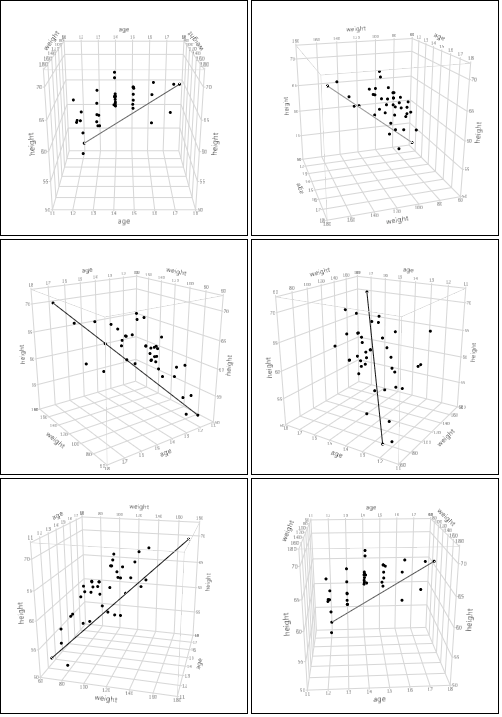
Here is what to do:
- Download and save the attached jsl script
- Create the scatterplot, add lines, resize, change colors, etc.
- Go to the red triangle in Scatterplot 3D and select save script > save script to clipboard.
- Open the jsl script you downloaded from here, at the top click run (make sure nothing is selected).
- Fill in the options on the left, I recommend starting with the defaults except to choose a filename.
- Paste your script from the clipboard into the text box on the right.
- Click go
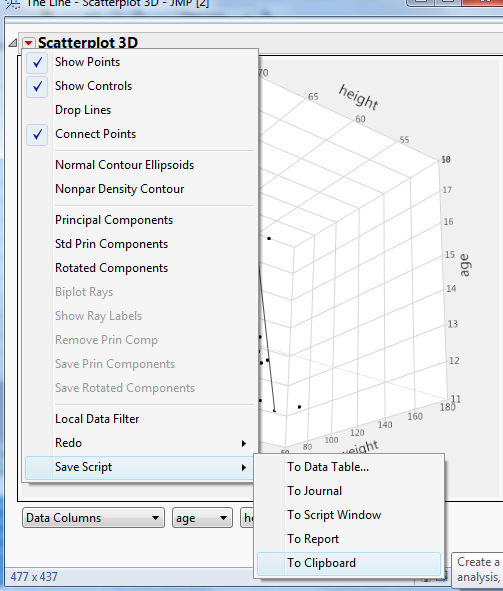
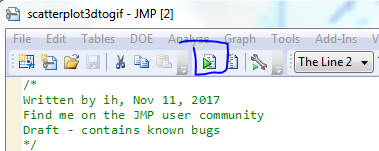
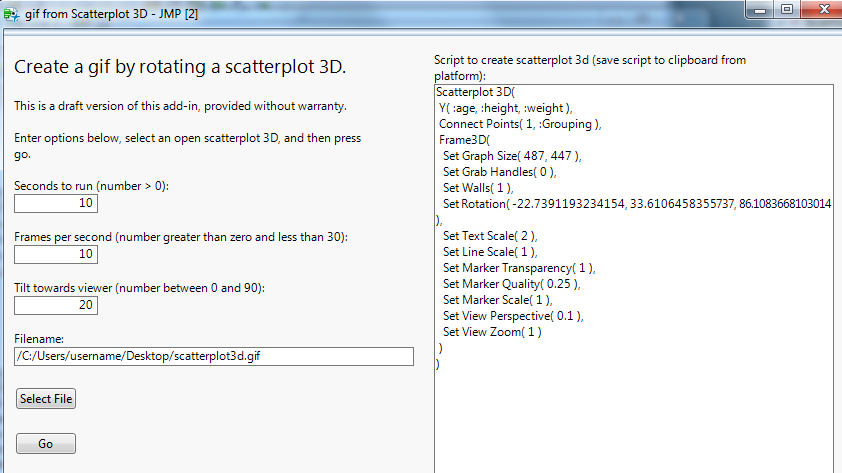
Wait a few seconds or minutes depending on the size of the scatterplot, the amount of data, and the duration/frames per second you selected and eventually it should save a copy of your spinning 3D scatterplot. To change which variable is on top, change the order of the data columns on the bottom of the scatterplot 3D platform before saving the script to the clipboard.
- Mark as New
- Bookmark
- Subscribe
- Mute
- Subscribe to RSS Feed
- Get Direct Link
- Report Inappropriate Content
Re: Adding a line to a 3-D scatterplot
FYI: This script to create animated gif images from rotating scatterplots is now available as an add-in in the file exchange.
Recommended Articles
- © 2025 JMP Statistical Discovery LLC. All Rights Reserved.
- Terms of Use
- Privacy Statement
- Contact Us