cancel
Showing results for 
Show  only  | Search instead for 
Did you mean: 
  • Sign-in to the JMP Community will be unavailable intermittently Dec. 6-7 due to a system update. Thank you for your understanding!
  • We’re retiring the File Exchange at the end of this year. The JMP Marketplace is now your destination for add-ins and extensions.
  • JMP 19 is here! Learn more about the new features.

Discussions

Solve problems, and share tips and tricks with other JMP users.
Choose Language Hide Translation Bar
eliyahu100
Level III

Add a local data filter to a subset table command using code

This is the code I wrote to create a subset table with a local data filter. I get a table with the columns selected but with all rows i.e., the local filter is not working.

Data Table("JoinedData140523") << Subset(
	Selected columns only(0),
	columns(
		:age 2022, :"# of children"n, :Gender, :Nationality, :Religiosity,
		:Education 3, :TOP YN, :TOP NoRelig YN
	),
	Local Data Filter(
		Add Filter(
			columns(:"Sevirity>3"n, :TOP total),
			Where(:"Sevirity>3"n == "1" & :TOP total == "Yes") // Combine the filter conditions
		)
	)
);


Any suggestions?

1 REPLY 1

Re: Add a local data filter to a subset table command using code

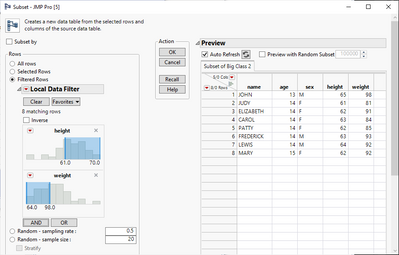
If you compute a subset table in JMP 17 with the Filtered Rows option:

danschikore_0-1684244891459.png

The Log will show you what the script should look like:


// Subset data table
// → Data Table( "Subset of Big Class 2" )
Data Table( "Big Class" ) << Subset(
	Filtered Rows( :height >= 61 & :weight <= 98 ),
	Selected columns only( 0 )
);

Note that the data filter that is included in the interface is only for UI - the JSL only requires the where-clause that the filter generates.  In earlier versions of JMP one way to do something similar would be to select the rows before computing the subset:

Data Table( "Big Class" ) << Select Where(:height >= 61 & :weight <= 98);
Data Table( "Big Class" ) << Subset(
	Selected Rows( 1 ),
	Selected columns only( 0 )
);


Recommended Articles