cancel
Showing results for 
Show  only  | Search instead for 
Did you mean: 
  • JMP will suspend normal business operations for our Winter Holiday beginning on Wednesday, Dec. 24, 2025, at 5:00 p.m. ET (2:00 p.m. ET for JMP Accounts Receivable).
    Regular business hours will resume at 9:00 a.m. EST on Friday, Jan. 2, 2026.
  • We’re retiring the File Exchange at the end of this year. The JMP Marketplace is now your destination for add-ins and extensions.

JMPer Cable

A technical blog for JMP users of all levels, full of how-to's, tips and tricks, and detailed information on JMP features
%3CLINGO-SUB%20id%3D%22lingo-sub-35611%22%20slang%3D%22en-US%22%20mode%3D%22NONE%22%20mode%3D%22NONE%22%20mode%3D%22NONE%22%3EHow%20to%20create%20custom%20error%20bars%20in%20Graph%20Builder%3C%2FLINGO-SUB%3E%3CLINGO-BODY%20id%3D%22lingo-body-35611%22%20slang%3D%22en-US%22%20mode%3D%22NONE%22%20mode%3D%22NONE%22%20mode%3D%22NONE%22%3E%3CP%3EWithin%20Graph%20Builder%2C%20scatterplots%2C%20line%20charts%20and%20bar%20charts%20support%20four%20kinds%20of%20error%20bars%2C%20or%20you%20can%20add%20your%20own%20custom%20error%20bars.%20It's%20not%20a%20well-known%20feature%2C%20so%20I%E2%80%99m%20going%20to%20walk%20through%20the%20steps.%3C%2FP%3E%0A%3CH3%20id%3D%22toc-hId-1156168789%22%20id%3D%22toc-hId-1569175907%22%20id%3D%22toc-hId-1569175907%22%20id%3D%22toc-hId-1569175907%22%20id%3D%22toc-hId-1569175907%22%20id%3D%22toc-hId-1569175907%22%20id%3D%22toc-hId-1569175907%22%20id%3D%22toc-hId-1569175907%22%20id%3D%22toc-hId-1569175907%22%20id%3D%22toc-hId-1569175907%22%20id%3D%22toc-hId-1569175907%22%20id%3D%22toc-hId-1569175907%22%20id%3D%22toc-hId-1569175907%22%3EWhat%20Are%20Error%20Bars%3F%3C%2FH3%3E%0A%3CP%3EError%20bars%20are%20graphical%20elements%20that%20represent%20%3CSPAN%3Euncertainty%3C%2FSPAN%3E.%20There%20are%20many%20measures%20of%20uncertainty%20that%20can%20be%20represented%2C%20each%20with%20its%20own%20interpretation.%20Error%20bars%20can%20be%20useful%20to%20show%3A%3C%2FP%3E%0A%3CUL%3E%0A%3CLI%3EContext%20for%20a%20summary%20statistic.%3C%2FLI%3E%0A%3CLI%3EDegrees%20of%20overlap%20among%20uncertainty%20ranges.%3C%2FLI%3E%0A%3CLI%3EInclusion%20of%20a%20particular%20value%2C%20such%20as%20if%20a%20parameter%20estimate's%20error%20bar%20contains%200.%3C%2FLI%3E%0A%3C%2FUL%3E%0A%3CH3%20id%3D%22toc-hId-2043672470%22%20id%3D%22toc-hId--982981054%22%20id%3D%22toc-hId--982981054%22%20id%3D%22toc-hId--982981054%22%20id%3D%22toc-hId--982981054%22%20id%3D%22toc-hId--982981054%22%20id%3D%22toc-hId--982981054%22%20id%3D%22toc-hId--982981054%22%20id%3D%22toc-hId--982981054%22%20id%3D%22toc-hId--982981054%22%20id%3D%22toc-hId--982981054%22%20id%3D%22toc-hId--982981054%22%20id%3D%22toc-hId--982981054%22%3EBuilt-In%20Error%20Bars%3C%2FH3%3E%0A%3CP%3EWhen%20you%20make%20a%20summary%20chart%20in%20Graph%20Builder%20with%20points%2C%20bars%20or%20lines%2C%20there%20is%20an%20option%20in%20the%20Properties%20area%20for%20adding%20Error%20Bars%20in%20one%20of%20four%20ways%3A%26nbsp%3B%3C%2FP%3E%0A%3CUL%3E%0A%3CLI%3ERange%3C%2FLI%3E%0A%3CLI%3EStandard%20Error%3C%2FLI%3E%0A%3CLI%3EStandard%20Deviation%3C%2FLI%3E%0A%3CLI%3EConfidence%20Interval%3C%2FLI%3E%0A%3C%2FUL%3E%0A%3CP%3EChoosing%20%3CEM%3EConfidence%20Interval%3C%2FEM%3E%20uses%20the%20specified%20confidence%20level%2C%20which%20is%2095%25%20by%20default.%20Since%20there%20are%20many%20types%20of%20error%20bars%2C%20all%20error%20bar%20choices%20add%20a%20note%20to%20the%20bottom%20of%20the%20graph%20to%20indicate%20which%20option%20was%20chosen.%3C%2FP%3E%0A%3CP%3E%26nbsp%3B%3CSPAN%20class%3D%22lia-inline-image-display-wrapper%20lia-image-align-center%22%20image-alt%3D%22ebauto.png%22%20style%3D%22width%3A%20556px%3B%22%3E%3CSPAN%20class%3D%22lia-inline-image-display-wrapper%22%20image-alt%3D%22ebauto.png%22%20style%3D%22width%3A%20556px%3B%22%3E%3CSPAN%20class%3D%22lia-inline-image-display-wrapper%22%20image-alt%3D%22ebauto.png%22%20style%3D%22width%3A%20556px%3B%22%3E%3CSPAN%20class%3D%22lia-inline-image-display-wrapper%22%20image-alt%3D%22ebauto.png%22%20style%3D%22width%3A%20556px%3B%22%3E%3CSPAN%20class%3D%22lia-inline-image-display-wrapper%22%20image-alt%3D%22ebauto.png%22%20style%3D%22width%3A%20556px%3B%22%3E%3CSPAN%20class%3D%22lia-inline-image-display-wrapper%22%20image-alt%3D%22ebauto.png%22%20style%3D%22width%3A%20556px%3B%22%3E%3CSPAN%20class%3D%22lia-inline-image-display-wrapper%22%20image-alt%3D%22ebauto.png%22%20style%3D%22width%3A%20556px%3B%22%3E%3CSPAN%20class%3D%22lia-inline-image-display-wrapper%22%20image-alt%3D%22ebauto.png%22%20style%3D%22width%3A%20556px%3B%22%3E%3CSPAN%20class%3D%22lia-inline-image-display-wrapper%22%20image-alt%3D%22ebauto.png%22%20style%3D%22width%3A%20556px%3B%22%3E%3CSPAN%20class%3D%22lia-inline-image-display-wrapper%22%20image-alt%3D%22ebauto.png%22%20style%3D%22width%3A%20556px%3B%22%3E%3CSPAN%20class%3D%22lia-inline-image-display-wrapper%22%20image-alt%3D%22ebauto.png%22%20style%3D%22width%3A%20556px%3B%22%3E%3CSPAN%20class%3D%22lia-inline-image-display-wrapper%22%20image-alt%3D%22ebauto.png%22%20style%3D%22width%3A%20556px%3B%22%3E%3Cspan%20class%3D%22lia-inline-image-display-wrapper%22%20image-alt%3D%22ebauto.png%22%20style%3D%22width%3A%20556px%3B%22%3E%3Cimg%20src%3D%22https%3A%2F%2Fcommunity.jmp.com%2Ft5%2Fimage%2Fserverpage%2Fimage-id%2F5077iA224E437B4C0EE63%2Fimage-size%2Flarge%3Fv%3Dv2%26amp%3Bpx%3D999%22%20role%3D%22button%22%20title%3D%22ebauto.png%22%20alt%3D%22ebauto.png%22%20%2F%3E%3C%2Fspan%3E%3C%2FSPAN%3E%3C%2FSPAN%3E%3C%2FSPAN%3E%3C%2FSPAN%3E%3C%2FSPAN%3E%3C%2FSPAN%3E%3C%2FSPAN%3E%3C%2FSPAN%3E%3C%2FSPAN%3E%3C%2FSPAN%3E%3C%2FSPAN%3E%3C%2FSPAN%3E%3C%2FP%3E%0A%3CP%3E%26nbsp%3B%3C%2FP%3E%0A%3CH3%20id%3D%22toc-hId--1363791145%22%20id%3D%22toc-hId-759829281%22%20id%3D%22toc-hId-759829281%22%20id%3D%22toc-hId-759829281%22%20id%3D%22toc-hId-759829281%22%20id%3D%22toc-hId-759829281%22%20id%3D%22toc-hId-759829281%22%20id%3D%22toc-hId-759829281%22%20id%3D%22toc-hId-759829281%22%20id%3D%22toc-hId-759829281%22%20id%3D%22toc-hId-759829281%22%20id%3D%22toc-hId-759829281%22%20id%3D%22toc-hId-759829281%22%3ECustom%20Error%20Bars%20on%20Points%3C%2FH3%3E%0A%3CP%3ETo%20make%20a%20dot%20chart%20with%20custom%20error%20bars%2C%20the%20trick%20is%20to%20think%20about%20it%20the%20other%20way%20around%3A%20Make%20a%20custom%20bar%20chart%20with%20points.%20The%20Bar%20element%20in%20Graph%20Builder%20has%20a%20style%20option%20for%20Interval%20bars.%20If%20you%20give%20it%20two%20variables%2C%20it%20draws%20an%20interval.%20If%20you%20give%20it%20three%20variables%2C%20it%20draws%20an%20interval%20with%20the%20first%20two%20and%20a%20circle%20with%20the%20third.%20Just%20what%20we%20want!%3C%2FP%3E%0A%3CP%3E%26nbsp%3B%3C%2FP%3E%0A%3CP%3EI'll%20demonstrate%20with%20this%20data%20table%2C%20which%20might%20have%20been%20produced%20by%20an%20analysis.%20You%20want%20a%20graph%20with%20error%20bars%20covering%20the%20%3CEM%3ELower%2095%25%3C%2FEM%3E%20and%20%3CEM%3EUpper%2095%25%3C%2FEM%3E%20columns%20in%20the%20table.%3C%2FP%3E%0A%3CP%3E%26nbsp%3B%3CSPAN%20class%3D%22lia-inline-image-display-wrapper%20lia-image-align-center%22%20image-alt%3D%22ebtable.png%22%20style%3D%22width%3A%20366px%3B%22%3E%3CSPAN%20class%3D%22lia-inline-image-display-wrapper%22%20image-alt%3D%22ebtable.png%22%20style%3D%22width%3A%20366px%3B%22%3E%3CSPAN%20class%3D%22lia-inline-image-display-wrapper%22%20image-alt%3D%22ebtable.png%22%20style%3D%22width%3A%20366px%3B%22%3E%3CSPAN%20class%3D%22lia-inline-image-display-wrapper%22%20image-alt%3D%22ebtable.png%22%20style%3D%22width%3A%20366px%3B%22%3E%3CSPAN%20class%3D%22lia-inline-image-display-wrapper%22%20image-alt%3D%22ebtable.png%22%20style%3D%22width%3A%20366px%3B%22%3E%3CSPAN%20class%3D%22lia-inline-image-display-wrapper%22%20image-alt%3D%22ebtable.png%22%20style%3D%22width%3A%20366px%3B%22%3E%3CSPAN%20class%3D%22lia-inline-image-display-wrapper%22%20image-alt%3D%22ebtable.png%22%20style%3D%22width%3A%20366px%3B%22%3E%3CSPAN%20class%3D%22lia-inline-image-display-wrapper%22%20image-alt%3D%22ebtable.png%22%20style%3D%22width%3A%20366px%3B%22%3E%3CSPAN%20class%3D%22lia-inline-image-display-wrapper%22%20image-alt%3D%22ebtable.png%22%20style%3D%22width%3A%20366px%3B%22%3E%3CSPAN%20class%3D%22lia-inline-image-display-wrapper%22%20image-alt%3D%22ebtable.png%22%20style%3D%22width%3A%20366px%3B%22%3E%3CSPAN%20class%3D%22lia-inline-image-display-wrapper%22%20image-alt%3D%22ebtable.png%22%20style%3D%22width%3A%20366px%3B%22%3E%3CSPAN%20class%3D%22lia-inline-image-display-wrapper%22%20image-alt%3D%22ebtable.png%22%20style%3D%22width%3A%20366px%3B%22%3E%3Cspan%20class%3D%22lia-inline-image-display-wrapper%22%20image-alt%3D%22ebtable.png%22%20style%3D%22width%3A%20366px%3B%22%3E%3Cimg%20src%3D%22https%3A%2F%2Fcommunity.jmp.com%2Ft5%2Fimage%2Fserverpage%2Fimage-id%2F5082i8BCBBD733F88A5B0%2Fimage-size%2Flarge%3Fv%3Dv2%26amp%3Bpx%3D999%22%20role%3D%22button%22%20title%3D%22ebtable.png%22%20alt%3D%22ebtable.png%22%20%2F%3E%3C%2Fspan%3E%3C%2FSPAN%3E%3C%2FSPAN%3E%3C%2FSPAN%3E%3C%2FSPAN%3E%3C%2FSPAN%3E%3C%2FSPAN%3E%3C%2FSPAN%3E%3C%2FSPAN%3E%3C%2FSPAN%3E%3C%2FSPAN%3E%3C%2FSPAN%3E%3C%2FSPAN%3E%3C%2FP%3E%0A%3CP%3E%26nbsp%3B%3C%2FP%3E%0A%3CP%3EOpen%20Graph%20Builder%20and%20put%20%3CEM%3ETerm%3C%2FEM%3E%20on%20the%20X%20axis%20and%20%3CEM%3ELower%2095%25%3C%2FEM%3E%2C%20%3CEM%3EUpper%2095%25%3C%2FEM%3E%20and%20%3CEM%3EMean%3C%2FEM%3E%20on%20the%20common%20Y%20axis%2C%20in%20that%20order.%3C%2FP%3E%0A%3CP%3E%26nbsp%3B%3CSPAN%20class%3D%22lia-inline-image-display-wrapper%20lia-image-align-center%22%20image-alt%3D%22eb1.png%22%20style%3D%22width%3A%20630px%3B%22%3E%3CSPAN%20class%3D%22lia-inline-image-display-wrapper%22%20image-alt%3D%22eb1.png%22%20style%3D%22width%3A%20857px%3B%22%3E%3CSPAN%20class%3D%22lia-inline-image-display-wrapper%22%20image-alt%3D%22eb1.png%22%20style%3D%22width%3A%20857px%3B%22%3E%3CSPAN%20class%3D%22lia-inline-image-display-wrapper%22%20image-alt%3D%22eb1.png%22%20style%3D%22width%3A%20857px%3B%22%3E%3CSPAN%20class%3D%22lia-inline-image-display-wrapper%22%20image-alt%3D%22eb1.png%22%20style%3D%22width%3A%20857px%3B%22%3E%3CSPAN%20class%3D%22lia-inline-image-display-wrapper%22%20image-alt%3D%22eb1.png%22%20style%3D%22width%3A%20857px%3B%22%3E%3CSPAN%20class%3D%22lia-inline-image-display-wrapper%22%20image-alt%3D%22eb1.png%22%20style%3D%22width%3A%20857px%3B%22%3E%3CSPAN%20class%3D%22lia-inline-image-display-wrapper%22%20image-alt%3D%22eb1.png%22%20style%3D%22width%3A%20857px%3B%22%3E%3CSPAN%20class%3D%22lia-inline-image-display-wrapper%22%20image-alt%3D%22eb1.png%22%20style%3D%22width%3A%20857px%3B%22%3E%3CSPAN%20class%3D%22lia-inline-image-display-wrapper%22%20image-alt%3D%22eb1.png%22%20style%3D%22width%3A%20857px%3B%22%3E%3CSPAN%20class%3D%22lia-inline-image-display-wrapper%22%20image-alt%3D%22eb1.png%22%20style%3D%22width%3A%20857px%3B%22%3E%3CSPAN%20class%3D%22lia-inline-image-display-wrapper%22%20image-alt%3D%22eb1.png%22%20style%3D%22width%3A%20857px%3B%22%3E%3Cspan%20class%3D%22lia-inline-image-display-wrapper%22%20image-alt%3D%22eb1.png%22%20style%3D%22width%3A%20857px%3B%22%3E%3Cimg%20src%3D%22https%3A%2F%2Fcommunity.jmp.com%2Ft5%2Fimage%2Fserverpage%2Fimage-id%2F5079i223C8A38CC2A5AE7%2Fimage-size%2Flarge%3Fv%3Dv2%26amp%3Bpx%3D999%22%20role%3D%22button%22%20title%3D%22eb1.png%22%20alt%3D%22eb1.png%22%20%2F%3E%3C%2Fspan%3E%3C%2FSPAN%3E%3C%2FSPAN%3E%3C%2FSPAN%3E%3C%2FSPAN%3E%3C%2FSPAN%3E%3C%2FSPAN%3E%3C%2FSPAN%3E%3C%2FSPAN%3E%3C%2FSPAN%3E%3C%2FSPAN%3E%3C%2FSPAN%3E%3C%2FSPAN%3E%3C%2FP%3E%0A%3CP%3E%26nbsp%3B%3C%2FP%3E%0A%3CP%3EChoose%20the%20Bar%20element%2C%20and%20the%20default%20style%20is%20%3CEM%3ESide%20by%20Side%3C%2FEM%3E.%3C%2FP%3E%0A%3CP%3E%26nbsp%3B%3CBR%20%2F%3E%3CSPAN%20class%3D%22lia-inline-image-display-wrapper%20lia-image-align-center%22%20image-alt%3D%22eb2.png%22%20style%3D%22width%3A%20630px%3B%22%3E%3CSPAN%20class%3D%22lia-inline-image-display-wrapper%22%20image-alt%3D%22eb2.png%22%20style%3D%22width%3A%20857px%3B%22%3E%3CSPAN%20class%3D%22lia-inline-image-display-wrapper%22%20image-alt%3D%22eb2.png%22%20style%3D%22width%3A%20857px%3B%22%3E%3CSPAN%20class%3D%22lia-inline-image-display-wrapper%22%20image-alt%3D%22eb2.png%22%20style%3D%22width%3A%20857px%3B%22%3E%3CSPAN%20class%3D%22lia-inline-image-display-wrapper%22%20image-alt%3D%22eb2.png%22%20style%3D%22width%3A%20857px%3B%22%3E%3CSPAN%20class%3D%22lia-inline-image-display-wrapper%22%20image-alt%3D%22eb2.png%22%20style%3D%22width%3A%20857px%3B%22%3E%3CSPAN%20class%3D%22lia-inline-image-display-wrapper%22%20image-alt%3D%22eb2.png%22%20style%3D%22width%3A%20857px%3B%22%3E%3CSPAN%20class%3D%22lia-inline-image-display-wrapper%22%20image-alt%3D%22eb2.png%22%20style%3D%22width%3A%20857px%3B%22%3E%3CSPAN%20class%3D%22lia-inline-image-display-wrapper%22%20image-alt%3D%22eb2.png%22%20style%3D%22width%3A%20857px%3B%22%3E%3CSPAN%20class%3D%22lia-inline-image-display-wrapper%22%20image-alt%3D%22eb2.png%22%20style%3D%22width%3A%20857px%3B%22%3E%3CSPAN%20class%3D%22lia-inline-image-display-wrapper%22%20image-alt%3D%22eb2.png%22%20style%3D%22width%3A%20857px%3B%22%3E%3CSPAN%20class%3D%22lia-inline-image-display-wrapper%22%20image-alt%3D%22eb2.png%22%20style%3D%22width%3A%20857px%3B%22%3E%3Cspan%20class%3D%22lia-inline-image-display-wrapper%22%20image-alt%3D%22eb2.png%22%20style%3D%22width%3A%20857px%3B%22%3E%3Cimg%20src%3D%22https%3A%2F%2Fcommunity.jmp.com%2Ft5%2Fimage%2Fserverpage%2Fimage-id%2F5081i50BF0EA7DD29D199%2Fimage-size%2Flarge%3Fv%3Dv2%26amp%3Bpx%3D999%22%20role%3D%22button%22%20title%3D%22eb2.png%22%20alt%3D%22eb2.png%22%20%2F%3E%3C%2Fspan%3E%3C%2FSPAN%3E%3C%2FSPAN%3E%3C%2FSPAN%3E%3C%2FSPAN%3E%3C%2FSPAN%3E%3C%2FSPAN%3E%3C%2FSPAN%3E%3C%2FSPAN%3E%3C%2FSPAN%3E%3C%2FSPAN%3E%3C%2FSPAN%3E%3C%2FSPAN%3E%3C%2FP%3E%0A%3CP%3E%26nbsp%3B%3C%2FP%3E%0A%3CP%3EIn%20the%20Properties%20panel%2C%20change%20the%20Style%20option%20to%20%3CEM%3EInterval%3C%2FEM%3E.%26nbsp%3B%3C%2FP%3E%0A%3CP%3E%26nbsp%3B%3CSPAN%20class%3D%22lia-inline-image-display-wrapper%20lia-image-align-center%22%20image-alt%3D%22eb3.png%22%20style%3D%22width%3A%20690px%3B%22%3E%3CSPAN%20class%3D%22lia-inline-image-display-wrapper%22%20image-alt%3D%22eb3.png%22%20style%3D%22width%3A%20939px%3B%22%3E%3CSPAN%20class%3D%22lia-inline-image-display-wrapper%22%20image-alt%3D%22eb3.png%22%20style%3D%22width%3A%20939px%3B%22%3E%3CSPAN%20class%3D%22lia-inline-image-display-wrapper%22%20image-alt%3D%22eb3.png%22%20style%3D%22width%3A%20939px%3B%22%3E%3CSPAN%20class%3D%22lia-inline-image-display-wrapper%22%20image-alt%3D%22eb3.png%22%20style%3D%22width%3A%20939px%3B%22%3E%3CSPAN%20class%3D%22lia-inline-image-display-wrapper%22%20image-alt%3D%22eb3.png%22%20style%3D%22width%3A%20939px%3B%22%3E%3CSPAN%20class%3D%22lia-inline-image-display-wrapper%22%20image-alt%3D%22eb3.png%22%20style%3D%22width%3A%20939px%3B%22%3E%3CSPAN%20class%3D%22lia-inline-image-display-wrapper%22%20image-alt%3D%22eb3.png%22%20style%3D%22width%3A%20939px%3B%22%3E%3CSPAN%20class%3D%22lia-inline-image-display-wrapper%22%20image-alt%3D%22eb3.png%22%20style%3D%22width%3A%20939px%3B%22%3E%3CSPAN%20class%3D%22lia-inline-image-display-wrapper%22%20image-alt%3D%22eb3.png%22%20style%3D%22width%3A%20939px%3B%22%3E%3CSPAN%20class%3D%22lia-inline-image-display-wrapper%22%20image-alt%3D%22eb3.png%22%20style%3D%22width%3A%20939px%3B%22%3E%3CSPAN%20class%3D%22lia-inline-image-display-wrapper%22%20image-alt%3D%22eb3.png%22%20style%3D%22width%3A%20939px%3B%22%3E%3Cspan%20class%3D%22lia-inline-image-display-wrapper%22%20image-alt%3D%22eb3.png%22%20style%3D%22width%3A%20939px%3B%22%3E%3Cimg%20src%3D%22https%3A%2F%2Fcommunity.jmp.com%2Ft5%2Fimage%2Fserverpage%2Fimage-id%2F5080i3106B4113BBDAAB5%2Fimage-size%2Flarge%3Fv%3Dv2%26amp%3Bpx%3D999%22%20role%3D%22button%22%20title%3D%22eb3.png%22%20alt%3D%22eb3.png%22%20%2F%3E%3C%2Fspan%3E%3C%2FSPAN%3E%3C%2FSPAN%3E%3C%2FSPAN%3E%3C%2FSPAN%3E%3C%2FSPAN%3E%3C%2FSPAN%3E%3C%2FSPAN%3E%3C%2FSPAN%3E%3C%2FSPAN%3E%3C%2FSPAN%3E%3C%2FSPAN%3E%3C%2FSPAN%3E%3C%2FP%3E%0A%3CP%3E%26nbsp%3B%3C%2FP%3E%0A%3CP%3EThen%20click%20%3CEM%3EDone%2C%3C%2FEM%3E%20and%20customize%20the%20labels%20and%20styling%20as%20desired.%3C%2FP%3E%0A%3CP%3E%26nbsp%3B%3C%2FP%3E%0A%3CP%3E%3CSPAN%20class%3D%22lia-inline-image-display-wrapper%20lia-image-align-center%22%20image-alt%3D%22eb4.png%22%20style%3D%22width%3A%20590px%3B%22%3E%3CSPAN%20class%3D%22lia-inline-image-display-wrapper%22%20image-alt%3D%22eb4.png%22%20style%3D%22width%3A%20590px%3B%22%3E%3CSPAN%20class%3D%22lia-inline-image-display-wrapper%22%20image-alt%3D%22eb4.png%22%20style%3D%22width%3A%20590px%3B%22%3E%3CSPAN%20class%3D%22lia-inline-image-display-wrapper%22%20image-alt%3D%22eb4.png%22%20style%3D%22width%3A%20590px%3B%22%3E%3CSPAN%20class%3D%22lia-inline-image-display-wrapper%22%20image-alt%3D%22eb4.png%22%20style%3D%22width%3A%20590px%3B%22%3E%3CSPAN%20class%3D%22lia-inline-image-display-wrapper%22%20image-alt%3D%22eb4.png%22%20style%3D%22width%3A%20590px%3B%22%3E%3CSPAN%20class%3D%22lia-inline-image-display-wrapper%22%20image-alt%3D%22eb4.png%22%20style%3D%22width%3A%20590px%3B%22%3E%3CSPAN%20class%3D%22lia-inline-image-display-wrapper%22%20image-alt%3D%22eb4.png%22%20style%3D%22width%3A%20590px%3B%22%3E%3CSPAN%20class%3D%22lia-inline-image-display-wrapper%22%20image-alt%3D%22eb4.png%22%20style%3D%22width%3A%20590px%3B%22%3E%3CSPAN%20class%3D%22lia-inline-image-display-wrapper%22%20image-alt%3D%22eb4.png%22%20style%3D%22width%3A%20590px%3B%22%3E%3CSPAN%20class%3D%22lia-inline-image-display-wrapper%22%20image-alt%3D%22eb4.png%22%20style%3D%22width%3A%20590px%3B%22%3E%3CSPAN%20class%3D%22lia-inline-image-display-wrapper%22%20image-alt%3D%22eb4.png%22%20style%3D%22width%3A%20590px%3B%22%3E%3Cspan%20class%3D%22lia-inline-image-display-wrapper%22%20image-alt%3D%22eb4.png%22%20style%3D%22width%3A%20590px%3B%22%3E%3Cimg%20src%3D%22https%3A%2F%2Fcommunity.jmp.com%2Ft5%2Fimage%2Fserverpage%2Fimage-id%2F5078iF4A260B7104D759C%2Fimage-size%2Flarge%3Fv%3Dv2%26amp%3Bpx%3D999%22%20role%3D%22button%22%20title%3D%22eb4.png%22%20alt%3D%22eb4.png%22%20%2F%3E%3C%2Fspan%3E%3C%2FSPAN%3E%3C%2FSPAN%3E%3C%2FSPAN%3E%3C%2FSPAN%3E%3C%2FSPAN%3E%3C%2FSPAN%3E%3C%2FSPAN%3E%3C%2FSPAN%3E%3C%2FSPAN%3E%3C%2FSPAN%3E%3C%2FSPAN%3E%3C%2FSPAN%3E%3C%2FP%3E%0A%3CP%3E%26nbsp%3B%3C%2FP%3E%0A%3CH3%20id%3D%22toc-hId--476287464%22%20id%3D%22toc-hId--1792327680%22%20id%3D%22toc-hId--1792327680%22%20id%3D%22toc-hId--1792327680%22%20id%3D%22toc-hId--1792327680%22%20id%3D%22toc-hId--1792327680%22%20id%3D%22toc-hId--1792327680%22%20id%3D%22toc-hId--1792327680%22%20id%3D%22toc-hId--1792327680%22%20id%3D%22toc-hId--1792327680%22%20id%3D%22toc-hId--1792327680%22%20id%3D%22toc-hId--1792327680%22%20id%3D%22toc-hId--1792327680%22%3ECustom%20Error%20Bars%20on%20Lines%20or%20Bars%3C%2FH3%3E%0A%3CP%3EThe%20above%20technique%20is%20great%20for%20custom%20error%20bars%20with%20points%2C%20but%20what%20about%20with%20lines%20and%20bars%3F%20For%20those%2C%20you%20need%20to%20know%20two%20more%20things%20about%20Graph%20Builder%3A%3C%2FP%3E%0A%3COL%3E%0A%3CLI%3EMultiple%20elements%20can%20be%20overlaid%20in%20the%20same%20graph.%3C%2FLI%3E%0A%3CLI%3EYou%20can%20control%20which%20elements%20use%20which%20variables.%3C%2FLI%3E%0A%3C%2FOL%3E%0A%3CP%3EWith%20that%20knowledge%2C%20the%20idea%20is%20to%20make%20a%20graph%20with%20both%20a%20Line%20element%20for%20the%20middle%20values%20and%20a%20Bar%20element%20in%20%3CEM%3EInterval%3C%2FEM%3E%20mode%20for%20the%20interval%20bars.%3C%2FP%3E%0A%3CP%3E%26nbsp%3B%3C%2FP%3E%0A%3CP%3EThe%20process%20starts%20from%20where%20we%20left%20off%20above.%20Next%2C%20click%20on%20the%20Line%20element%20and%20drag%20it%20into%20the%20graph%20to%20add%20lines%20without%20removing%20the%20interval%20bars.%20At%20this%20point%2C%20the%20Line%20element%20is%20showing%20all%20three%20variables%2C%20and%20so%20is%20the%20Bar%20element%2C%20which%20is%20only%20a%20starting%20point.%3C%2FP%3E%0A%3CP%3E%3CBR%20%2F%3E%3CSPAN%20class%3D%22lia-inline-image-display-wrapper%20lia-image-align-center%22%20image-alt%3D%22eb5.png%22%20style%3D%22width%3A%20690px%3B%22%3E%3CSPAN%20class%3D%22lia-inline-image-display-wrapper%22%20image-alt%3D%22eb5.png%22%20style%3D%22width%3A%20939px%3B%22%3E%3CSPAN%20class%3D%22lia-inline-image-display-wrapper%22%20image-alt%3D%22eb5.png%22%20style%3D%22width%3A%20939px%3B%22%3E%3CSPAN%20class%3D%22lia-inline-image-display-wrapper%22%20image-alt%3D%22eb5.png%22%20style%3D%22width%3A%20939px%3B%22%3E%3CSPAN%20class%3D%22lia-inline-image-display-wrapper%22%20image-alt%3D%22eb5.png%22%20style%3D%22width%3A%20939px%3B%22%3E%3CSPAN%20class%3D%22lia-inline-image-display-wrapper%22%20image-alt%3D%22eb5.png%22%20style%3D%22width%3A%20939px%3B%22%3E%3CSPAN%20class%3D%22lia-inline-image-display-wrapper%22%20image-alt%3D%22eb5.png%22%20style%3D%22width%3A%20939px%3B%22%3E%3CSPAN%20class%3D%22lia-inline-image-display-wrapper%22%20image-alt%3D%22eb5.png%22%20style%3D%22width%3A%20939px%3B%22%3E%3CSPAN%20class%3D%22lia-inline-image-display-wrapper%22%20image-alt%3D%22eb5.png%22%20style%3D%22width%3A%20939px%3B%22%3E%3CSPAN%20class%3D%22lia-inline-image-display-wrapper%22%20image-alt%3D%22eb5.png%22%20style%3D%22width%3A%20939px%3B%22%3E%3CSPAN%20class%3D%22lia-inline-image-display-wrapper%22%20image-alt%3D%22eb5.png%22%20style%3D%22width%3A%20939px%3B%22%3E%3CSPAN%20class%3D%22lia-inline-image-display-wrapper%22%20image-alt%3D%22eb5.png%22%20style%3D%22width%3A%20939px%3B%22%3E%3Cspan%20class%3D%22lia-inline-image-display-wrapper%22%20image-alt%3D%22eb5.png%22%20style%3D%22width%3A%20939px%3B%22%3E%3Cimg%20src%3D%22https%3A%2F%2Fcommunity.jmp.com%2Ft5%2Fimage%2Fserverpage%2Fimage-id%2F5087i225151CCBAD0965D%2Fimage-size%2Flarge%3Fv%3Dv2%26amp%3Bpx%3D999%22%20role%3D%22button%22%20title%3D%22eb5.png%22%20alt%3D%22eb5.png%22%20%2F%3E%3C%2Fspan%3E%3C%2FSPAN%3E%3C%2FSPAN%3E%3C%2FSPAN%3E%3C%2FSPAN%3E%3C%2FSPAN%3E%3C%2FSPAN%3E%3C%2FSPAN%3E%3C%2FSPAN%3E%3C%2FSPAN%3E%3C%2FSPAN%3E%3C%2FSPAN%3E%3C%2FSPAN%3E%3C%2FP%3E%0A%3CP%3E%26nbsp%3B%3C%2FP%3E%0A%3CP%3EGo%20into%20the%20Variables%20section%20of%20the%20Line%20Properties%20and%20uncheck%20the%20%3CEM%3ELower%2095%25%3C%2FEM%3E%20and%20%3CEM%3EUpper%2095%25%3C%2FEM%3E%20variables.%20Now%20the%20line%20only%20connects%20the%20middle%20values.%3C%2FP%3E%0A%3CP%3E%26nbsp%3B%3CSPAN%20class%3D%22lia-inline-image-display-wrapper%20lia-image-align-center%22%20image-alt%3D%22eb6.png%22%20style%3D%22width%3A%20690px%3B%22%3E%3CSPAN%20class%3D%22lia-inline-image-display-wrapper%22%20image-alt%3D%22eb6.png%22%20style%3D%22width%3A%20939px%3B%22%3E%3CSPAN%20class%3D%22lia-inline-image-display-wrapper%22%20image-alt%3D%22eb6.png%22%20style%3D%22width%3A%20939px%3B%22%3E%3CSPAN%20class%3D%22lia-inline-image-display-wrapper%22%20image-alt%3D%22eb6.png%22%20style%3D%22width%3A%20939px%3B%22%3E%3CSPAN%20class%3D%22lia-inline-image-display-wrapper%22%20image-alt%3D%22eb6.png%22%20style%3D%22width%3A%20939px%3B%22%3E%3CSPAN%20class%3D%22lia-inline-image-display-wrapper%22%20image-alt%3D%22eb6.png%22%20style%3D%22width%3A%20939px%3B%22%3E%3CSPAN%20class%3D%22lia-inline-image-display-wrapper%22%20image-alt%3D%22eb6.png%22%20style%3D%22width%3A%20939px%3B%22%3E%3CSPAN%20class%3D%22lia-inline-image-display-wrapper%22%20image-alt%3D%22eb6.png%22%20style%3D%22width%3A%20939px%3B%22%3E%3CSPAN%20class%3D%22lia-inline-image-display-wrapper%22%20image-alt%3D%22eb6.png%22%20style%3D%22width%3A%20939px%3B%22%3E%3CSPAN%20class%3D%22lia-inline-image-display-wrapper%22%20image-alt%3D%22eb6.png%22%20style%3D%22width%3A%20939px%3B%22%3E%3CSPAN%20class%3D%22lia-inline-image-display-wrapper%22%20image-alt%3D%22eb6.png%22%20style%3D%22width%3A%20939px%3B%22%3E%3CSPAN%20class%3D%22lia-inline-image-display-wrapper%22%20image-alt%3D%22eb6.png%22%20style%3D%22width%3A%20939px%3B%22%3E%3Cspan%20class%3D%22lia-inline-image-display-wrapper%22%20image-alt%3D%22eb6.png%22%20style%3D%22width%3A%20939px%3B%22%3E%3Cimg%20src%3D%22https%3A%2F%2Fcommunity.jmp.com%2Ft5%2Fimage%2Fserverpage%2Fimage-id%2F5086iA46BF5F039BF8217%2Fimage-size%2Flarge%3Fv%3Dv2%26amp%3Bpx%3D999%22%20role%3D%22button%22%20title%3D%22eb6.png%22%20alt%3D%22eb6.png%22%20%2F%3E%3C%2Fspan%3E%3C%2FSPAN%3E%3C%2FSPAN%3E%3C%2FSPAN%3E%3C%2FSPAN%3E%3C%2FSPAN%3E%3C%2FSPAN%3E%3C%2FSPAN%3E%3C%2FSPAN%3E%3C%2FSPAN%3E%3C%2FSPAN%3E%3C%2FSPAN%3E%3C%2FSPAN%3E%3C%2FP%3E%0A%3CP%3E%26nbsp%3B%3C%2FP%3E%0A%3CP%3EGo%20into%20the%20Variables%20section%20of%20the%20Bar%20Properties%20to%20uncheck%20the%20%3CEM%3EMean%3C%2FEM%3E%20variable%20to%20remove%20the%20circle.%3C%2FP%3E%0A%3CP%3E%26nbsp%3B%3CSPAN%20class%3D%22lia-inline-image-display-wrapper%20lia-image-align-center%22%20image-alt%3D%22eb7.png%22%20style%3D%22width%3A%20690px%3B%22%3E%3CSPAN%20class%3D%22lia-inline-image-display-wrapper%22%20image-alt%3D%22eb7.png%22%20style%3D%22width%3A%20939px%3B%22%3E%3CSPAN%20class%3D%22lia-inline-image-display-wrapper%22%20image-alt%3D%22eb7.png%22%20style%3D%22width%3A%20939px%3B%22%3E%3CSPAN%20class%3D%22lia-inline-image-display-wrapper%22%20image-alt%3D%22eb7.png%22%20style%3D%22width%3A%20939px%3B%22%3E%3CSPAN%20class%3D%22lia-inline-image-display-wrapper%22%20image-alt%3D%22eb7.png%22%20style%3D%22width%3A%20939px%3B%22%3E%3CSPAN%20class%3D%22lia-inline-image-display-wrapper%22%20image-alt%3D%22eb7.png%22%20style%3D%22width%3A%20939px%3B%22%3E%3CSPAN%20class%3D%22lia-inline-image-display-wrapper%22%20image-alt%3D%22eb7.png%22%20style%3D%22width%3A%20939px%3B%22%3E%3CSPAN%20class%3D%22lia-inline-image-display-wrapper%22%20image-alt%3D%22eb7.png%22%20style%3D%22width%3A%20939px%3B%22%3E%3CSPAN%20class%3D%22lia-inline-image-display-wrapper%22%20image-alt%3D%22eb7.png%22%20style%3D%22width%3A%20939px%3B%22%3E%3CSPAN%20class%3D%22lia-inline-image-display-wrapper%22%20image-alt%3D%22eb7.png%22%20style%3D%22width%3A%20939px%3B%22%3E%3CSPAN%20class%3D%22lia-inline-image-display-wrapper%22%20image-alt%3D%22eb7.png%22%20style%3D%22width%3A%20939px%3B%22%3E%3CSPAN%20class%3D%22lia-inline-image-display-wrapper%22%20image-alt%3D%22eb7.png%22%20style%3D%22width%3A%20939px%3B%22%3E%3Cspan%20class%3D%22lia-inline-image-display-wrapper%22%20image-alt%3D%22eb7.png%22%20style%3D%22width%3A%20939px%3B%22%3E%3Cimg%20src%3D%22https%3A%2F%2Fcommunity.jmp.com%2Ft5%2Fimage%2Fserverpage%2Fimage-id%2F5085i2817D7DFC99A2FAC%2Fimage-size%2Flarge%3Fv%3Dv2%26amp%3Bpx%3D999%22%20role%3D%22button%22%20title%3D%22eb7.png%22%20alt%3D%22eb7.png%22%20%2F%3E%3C%2Fspan%3E%3C%2FSPAN%3E%3C%2FSPAN%3E%3C%2FSPAN%3E%3C%2FSPAN%3E%3C%2FSPAN%3E%3C%2FSPAN%3E%3C%2FSPAN%3E%3C%2FSPAN%3E%3C%2FSPAN%3E%3C%2FSPAN%3E%3C%2FSPAN%3E%3C%2FSPAN%3E%3C%2FP%3E%0A%3CP%3E%26nbsp%3B%3C%2FP%3E%0A%3CP%3EClick%20%3CEM%3EDone%3C%2FEM%3E%2C%20and%26nbsp%3Bmake%20styling%20changes%20in%20the%20legend%20(right-click%20or%20use%20the%20Legend%20Settings%20dialog)%20for%20color%20and%20line%20thickness.%3C%2FP%3E%0A%3CP%3E%26nbsp%3B%3CBR%20%2F%3E%3CSPAN%20class%3D%22lia-inline-image-display-wrapper%20lia-image-align-center%22%20image-alt%3D%22eb0.png%22%20style%3D%22width%3A%20594px%3B%22%3E%3CSPAN%20class%3D%22lia-inline-image-display-wrapper%22%20image-alt%3D%22eb0.png%22%20style%3D%22width%3A%20594px%3B%22%3E%3CSPAN%20class%3D%22lia-inline-image-display-wrapper%22%20image-alt%3D%22eb0.png%22%20style%3D%22width%3A%20594px%3B%22%3E%3CSPAN%20class%3D%22lia-inline-image-display-wrapper%22%20image-alt%3D%22eb0.png%22%20style%3D%22width%3A%20594px%3B%22%3E%3CSPAN%20class%3D%22lia-inline-image-display-wrapper%22%20image-alt%3D%22eb0.png%22%20style%3D%22width%3A%20594px%3B%22%3E%3CSPAN%20class%3D%22lia-inline-image-display-wrapper%22%20image-alt%3D%22eb0.png%22%20style%3D%22width%3A%20594px%3B%22%3E%3CSPAN%20class%3D%22lia-inline-image-display-wrapper%22%20image-alt%3D%22eb0.png%22%20style%3D%22width%3A%20594px%3B%22%3E%3CSPAN%20class%3D%22lia-inline-image-display-wrapper%22%20image-alt%3D%22eb0.png%22%20style%3D%22width%3A%20594px%3B%22%3E%3CSPAN%20class%3D%22lia-inline-image-display-wrapper%22%20image-alt%3D%22eb0.png%22%20style%3D%22width%3A%20594px%3B%22%3E%3CSPAN%20class%3D%22lia-inline-image-display-wrapper%22%20image-alt%3D%22eb0.png%22%20style%3D%22width%3A%20594px%3B%22%3E%3CSPAN%20class%3D%22lia-inline-image-display-wrapper%22%20image-alt%3D%22eb0.png%22%20style%3D%22width%3A%20594px%3B%22%3E%3CSPAN%20class%3D%22lia-inline-image-display-wrapper%22%20image-alt%3D%22eb0.png%22%20style%3D%22width%3A%20594px%3B%22%3E%3Cspan%20class%3D%22lia-inline-image-display-wrapper%22%20image-alt%3D%22eb0.png%22%20style%3D%22width%3A%20594px%3B%22%3E%3Cimg%20src%3D%22https%3A%2F%2Fcommunity.jmp.com%2Ft5%2Fimage%2Fserverpage%2Fimage-id%2F5083i1E2DDAFE1A8F4234%2Fimage-size%2Flarge%3Fv%3Dv2%26amp%3Bpx%3D999%22%20role%3D%22button%22%20title%3D%22eb0.png%22%20alt%3D%22eb0.png%22%20%2F%3E%3C%2Fspan%3E%3C%2FSPAN%3E%3C%2FSPAN%3E%3C%2FSPAN%3E%3C%2FSPAN%3E%3C%2FSPAN%3E%3C%2FSPAN%3E%3C%2FSPAN%3E%3C%2FSPAN%3E%3C%2FSPAN%3E%3C%2FSPAN%3E%3C%2FSPAN%3E%3C%2FSPAN%3E%3C%2FP%3E%0A%3CP%3E%26nbsp%3B%3C%2FP%3E%0A%3CP%3E%26nbsp%3BUse%20the%20same%20sequence%20of%20steps%20for%20bars%2C%20dragging%20in%20the%20Bar%20element%20instead%20of%20the%20Line%20element%20at%20the%20start.%3C%2FP%3E%0A%3CP%3E%26nbsp%3B%3C%2FP%3E%0A%3CP%3E%3CSPAN%20class%3D%22lia-inline-image-display-wrapper%20lia-image-align-center%22%20image-alt%3D%22eb8.png%22%20style%3D%22width%3A%20593px%3B%22%3E%3CSPAN%20class%3D%22lia-inline-image-display-wrapper%22%20image-alt%3D%22eb8.png%22%20style%3D%22width%3A%20593px%3B%22%3E%3CSPAN%20class%3D%22lia-inline-image-display-wrapper%22%20image-alt%3D%22eb8.png%22%20style%3D%22width%3A%20593px%3B%22%3E%3CSPAN%20class%3D%22lia-inline-image-display-wrapper%22%20image-alt%3D%22eb8.png%22%20style%3D%22width%3A%20593px%3B%22%3E%3CSPAN%20class%3D%22lia-inline-image-display-wrapper%22%20image-alt%3D%22eb8.png%22%20style%3D%22width%3A%20593px%3B%22%3E%3CSPAN%20class%3D%22lia-inline-image-display-wrapper%22%20image-alt%3D%22eb8.png%22%20style%3D%22width%3A%20593px%3B%22%3E%3CSPAN%20class%3D%22lia-inline-image-display-wrapper%22%20image-alt%3D%22eb8.png%22%20style%3D%22width%3A%20593px%3B%22%3E%3CSPAN%20class%3D%22lia-inline-image-display-wrapper%22%20image-alt%3D%22eb8.png%22%20style%3D%22width%3A%20593px%3B%22%3E%3CSPAN%20class%3D%22lia-inline-image-display-wrapper%22%20image-alt%3D%22eb8.png%22%20style%3D%22width%3A%20593px%3B%22%3E%3CSPAN%20class%3D%22lia-inline-image-display-wrapper%22%20image-alt%3D%22eb8.png%22%20style%3D%22width%3A%20593px%3B%22%3E%3CSPAN%20class%3D%22lia-inline-image-display-wrapper%22%20image-alt%3D%22eb8.png%22%20style%3D%22width%3A%20593px%3B%22%3E%3CSPAN%20class%3D%22lia-inline-image-display-wrapper%22%20image-alt%3D%22eb8.png%22%20style%3D%22width%3A%20593px%3B%22%3E%3Cspan%20class%3D%22lia-inline-image-display-wrapper%22%20image-alt%3D%22eb8.png%22%20style%3D%22width%3A%20593px%3B%22%3E%3Cimg%20src%3D%22https%3A%2F%2Fcommunity.jmp.com%2Ft5%2Fimage%2Fserverpage%2Fimage-id%2F5084i495C2036368596B4%2Fimage-size%2Flarge%3Fv%3Dv2%26amp%3Bpx%3D999%22%20role%3D%22button%22%20title%3D%22eb8.png%22%20alt%3D%22eb8.png%22%20%2F%3E%3C%2Fspan%3E%3C%2FSPAN%3E%3C%2FSPAN%3E%3C%2FSPAN%3E%3C%2FSPAN%3E%3C%2FSPAN%3E%3C%2FSPAN%3E%3C%2FSPAN%3E%3C%2FSPAN%3E%3C%2FSPAN%3E%3C%2FSPAN%3E%3C%2FSPAN%3E%3C%2FSPAN%3E%26nbsp%3B%3C%2FP%3E%0A%3CP%3E%26nbsp%3BSo%2C%20there%20you%20have%20it!%20Now%20you%20can%20make%20your%20error%20bars%20look%20just%20the%20way%20you%20want.%3C%2FP%3E%3C%2FLINGO-BODY%3E%3CLINGO-TEASER%20id%3D%22lingo-teaser-35611%22%20slang%3D%22en-US%22%3E%3CP%3EWithin%20Graph%20Builder%2C%20scatterplots%2C%20line%20charts%20and%20bar%20charts%20support%20four%20kinds%20of%20error%20bars%2C%20or%20you%20can%20add%20your%20own%20custom%20error%20bars.%20It's%20not%20a%20well-known%20feature%2C%20so%20I%E2%80%99m%20going%20to%20walk%20through%20the%20steps.%3CSPAN%20class%3D%22lia-inline-image-display-wrapper%20lia-image-align-center%22%20image-alt%3D%22error_bars_GB.png%22%20style%3D%22width%3A%20593px%3B%22%3E%3CSPAN%20class%3D%22lia-inline-image-display-wrapper%22%20image-alt%3D%22error_bars_GB.png%22%20style%3D%22width%3A%20593px%3B%22%3E%3CSPAN%20class%3D%22lia-inline-image-display-wrapper%22%20image-alt%3D%22error_bars_GB.png%22%20style%3D%22width%3A%20593px%3B%22%3E%3CSPAN%20class%3D%22lia-inline-image-display-wrapper%22%20image-alt%3D%22error_bars_GB.png%22%20style%3D%22width%3A%20593px%3B%22%3E%3CSPAN%20class%3D%22lia-inline-image-display-wrapper%22%20image-alt%3D%22error_bars_GB.png%22%20style%3D%22width%3A%20593px%3B%22%3E%3CSPAN%20class%3D%22lia-inline-image-display-wrapper%22%20image-alt%3D%22error_bars_GB.png%22%20style%3D%22width%3A%20593px%3B%22%3E%3CSPAN%20class%3D%22lia-inline-image-display-wrapper%22%20image-alt%3D%22error_bars_GB.png%22%20style%3D%22width%3A%20593px%3B%22%3E%3CSPAN%20class%3D%22lia-inline-image-display-wrapper%22%20image-alt%3D%22error_bars_GB.png%22%20style%3D%22width%3A%20593px%3B%22%3E%3CSPAN%20class%3D%22lia-inline-image-display-wrapper%22%20image-alt%3D%22error_bars_GB.png%22%20style%3D%22width%3A%20593px%3B%22%3E%3CSPAN%20class%3D%22lia-inline-image-display-wrapper%22%20image-alt%3D%22error_bars_GB.png%22%20style%3D%22width%3A%20593px%3B%22%3E%3CSPAN%20class%3D%22lia-inline-image-display-wrapper%22%20image-alt%3D%22error_bars_GB.png%22%20style%3D%22width%3A%20593px%3B%22%3E%3CSPAN%20class%3D%22lia-inline-image-display-wrapper%22%20image-alt%3D%22error_bars_GB.png%22%20style%3D%22width%3A%20593px%3B%22%3E%3Cspan%20class%3D%22lia-inline-image-display-wrapper%22%20image-alt%3D%22error_bars_GB.png%22%20style%3D%22width%3A%20593px%3B%22%3E%3Cimg%20src%3D%22https%3A%2F%2Fcommunity.jmp.com%2Ft5%2Fimage%2Fserverpage%2Fimage-id%2F5088iEDE4CBA4C947BCC9%2Fimage-size%2Flarge%3Fv%3Dv2%26amp%3Bpx%3D999%22%20role%3D%22button%22%20title%3D%22error_bars_GB.png%22%20alt%3D%22error_bars_GB.png%22%20%2F%3E%3C%2Fspan%3E%3C%2FSPAN%3E%3C%2FSPAN%3E%3C%2FSPAN%3E%3C%2FSPAN%3E%3C%2FSPAN%3E%3C%2FSPAN%3E%3C%2FSPAN%3E%3C%2FSPAN%3E%3C%2FSPAN%3E%3C%2FSPAN%3E%3C%2FSPAN%3E%3C%2FSPAN%3E%3C%2FP%3E%0A%3CP%3E%26nbsp%3B%3C%2FP%3E%0A%3CP%3E%26nbsp%3B%3C%2FP%3E%0A%3CP%3E%26nbsp%3B%3C%2FP%3E%0A%3CP%3E%26nbsp%3B%3C%2FP%3E%3C%2FLINGO-TEASER%3E%3CLINGO-SUB%20id%3D%22lingo-sub-674779%22%20slang%3D%22en-US%22%20mode%3D%22NONE%22%20mode%3D%22NONE%22%20mode%3D%22NONE%22%3ERe%3A%20How%20to%20create%20custom%20error%20bars%20in%20Graph%20Builder%3C%2FLINGO-SUB%3E%3CLINGO-BODY%20id%3D%22lingo-body-674779%22%20slang%3D%22en-US%22%20mode%3D%22NONE%22%20mode%3D%22NONE%22%20mode%3D%22NONE%22%3E%3CP%3EI%20agree%20with%20slight.%20Being%20able%20to%20drag%20and%20drop%20a%20pre-calculated%20standard%20error%20from%20a%20column%20to%20each%20dataset%20in%20graph%20builder%20would%20be%20really%20valuable.%26nbsp%3B%3C%2FP%3E%3C%2FLINGO-BODY%3E%3CLINGO-SUB%20id%3D%22lingo-sub-351820%22%20slang%3D%22en-US%22%20mode%3D%22NONE%22%20mode%3D%22NONE%22%20mode%3D%22NONE%22%3ERe%3A%20How%20to%20create%20custom%20error%20bars%20in%20Graph%20Builder%3C%2FLINGO-SUB%3E%3CLINGO-BODY%20id%3D%22lingo-body-351820%22%20slang%3D%22en-US%22%20mode%3D%22NONE%22%20mode%3D%22NONE%22%20mode%3D%22NONE%22%3E%3CP%3EIs%20it%20possible%20to%20do%20this%20with%20multiple%20separate%20datasets%20on%20the%20same%20graph%3F%20I'm%20able%20to%20do%20it%20beautifully%20with%20my%20first%20dataset%20but%20then%20when%20I%20try%20to%20add%20a%20different%20data%20series%2C%20I%20can%20only%20get%20the%20error%20bars%20to%20appear%20for%20one%20or%20the%20other%20and%20not%20both.%20This%20seems%20to%20be%20because%20the%20interval%20option%20only%20allows%20for%20the%20first%20two%20variables%20to%20be%20connected%20and%20all%20others%20will%20be%20shown%20as%20markers.%26nbsp%3B%3C%2FP%3E%3C%2FLINGO-BODY%3E%3CLINGO-SUB%20id%3D%22lingo-sub-55093%22%20slang%3D%22en-US%22%20mode%3D%22NONE%22%20mode%3D%22NONE%22%20mode%3D%22NONE%22%3ERe%3A%20How%20to%20create%20custom%20error%20bars%20in%20Graph%20Builder%3C%2FLINGO-SUB%3E%3CLINGO-BODY%20id%3D%22lingo-body-55093%22%20slang%3D%22en-US%22%20mode%3D%22NONE%22%20mode%3D%22NONE%22%20mode%3D%22NONE%22%3E%3CP%3ELooking%20forward%20to%20JMP%2014%20with%20the%20new%20Interval%20drop%20zone%20in%20graph%20builder.%20There%20should%20be%20an%20option%20in%20the%20report%20window%20to%20graph%20your%20output%20with%20the%20upper%20and%20lower%2095%25%20derived%20from%20your%20model%20or%20to%20bring%20the%20LS%20means%20plot%20into%20graph%20builder.%3C%2FP%3E%3C%2FLINGO-BODY%3E%3CLINGO-SUB%20id%3D%22lingo-sub-51733%22%20slang%3D%22en-US%22%20mode%3D%22NONE%22%20mode%3D%22NONE%22%20mode%3D%22NONE%22%3ERe%3A%20How%20to%20create%20custom%20error%20bars%20in%20Graph%20Builder%3C%2FLINGO-SUB%3E%3CLINGO-BODY%20id%3D%22lingo-body-51733%22%20slang%3D%22en-US%22%20mode%3D%22NONE%22%20mode%3D%22NONE%22%20mode%3D%22NONE%22%3E%3CP%3EI%20tried%20this%20solution%20from%20whitelampe%20and%20it%20worked.%20Thanks!%3C%2FP%3E%3C%2FLINGO-BODY%3E%3CLINGO-SUB%20id%3D%22lingo-sub-47652%22%20slang%3D%22en-US%22%20mode%3D%22NONE%22%20mode%3D%22NONE%22%20mode%3D%22NONE%22%3ERe%3A%20How%20to%20create%20custom%20error%20bars%20in%20Graph%20Builder%3C%2FLINGO-SUB%3E%3CLINGO-BODY%20id%3D%22lingo-body-47652%22%20slang%3D%22en-US%22%20mode%3D%22NONE%22%20mode%3D%22NONE%22%20mode%3D%22NONE%22%3E%3CBLOCKQUOTE%3EThere%20is%20an%20easier%20option%26nbsp%3B-%20even%20without%20the%20jitter-problem%20when%20you%20use%20an%20additional%20overlay%20variable.%3CP%20class%3D%221511624753474%22%3E%26nbsp%3BFirst%20create%20a%20column%20for%20lower%20and%26nbsp%3Bthe%20upper%20value%20each%20(as%20descripted%20above).%20Then%20stack%20the%20data%20(central%20point%2C%20upper%26nbsp%3Bvalue%2C%20lower%26nbsp%3Bvalue).%20Open%20graph-builder%20and%20add%20the%20stacked%20data%20to%20the%20y-axis.%20Then%20choose%20summary%20statistic%20%22mean%22%20and%20Error%20bars%20%22range%22.%20That's%20it.%20Even%20without%20the%20jitter%20problem!%20Good%20luck%20%3A)%3C%2Fimg%3E%3C%2FP%3E%3C%2FBLOCKQUOTE%3E%3C%2FLINGO-BODY%3E%3CLINGO-SUB%20id%3D%22lingo-sub-44981%22%20slang%3D%22en-US%22%20mode%3D%22NONE%22%20mode%3D%22NONE%22%20mode%3D%22NONE%22%3ERe%3A%20How%20to%20create%20custom%20error%20bars%20in%20Graph%20Builder%3C%2FLINGO-SUB%3E%3CLINGO-BODY%20id%3D%22lingo-body-44981%22%20slang%3D%22en-US%22%20mode%3D%22NONE%22%20mode%3D%22NONE%22%20mode%3D%22NONE%22%3E%3CP%3EIf%20I%20create%20custom%20error%20bars%20and%20then%20introduce%20an%20additional%20overlay%20variable%2C%20the%20positioning%20of%20the%20error%20bars%20with%20respect%20to%20the%20x-axis%20becomes%20staggered%20-%20as%20you%20would%20expect%20for%20a%20barchart%20but%20not%20something%20you%20want%20for%20error%20bars.%26nbsp%3B%20How%20do%20you%20get%20around%20that%3F%26nbsp%3B%20This%20is%20particularly%20confusing%20when%20the%20centre%20points%20are%20connected%20with%20a%20line%2C%20because%20the%20line%20connects%20to%20where%20the%20data%20points%20ought%20to%20be%20and%20not%20to%20where%20they%20actually%20are.%3C%2FP%3E%3C%2FLINGO-BODY%3E%3CLINGO-SUB%20id%3D%22lingo-sub-36012%22%20slang%3D%22en-US%22%20mode%3D%22NONE%22%20mode%3D%22NONE%22%20mode%3D%22NONE%22%3ERe%3A%20How%20to%20create%20custom%20error%20bars%20in%20Graph%20Builder%3C%2FLINGO-SUB%3E%3CLINGO-BODY%20id%3D%22lingo-body-36012%22%20slang%3D%22en-US%22%20mode%3D%22NONE%22%20mode%3D%22NONE%22%20mode%3D%22NONE%22%3E%3CP%3EI%20am%20trying%20to%20overlay%20error%20bars%20that%20already%20computed%20and%20stored%20in%20one%20of%20the%20column.%20Do%20you%20know%20if%20this%20is%20possible.%3C%2FP%3E%3CP%3EThanks%3C%2FP%3E%3CP%3EWalid%3C%2FP%3E%3C%2FLINGO-BODY%3E%3CLINGO-SUB%20id%3D%22lingo-sub-674894%22%20slang%3D%22en-US%22%20mode%3D%22NONE%22%20mode%3D%22NONE%22%20mode%3D%22NONE%22%3ERe%3A%20How%20to%20create%20custom%20error%20bars%20in%20Graph%20Builder%3C%2FLINGO-SUB%3E%3CLINGO-BODY%20id%3D%22lingo-body-674894%22%20slang%3D%22en-US%22%20mode%3D%22NONE%22%20mode%3D%22NONE%22%20mode%3D%22NONE%22%3E%3CP%3E%3CA%20href%3D%22https%3A%2F%2Fcommunity.jmp.com%2Ft5%2Fuser%2Fviewprofilepage%2Fuser-id%2F50227%22%20target%3D%22_blank%22%3E%40Matt21%3C%2FA%3E%26nbsp%3B%20Fee%20free%20to%20post%20request%20to%20%3CA%20href%3D%22https%3A%2F%2Fcommunity.jmp.com%2Ft5%2FJMP-Wish-List%2Fidb-p%2Fjmp-wish-list%22%20target%3D%22_self%22%3EJMP%20Wish%20List%26nbsp%3B%3C%2FA%3E%3C%2FP%3E%3C%2FLINGO-BODY%3E
Choose Language Hide Translation Bar
XanGregg
Staff
How to create custom error bars in Graph Builder

Within Graph Builder, scatterplots, line charts and bar charts support four kinds of error bars, or you can add your own custom error bars. It's not a well-known feature, so I’m going to walk through the steps.

What Are Error Bars?

Error bars are graphical elements that represent uncertainty. There are many measures of uncertainty that can be represented, each with its own interpretation. Error bars can be useful to show:

  • Context for a summary statistic.
  • Degrees of overlap among uncertainty ranges.
  • Inclusion of a particular value, such as if a parameter estimate's error bar contains 0.

Built-In Error Bars

When you make a summary chart in Graph Builder with points, bars or lines, there is an option in the Properties area for adding Error Bars in one of four ways: 

  • Range
  • Standard Error
  • Standard Deviation
  • Confidence Interval

Choosing Confidence Interval uses the specified confidence level, which is 95% by default. Since there are many types of error bars, all error bar choices add a note to the bottom of the graph to indicate which option was chosen.
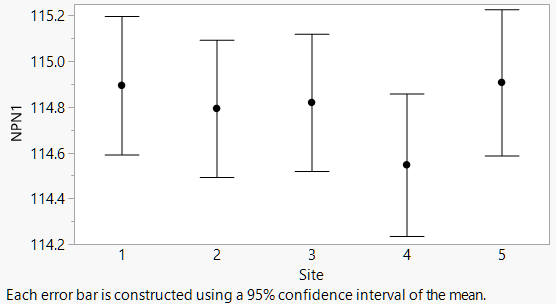
 ebauto.png


Custom Error Bars on Points

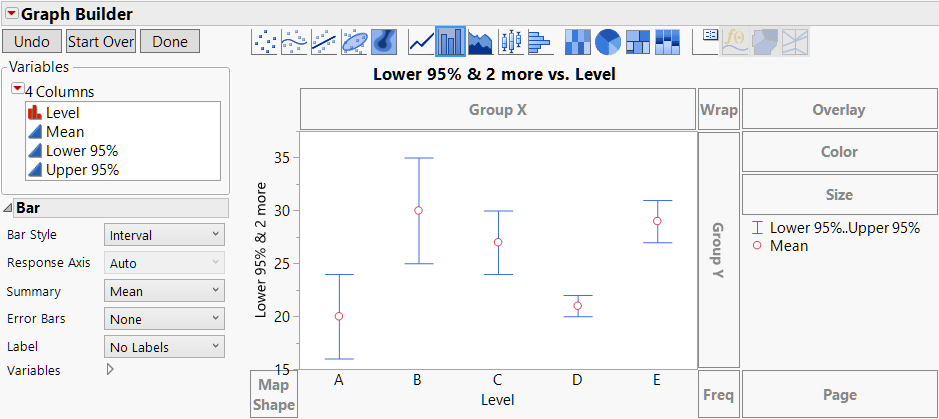
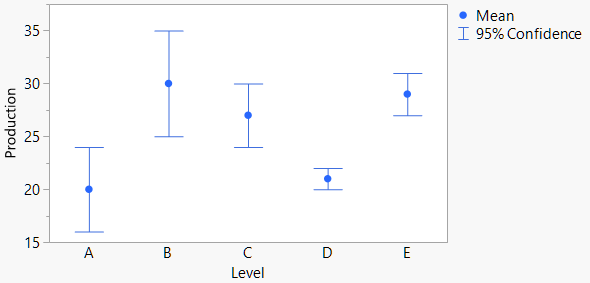
To make a dot chart with custom error bars, the trick is to think about it the other way around: Make a custom bar chart with points. The Bar element in Graph Builder has a style option for Interval bars. If you give it two variables, it draws an interval. If you give it three variables, it draws an interval with the first two and a circle with the third. Just what we want!


I'll demonstrate with this data table, which might have been produced by an analysis. You want a graph with error bars covering the Lower 95% and Upper 95% columns in the table.
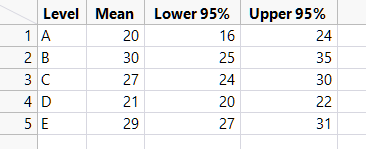
 ebtable.png


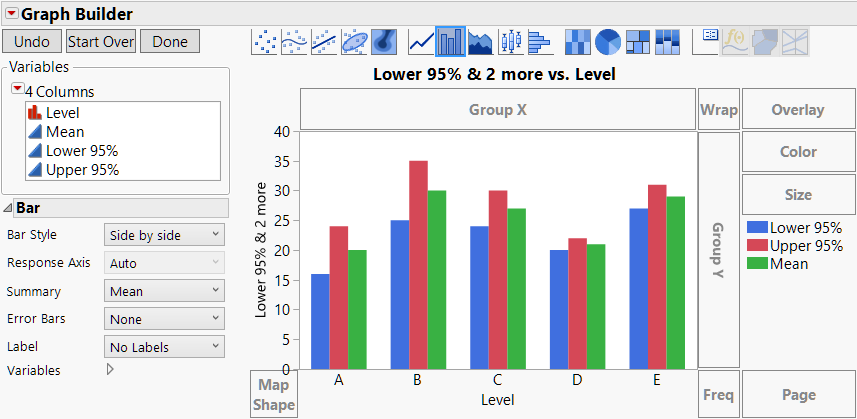
Open Graph Builder and put Term on the X axis and Lower 95%, Upper 95% and Mean on the common Y axis, in that order.
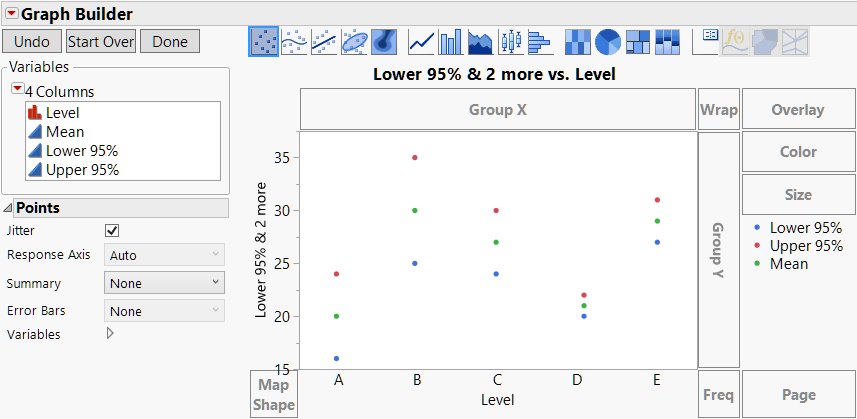
 eb1.png


Choose the Bar element, and the default style is Side by Side.
 
eb2.png


In the Properties panel, change the Style option to Interval

 eb3.png


Then click Done, and customize the labels and styling as desired.
 

eb4.png


Custom Error Bars on Lines or Bars

The above technique is great for custom error bars with points, but what about with lines and bars? For those, you need to know two more things about Graph Builder:

  1. Multiple elements can be overlaid in the same graph.
  2. You can control which elements use which variables.

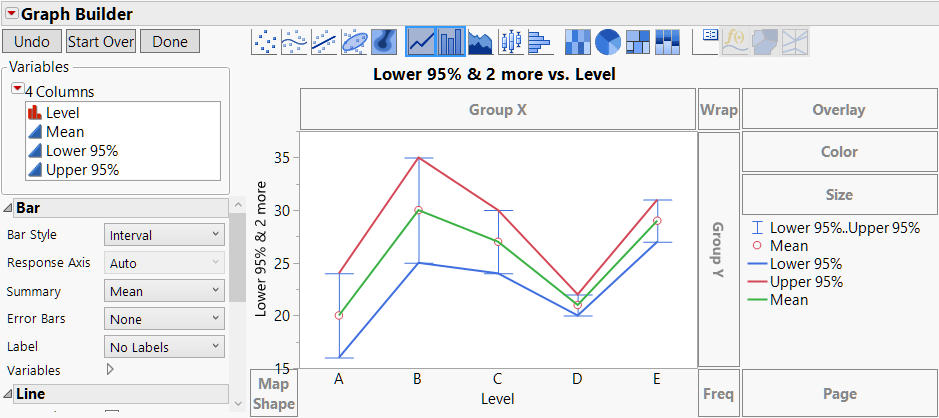
With that knowledge, the idea is to make a graph with both a Line element for the middle values and a Bar element in Interval mode for the interval bars.


The process starts from where we left off above. Next, click on the Line element and drag it into the graph to add lines without removing the interval bars. At this point, the Line element is showing all three variables, and so is the Bar element, which is only a starting point.

eb5.png


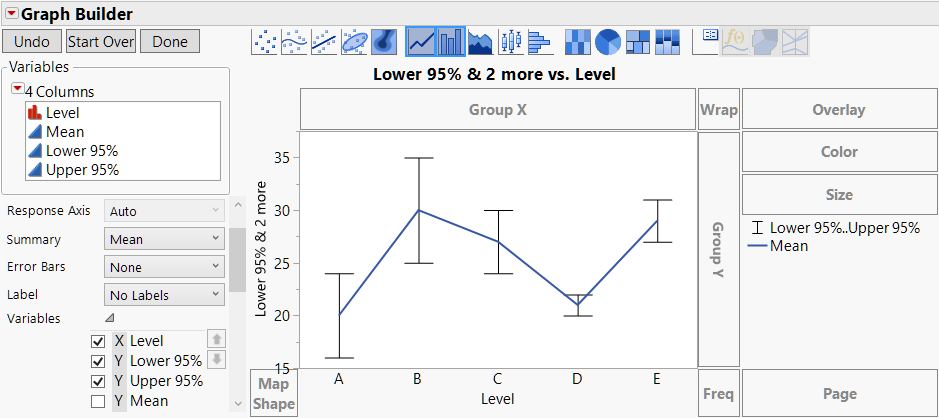
Go into the Variables section of the Line Properties and uncheck the Lower 95% and Upper 95% variables. Now the line only connects the middle values.

 eb6.png


Go into the Variables section of the Bar Properties to uncheck the Mean variable to remove the circle.
 eb7.png


Click Done, and make styling changes in the legend (right-click or use the Legend Settings dialog) for color and line thickness.
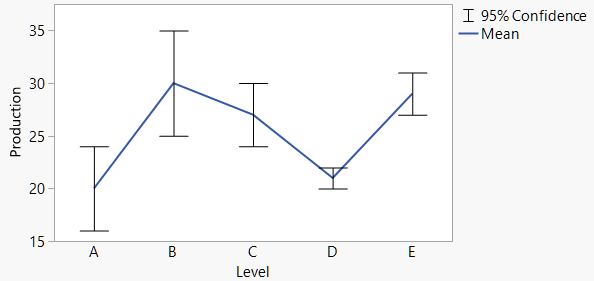
 
eb0.png


 Use the same sequence of steps for bars, dragging in the Bar element instead of the Line element at the start.
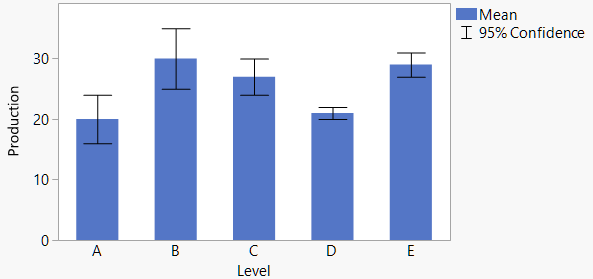
 

eb8.png 

 So, there you have it! Now you can make your error bars look just the way you want.

Last Modified: Feb 13, 2017 2:10 PM
Comments