cancel
Showing results for 
Show  only  | Search instead for 
Did you mean: 
  • JMP will suspend normal business operations for our Winter Holiday beginning on Wednesday, Dec. 24, 2025, at 5:00 p.m. ET (2:00 p.m. ET for JMP Accounts Receivable).
    Regular business hours will resume at 9:00 a.m. EST on Friday, Jan. 2, 2026.
  • We’re retiring the File Exchange at the end of this year. The JMP Marketplace is now your destination for add-ins and extensions.

JMPer Cable

A technical blog for JMP users of all levels, full of how-to's, tips and tricks, and detailed information on JMP features
%3CLINGO-SUB%20id%3D%22lingo-sub-35611%22%20slang%3D%22en-US%22%20mode%3D%22NONE%22%20mode%3D%22NONE%22%20mode%3D%22NONE%22%3ESo%20erstellen%20Sie%20benutzerdefinierte%20Fehlerbalken%20in%20Graph%20Builder%3C%2FLINGO-SUB%3E%3CLINGO-BODY%20id%3D%22lingo-body-35611%22%20slang%3D%22en-US%22%20mode%3D%22NONE%22%20mode%3D%22NONE%22%20mode%3D%22NONE%22%3E%3CP%3EIm%20Graph%20Builder%20unterst%C3%BCtzen%20Streudiagramme%2C%20Liniendiagramme%20und%20Balkendiagramme%20vier%20Arten%20von%20Fehlerbalken%2C%20Sie%20k%C3%B6nnen%20aber%20auch%20Ihre%20eigenen%20benutzerdefinierten%20Fehlerbalken%20hinzuf%C3%BCgen.%20Da%20es%20sich%20nicht%20um%20eine%20bekannte%20Funktion%20handelt%2C%20werde%20ich%20die%20einzelnen%20Schritte%20durchgehen.%3C%2FP%3E%0A%3CH3%20id%3D%22toc-hId-1156168789%22%20id%3D%22toc-hId-1569175936%22%20id%3D%22toc-hId-1569175936%22%20id%3D%22toc-hId-1569175936%22%20id%3D%22toc-hId-1569175936%22%20id%3D%22toc-hId-1569175936%22%20id%3D%22toc-hId-1569175936%22%20id%3D%22toc-hId-1569175936%22%20id%3D%22toc-hId-1569175936%22%20id%3D%22toc-hId-1569175936%22%20id%3D%22toc-hId-1569175936%22%20id%3D%22toc-hId-1569175936%22%3EWas%20sind%20Fehlerbalken%3F%3C%2FH3%3E%0A%3CP%3EFehlerbalken%20sind%20grafische%20Elemente%2C%20die%20darstellen%3CSPAN%3E%20Unsicherheit%3C%2FSPAN%3E%20.%20Es%20k%C3%B6nnen%20viele%20Unsicherheitsma%C3%9Fe%20dargestellt%20werden%2C%20jedes%20mit%20seiner%20eigenen%20Interpretation.%20Fehlerbalken%20k%C3%B6nnen%20n%C3%BCtzlich%20sein%2C%20um%20Folgendes%20anzuzeigen%3A%3C%2FP%3E%0A%3CUL%3E%0A%3CLI%3EKontext%20f%C3%BCr%20eine%20zusammenfassende%20Statistik.%3C%2FLI%3E%0A%3CLI%3EGrad%20der%20%C3%9Cberlappung%20zwischen%20Unsicherheitsbereichen.%3C%2FLI%3E%0A%3CLI%3EEinbeziehung%20eines%20bestimmten%20Werts%2C%20beispielsweise%20wenn%20der%20Fehlerbalken%20einer%20Parametersch%C3%A4tzung%200%20enth%C3%A4lt.%3C%2FLI%3E%0A%3C%2FUL%3E%0A%3CH3%20id%3D%22toc-hId-2043672470%22%20id%3D%22toc-hId--982981025%22%20id%3D%22toc-hId--982981025%22%20id%3D%22toc-hId--982981025%22%20id%3D%22toc-hId--982981025%22%20id%3D%22toc-hId--982981025%22%20id%3D%22toc-hId--982981025%22%20id%3D%22toc-hId--982981025%22%20id%3D%22toc-hId--982981025%22%20id%3D%22toc-hId--982981025%22%20id%3D%22toc-hId--982981025%22%20id%3D%22toc-hId--982981025%22%3EIntegrierte%20Fehlerbalken%3C%2FH3%3E%0A%3CP%3EWenn%20Sie%20im%20Graph%20Builder%20ein%20zusammenfassendes%20Diagramm%20mit%20Punkten%2C%20Balken%20oder%20Linien%20erstellen%2C%20gibt%20es%20im%20Eigenschaftenbereich%20eine%20Option%20zum%20Hinzuf%C3%BCgen%20von%20Fehlerbalken%20auf%20eine%20von%20vier%20Arten%3A%3C%2FP%3E%0A%3CUL%3E%0A%3CLI%3EReichweite%3C%2FLI%3E%0A%3CLI%3EStandart%20Fehler%3C%2FLI%3E%0A%3CLI%3EStandardabweichung%3C%2FLI%3E%0A%3CLI%3EKonfidenzintervall%3C%2FLI%3E%0A%3C%2FUL%3E%0A%3CP%3EW%C3%A4hlen%3CEM%3E%20Konfidenzintervall%3C%2FEM%3E%20verwendet%20das%20angegebene%20Konfidenzniveau%2C%20das%20standardm%C3%A4%C3%9Fig%2095%20%25%20betr%C3%A4gt.%20Da%20es%20viele%20Arten%20von%20Fehlerbalken%20gibt%2C%20wird%20bei%20allen%20Fehlerbalkenoptionen%20am%20unteren%20Rand%20des%20Diagramms%20ein%20Hinweis%20hinzugef%C3%BCgt%2C%20der%20angibt%2C%20welche%20Option%20ausgew%C3%A4hlt%20wurde.%3C%2FP%3E%0A%3CP%3E%26nbsp%3B%3CSPAN%20class%3D%22lia-inline-image-display-wrapper%20lia-image-align-center%22%20image-alt%3D%22ebauto.png%22%20style%3D%22width%3A%20556px%3B%22%3E%3CSPAN%20class%3D%22lia-inline-image-display-wrapper%22%20image-alt%3D%22ebauto.png%22%20style%3D%22width%3A%20556px%3B%22%3E%3CSPAN%20class%3D%22lia-inline-image-display-wrapper%22%20image-alt%3D%22ebauto.png%22%20style%3D%22width%3A%20556px%3B%22%3E%3CSPAN%20class%3D%22lia-inline-image-display-wrapper%22%20image-alt%3D%22ebauto.png%22%20style%3D%22width%3A%20556px%3B%22%3E%3CSPAN%20class%3D%22lia-inline-image-display-wrapper%22%20image-alt%3D%22ebauto.png%22%20style%3D%22width%3A%20556px%3B%22%3E%3CSPAN%20class%3D%22lia-inline-image-display-wrapper%22%20image-alt%3D%22ebauto.png%22%20style%3D%22width%3A%20556px%3B%22%3E%3CSPAN%20class%3D%22lia-inline-image-display-wrapper%22%20image-alt%3D%22ebauto.png%22%20style%3D%22width%3A%20556px%3B%22%3E%3CSPAN%20class%3D%22lia-inline-image-display-wrapper%22%20image-alt%3D%22ebauto.png%22%20style%3D%22width%3A%20556px%3B%22%3E%3CSPAN%20class%3D%22lia-inline-image-display-wrapper%22%20image-alt%3D%22ebauto.png%22%20style%3D%22width%3A%20556px%3B%22%3E%3CSPAN%20class%3D%22lia-inline-image-display-wrapper%22%20image-alt%3D%22ebauto.png%22%20style%3D%22width%3A%20556px%3B%22%3E%3CSPAN%20class%3D%22lia-inline-image-display-wrapper%22%20image-alt%3D%22ebauto.png%22%20style%3D%22width%3A%20556px%3B%22%3E%3Cspan%20class%3D%22lia-inline-image-display-wrapper%22%20image-alt%3D%22ebauto.png%22%20style%3D%22width%3A%20556px%3B%22%3E%3Cimg%20src%3D%22https%3A%2F%2Fcommunity.jmp.com%2Ft5%2Fimage%2Fserverpage%2Fimage-id%2F5077iA224E437B4C0EE63%2Fimage-size%2Flarge%3Fv%3Dv2%26amp%3Bpx%3D999%22%20role%3D%22button%22%20title%3D%22ebauto.png%22%20alt%3D%22ebauto.png%22%20%2F%3E%3C%2Fspan%3E%3C%2FSPAN%3E%3C%2FSPAN%3E%3C%2FSPAN%3E%3C%2FSPAN%3E%3C%2FSPAN%3E%3C%2FSPAN%3E%3C%2FSPAN%3E%3C%2FSPAN%3E%3C%2FSPAN%3E%3C%2FSPAN%3E%3C%2FSPAN%3E%3C%2FP%3E%0A%3CP%3E%26nbsp%3B%3C%2FP%3E%0A%3CH3%20id%3D%22toc-hId--1363791145%22%20id%3D%22toc-hId-759829310%22%20id%3D%22toc-hId-759829310%22%20id%3D%22toc-hId-759829310%22%20id%3D%22toc-hId-759829310%22%20id%3D%22toc-hId-759829310%22%20id%3D%22toc-hId-759829310%22%20id%3D%22toc-hId-759829310%22%20id%3D%22toc-hId-759829310%22%20id%3D%22toc-hId-759829310%22%20id%3D%22toc-hId-759829310%22%20id%3D%22toc-hId-759829310%22%3EBenutzerdefinierte%20Fehlerbalken%20f%C3%BCr%20Punkte%3C%2FH3%3E%0A%3CP%3EUm%20ein%20Punktdiagramm%20mit%20benutzerdefinierten%20Fehlerbalken%20zu%20erstellen%2C%20besteht%20der%20Trick%20darin%2C%20es%20andersherum%20zu%20betrachten%3A%20Erstellen%20Sie%20ein%20benutzerdefiniertes%20Balkendiagramm%20mit%20Punkten.%20Das%20Bar-Element%20im%20Graph%20Builder%20verf%C3%BCgt%20%C3%BCber%20eine%20Stiloption%20f%C3%BCr%20Intervallbalken.%20Wenn%20Sie%20ihm%20zwei%20Variablen%20geben%2C%20wird%20ein%20Intervall%20gezeichnet.%20Wenn%20man%20ihm%20drei%20Variablen%20gibt%2C%20zeichnet%20er%20mit%20den%20ersten%20beiden%20ein%20Intervall%20und%20mit%20der%20dritten%20einen%20Kreis.%20Genau%20das%2C%20was%20wir%20wollen!%3C%2FP%3E%0A%3CP%3E%26nbsp%3B%3C%2FP%3E%0A%3CP%3EIch%20werde%20es%20mit%20dieser%20Datentabelle%20demonstrieren%2C%20die%20m%C3%B6glicherweise%20durch%20eine%20Analyse%20erstellt%20wurde.%20Sie%20m%C3%B6chten%20ein%20Diagramm%20mit%20Fehlerbalken%2C%20das%20das%20abdeckt%3CEM%3E%20Niedrigere%2095%26nbsp%3B%25%3C%2FEM%3E%20Und%3CEM%3E%20Obere%2095%20%25%3C%2FEM%3E%20Spalten%20in%20der%20Tabelle.%3C%2FP%3E%0A%3CP%3E%26nbsp%3B%3CSPAN%20class%3D%22lia-inline-image-display-wrapper%20lia-image-align-center%22%20image-alt%3D%22ebtable.png%22%20style%3D%22width%3A%20366px%3B%22%3E%3CSPAN%20class%3D%22lia-inline-image-display-wrapper%22%20image-alt%3D%22ebtable.png%22%20style%3D%22width%3A%20366px%3B%22%3E%3CSPAN%20class%3D%22lia-inline-image-display-wrapper%22%20image-alt%3D%22ebtable.png%22%20style%3D%22width%3A%20366px%3B%22%3E%3CSPAN%20class%3D%22lia-inline-image-display-wrapper%22%20image-alt%3D%22ebtable.png%22%20style%3D%22width%3A%20366px%3B%22%3E%3CSPAN%20class%3D%22lia-inline-image-display-wrapper%22%20image-alt%3D%22ebtable.png%22%20style%3D%22width%3A%20366px%3B%22%3E%3CSPAN%20class%3D%22lia-inline-image-display-wrapper%22%20image-alt%3D%22ebtable.png%22%20style%3D%22width%3A%20366px%3B%22%3E%3CSPAN%20class%3D%22lia-inline-image-display-wrapper%22%20image-alt%3D%22ebtable.png%22%20style%3D%22width%3A%20366px%3B%22%3E%3CSPAN%20class%3D%22lia-inline-image-display-wrapper%22%20image-alt%3D%22ebtable.png%22%20style%3D%22width%3A%20366px%3B%22%3E%3CSPAN%20class%3D%22lia-inline-image-display-wrapper%22%20image-alt%3D%22ebtable.png%22%20style%3D%22width%3A%20366px%3B%22%3E%3CSPAN%20class%3D%22lia-inline-image-display-wrapper%22%20image-alt%3D%22ebtable.png%22%20style%3D%22width%3A%20366px%3B%22%3E%3CSPAN%20class%3D%22lia-inline-image-display-wrapper%22%20image-alt%3D%22ebtable.png%22%20style%3D%22width%3A%20366px%3B%22%3E%3Cspan%20class%3D%22lia-inline-image-display-wrapper%22%20image-alt%3D%22ebtable.png%22%20style%3D%22width%3A%20366px%3B%22%3E%3Cimg%20src%3D%22https%3A%2F%2Fcommunity.jmp.com%2Ft5%2Fimage%2Fserverpage%2Fimage-id%2F5082i8BCBBD733F88A5B0%2Fimage-size%2Flarge%3Fv%3Dv2%26amp%3Bpx%3D999%22%20role%3D%22button%22%20title%3D%22ebtable.png%22%20alt%3D%22ebtable.png%22%20%2F%3E%3C%2Fspan%3E%3C%2FSPAN%3E%3C%2FSPAN%3E%3C%2FSPAN%3E%3C%2FSPAN%3E%3C%2FSPAN%3E%3C%2FSPAN%3E%3C%2FSPAN%3E%3C%2FSPAN%3E%3C%2FSPAN%3E%3C%2FSPAN%3E%3C%2FSPAN%3E%3C%2FP%3E%0A%3CP%3E%26nbsp%3B%3C%2FP%3E%0A%3CP%3E%C3%96ffnen%20Sie%20Graph%20Builder%20und%20legen%20Sie%20es%20ab%3CEM%3E%20Begriff%3C%2FEM%3E%20auf%20der%20X-Achse%20und%3CEM%3E%20Niedrigere%2095%26nbsp%3B%25%3C%2FEM%3E%20%2C%3CEM%3E%20Obere%2095%20%25%3C%2FEM%3E%20Und%3CEM%3E%20Bedeuten%3C%2FEM%3E%20auf%20der%20gemeinsamen%20Y-Achse%2C%20in%20dieser%20Reihenfolge.%3C%2FP%3E%0A%3CP%3E%26nbsp%3B%3CSPAN%20class%3D%22lia-inline-image-display-wrapper%20lia-image-align-center%22%20image-alt%3D%22eb1.png%22%20style%3D%22width%3A%20630px%3B%22%3E%3CSPAN%20class%3D%22lia-inline-image-display-wrapper%22%20image-alt%3D%22eb1.png%22%20style%3D%22width%3A%20857px%3B%22%3E%3CSPAN%20class%3D%22lia-inline-image-display-wrapper%22%20image-alt%3D%22eb1.png%22%20style%3D%22width%3A%20857px%3B%22%3E%3CSPAN%20class%3D%22lia-inline-image-display-wrapper%22%20image-alt%3D%22eb1.png%22%20style%3D%22width%3A%20857px%3B%22%3E%3CSPAN%20class%3D%22lia-inline-image-display-wrapper%22%20image-alt%3D%22eb1.png%22%20style%3D%22width%3A%20857px%3B%22%3E%3CSPAN%20class%3D%22lia-inline-image-display-wrapper%22%20image-alt%3D%22eb1.png%22%20style%3D%22width%3A%20857px%3B%22%3E%3CSPAN%20class%3D%22lia-inline-image-display-wrapper%22%20image-alt%3D%22eb1.png%22%20style%3D%22width%3A%20857px%3B%22%3E%3CSPAN%20class%3D%22lia-inline-image-display-wrapper%22%20image-alt%3D%22eb1.png%22%20style%3D%22width%3A%20857px%3B%22%3E%3CSPAN%20class%3D%22lia-inline-image-display-wrapper%22%20image-alt%3D%22eb1.png%22%20style%3D%22width%3A%20857px%3B%22%3E%3CSPAN%20class%3D%22lia-inline-image-display-wrapper%22%20image-alt%3D%22eb1.png%22%20style%3D%22width%3A%20857px%3B%22%3E%3CSPAN%20class%3D%22lia-inline-image-display-wrapper%22%20image-alt%3D%22eb1.png%22%20style%3D%22width%3A%20857px%3B%22%3E%3Cspan%20class%3D%22lia-inline-image-display-wrapper%22%20image-alt%3D%22eb1.png%22%20style%3D%22width%3A%20857px%3B%22%3E%3Cimg%20src%3D%22https%3A%2F%2Fcommunity.jmp.com%2Ft5%2Fimage%2Fserverpage%2Fimage-id%2F5079i223C8A38CC2A5AE7%2Fimage-size%2Flarge%3Fv%3Dv2%26amp%3Bpx%3D999%22%20role%3D%22button%22%20title%3D%22eb1.png%22%20alt%3D%22eb1.png%22%20%2F%3E%3C%2Fspan%3E%3C%2FSPAN%3E%3C%2FSPAN%3E%3C%2FSPAN%3E%3C%2FSPAN%3E%3C%2FSPAN%3E%3C%2FSPAN%3E%3C%2FSPAN%3E%3C%2FSPAN%3E%3C%2FSPAN%3E%3C%2FSPAN%3E%3C%2FSPAN%3E%3C%2FP%3E%0A%3CP%3E%26nbsp%3B%3C%2FP%3E%0A%3CP%3EW%C3%A4hlen%20Sie%20das%20Bar-Element%20und%20der%20Standardstil%20ist%3CEM%3E%20Seite%20an%20Seite%3C%2FEM%3E%20.%3C%2FP%3E%0A%3CP%3E%26nbsp%3B%3CBR%20%2F%3E%3CSPAN%20class%3D%22lia-inline-image-display-wrapper%20lia-image-align-center%22%20image-alt%3D%22eb2.png%22%20style%3D%22width%3A%20630px%3B%22%3E%3CSPAN%20class%3D%22lia-inline-image-display-wrapper%22%20image-alt%3D%22eb2.png%22%20style%3D%22width%3A%20857px%3B%22%3E%3CSPAN%20class%3D%22lia-inline-image-display-wrapper%22%20image-alt%3D%22eb2.png%22%20style%3D%22width%3A%20857px%3B%22%3E%3CSPAN%20class%3D%22lia-inline-image-display-wrapper%22%20image-alt%3D%22eb2.png%22%20style%3D%22width%3A%20857px%3B%22%3E%3CSPAN%20class%3D%22lia-inline-image-display-wrapper%22%20image-alt%3D%22eb2.png%22%20style%3D%22width%3A%20857px%3B%22%3E%3CSPAN%20class%3D%22lia-inline-image-display-wrapper%22%20image-alt%3D%22eb2.png%22%20style%3D%22width%3A%20857px%3B%22%3E%3CSPAN%20class%3D%22lia-inline-image-display-wrapper%22%20image-alt%3D%22eb2.png%22%20style%3D%22width%3A%20857px%3B%22%3E%3CSPAN%20class%3D%22lia-inline-image-display-wrapper%22%20image-alt%3D%22eb2.png%22%20style%3D%22width%3A%20857px%3B%22%3E%3CSPAN%20class%3D%22lia-inline-image-display-wrapper%22%20image-alt%3D%22eb2.png%22%20style%3D%22width%3A%20857px%3B%22%3E%3CSPAN%20class%3D%22lia-inline-image-display-wrapper%22%20image-alt%3D%22eb2.png%22%20style%3D%22width%3A%20857px%3B%22%3E%3CSPAN%20class%3D%22lia-inline-image-display-wrapper%22%20image-alt%3D%22eb2.png%22%20style%3D%22width%3A%20857px%3B%22%3E%3Cspan%20class%3D%22lia-inline-image-display-wrapper%22%20image-alt%3D%22eb2.png%22%20style%3D%22width%3A%20857px%3B%22%3E%3Cimg%20src%3D%22https%3A%2F%2Fcommunity.jmp.com%2Ft5%2Fimage%2Fserverpage%2Fimage-id%2F5081i50BF0EA7DD29D199%2Fimage-size%2Flarge%3Fv%3Dv2%26amp%3Bpx%3D999%22%20role%3D%22button%22%20title%3D%22eb2.png%22%20alt%3D%22eb2.png%22%20%2F%3E%3C%2Fspan%3E%3C%2FSPAN%3E%3C%2FSPAN%3E%3C%2FSPAN%3E%3C%2FSPAN%3E%3C%2FSPAN%3E%3C%2FSPAN%3E%3C%2FSPAN%3E%3C%2FSPAN%3E%3C%2FSPAN%3E%3C%2FSPAN%3E%3C%2FSPAN%3E%3C%2FP%3E%0A%3CP%3E%26nbsp%3B%3C%2FP%3E%0A%3CP%3E%C3%84ndern%20Sie%20im%20Eigenschaftenfenster%20die%20Option%20%E2%80%9EStil%E2%80%9C%20in%3CEM%3E%20Intervall%3C%2FEM%3E%20.%3C%2FP%3E%0A%3CP%3E%26nbsp%3B%3CSPAN%20class%3D%22lia-inline-image-display-wrapper%20lia-image-align-center%22%20image-alt%3D%22eb3.png%22%20style%3D%22width%3A%20690px%3B%22%3E%3CSPAN%20class%3D%22lia-inline-image-display-wrapper%22%20image-alt%3D%22eb3.png%22%20style%3D%22width%3A%20939px%3B%22%3E%3CSPAN%20class%3D%22lia-inline-image-display-wrapper%22%20image-alt%3D%22eb3.png%22%20style%3D%22width%3A%20939px%3B%22%3E%3CSPAN%20class%3D%22lia-inline-image-display-wrapper%22%20image-alt%3D%22eb3.png%22%20style%3D%22width%3A%20939px%3B%22%3E%3CSPAN%20class%3D%22lia-inline-image-display-wrapper%22%20image-alt%3D%22eb3.png%22%20style%3D%22width%3A%20939px%3B%22%3E%3CSPAN%20class%3D%22lia-inline-image-display-wrapper%22%20image-alt%3D%22eb3.png%22%20style%3D%22width%3A%20939px%3B%22%3E%3CSPAN%20class%3D%22lia-inline-image-display-wrapper%22%20image-alt%3D%22eb3.png%22%20style%3D%22width%3A%20939px%3B%22%3E%3CSPAN%20class%3D%22lia-inline-image-display-wrapper%22%20image-alt%3D%22eb3.png%22%20style%3D%22width%3A%20939px%3B%22%3E%3CSPAN%20class%3D%22lia-inline-image-display-wrapper%22%20image-alt%3D%22eb3.png%22%20style%3D%22width%3A%20939px%3B%22%3E%3CSPAN%20class%3D%22lia-inline-image-display-wrapper%22%20image-alt%3D%22eb3.png%22%20style%3D%22width%3A%20939px%3B%22%3E%3CSPAN%20class%3D%22lia-inline-image-display-wrapper%22%20image-alt%3D%22eb3.png%22%20style%3D%22width%3A%20939px%3B%22%3E%3Cspan%20class%3D%22lia-inline-image-display-wrapper%22%20image-alt%3D%22eb3.png%22%20style%3D%22width%3A%20939px%3B%22%3E%3Cimg%20src%3D%22https%3A%2F%2Fcommunity.jmp.com%2Ft5%2Fimage%2Fserverpage%2Fimage-id%2F5080i3106B4113BBDAAB5%2Fimage-size%2Flarge%3Fv%3Dv2%26amp%3Bpx%3D999%22%20role%3D%22button%22%20title%3D%22eb3.png%22%20alt%3D%22eb3.png%22%20%2F%3E%3C%2Fspan%3E%3C%2FSPAN%3E%3C%2FSPAN%3E%3C%2FSPAN%3E%3C%2FSPAN%3E%3C%2FSPAN%3E%3C%2FSPAN%3E%3C%2FSPAN%3E%3C%2FSPAN%3E%3C%2FSPAN%3E%3C%2FSPAN%3E%3C%2FSPAN%3E%3C%2FP%3E%0A%3CP%3E%26nbsp%3B%3C%2FP%3E%0A%3CP%3EDann%20klick%3CEM%3E%20Erledigt%2C%3C%2FEM%3E%20und%20passen%20Sie%20die%20Beschriftungen%20und%20das%20Styling%20nach%20Ihren%20W%C3%BCnschen%20an.%3C%2FP%3E%0A%3CP%3E%26nbsp%3B%3C%2FP%3E%0A%3CP%3E%3CSPAN%20class%3D%22lia-inline-image-display-wrapper%20lia-image-align-center%22%20image-alt%3D%22eb4.png%22%20style%3D%22width%3A%20590px%3B%22%3E%3CSPAN%20class%3D%22lia-inline-image-display-wrapper%22%20image-alt%3D%22eb4.png%22%20style%3D%22width%3A%20590px%3B%22%3E%3CSPAN%20class%3D%22lia-inline-image-display-wrapper%22%20image-alt%3D%22eb4.png%22%20style%3D%22width%3A%20590px%3B%22%3E%3CSPAN%20class%3D%22lia-inline-image-display-wrapper%22%20image-alt%3D%22eb4.png%22%20style%3D%22width%3A%20590px%3B%22%3E%3CSPAN%20class%3D%22lia-inline-image-display-wrapper%22%20image-alt%3D%22eb4.png%22%20style%3D%22width%3A%20590px%3B%22%3E%3CSPAN%20class%3D%22lia-inline-image-display-wrapper%22%20image-alt%3D%22eb4.png%22%20style%3D%22width%3A%20590px%3B%22%3E%3CSPAN%20class%3D%22lia-inline-image-display-wrapper%22%20image-alt%3D%22eb4.png%22%20style%3D%22width%3A%20590px%3B%22%3E%3CSPAN%20class%3D%22lia-inline-image-display-wrapper%22%20image-alt%3D%22eb4.png%22%20style%3D%22width%3A%20590px%3B%22%3E%3CSPAN%20class%3D%22lia-inline-image-display-wrapper%22%20image-alt%3D%22eb4.png%22%20style%3D%22width%3A%20590px%3B%22%3E%3CSPAN%20class%3D%22lia-inline-image-display-wrapper%22%20image-alt%3D%22eb4.png%22%20style%3D%22width%3A%20590px%3B%22%3E%3CSPAN%20class%3D%22lia-inline-image-display-wrapper%22%20image-alt%3D%22eb4.png%22%20style%3D%22width%3A%20590px%3B%22%3E%3Cspan%20class%3D%22lia-inline-image-display-wrapper%22%20image-alt%3D%22eb4.png%22%20style%3D%22width%3A%20590px%3B%22%3E%3Cimg%20src%3D%22https%3A%2F%2Fcommunity.jmp.com%2Ft5%2Fimage%2Fserverpage%2Fimage-id%2F5078iF4A260B7104D759C%2Fimage-size%2Flarge%3Fv%3Dv2%26amp%3Bpx%3D999%22%20role%3D%22button%22%20title%3D%22eb4.png%22%20alt%3D%22eb4.png%22%20%2F%3E%3C%2Fspan%3E%3C%2FSPAN%3E%3C%2FSPAN%3E%3C%2FSPAN%3E%3C%2FSPAN%3E%3C%2FSPAN%3E%3C%2FSPAN%3E%3C%2FSPAN%3E%3C%2FSPAN%3E%3C%2FSPAN%3E%3C%2FSPAN%3E%3C%2FSPAN%3E%3C%2FP%3E%0A%3CP%3E%26nbsp%3B%3C%2FP%3E%0A%3CH3%20id%3D%22toc-hId--476287464%22%20id%3D%22toc-hId--1792327651%22%20id%3D%22toc-hId--1792327651%22%20id%3D%22toc-hId--1792327651%22%20id%3D%22toc-hId--1792327651%22%20id%3D%22toc-hId--1792327651%22%20id%3D%22toc-hId--1792327651%22%20id%3D%22toc-hId--1792327651%22%20id%3D%22toc-hId--1792327651%22%20id%3D%22toc-hId--1792327651%22%20id%3D%22toc-hId--1792327651%22%20id%3D%22toc-hId--1792327651%22%3EBenutzerdefinierte%20Fehlerbalken%20auf%20Linien%20oder%20Balken%3C%2FH3%3E%0A%3CP%3EDie%20obige%20Technik%20eignet%20sich%20hervorragend%20f%C3%BCr%20benutzerdefinierte%20Fehlerbalken%20mit%20Punkten%2C%20aber%20wie%20sieht%20es%20mit%20Linien%20und%20Balken%20aus%3F%20Daf%C3%BCr%20m%C3%BCssen%20Sie%20zwei%20weitere%20Dinge%20%C3%BCber%20Graph%20Builder%20wissen%3A%3C%2FP%3E%0A%3COL%3E%0A%3CLI%3EMehrere%20Elemente%20k%C3%B6nnen%20im%20selben%20Diagramm%20%C3%BCberlagert%20werden.%3C%2FLI%3E%0A%3CLI%3ESie%20k%C3%B6nnen%20steuern%2C%20welche%20Elemente%20welche%20Variablen%20verwenden.%3C%2FLI%3E%0A%3C%2FOL%3E%0A%3CP%3EMit%20diesem%20Wissen%20besteht%20die%20Idee%20darin%2C%20ein%20Diagramm%20mit%20einem%20Linienelement%20f%C3%BCr%20die%20Mittelwerte%20und%20einem%20Balkenelement%20zu%20erstellen%3CEM%3E%20Intervall%3C%2FEM%3E%20Modus%20f%C3%BCr%20die%20Intervallbalken.%3C%2FP%3E%0A%3CP%3E%26nbsp%3B%3C%2FP%3E%0A%3CP%3EDer%20Prozess%20beginnt%20dort%2C%20wo%20wir%20oben%20aufgeh%C3%B6rt%20haben.%20Klicken%20Sie%20anschlie%C3%9Fend%20auf%20das%20Linienelement%20und%20ziehen%20Sie%20es%20in%20das%20Diagramm%2C%20um%20Linien%20hinzuzuf%C3%BCgen%2C%20ohne%20die%20Intervallbalken%20zu%20entfernen.%20Zu%20diesem%20Zeitpunkt%20zeigt%20das%20Linienelement%20alle%20drei%20Variablen%20an%2C%20ebenso%20wie%20das%20Balkenelement%2C%20das%20nur%20ein%20Ausgangspunkt%20ist.%3C%2FP%3E%0A%3CP%3E%3CBR%20%2F%3E%3CSPAN%20class%3D%22lia-inline-image-display-wrapper%20lia-image-align-center%22%20image-alt%3D%22eb5.png%22%20style%3D%22width%3A%20690px%3B%22%3E%3CSPAN%20class%3D%22lia-inline-image-display-wrapper%22%20image-alt%3D%22eb5.png%22%20style%3D%22width%3A%20939px%3B%22%3E%3CSPAN%20class%3D%22lia-inline-image-display-wrapper%22%20image-alt%3D%22eb5.png%22%20style%3D%22width%3A%20939px%3B%22%3E%3CSPAN%20class%3D%22lia-inline-image-display-wrapper%22%20image-alt%3D%22eb5.png%22%20style%3D%22width%3A%20939px%3B%22%3E%3CSPAN%20class%3D%22lia-inline-image-display-wrapper%22%20image-alt%3D%22eb5.png%22%20style%3D%22width%3A%20939px%3B%22%3E%3CSPAN%20class%3D%22lia-inline-image-display-wrapper%22%20image-alt%3D%22eb5.png%22%20style%3D%22width%3A%20939px%3B%22%3E%3CSPAN%20class%3D%22lia-inline-image-display-wrapper%22%20image-alt%3D%22eb5.png%22%20style%3D%22width%3A%20939px%3B%22%3E%3CSPAN%20class%3D%22lia-inline-image-display-wrapper%22%20image-alt%3D%22eb5.png%22%20style%3D%22width%3A%20939px%3B%22%3E%3CSPAN%20class%3D%22lia-inline-image-display-wrapper%22%20image-alt%3D%22eb5.png%22%20style%3D%22width%3A%20939px%3B%22%3E%3CSPAN%20class%3D%22lia-inline-image-display-wrapper%22%20image-alt%3D%22eb5.png%22%20style%3D%22width%3A%20939px%3B%22%3E%3CSPAN%20class%3D%22lia-inline-image-display-wrapper%22%20image-alt%3D%22eb5.png%22%20style%3D%22width%3A%20939px%3B%22%3E%3Cspan%20class%3D%22lia-inline-image-display-wrapper%22%20image-alt%3D%22eb5.png%22%20style%3D%22width%3A%20939px%3B%22%3E%3Cimg%20src%3D%22https%3A%2F%2Fcommunity.jmp.com%2Ft5%2Fimage%2Fserverpage%2Fimage-id%2F5087i225151CCBAD0965D%2Fimage-size%2Flarge%3Fv%3Dv2%26amp%3Bpx%3D999%22%20role%3D%22button%22%20title%3D%22eb5.png%22%20alt%3D%22eb5.png%22%20%2F%3E%3C%2Fspan%3E%3C%2FSPAN%3E%3C%2FSPAN%3E%3C%2FSPAN%3E%3C%2FSPAN%3E%3C%2FSPAN%3E%3C%2FSPAN%3E%3C%2FSPAN%3E%3C%2FSPAN%3E%3C%2FSPAN%3E%3C%2FSPAN%3E%3C%2FSPAN%3E%3C%2FP%3E%0A%3CP%3E%26nbsp%3B%3C%2FP%3E%0A%3CP%3EGehen%20Sie%20in%20den%20Abschnitt%20%E2%80%9EVariablen%E2%80%9C%20der%20Zeileneigenschaften%20und%20deaktivieren%20Sie%20das%20Kontrollk%C3%A4stchen%3CEM%3E%20Niedrigere%2095%26nbsp%3B%25%3C%2FEM%3E%20Und%3CEM%3E%20Obere%2095%20%25%3C%2FEM%3E%20Variablen.%20Jetzt%20verbindet%20die%20Linie%20nur%20noch%20die%20Mittelwerte.%3C%2FP%3E%0A%3CP%3E%26nbsp%3B%3CSPAN%20class%3D%22lia-inline-image-display-wrapper%20lia-image-align-center%22%20image-alt%3D%22eb6.png%22%20style%3D%22width%3A%20690px%3B%22%3E%3CSPAN%20class%3D%22lia-inline-image-display-wrapper%22%20image-alt%3D%22eb6.png%22%20style%3D%22width%3A%20939px%3B%22%3E%3CSPAN%20class%3D%22lia-inline-image-display-wrapper%22%20image-alt%3D%22eb6.png%22%20style%3D%22width%3A%20939px%3B%22%3E%3CSPAN%20class%3D%22lia-inline-image-display-wrapper%22%20image-alt%3D%22eb6.png%22%20style%3D%22width%3A%20939px%3B%22%3E%3CSPAN%20class%3D%22lia-inline-image-display-wrapper%22%20image-alt%3D%22eb6.png%22%20style%3D%22width%3A%20939px%3B%22%3E%3CSPAN%20class%3D%22lia-inline-image-display-wrapper%22%20image-alt%3D%22eb6.png%22%20style%3D%22width%3A%20939px%3B%22%3E%3CSPAN%20class%3D%22lia-inline-image-display-wrapper%22%20image-alt%3D%22eb6.png%22%20style%3D%22width%3A%20939px%3B%22%3E%3CSPAN%20class%3D%22lia-inline-image-display-wrapper%22%20image-alt%3D%22eb6.png%22%20style%3D%22width%3A%20939px%3B%22%3E%3CSPAN%20class%3D%22lia-inline-image-display-wrapper%22%20image-alt%3D%22eb6.png%22%20style%3D%22width%3A%20939px%3B%22%3E%3CSPAN%20class%3D%22lia-inline-image-display-wrapper%22%20image-alt%3D%22eb6.png%22%20style%3D%22width%3A%20939px%3B%22%3E%3CSPAN%20class%3D%22lia-inline-image-display-wrapper%22%20image-alt%3D%22eb6.png%22%20style%3D%22width%3A%20939px%3B%22%3E%3Cspan%20class%3D%22lia-inline-image-display-wrapper%22%20image-alt%3D%22eb6.png%22%20style%3D%22width%3A%20939px%3B%22%3E%3Cimg%20src%3D%22https%3A%2F%2Fcommunity.jmp.com%2Ft5%2Fimage%2Fserverpage%2Fimage-id%2F5086iA46BF5F039BF8217%2Fimage-size%2Flarge%3Fv%3Dv2%26amp%3Bpx%3D999%22%20role%3D%22button%22%20title%3D%22eb6.png%22%20alt%3D%22eb6.png%22%20%2F%3E%3C%2Fspan%3E%3C%2FSPAN%3E%3C%2FSPAN%3E%3C%2FSPAN%3E%3C%2FSPAN%3E%3C%2FSPAN%3E%3C%2FSPAN%3E%3C%2FSPAN%3E%3C%2FSPAN%3E%3C%2FSPAN%3E%3C%2FSPAN%3E%3C%2FSPAN%3E%3C%2FP%3E%0A%3CP%3E%26nbsp%3B%3C%2FP%3E%0A%3CP%3EGehen%20Sie%20in%20den%20Abschnitt%20%E2%80%9EVariablen%E2%80%9C%20der%20Balkeneigenschaften%2C%20um%20das%20Kontrollk%C3%A4stchen%20zu%20deaktivieren%3CEM%3E%20Bedeuten%3C%2FEM%3E%20Variable%2C%20um%20den%20Kreis%20zu%20entfernen.%3C%2FP%3E%0A%3CP%3E%26nbsp%3B%3CSPAN%20class%3D%22lia-inline-image-display-wrapper%20lia-image-align-center%22%20image-alt%3D%22eb7.png%22%20style%3D%22width%3A%20690px%3B%22%3E%3CSPAN%20class%3D%22lia-inline-image-display-wrapper%22%20image-alt%3D%22eb7.png%22%20style%3D%22width%3A%20939px%3B%22%3E%3CSPAN%20class%3D%22lia-inline-image-display-wrapper%22%20image-alt%3D%22eb7.png%22%20style%3D%22width%3A%20939px%3B%22%3E%3CSPAN%20class%3D%22lia-inline-image-display-wrapper%22%20image-alt%3D%22eb7.png%22%20style%3D%22width%3A%20939px%3B%22%3E%3CSPAN%20class%3D%22lia-inline-image-display-wrapper%22%20image-alt%3D%22eb7.png%22%20style%3D%22width%3A%20939px%3B%22%3E%3CSPAN%20class%3D%22lia-inline-image-display-wrapper%22%20image-alt%3D%22eb7.png%22%20style%3D%22width%3A%20939px%3B%22%3E%3CSPAN%20class%3D%22lia-inline-image-display-wrapper%22%20image-alt%3D%22eb7.png%22%20style%3D%22width%3A%20939px%3B%22%3E%3CSPAN%20class%3D%22lia-inline-image-display-wrapper%22%20image-alt%3D%22eb7.png%22%20style%3D%22width%3A%20939px%3B%22%3E%3CSPAN%20class%3D%22lia-inline-image-display-wrapper%22%20image-alt%3D%22eb7.png%22%20style%3D%22width%3A%20939px%3B%22%3E%3CSPAN%20class%3D%22lia-inline-image-display-wrapper%22%20image-alt%3D%22eb7.png%22%20style%3D%22width%3A%20939px%3B%22%3E%3CSPAN%20class%3D%22lia-inline-image-display-wrapper%22%20image-alt%3D%22eb7.png%22%20style%3D%22width%3A%20939px%3B%22%3E%3Cspan%20class%3D%22lia-inline-image-display-wrapper%22%20image-alt%3D%22eb7.png%22%20style%3D%22width%3A%20939px%3B%22%3E%3Cimg%20src%3D%22https%3A%2F%2Fcommunity.jmp.com%2Ft5%2Fimage%2Fserverpage%2Fimage-id%2F5085i2817D7DFC99A2FAC%2Fimage-size%2Flarge%3Fv%3Dv2%26amp%3Bpx%3D999%22%20role%3D%22button%22%20title%3D%22eb7.png%22%20alt%3D%22eb7.png%22%20%2F%3E%3C%2Fspan%3E%3C%2FSPAN%3E%3C%2FSPAN%3E%3C%2FSPAN%3E%3C%2FSPAN%3E%3C%2FSPAN%3E%3C%2FSPAN%3E%3C%2FSPAN%3E%3C%2FSPAN%3E%3C%2FSPAN%3E%3C%2FSPAN%3E%3C%2FSPAN%3E%3C%2FP%3E%0A%3CP%3E%26nbsp%3B%3C%2FP%3E%0A%3CP%3EKlicken%3CEM%3E%20Erledigt%3C%2FEM%3E%20und%20nehmen%20Sie%20in%20der%20Legende%20Stil%C3%A4nderungen%20f%C3%BCr%20Farbe%20und%20Linienst%C3%A4rke%20vor%20(klicken%20Sie%20mit%20der%20rechten%20Maustaste%20oder%20verwenden%20Sie%20das%20Dialogfeld%20%E2%80%9ELegendeneinstellungen%E2%80%9C).%3C%2FP%3E%0A%3CP%3E%26nbsp%3B%3CBR%20%2F%3E%3CSPAN%20class%3D%22lia-inline-image-display-wrapper%20lia-image-align-center%22%20image-alt%3D%22eb0.png%22%20style%3D%22width%3A%20594px%3B%22%3E%3CSPAN%20class%3D%22lia-inline-image-display-wrapper%22%20image-alt%3D%22eb0.png%22%20style%3D%22width%3A%20594px%3B%22%3E%3CSPAN%20class%3D%22lia-inline-image-display-wrapper%22%20image-alt%3D%22eb0.png%22%20style%3D%22width%3A%20594px%3B%22%3E%3CSPAN%20class%3D%22lia-inline-image-display-wrapper%22%20image-alt%3D%22eb0.png%22%20style%3D%22width%3A%20594px%3B%22%3E%3CSPAN%20class%3D%22lia-inline-image-display-wrapper%22%20image-alt%3D%22eb0.png%22%20style%3D%22width%3A%20594px%3B%22%3E%3CSPAN%20class%3D%22lia-inline-image-display-wrapper%22%20image-alt%3D%22eb0.png%22%20style%3D%22width%3A%20594px%3B%22%3E%3CSPAN%20class%3D%22lia-inline-image-display-wrapper%22%20image-alt%3D%22eb0.png%22%20style%3D%22width%3A%20594px%3B%22%3E%3CSPAN%20class%3D%22lia-inline-image-display-wrapper%22%20image-alt%3D%22eb0.png%22%20style%3D%22width%3A%20594px%3B%22%3E%3CSPAN%20class%3D%22lia-inline-image-display-wrapper%22%20image-alt%3D%22eb0.png%22%20style%3D%22width%3A%20594px%3B%22%3E%3CSPAN%20class%3D%22lia-inline-image-display-wrapper%22%20image-alt%3D%22eb0.png%22%20style%3D%22width%3A%20594px%3B%22%3E%3CSPAN%20class%3D%22lia-inline-image-display-wrapper%22%20image-alt%3D%22eb0.png%22%20style%3D%22width%3A%20594px%3B%22%3E%3Cspan%20class%3D%22lia-inline-image-display-wrapper%22%20image-alt%3D%22eb0.png%22%20style%3D%22width%3A%20594px%3B%22%3E%3Cimg%20src%3D%22https%3A%2F%2Fcommunity.jmp.com%2Ft5%2Fimage%2Fserverpage%2Fimage-id%2F5083i1E2DDAFE1A8F4234%2Fimage-size%2Flarge%3Fv%3Dv2%26amp%3Bpx%3D999%22%20role%3D%22button%22%20title%3D%22eb0.png%22%20alt%3D%22eb0.png%22%20%2F%3E%3C%2Fspan%3E%3C%2FSPAN%3E%3C%2FSPAN%3E%3C%2FSPAN%3E%3C%2FSPAN%3E%3C%2FSPAN%3E%3C%2FSPAN%3E%3C%2FSPAN%3E%3C%2FSPAN%3E%3C%2FSPAN%3E%3C%2FSPAN%3E%3C%2FSPAN%3E%3C%2FP%3E%0A%3CP%3E%26nbsp%3B%3C%2FP%3E%0A%3CP%3EVerwenden%20Sie%20die%20gleiche%20Schrittfolge%20f%C3%BCr%20Balken%2C%20indem%20Sie%20am%20Anfang%20das%20Element%20%E2%80%9EBalken%E2%80%9C%20anstelle%20des%20Elements%20%E2%80%9ELinie%E2%80%9C%20hineinziehen.%3C%2FP%3E%0A%3CP%3E%26nbsp%3B%3C%2FP%3E%0A%3CP%3E%3CSPAN%20class%3D%22lia-inline-image-display-wrapper%20lia-image-align-center%22%20image-alt%3D%22eb8.png%22%20style%3D%22width%3A%20593px%3B%22%3E%3CSPAN%20class%3D%22lia-inline-image-display-wrapper%22%20image-alt%3D%22eb8.png%22%20style%3D%22width%3A%20593px%3B%22%3E%3CSPAN%20class%3D%22lia-inline-image-display-wrapper%22%20image-alt%3D%22eb8.png%22%20style%3D%22width%3A%20593px%3B%22%3E%3CSPAN%20class%3D%22lia-inline-image-display-wrapper%22%20image-alt%3D%22eb8.png%22%20style%3D%22width%3A%20593px%3B%22%3E%3CSPAN%20class%3D%22lia-inline-image-display-wrapper%22%20image-alt%3D%22eb8.png%22%20style%3D%22width%3A%20593px%3B%22%3E%3CSPAN%20class%3D%22lia-inline-image-display-wrapper%22%20image-alt%3D%22eb8.png%22%20style%3D%22width%3A%20593px%3B%22%3E%3CSPAN%20class%3D%22lia-inline-image-display-wrapper%22%20image-alt%3D%22eb8.png%22%20style%3D%22width%3A%20593px%3B%22%3E%3CSPAN%20class%3D%22lia-inline-image-display-wrapper%22%20image-alt%3D%22eb8.png%22%20style%3D%22width%3A%20593px%3B%22%3E%3CSPAN%20class%3D%22lia-inline-image-display-wrapper%22%20image-alt%3D%22eb8.png%22%20style%3D%22width%3A%20593px%3B%22%3E%3CSPAN%20class%3D%22lia-inline-image-display-wrapper%22%20image-alt%3D%22eb8.png%22%20style%3D%22width%3A%20593px%3B%22%3E%3CSPAN%20class%3D%22lia-inline-image-display-wrapper%22%20image-alt%3D%22eb8.png%22%20style%3D%22width%3A%20593px%3B%22%3E%3Cspan%20class%3D%22lia-inline-image-display-wrapper%22%20image-alt%3D%22eb8.png%22%20style%3D%22width%3A%20593px%3B%22%3E%3Cimg%20src%3D%22https%3A%2F%2Fcommunity.jmp.com%2Ft5%2Fimage%2Fserverpage%2Fimage-id%2F5084i495C2036368596B4%2Fimage-size%2Flarge%3Fv%3Dv2%26amp%3Bpx%3D999%22%20role%3D%22button%22%20title%3D%22eb8.png%22%20alt%3D%22eb8.png%22%20%2F%3E%3C%2Fspan%3E%3C%2FSPAN%3E%3C%2FSPAN%3E%3C%2FSPAN%3E%3C%2FSPAN%3E%3C%2FSPAN%3E%3C%2FSPAN%3E%3C%2FSPAN%3E%3C%2FSPAN%3E%3C%2FSPAN%3E%3C%2FSPAN%3E%3C%2FSPAN%3E%26nbsp%3B%3C%2FP%3E%0A%3CP%3EDa%20haben%20Sie%20es%20also!%20Jetzt%20k%C3%B6nnen%20Sie%20Ihre%20Fehlerbalken%20ganz%20nach%20Ihren%20W%C3%BCnschen%20gestalten.%3C%2FP%3E%3C%2FLINGO-BODY%3E%3CLINGO-TEASER%20id%3D%22lingo-teaser-35611%22%20slang%3D%22en-US%22%3E%3CP%3EIm%20Graph%20Builder%20unterst%C3%BCtzen%20Streudiagramme%2C%20Liniendiagramme%20und%20Balkendiagramme%20vier%20Arten%20von%20Fehlerbalken%2C%20Sie%20k%C3%B6nnen%20aber%20auch%20Ihre%20eigenen%20benutzerdefinierten%20Fehlerbalken%20hinzuf%C3%BCgen.%20Da%20es%20sich%20nicht%20um%20eine%20bekannte%20Funktion%20handelt%2C%20werde%20ich%20die%20einzelnen%20Schritte%20durchgehen.%3CSPAN%20class%3D%22lia-inline-image-display-wrapper%20lia-image-align-center%22%20image-alt%3D%22error_bars_GB.png%22%20style%3D%22width%3A%20593px%3B%22%3E%3CSPAN%20class%3D%22lia-inline-image-display-wrapper%22%20image-alt%3D%22error_bars_GB.png%22%20style%3D%22width%3A%20593px%3B%22%3E%3CSPAN%20class%3D%22lia-inline-image-display-wrapper%22%20image-alt%3D%22error_bars_GB.png%22%20style%3D%22width%3A%20593px%3B%22%3E%3CSPAN%20class%3D%22lia-inline-image-display-wrapper%22%20image-alt%3D%22error_bars_GB.png%22%20style%3D%22width%3A%20593px%3B%22%3E%3CSPAN%20class%3D%22lia-inline-image-display-wrapper%22%20image-alt%3D%22error_bars_GB.png%22%20style%3D%22width%3A%20593px%3B%22%3E%3CSPAN%20class%3D%22lia-inline-image-display-wrapper%22%20image-alt%3D%22error_bars_GB.png%22%20style%3D%22width%3A%20593px%3B%22%3E%3CSPAN%20class%3D%22lia-inline-image-display-wrapper%22%20image-alt%3D%22error_bars_GB.png%22%20style%3D%22width%3A%20593px%3B%22%3E%3CSPAN%20class%3D%22lia-inline-image-display-wrapper%22%20image-alt%3D%22error_bars_GB.png%22%20style%3D%22width%3A%20593px%3B%22%3E%3CSPAN%20class%3D%22lia-inline-image-display-wrapper%22%20image-alt%3D%22error_bars_GB.png%22%20style%3D%22width%3A%20593px%3B%22%3E%3CSPAN%20class%3D%22lia-inline-image-display-wrapper%22%20image-alt%3D%22error_bars_GB.png%22%20style%3D%22width%3A%20593px%3B%22%3E%3CSPAN%20class%3D%22lia-inline-image-display-wrapper%22%20image-alt%3D%22error_bars_GB.png%22%20style%3D%22width%3A%20593px%3B%22%3E%3Cspan%20class%3D%22lia-inline-image-display-wrapper%22%20image-alt%3D%22error_bars_GB.png%22%20style%3D%22width%3A%20593px%3B%22%3E%3Cimg%20src%3D%22https%3A%2F%2Fcommunity.jmp.com%2Ft5%2Fimage%2Fserverpage%2Fimage-id%2F5088iEDE4CBA4C947BCC9%2Fimage-size%2Flarge%3Fv%3Dv2%26amp%3Bpx%3D999%22%20role%3D%22button%22%20title%3D%22error_bars_GB.png%22%20alt%3D%22error_bars_GB.png%22%20%2F%3E%3C%2Fspan%3E%3C%2FSPAN%3E%3C%2FSPAN%3E%3C%2FSPAN%3E%3C%2FSPAN%3E%3C%2FSPAN%3E%3C%2FSPAN%3E%3C%2FSPAN%3E%3C%2FSPAN%3E%3C%2FSPAN%3E%3C%2FSPAN%3E%3C%2FSPAN%3E%3C%2FP%3E%0A%3CP%3E%26nbsp%3B%3C%2FP%3E%0A%3CP%3E%26nbsp%3B%3C%2FP%3E%0A%3CP%3E%26nbsp%3B%3C%2FP%3E%0A%3CP%3E%26nbsp%3B%3C%2FP%3E%3C%2FLINGO-TEASER%3E%3CLINGO-SUB%20id%3D%22lingo-sub-674779%22%20slang%3D%22en-US%22%20mode%3D%22NONE%22%20mode%3D%22NONE%22%20mode%3D%22NONE%22%3EBetreff%3A%20So%20erstellen%20Sie%20benutzerdefinierte%20Fehlerbalken%20in%20Graph%20Builder%3C%2FLINGO-SUB%3E%3CLINGO-BODY%20id%3D%22lingo-body-674779%22%20slang%3D%22en-US%22%20mode%3D%22NONE%22%20mode%3D%22NONE%22%20mode%3D%22NONE%22%3E%3CP%3EIch%20stimme%20leicht%20zu.%20Es%20w%C3%A4re%20wirklich%20wertvoll%2C%20einen%20vorberechneten%20Standardfehler%20per%20Drag-and-Drop%20aus%20einer%20Spalte%20in%20jeden%20Datensatz%20im%20Graph%20Builder%20ziehen%20zu%20k%C3%B6nnen.%3C%2FP%3E%3C%2FLINGO-BODY%3E%3CLINGO-SUB%20id%3D%22lingo-sub-351820%22%20slang%3D%22en-US%22%20mode%3D%22NONE%22%20mode%3D%22NONE%22%20mode%3D%22NONE%22%3EBetreff%3A%20So%20erstellen%20Sie%20benutzerdefinierte%20Fehlerbalken%20in%20Graph%20Builder%3C%2FLINGO-SUB%3E%3CLINGO-BODY%20id%3D%22lingo-body-351820%22%20slang%3D%22en-US%22%20mode%3D%22NONE%22%20mode%3D%22NONE%22%20mode%3D%22NONE%22%3E%3CP%3EIst%20dies%20mit%20mehreren%20separaten%20Datens%C3%A4tzen%20im%20selben%20Diagramm%20m%C3%B6glich%3F%20Mit%20meinem%20ersten%20Datensatz%20gelingt%20mir%20das%20wunderbar%2C%20aber%20wenn%20ich%20dann%20versuche%2C%20eine%20andere%20Datenreihe%20hinzuzuf%C3%BCgen%2C%20erscheinen%20die%20Fehlerbalken%20nur%20f%C3%BCr%20den%20einen%20oder%20anderen%20und%20nicht%20f%C3%BCr%20beide.%20Dies%20scheint%20daran%20zu%20liegen%2C%20dass%20die%20Intervalloption%20nur%20die%20Verbindung%20der%20ersten%20beiden%20Variablen%20zul%C3%A4sst%20und%20alle%20anderen%20als%20Markierungen%20angezeigt%20werden.%3C%2FP%3E%3C%2FLINGO-BODY%3E%3CLINGO-SUB%20id%3D%22lingo-sub-55093%22%20slang%3D%22en-US%22%20mode%3D%22NONE%22%20mode%3D%22NONE%22%20mode%3D%22NONE%22%3EBetreff%3A%20So%20erstellen%20Sie%20benutzerdefinierte%20Fehlerbalken%20in%20Graph%20Builder%3C%2FLINGO-SUB%3E%3CLINGO-BODY%20id%3D%22lingo-body-55093%22%20slang%3D%22en-US%22%20mode%3D%22NONE%22%20mode%3D%22NONE%22%20mode%3D%22NONE%22%3E%3CP%3EIch%20freue%20mich%20auf%20JMP%2014%20mit%20der%20neuen%20Intervall-Drop-Zone%20im%20Graph%20Builder.%20Im%20Berichtsfenster%20sollte%20es%20eine%20Option%20geben%2C%20mit%20der%20Sie%20Ihre%20Ausgabe%20grafisch%20darstellen%20k%C3%B6nnen%2C%20wobei%20die%20oberen%20und%20unteren%2095%20%25%20aus%20Ihrem%20Modell%20abgeleitet%20werden%2C%20oder%20um%20die%20LS-Mittelwertdarstellung%20in%20den%20Diagrammersteller%20zu%20%C3%BCbertragen.%3C%2FP%3E%3C%2FLINGO-BODY%3E%3CLINGO-SUB%20id%3D%22lingo-sub-51733%22%20slang%3D%22en-US%22%20mode%3D%22NONE%22%20mode%3D%22NONE%22%20mode%3D%22NONE%22%3EBetreff%3A%20So%20erstellen%20Sie%20benutzerdefinierte%20Fehlerbalken%20in%20Graph%20Builder%3C%2FLINGO-SUB%3E%3CLINGO-BODY%20id%3D%22lingo-body-51733%22%20slang%3D%22en-US%22%20mode%3D%22NONE%22%20mode%3D%22NONE%22%20mode%3D%22NONE%22%3E%3CP%3EIch%20habe%20diese%20L%C3%B6sung%20von%20Whitelampe%20ausprobiert%20und%20sie%20hat%20funktioniert.%20Danke!%3C%2FP%3E%3C%2FLINGO-BODY%3E%3CLINGO-SUB%20id%3D%22lingo-sub-47652%22%20slang%3D%22en-US%22%20mode%3D%22NONE%22%20mode%3D%22NONE%22%20mode%3D%22NONE%22%3EBetreff%3A%20So%20erstellen%20Sie%20benutzerdefinierte%20Fehlerbalken%20in%20Graph%20Builder%3C%2FLINGO-SUB%3E%3CLINGO-BODY%20id%3D%22lingo-body-47652%22%20slang%3D%22en-US%22%20mode%3D%22NONE%22%20mode%3D%22NONE%22%20mode%3D%22NONE%22%3E%3CBLOCKQUOTE%3EEs%20gibt%20eine%20einfachere%20M%C3%B6glichkeit%20%E2%80%93%20auch%20ohne%20das%20Jitter-Problem%2C%20wenn%20Sie%20eine%20zus%C3%A4tzliche%20Overlay-Variable%20verwenden.%3CP%20class%3D%221511624753474%22%3EErstellen%20Sie%20zun%C3%A4chst%20jeweils%20eine%20Spalte%20f%C3%BCr%20den%20unteren%20und%20den%20oberen%20Wert%20(wie%20oben%20beschrieben).%20Dann%20stapeln%20Sie%20die%20Daten%20(Mittelpunkt%2C%20oberer%20Wert%2C%20unterer%20Wert).%20%C3%96ffnen%20Sie%20den%20Graph-Builder%20und%20f%C3%BCgen%20Sie%20die%20gestapelten%20Daten%20zur%20Y-Achse%20hinzu.%20W%C3%A4hlen%20Sie%20dann%20die%20Zusammenfassungsstatistik%20%E2%80%9EMittelwert%E2%80%9C%20und%20die%20Fehlerbalken%20%E2%80%9EBereich%E2%80%9C%20aus.%20Das%20ist%20es.%20Auch%20ohne%20das%20Jitter-Problem!%20Viel%20Gl%C3%BCck%20%3A)%3C%2Fimg%3E%3C%2FP%3E%3C%2FBLOCKQUOTE%3E%3C%2FLINGO-BODY%3E%3CLINGO-SUB%20id%3D%22lingo-sub-44981%22%20slang%3D%22en-US%22%20mode%3D%22NONE%22%20mode%3D%22NONE%22%20mode%3D%22NONE%22%3EBetreff%3A%20So%20erstellen%20Sie%20benutzerdefinierte%20Fehlerbalken%20in%20Graph%20Builder%3C%2FLINGO-SUB%3E%3CLINGO-BODY%20id%3D%22lingo-body-44981%22%20slang%3D%22en-US%22%20mode%3D%22NONE%22%20mode%3D%22NONE%22%20mode%3D%22NONE%22%3E%3CP%3EWenn%20ich%20benutzerdefinierte%20Fehlerbalken%20erstelle%20und%20dann%20eine%20zus%C3%A4tzliche%20Overlay-Variable%20einf%C3%BCge%2C%20wird%20die%20Positionierung%20der%20Fehlerbalken%20in%20Bezug%20auf%20die%20x-Achse%20gestaffelt%20%E2%80%93%20wie%20man%20es%20von%20einem%20Balkendiagramm%20erwarten%20w%C3%BCrde%2C%20aber%20nicht%20so%2C%20wie%20man%20es%20f%C3%BCr%20Fehlerbalken%20m%C3%B6chte.Wie%20umgehen%20Sie%20das%3FDies%20ist%20besonders%20verwirrend%2C%20wenn%20die%20Mittelpunkte%20mit%20einer%20Linie%20verbunden%20sind%2C%20da%20die%20Linie%20mit%20der%20Stelle%20verbunden%20ist%2C%20an%20der%20sich%20die%20Datenpunkte%20befinden%20sollten%2C%20und%20nicht%20mit%20der%20Stelle%2C%20an%20der%20sie%20sich%20tats%C3%A4chlich%20befinden.%3C%2FP%3E%3C%2FLINGO-BODY%3E%3CLINGO-SUB%20id%3D%22lingo-sub-36012%22%20slang%3D%22en-US%22%20mode%3D%22NONE%22%20mode%3D%22NONE%22%20mode%3D%22NONE%22%3EBetreff%3A%20So%20erstellen%20Sie%20benutzerdefinierte%20Fehlerbalken%20in%20Graph%20Builder%3C%2FLINGO-SUB%3E%3CLINGO-BODY%20id%3D%22lingo-body-36012%22%20slang%3D%22en-US%22%20mode%3D%22NONE%22%20mode%3D%22NONE%22%20mode%3D%22NONE%22%3E%3CP%3EIch%20versuche%2C%20Fehlerbalken%20zu%20%C3%BCberlagern%2C%20die%20bereits%20berechnet%20und%20in%20einer%20der%20Spalten%20gespeichert%20wurden.%20Wissen%20Sie%2C%20ob%20das%20m%C3%B6glich%20ist%3F%3C%2FP%3E%3CP%3EDanke%3C%2FP%3E%3CP%3EWalid%3C%2FP%3E%3C%2FLINGO-BODY%3E%3CLINGO-SUB%20id%3D%22lingo-sub-674894%22%20slang%3D%22en-US%22%20mode%3D%22NONE%22%20mode%3D%22NONE%22%20mode%3D%22NONE%22%3EBetreff%3A%20So%20erstellen%20Sie%20benutzerdefinierte%20Fehlerbalken%20in%20Graph%20Builder%3C%2FLINGO-SUB%3E%3CLINGO-BODY%20id%3D%22lingo-body-674894%22%20slang%3D%22en-US%22%20mode%3D%22NONE%22%20mode%3D%22NONE%22%20mode%3D%22NONE%22%3E%3CP%3E%3CA%20href%3D%22https%3A%2F%2Fcommunity.jmp.com%2Ft5%2Fuser%2Fviewprofilepage%2Fuser-id%2F50227%22%20target%3D%22_blank%22%3E%40Matt21%3C%2FA%3E%20Es%20ist%20kostenfrei%2C%20die%20Anfrage%20an%20zu%20senden%3CA%20href%3D%22https%3A%2F%2Fcommunity.jmp.com%2Ft5%2FJMP-Wish-List%2Fidb-p%2Fjmp-wish-list%22%20target%3D%22_self%22%3E%20JMP-Wunschliste%3C%2FA%3E%3C%2FP%3E%3C%2FLINGO-BODY%3E
Choose Language Hide Translation Bar
XanGregg
Staff
How to create custom error bars in Graph Builder

Within Graph Builder, scatterplots, line charts and bar charts support four kinds of error bars, or you can add your own custom error bars. It's not a well-known feature, so I’m going to walk through the steps.

What Are Error Bars?

Error bars are graphical elements that represent uncertainty. There are many measures of uncertainty that can be represented, each with its own interpretation. Error bars can be useful to show:

  • Context for a summary statistic.
  • Degrees of overlap among uncertainty ranges.
  • Inclusion of a particular value, such as if a parameter estimate's error bar contains 0.

Built-In Error Bars

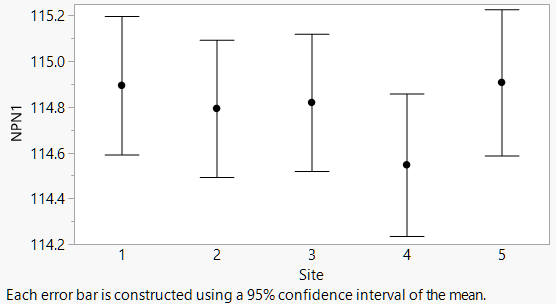
When you make a summary chart in Graph Builder with points, bars or lines, there is an option in the Properties area for adding Error Bars in one of four ways: 

  • Range
  • Standard Error
  • Standard Deviation
  • Confidence Interval

Choosing Confidence Interval uses the specified confidence level, which is 95% by default. Since there are many types of error bars, all error bar choices add a note to the bottom of the graph to indicate which option was chosen.
 ebauto.png


Custom Error Bars on Points

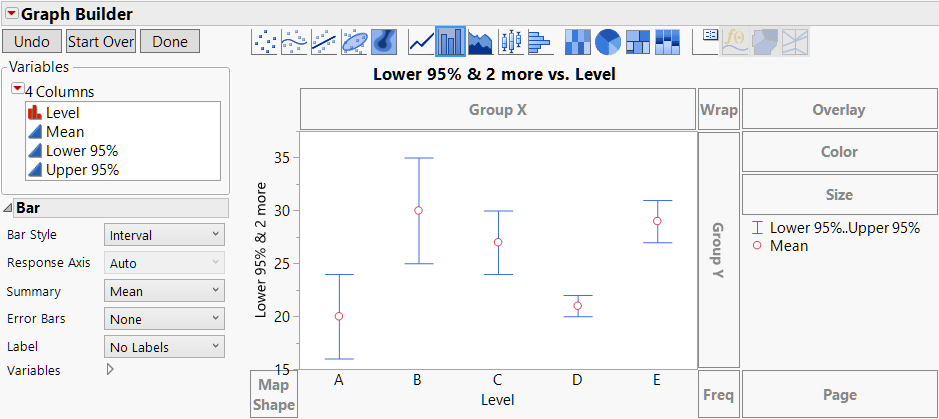
To make a dot chart with custom error bars, the trick is to think about it the other way around: Make a custom bar chart with points. The Bar element in Graph Builder has a style option for Interval bars. If you give it two variables, it draws an interval. If you give it three variables, it draws an interval with the first two and a circle with the third. Just what we want!


I'll demonstrate with this data table, which might have been produced by an analysis. You want a graph with error bars covering the Lower 95% and Upper 95% columns in the table.
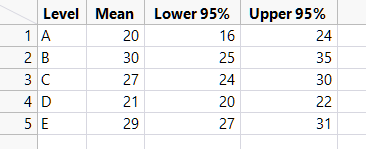
 ebtable.png


Open Graph Builder and put Term on the X axis and Lower 95%, Upper 95% and Mean on the common Y axis, in that order.
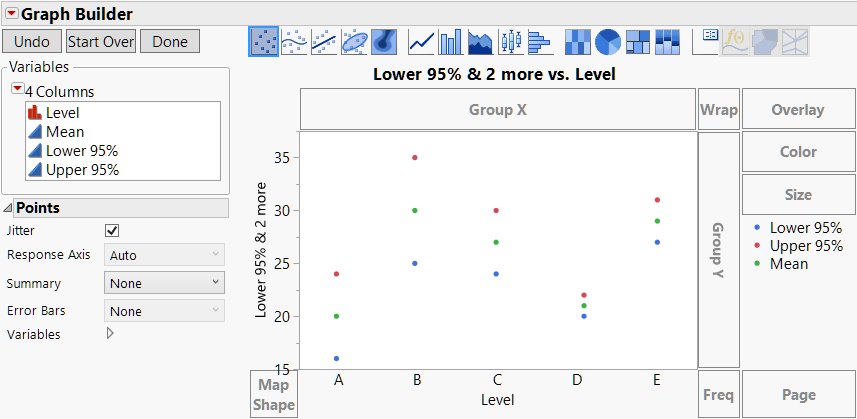
 eb1.png


Choose the Bar element, and the default style is Side by Side.
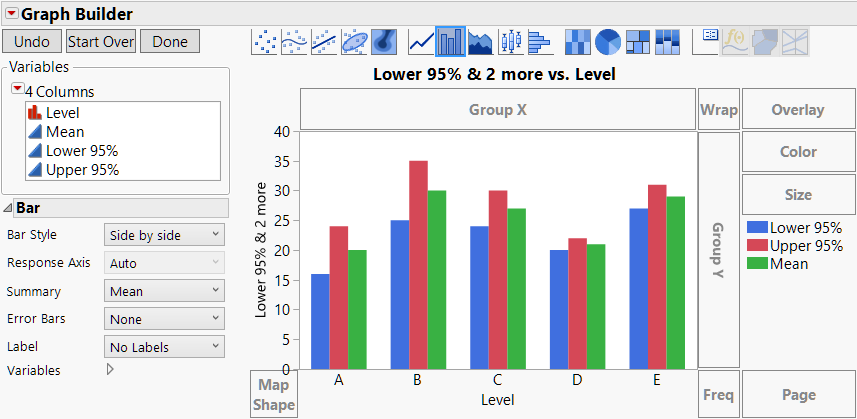
 
eb2.png


In the Properties panel, change the Style option to Interval

 eb3.png


Then click Done, and customize the labels and styling as desired.
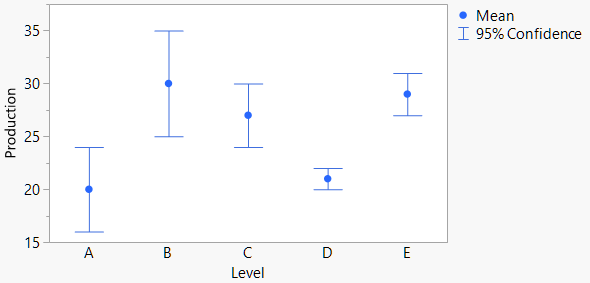
 

eb4.png


Custom Error Bars on Lines or Bars

The above technique is great for custom error bars with points, but what about with lines and bars? For those, you need to know two more things about Graph Builder:

  1. Multiple elements can be overlaid in the same graph.
  2. You can control which elements use which variables.

With that knowledge, the idea is to make a graph with both a Line element for the middle values and a Bar element in Interval mode for the interval bars.


The process starts from where we left off above. Next, click on the Line element and drag it into the graph to add lines without removing the interval bars. At this point, the Line element is showing all three variables, and so is the Bar element, which is only a starting point.
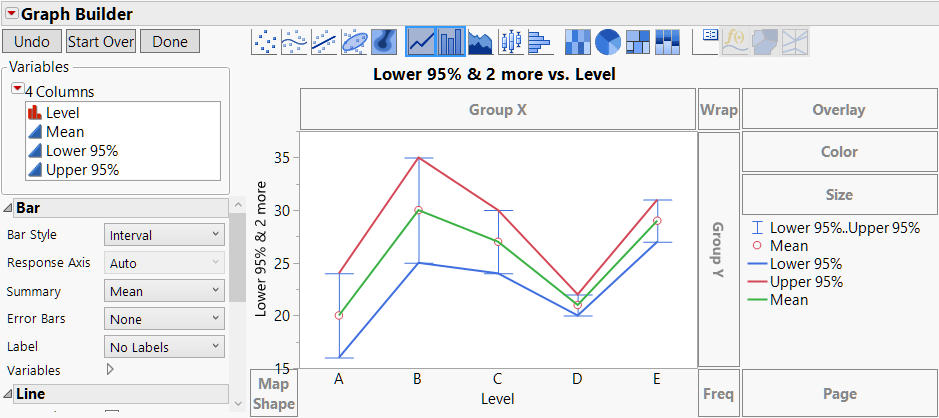

eb5.png


Go into the Variables section of the Line Properties and uncheck the Lower 95% and Upper 95% variables. Now the line only connects the middle values.

 eb6.png


Go into the Variables section of the Bar Properties to uncheck the Mean variable to remove the circle.
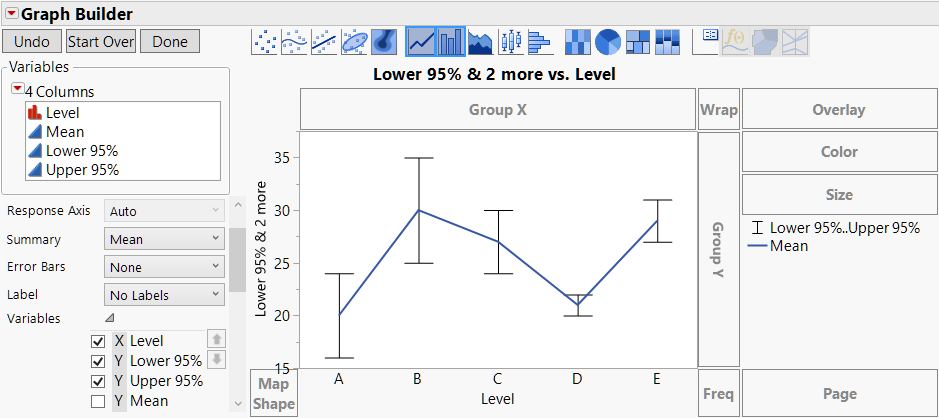
 eb7.png


Click Done, and make styling changes in the legend (right-click or use the Legend Settings dialog) for color and line thickness.
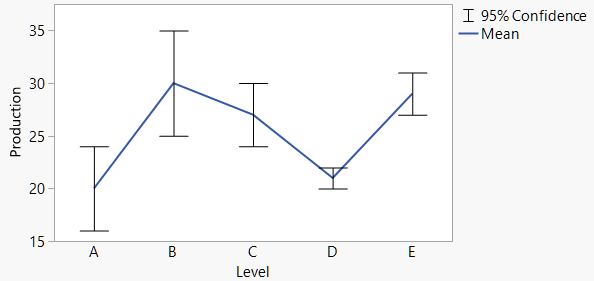
 
eb0.png


 Use the same sequence of steps for bars, dragging in the Bar element instead of the Line element at the start.
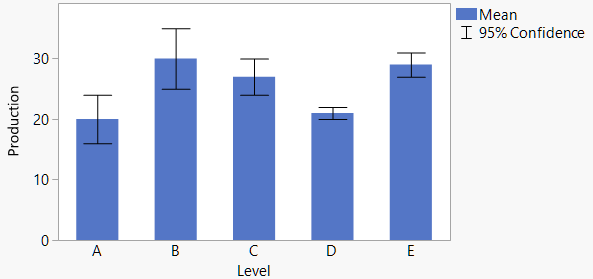
 

eb8.png 

 So, there you have it! Now you can make your error bars look just the way you want.

Last Modified: Feb 13, 2017 2:10 PM
Comments