cancel
Showing results for 
Show  only  | Search instead for 
Did you mean: 
  • Sign-in to the JMP Community will be unavailable intermittently Dec. 6-7 due to a system update. Thank you for your understanding!
  • We’re retiring the File Exchange at the end of this year. The JMP Marketplace is now your destination for add-ins and extensions.
  • JMP 19 is here! Learn more about the new features.

JMP Wish List

We want to hear your ideas for improving JMP. Share them here.
Choose Language Hide Translation Bar

Col Median (and others): add "Where" option

☐ cool new feature
☑ could help many users!

☐ removes a „bug“

☐ nice to have

☐ nobody needs it


#myTop10_2022


There is a set of posts with questions how to restrict the Col ... aggregation functions to a specific subset.

Compute Column Mean while restricting observations used 

JMP10: Col Max() and Col Min() functions returned the data from excluded row 

Col Functions and Row States 

How do I use the Col Maximum Formula with a "where" condition 

Exclude data in formula 


Application cases:

  • excluded rows from the aggregation:
    Col Max(if(not(excluded()), :weight,.),: sex)
    or even shorter (if one doesn't need values in the excluded rows);
    Col Max(:weight, :sex, :excluded())
  • Benchmark some data with a reference data set (country A in this post) 
    :data / Col Maximum(if(:country="A", :data,.))


  • calculate relative performance over time (divide all values at time t>=t0  by values at t=t0)
    (here the Col Mean is actually to get the value for :time=0 to the other rows.:)
    : data / Col Mean(if(:time=0, :data, 0) :batch, :sampleID)


As one can see in the examples above, the easy solution is an If statement inside the Col xyz aggreagtion:


col Mean( if(:sex=="M", :weight,.), :age);
col Mean( if(not(excluded()), :weight,.), :age)


The problem:

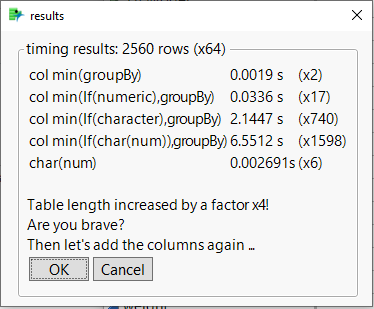
The approach is EXTREMELY slow - if the subset if-condition contains a  string comparison:
How-do-I-use-the-Col-Maximum-Formula-with-a-where/M78599

Then the time scales quadratically with the number of rows and even for small data sets with just a few 1000 entries the calculation takes seconds.
For data sets with some million entries it would take months (!!!) - but will be stopped by a timeout and an error message pops up. Not nice!


My wish: 

fix the bug


Even better:

Provide an additonal where option for Col xyz aggreagtions

  • which fixes the timing problem automatically: first restricts the data set, then applys the aggregation (--> much faster, even if the cool "col..." speedup has a  bug)
  • which  make subset definitions easier,
    instead of (*), you just need:


col Mean(:weight, :age, where(:sex=="M"))
col Mean(:weight, :age, where(not(excluded())))


timing examples, copied from here
hogi_0-1688758905875.png

corrected version - in a prev. version the screenshot showed [ms] instead of [s]


more wishes submitted by  hogi_2-1702196401638.png

8 Comments
Status changed to: Acknowledged

Hi @hogi, thank you for your suggestion! We have captured your request and will take it under consideration.

SamGardner
Level VII
Status changed to: Investigating
 
SamGardner
Level VII
Status changed to: Under Consideration

@hogi this is being looked at closely as we work on ways to improve how Where( ) clauses are used throughout JMP.  Thanks for the suggestion!

hogi
Level XIII

thanks :)

hogi
Level XIII

for the time till where(...) will be available in a future version of Jmp, one can speed up the the col aggregation by orders of magnitude via the workaround
changing the data type to numeric - or use a numeric formula column.
https://community.jmp.com/t5/Discussions/Tips-and-Tricks-best-practice-with-JMP-JSL/td-p/662686 


hogi
Level XIII

Thanks, @SamGardner  , @Sarah-Sylvestre , it's available now in JMP18 : )


Before changing the status to Delivered, could you please check if the usage of Where is like in tended in this Snippet?

Compared to the original approach is extremely slow : (

dt = Open( "$SAMPLE_DATA/Airline Delays.jmp" );

Print("old aproach");
t0 = hptime();
New Column( "max - 1st of month",
	Formula( Col Maximum( if(:Day of Month == 1 , :Arrival Delay,.), :Month) )
);
dt << run formulas();
show((hp time()-t0)/1000000); // 0.5s

Print("new  aproach - with Where");
t0 = hptime();
New Column( "max - 1st of month",
	Formula( Col Maximum( :Arrival Delay, :Month, Where( :Day of Month == 1 ) ) )
);
dt << run formulas();
show((hp time()-t0)/1000000); // 140s 


hogi
Level XIII
Print("new  aproach - with Where, semi-bugfix");
t0 = hptime();
 myWhere = Where( :Day of Month == 1 ) ;
Eval (Eval Expr(New Column( "max - 1st of month",
	Formula( Col Maximum( :Arrival Delay, :Month, Expr(myWhere) )
))));
dt << run formulas();
show((hp time()-t0)/1000000); // 40s - better but still way too slow ...
hogi
Level XIII

Ah, doesn't work yet  : (


Names Default to Here(1);
dt = Open( "$SAMPLE_DATA/Big Class.jmp" );

New Column( "max - 1st of month",
	Formula( Col Minimum( :weight, :sex, Where( :age ==17 ) ) )
);