Turn on suggestions
Auto-suggest helps you quickly narrow down your search results by suggesting possible matches as you type.
- Don’t miss your chance to experience Discovery Summit Europe at our best available rate! Early bird registration through 31 Oct.
- Graph Builder Toolbar streamlines interactive graphing. Creates shortcuts on Report and GraphBuilder Helpers toolbars. Download and install the extension.
- JMP will suspend normal business operations for our Rest and Recharge Day on Friday, October 2, 2026.
Regular business hours will resume on Monday, October 5, 2026.
Options
- Subscribe to RSS Feed
- Mark Topic as New
- Mark Topic as Read
- Float this Topic for Current User
- Bookmark
- Subscribe
- Mute
- Printer Friendly Page
Discussions
Solve problems, and share tips and tricks with other JMP users.- User Community
- :
- Discussions
- :
- y scaling in graph box problem

Level VII
- Mark as New
- Bookmark
- Subscribe
- Mute
- Subscribe to RSS Feed
- Get Direct Link
- Report Inappropriate Content
y scaling in graph box problem
Jan 12, 2026 12:23 PM
(814 views)
Dear community,
I want to generate many custom graphs (for each line in a table with > 20K rows) and decided to do with a graph box.
But when I generate it, it fails to recognize the y scaling (maximum is 9e6 and noch 100).
What is going wrong here?
Thanks and BR
(inspired by Solved: Changing the scales of a graph box - JMP User Community)
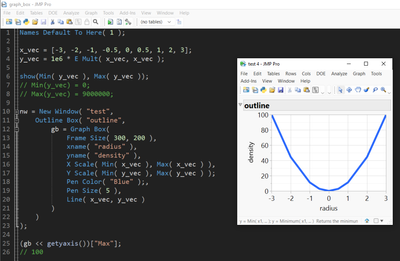
Names Default To Here( 1 );

x_vec = [-3, -2, -1, -0.5, 0, 0.5, 1, 2, 3];
y_vec = 1e6 * E Mult( x_vec, x_vec );

show(Min( y_vec ), Max( y_vec ));
// Min(y_vec) = 0;
// Max(y_vec) = 9000000;

nw = New Window( "test",
	Outline Box( "outline",
		gb = Graph Box(
			Frame Size( 300, 200 ),
			xname( "radius" ),
			yname( "density" ),
			X Scale( Min( x_vec ), Max( x_vec ) ),
			Y Scale( Min( y_vec ), Max( y_vec ) );
			Pen Color( "Blue" );,
			Pen Size( 5 ),
			Line( x_vec, y_vec )
		)
	)
);

(gb << getyaxis())["Max"];
// 100
Georg
1 ACCEPTED SOLUTION
Accepted Solutions


Super User
Solution
- Mark as New
- Bookmark
- Subscribe
- Mute
- Subscribe to RSS Feed
- Get Direct Link
- Report Inappropriate Content
Re: y scaling in graph box problem
I think if you just change ";" after Y Scale to "," it should work.
-Jarmo
2 REPLIES 2
Super User
Solution
- Mark as New
- Bookmark
- Subscribe
- Mute
- Subscribe to RSS Feed
- Get Direct Link
- Report Inappropriate Content
Re: y scaling in graph box problem
I think if you just change ";" after Y Scale to "," it should work.
-Jarmo

Level XIII
- Mark as New
- Bookmark
- Subscribe
- Mute
- Subscribe to RSS Feed
- Get Direct Link
- Report Inappropriate Content
Re: y scaling in graph box problem
wow, good catch!
So, named props of the Graph box have to be separated by commas, the expressions inside the script of the graph can be separated by commas or semicolons.

Recommended Articles
- © 2026 JMP Statistical Discovery LLC. All Rights Reserved.
- Terms of Use
- Privacy Statement
- Contact Us