- JMP will suspend normal business operations for our Winter Holiday beginning on Wednesday, Dec. 24, 2025, at 5:00 p.m. ET (2:00 p.m. ET for JMP Accounts Receivable).
Regular business hours will resume at 9:00 a.m. EST on Friday, Jan. 2, 2026. - We’re retiring the File Exchange at the end of this year. The JMP Marketplace is now your destination for add-ins and extensions.
- Subscribe to RSS Feed
- Mark Topic as New
- Mark Topic as Read
- Float this Topic for Current User
- Bookmark
- Subscribe
- Mute
- Printer Friendly Page
Discussions
Solve problems, and share tips and tricks with other JMP users.- JMP User Community
- :
- Discussions
- :
- select a row then reselect Scriptiing

- Mark as New
- Bookmark
- Subscribe
- Mute
- Subscribe to RSS Feed
- Get Direct Link
- Report Inappropriate Content
select a row then reselect Scriptiing
In this sample table, I am trying to select the row that has a value of 2 in :Number, grab the value "A" from :Letter, then select all the rows contains "A" in :Letter.
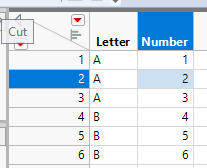
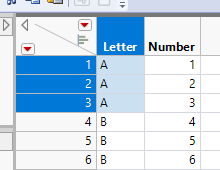
I wrote this script but it is not working.
dt= current datatable();
dt <<select where (:"Number" == 2);

s=Column(dt, "Letter")<<get Values;

show (s);

dt<<select where(contains(s,:"Letter"));
looking at the log
s = {"A", "A", "A", "B", "B", "B"};
And no rows were selected at the end of the script.
What went wrong?
Thanks
Accepted Solutions


- Mark as New
- Bookmark
- Subscribe
- Mute
- Subscribe to RSS Feed
- Get Direct Link
- Report Inappropriate Content
Re: select a row then reselect Scriptiing
I think you should have all rows selected based on your script because s contains all values from Letter column, not just those which match number 2's letter and then you check if current rows letter is in that list (it always is).
There are many ways to do what you want. Here is the method I would most likely use ( Data table subscripting :(
Names Default To Here(1);
dt = New Table("Untitled",
	Add Rows(6),
	New Column("Letter", Character, "Nominal", Set Values({"A", "A", "A", "B", "B", "B"})),
	New Column("Number", Numeric, "Continuous", Format("Best", 12), Set Values([1, 2, 3, 4, 5, 6]))
);

num_rows = dt << Get Rows Where(:Number == 2);
show(num_rows);
letters_of_interest = dt[num_rows, "Letter"];
show(letters_of_interest);
dt << Select Where(Contains(letters_of_interest, :Letter));
You could also use << Select Where in combination with << Get Selected Rows (one exampleget values from select where )
- Mark as New
- Bookmark
- Subscribe
- Mute
- Subscribe to RSS Feed
- Get Direct Link
- Report Inappropriate Content
Re: select a row then reselect Scriptiing
I think you should have all rows selected based on your script because s contains all values from Letter column, not just those which match number 2's letter and then you check if current rows letter is in that list (it always is).
There are many ways to do what you want. Here is the method I would most likely use ( Data table subscripting :(
Names Default To Here(1);
dt = New Table("Untitled",
	Add Rows(6),
	New Column("Letter", Character, "Nominal", Set Values({"A", "A", "A", "B", "B", "B"})),
	New Column("Number", Numeric, "Continuous", Format("Best", 12), Set Values([1, 2, 3, 4, 5, 6]))
);

num_rows = dt << Get Rows Where(:Number == 2);
show(num_rows);
letters_of_interest = dt[num_rows, "Letter"];
show(letters_of_interest);
dt << Select Where(Contains(letters_of_interest, :Letter));
You could also use << Select Where in combination with << Get Selected Rows (one exampleget values from select where )
- Mark as New
- Bookmark
- Subscribe
- Mute
- Subscribe to RSS Feed
- Get Direct Link
- Report Inappropriate Content
Re: select a row then reselect Scriptiing
Thank you. I certainly missed the "Get Rows part"
I came up with this script after a bit of digging
dt= current datatable();
dt <<Row Selection(select where (:"Number" == 2));

s= (dt:"Letter"[dt << get selected rows]);
show (s);

dt<<Row Selection (select where(contains(s,:"Letter")));Recommended Articles
- © 2025 JMP Statistical Discovery LLC. All Rights Reserved.
- Terms of Use
- Privacy Statement
- Contact Us