- JMP will suspend normal business operations for our Winter Holiday beginning on Wednesday, Dec. 24, 2025, at 5:00 p.m. ET (2:00 p.m. ET for JMP Accounts Receivable).
Regular business hours will resume at 9:00 a.m. EST on Friday, Jan. 2, 2026. - We’re retiring the File Exchange at the end of this year. The JMP Marketplace is now your destination for add-ins and extensions.
- Subscribe to RSS Feed
- Mark Topic as New
- Mark Topic as Read
- Float this Topic for Current User
- Bookmark
- Subscribe
- Mute
- Printer Friendly Page
Discussions
Solve problems, and share tips and tricks with other JMP users.- JMP User Community
- :
- Discussions
- :
- screening processus and date of report

- Mark as New
- Bookmark
- Subscribe
- Mute
- Subscribe to RSS Feed
- Get Direct Link
- Report Inappropriate Content
screening processus and date of report
Hi,
I'm used to have date for my reports.
but with the screening of processus, I have it 3x and I have a gap.
Is there a tip to avoid it ?
best regards

- Tags:
- windows
Accepted Solutions


- Mark as New
- Bookmark
- Subscribe
- Mute
- Subscribe to RSS Feed
- Get Direct Link
- Report Inappropriate Content
Re: screening processus and date of report
Doesn't seem to happen to me. Which JMP version are you using? I'm using 18.1 so maybe it has been fixed at some point.


- Mark as New
- Bookmark
- Subscribe
- Mute
- Subscribe to RSS Feed
- Get Direct Link
- Report Inappropriate Content
Re: screening processus and date of report
Is this standard process screening report with local data filter or some more customized script?
- Mark as New
- Bookmark
- Subscribe
- Mute
- Subscribe to RSS Feed
- Get Direct Link
- Report Inappropriate Content
Re: screening processus and date of report
standard process screening with local data filter
- Mark as New
- Bookmark
- Subscribe
- Mute
- Subscribe to RSS Feed
- Get Direct Link
- Report Inappropriate Content
Re: screening processus and date of report
Not sure how that happens. After I enabled "Date Title on Output" I got this

- Mark as New
- Bookmark
- Subscribe
- Mute
- Subscribe to RSS Feed
- Get Direct Link
- Report Inappropriate Content
Re: screening processus and date of report
hi,
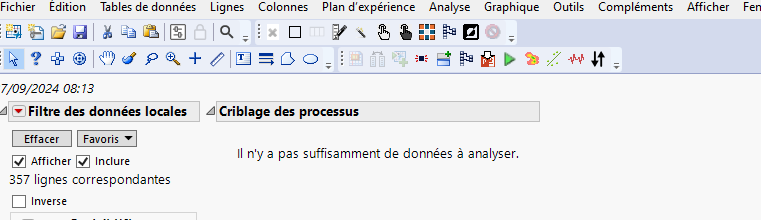
voici les étapes successives qui décrivent ce bug:
Etape 1: process screening + filtre de données local: voir capture1. l'affichage est OK
Etape 2: je sélectionne dans le filtre une variable; JMP ne fait pas le screening car pas assez de données ( pour le procees screening: faut-il un nombre de résultats par variable minimum ??): voir capture 2
Etape 3: je sélectionne une nouvelle variable: le problème apparaît: voir capture 3. l'affichage n'est pas OK avec les dates.
cordialement


- Mark as New
- Bookmark
- Subscribe
- Mute
- Subscribe to RSS Feed
- Get Direct Link
- Report Inappropriate Content
Re: screening processus and date of report
Doesn't seem to happen to me. Which JMP version are you using? I'm using 18.1 so maybe it has been fixed at some point.
- Mark as New
- Bookmark
- Subscribe
- Mute
- Subscribe to RSS Feed
- Get Direct Link
- Report Inappropriate Content
Re: screening processus and date of report
Hi,
JMP 17.0.
j'avais JMP 18 mais quand j'ai changé de PC, la réinstallation de JMP 18 m'avait donné le même problème que:
Solved: Re: Different icons for JMP Files - JMP User Community
et je suis revenu à JMP 17.
- Mark as New
- Bookmark
- Subscribe
- Mute
- Subscribe to RSS Feed
- Get Direct Link
- Report Inappropriate Content
Re: screening processus and date of report
If I remember correctly this should solve that issue Problem Note 52261: New instance of JMP® is opened each time a new file is opene... - JMP User Commu...
Recommended Articles
- © 2026 JMP Statistical Discovery LLC. All Rights Reserved.
- Terms of Use
- Privacy Statement
- Contact Us