Turn on suggestions
Auto-suggest helps you quickly narrow down your search results by suggesting possible matches as you type.
- Don’t miss your chance to experience Discovery Summit Europe at our best available rate! Early bird registration through 31 Oct.
- Graph Builder Toolbar streamlines interactive graphing. Creates shortcuts on Report and GraphBuilder Helpers toolbars. Download and install the extension.
Options
- Subscribe to RSS Feed
- Mark Topic as New
- Mark Topic as Read
- Float this Topic for Current User
- Bookmark
- Subscribe
- Mute
- Printer Friendly Page
Discussions
Solve problems, and share tips and tricks with other JMP users.- User Community
- :
- Discussions
- :
- "access violation"

Level IV
- Mark as New
- Bookmark
- Subscribe
- Mute
- Subscribe to RSS Feed
- Get Direct Link
- Report Inappropriate Content
"access violation"
Created:
Oct 5, 2015 03:51 PM
| Last Modified: Oct 18, 2016 5:50 PM
(10277 views)
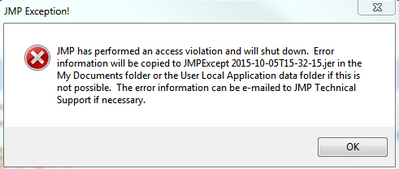
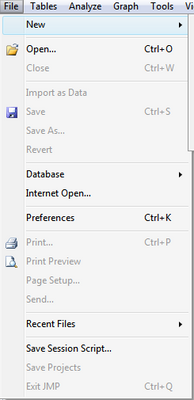
I am using jmp 12.01 and experiencing the problem "access violation" just after open a JMP session. The exit button in file menu is grayout and can not be closed by any means except use task manager of Windows. below are the screen shots. I have emailed to jmp support but would like to check if any member in this forum can help me out.
1 ACCEPTED SOLUTION
Accepted Solutions
Level IV
Solution
- Mark as New
- Bookmark
- Subscribe
- Mute
- Subscribe to RSS Feed
- Get Direct Link
- Report Inappropriate Content
Re: "access violation"
Created:
Oct 7, 2015 03:24 PM
| Last Modified: Oct 18, 2016 5:52 PM
(12332 views)
| Posted in reply to message from robust1972 10-05-2015
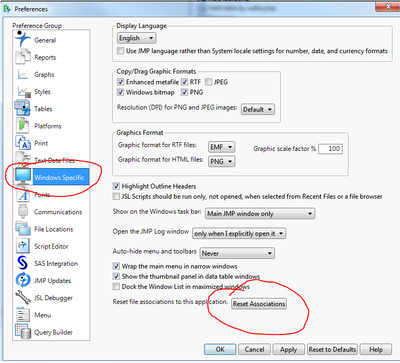
The issue was fixed finally by choose File/Preference/Windows Specific/ then click on reset association. I guess some file extension was associated with jmp accidentally and caused the issue.
1 REPLY 1
Level IV
Solution
- Mark as New
- Bookmark
- Subscribe
- Mute
- Subscribe to RSS Feed
- Get Direct Link
- Report Inappropriate Content
Re: "access violation"
Created:
Oct 7, 2015 03:24 PM
| Last Modified: Oct 18, 2016 5:52 PM
(12333 views)
| Posted in reply to message from robust1972 10-05-2015
The issue was fixed finally by choose File/Preference/Windows Specific/ then click on reset association. I guess some file extension was associated with jmp accidentally and caused the issue.
Recommended Articles
- © 2026 JMP Statistical Discovery LLC. All Rights Reserved.
- Terms of Use
- Privacy Statement
- Contact Us