- JMP will suspend normal business operations for our Winter Holiday beginning on Wednesday, Dec. 24, 2025, at 5:00 p.m. ET (2:00 p.m. ET for JMP Accounts Receivable).
Regular business hours will resume at 9:00 a.m. EST on Friday, Jan. 2, 2026. - We’re retiring the File Exchange at the end of this year. The JMP Marketplace is now your destination for add-ins and extensions.
- RSS フィードを購読する
- トピックを新着としてマーク
- トピックを既読としてマーク
- このトピックを現在のユーザーにフロートします
- ブックマーク
- 購読
- ミュート
- 印刷用ページ
Discussions
Solve problems, and share tips and tricks with other JMP users.- JMP User Community
- :
- Discussions
- :
- problème avec un graphique

- 新着としてマーク
- ブックマーク
- 購読
- ミュート
- RSS フィードを購読する
- ダイレクトリンクを取得
- 印刷
- 不適切なコンテンツを報告
problème avec un graphique
bonjour,
j'ai une base de données qui commence en octobre 2024, jusqu'à janvier 2025.
j'ai ce graphique joint.
existe-t-il une astuce pour ne pas avoir les mois sans résultats?

cordialement
- タグ:
- windows


- 新着としてマーク
- ブックマーク
- 購読
- ミュート
- RSS フィードを購読する
- ダイレクトリンクを取得
- 印刷
- 不適切なコンテンツを報告
Re: problème avec un graphique
Hi @Françoise,
Happy new Year 2025 !
I think you may find a solution in previous post A way to show a date with no data in graph builder by changing your column date format (from continuous to categorical/ordinal), disable "Include Missing categories" in Graph Builder Graph Builder - parallel Plot - missing entries, or simply hide & exclude rows with no data.
Hope this answer may help you,
"It is not unusual for a well-designed experiment to analyze itself" (Box, Hunter and Hunter)

- 新着としてマーク
- ブックマーク
- 購読
- ミュート
- RSS フィードを購読する
- ダイレクトリンクを取得
- 印刷
- 不適切なコンテンツを報告
Re: problème avec un graphique
Just add Moyenne to the Local Data Filer and move one of the sliders, first in - and then out, to select all data points (with values). Then all data points with values will be displayed - and regions without data will disappear.
A significant disadvantage of this approach: it is NOT dynamic.
The Data filter will stay as it is - once the data set gets updated, the plot will still show data with the previous limits.
better: add a transform column via right click /
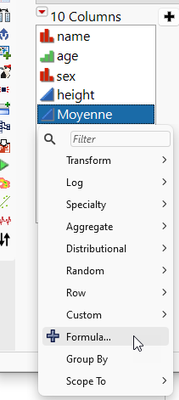
with the formula:

Then use the local data filter to select

おすすめの記事
- © 2025 JMP Statistical Discovery LLC. All Rights Reserved.
- 利用規約
- 個人情報の取り扱いについて
- お問い合わせ