- Subscribe to RSS Feed
- Mark Topic as New
- Mark Topic as Read
- Float this Topic for Current User
- Bookmark
- Subscribe
- Mute
- Printer Friendly Page
Discussions
Solve problems, and share tips and tricks with other JMP users.- JMP User Community
- :
- Discussions
- :
- interpolate missing data value based on its neighbouring data

- Mark as New
- Bookmark
- Subscribe
- Mute
- Subscribe to RSS Feed
- Get Direct Link
- Report Inappropriate Content
interpolate missing data value based on its neighbouring data
I have a work need to find the missing value based on its neighbouring value.
The value can be found below with its x,y coordinates.
The goal is to calculate the Z_value based on its neighbouring value fitting, such as contour map method.
THanks
| x | y | Z_Value |
| 120 | 180 | 3.48 |
| 181 | 146 | |
| 184 | 120 | 3.3 |
| 184 | 180 | 3.28 |
| 184 | 240 | 3.13 |
| 187 | 205 | |
| 190 | 92 | |
| 190 | 268 | |
| 191 | 77 | |
| 192 | 152 | |
| 215 | 154 | |
| 216 | 243 | |
| 226 | 218 | |
| 235 | 79 | |
| 248 | 60 | 3.8 |
| 248 | 120 | 3.42 |
| 248 | 180 | 3.31 |
| 248 | 240 | 3.36 |
| 248 | 300 | 3.18 |
| 250 | 268 | |
| 251 | 142 | |
| 253 | 87 | |
| 253 | 205 | |
| 271 | 255 | |
| 277 | 193 | |
| 295 | 86 | |
| 298 | 157 | |
| 312 | 120 | 3.64 |
| 312 | 180 | 3.46 |
| 312 | 240 | 3.38 |
| 313 | 208 | |
| 313 | 263 | |
| 319 | 149 | |
| 335 | 164 | |
| 353 | 177 | |
| 376 | 180 | 3.31 |
Accepted Solutions


- Mark as New
- Bookmark
- Subscribe
- Mute
- Subscribe to RSS Feed
- Get Direct Link
- Report Inappropriate Content
Re: interpolate missing data value based on its neighbouring data
The contour plot platform allows you to create a new data table where the xy matrix can be interpolated to whatever precision desired.
From the red triangle, select
Save=>Generated Grid
- Mark as New
- Bookmark
- Subscribe
- Mute
- Subscribe to RSS Feed
- Get Direct Link
- Report Inappropriate Content
Re: interpolate missing data value based on its neighbouring data
Here is the example taken directly from the Scripting Index
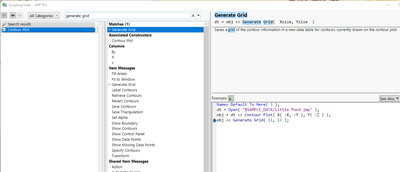
Names Default To Here( 1 );
dt = Open( "$SAMPLE_DATA/Little Pond.jmp" );
obj = dt << Contour Plot( X( :X, :Y ), Y( :Z ) );
obj << Generate Grid( 11, 11 );- Mark as New
- Bookmark
- Subscribe
- Mute
- Subscribe to RSS Feed
- Get Direct Link
- Report Inappropriate Content
Re: interpolate missing data value based on its neighbouring data
The contour plot platform allows you to create a new data table where the xy matrix can be interpolated to whatever precision desired.
From the red triangle, select
Save=>Generated Grid
- Mark as New
- Bookmark
- Subscribe
- Mute
- Subscribe to RSS Feed
- Get Direct Link
- Report Inappropriate Content
Re: interpolate missing data value based on its neighbouring data
This works, thanks.
By any chance, do you happen to know the JSL for the grid generation?
I am trying to use table copy script, but it doesn't work.
For example,to generate a 21 horizontal grid, and a 32 vertical grid.
- Mark as New
- Bookmark
- Subscribe
- Mute
- Subscribe to RSS Feed
- Get Direct Link
- Report Inappropriate Content
Re: interpolate missing data value based on its neighbouring data
Here is the example taken directly from the Scripting Index
Names Default To Here( 1 );
dt = Open( "$SAMPLE_DATA/Little Pond.jmp" );
obj = dt << Contour Plot( X( :X, :Y ), Y( :Z ) );
obj << Generate Grid( 11, 11 );- Mark as New
- Bookmark
- Subscribe
- Mute
- Subscribe to RSS Feed
- Get Direct Link
- Report Inappropriate Content
Re: interpolate missing data value based on its neighbouring data
This is great, thanks
Recommended Articles
- © 2026 JMP Statistical Discovery LLC. All Rights Reserved.
- Terms of Use
- Privacy Statement
- Contact Us