cancel
Showing results for 
Show  only  | Search instead for 
Did you mean: 
  • Don’t miss your chance to experience Discovery Summit Europe at our best available rate! Early bird registration through 31 Oct.
  • Graph Builder Toolbar streamlines interactive graphing. Creates shortcuts on Report and GraphBuilder Helpers toolbars. Download and install the extension.
  • JMP will suspend normal business operations for our Rest and Recharge Day on Friday, October 2, 2026.
    Regular business hours will resume on Monday, October 5, 2026.

Discussions

Solve problems, and share tips and tricks with other JMP users.
Choose Language Hide Translation Bar
hunterssze
Level I

how to add state name label to the graphic building when using a map

Hello,

        I am trying to figure out how to adding the state Name label to the graphic builder..  I am using the following example..

Example of Creating a Map in Graph Builder

1 REPLY 1
ian_jmp
Level X

Re: how to add state name label to the graphic building when using a map

Note that the 'State' column has a yellow 'label' icon next to it. This is what produces the tooltips that appear when you hover over a state. To get persistent labels, you need to also label rows. Select 'Rows > Row Selection > Select All Rows', then 'Rows > Label/Unlabel':
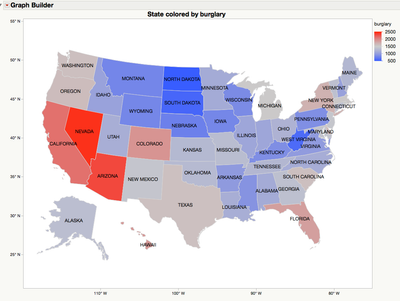
11670_Screen Shot 2016-05-24 at 16.33.13.png

Recommended Articles