cancel
Showing results for 
Show  only  | Search instead for 
Did you mean: 
  • Learn how to build custom Python data connectors and further customize JMP’s Data Connector Framework with the Python Data Connector Demo, available now in the JMP Marketplace!
  • See how to move from signal modeling to system modeling at the first JMP Aerospace Analytics webinar. Register. June 18, 1 p.m. US Eastern Time.

Discussions

Solve problems, and share tips and tricks with other JMP users.
Choose Language Hide Translation Bar
hunterssze
Level I

how to add state name label to the graphic building when using a map

Hello,

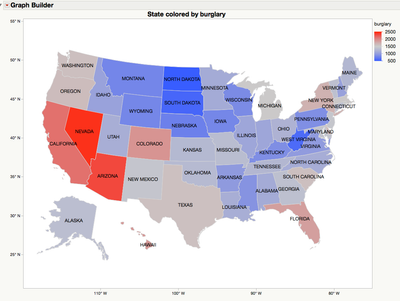
        I am trying to figure out how to adding the state Name label to the graphic builder..  I am using the following example..

Example of Creating a Map in Graph Builder

1 REPLY 1
ian_jmp
Level X

Re: how to add state name label to the graphic building when using a map

Note that the 'State' column has a yellow 'label' icon next to it. This is what produces the tooltips that appear when you hover over a state. To get persistent labels, you need to also label rows. Select 'Rows > Row Selection > Select All Rows', then 'Rows > Label/Unlabel':
11670_Screen Shot 2016-05-24 at 16.33.13.png

Recommended Articles
