cancel
Showing results for 
Show  only  | Search instead for 
Did you mean: 
  • JMP will suspend normal business operations for our Winter Holiday beginning on Wednesday, Dec. 24, 2025, at 5:00 p.m. ET (2:00 p.m. ET for JMP Accounts Receivable).
    Regular business hours will resume at 9:00 a.m. EST on Friday, Jan. 2, 2026.
  • We’re retiring the File Exchange at the end of this year. The JMP Marketplace is now your destination for add-ins and extensions.

Discussions

Solve problems, and share tips and tricks with other JMP users.
%3CLINGO-SUB%20id%3D%22lingo-sub-233258%22%20slang%3D%22en-US%22%20mode%3D%22NONE%22%3Ehow%20to%20add%20Percentage%20difference%20on%20graph%3C%2FLINGO-SUB%3E%3CLINGO-BODY%20id%3D%22lingo-body-233258%22%20slang%3D%22en-US%22%20mode%3D%22NONE%22%3E%3CP%3EHi.%3C%2FP%3E%3CP%3E%26nbsp%3B%3C%2FP%3E%3CP%3EI%20built%20a%20graph%20with%201%20response%20and%20two%20variations%20(X%20axis%20and%20warp)%20.%3C%2FP%3E%3CP%3E%26nbsp%3B%3C%2FP%3E%3CP%3E%3CA%20href%3D%22https%3A%2F%2Fpublic.jmp.com%2Fpackages%2FGraph-Builder%2Fjs-p%2FGBG5bpnyJFh54pTmJhkjd%22%20target%3D%22_blank%22%20rel%3D%22noopener%20noreferrer%22%3EYou%20can%20see%20it%20here%3C%2FA%3E%26nbsp%3B%3C%2FP%3E%3CP%3E%26nbsp%3B%3C%2FP%3E%3CP%3Ebut%2C%20I%20would%20like%20to%20add%20a%20the%20percentage%20difference%2C%20as%20you%20can%20see%20in%20the%20next%26nbsp%3B%20photo-%20I%20made%20by%20PP%3C%2FP%3E%3CP%3E%26nbsp%3B%3C%2FP%3E%3CP%3E%3CSPAN%20class%3D%22lia-inline-image-display-wrapper%20lia-image-align-left%22%20image-alt%3D%22test.png%22%20style%3D%22width%3A%20400px%3B%22%3E%3CSPAN%20class%3D%22lia-inline-image-display-wrapper%22%20image-alt%3D%22test.png%22%20style%3D%22width%3A%20400px%3B%22%3E%3Cspan%20class%3D%22lia-inline-image-display-wrapper%22%20image-alt%3D%22test.png%22%20style%3D%22width%3A%20400px%3B%22%3E%3Cimg%20src%3D%22https%3A%2F%2Fcommunity.jmp.com%2Ft5%2Fimage%2Fserverpage%2Fimage-id%2F20248iF04743CB158269FC%2Fimage-size%2Fmedium%3Fv%3Dv2%26amp%3Bpx%3D400%22%20role%3D%22button%22%20title%3D%22test.png%22%20alt%3D%22test.png%22%20%2F%3E%3C%2Fspan%3E%3C%2FSPAN%3E%3C%2FSPAN%3E%3C%2FP%3E%3CP%3E%26nbsp%3B%3C%2FP%3E%3CP%3E%26nbsp%3B%3C%2FP%3E%3CP%3E%26nbsp%3B%3C%2FP%3E%3CP%3E%26nbsp%3B%3C%2FP%3E%3CP%3E%26nbsp%3B%3C%2FP%3E%3CP%3E%26nbsp%3B%3C%2FP%3E%3CP%3E%26nbsp%3B%3C%2FP%3E%3CP%3Edoes%20anyone%20have%20a%20recommendation%20what%20is%20the%20best%20way%20to%20do%20this%3F%3C%2FP%3E%3CP%3E%26nbsp%3B%3C%2FP%3E%3CP%3E%26nbsp%3B%3C%2FP%3E%3CP%3E%26nbsp%3B%3C%2FP%3E%3CP%3E%26nbsp%3B%3C%2FP%3E%3CP%3E%26nbsp%3B%3C%2FP%3E%3C%2FLINGO-BODY%3E%3CLINGO-SUB%20id%3D%22lingo-sub-233298%22%20slang%3D%22en-US%22%20mode%3D%22NONE%22%3ERe%3A%20how%20to%20add%20Percentage%20difference%20on%20graph%3C%2FLINGO-SUB%3E%3CLINGO-BODY%20id%3D%22lingo-body-233298%22%20slang%3D%22en-US%22%20mode%3D%22NONE%22%3E%3CP%3EYes.%3C%2FP%3E%0A%3CP%3EHere%20is%20an%20example%20taken%20right%20from%20the%20Scripting%20Index%20for%20%22%26lt%3B%26lt%3B%20Add%20Graphics%20Script%22.%26nbsp%3B%20It%20uses%20the%20Bivariate%20platform%2C%20but%20%26lt%3B%26lt%3B%20Add%20Graphics%20Script%20is%20also%20supported%20for%20the%20Graph%20Builder%3C%2FP%3E%0A%3CPRE%3E%3CCODE%20class%3D%22%20language-jsl%22%3ENames%20Default%20To%20Here(%201%20)%3B%0AOpen(%20%22%24SAMPLE_DATA%2FBig%20Class.jmp%22%20)%3B%0Abiv%20%3D%20Bivariate(%20Y(%20%3Aweight%20)%2C%20X(%20%3Aheight%20)%2C%20FitLine%20)%3B%0Arbiv%20%3D%20biv%20%26lt%3B%26lt%3B%20report%3B%0Aframebox%20%3D%20rbiv%5Bframe%20box(%201%20)%5D%3B%0Aframebox%20%26lt%3B%26lt%3B%20Add%20Graphics%20Script(%0A%20Transparency(%200.5%20)%3B%0A%20Fill%20Color(%20%7B1.0%2C%200.5%2C%200.0%7D%20)%3B%0A%20Polygon(%20%5B60%2C%2072%2C%2057%5D%2C%20%5B75%2C%20120%2C%20120%5D%20)%3B%0A)%3B%3C%2FCODE%3E%3C%2FPRE%3E%3C%2FLINGO-BODY%3E%3CLINGO-SUB%20id%3D%22lingo-sub-233270%22%20slang%3D%22en-US%22%20mode%3D%22NONE%22%3ERe%3A%20how%20to%20add%20Percentage%20difference%20on%20graph%3C%2FLINGO-SUB%3E%3CLINGO-BODY%20id%3D%22lingo-body-233270%22%20slang%3D%22en-US%22%20mode%3D%22NONE%22%3E%3CP%3EThanks!%26nbsp%3B%3C%2FP%3E%3CP%3E%26nbsp%3B%3C%2FP%3E%3CP%3Eadd%20it%20is%20possible%20to%20add%20a%20custom%20calculation%20automatically%20%3F%3C%2FP%3E%3C%2FLINGO-BODY%3E%3CLINGO-SUB%20id%3D%22lingo-sub-233269%22%20slang%3D%22en-US%22%20mode%3D%22NONE%22%3ERe%3A%20how%20to%20add%20Percentage%20difference%20on%20graph%3C%2FLINGO-SUB%3E%3CLINGO-BODY%20id%3D%22lingo-body-233269%22%20slang%3D%22en-US%22%20mode%3D%22NONE%22%3E%3CP%3EYou%20can%20add%20the%20annotations%20by%20using%20the%20Objects%20available%20under%20the%20Tool%20Bar%3C%2FP%3E%0A%3CP%3E%3CSPAN%20class%3D%22lia-inline-image-display-wrapper%20lia-image-align-inline%22%20image-alt%3D%22anno.PNG%22%20style%3D%22width%3A%20476px%3B%22%3E%3CSPAN%20class%3D%22lia-inline-image-display-wrapper%22%20image-alt%3D%22anno.PNG%22%20style%3D%22width%3A%20476px%3B%22%3E%3Cspan%20class%3D%22lia-inline-image-display-wrapper%22%20image-alt%3D%22anno.PNG%22%20style%3D%22width%3A%20476px%3B%22%3E%3Cimg%20src%3D%22https%3A%2F%2Fcommunity.jmp.com%2Ft5%2Fimage%2Fserverpage%2Fimage-id%2F20249i42C5F1DA068ADBDF%2Fimage-size%2Flarge%3Fv%3Dv2%26amp%3Bpx%3D999%22%20role%3D%22button%22%20title%3D%22anno.PNG%22%20alt%3D%22anno.PNG%22%20%2F%3E%3C%2Fspan%3E%3C%2FSPAN%3E%3C%2FSPAN%3E%3C%2FP%3E%0A%3CP%3EOr%20you%20can%20use%20JSL%20and%20the%20%22%26lt%3B%26lt%3B%20Add%20Graphics%20Script%22%20to%20add%20the%20annotation%20programmatically%3C%2FP%3E%3C%2FLINGO-BODY%3E
Choose Language Hide Translation Bar
TalDamri
Level III

how to add Percentage difference on graph

Hi.


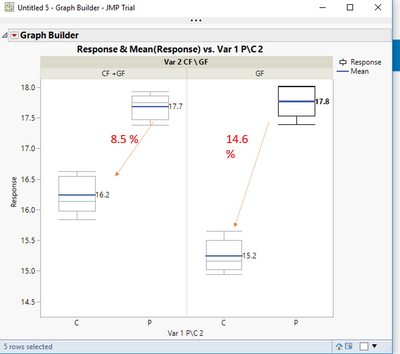
I built a graph with 1 response and two variations (X axis and warp) .


You can see it here 


but, I would like to add a the percentage difference, as you can see in the next  photo- I made by PP
 

test.png


does anyone have a recommendation what is the best way to do this?


1 ACCEPTED SOLUTION

Accepted Solutions
txnelson
Super User

Re: how to add Percentage difference on graph

Yes.

Here is an example taken right from the Scripting Index for "<< Add Graphics Script".  It uses the Bivariate platform, but << Add Graphics Script is also supported for the Graph Builder

Names Default To Here( 1 );
Open( "$SAMPLE_DATA/Big Class.jmp" );
biv = Bivariate( Y( :weight ), X( :height ), FitLine );
rbiv = biv << report;
framebox = rbiv[frame box( 1 )];
framebox << Add Graphics Script(
	Transparency( 0.5 );
	Fill Color( {1.0, 0.5, 0.0} );
	Polygon( [60, 72, 57], [75, 120, 120] );
);
Jim

View solution in original post

3 REPLIES 3
txnelson
Super User

Re: how to add Percentage difference on graph

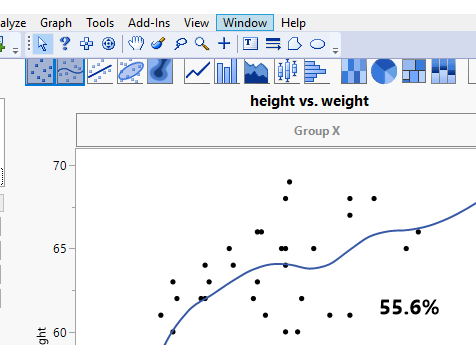
You can add the annotations by using the Objects available under the Tool Bar
anno.PNG

Or you can use JSL and the "<< Add Graphics Script" to add the annotation programmatically

Jim
TalDamri
Level III

Re: how to add Percentage difference on graph

Thanks! 


add it is possible to add a custom calculation automatically ?

txnelson
Super User

Re: how to add Percentage difference on graph

Yes.

Here is an example taken right from the Scripting Index for "<< Add Graphics Script".  It uses the Bivariate platform, but << Add Graphics Script is also supported for the Graph Builder

Names Default To Here( 1 );
Open( "$SAMPLE_DATA/Big Class.jmp" );
biv = Bivariate( Y( :weight ), X( :height ), FitLine );
rbiv = biv << report;
framebox = rbiv[frame box( 1 )];
framebox << Add Graphics Script(
	Transparency( 0.5 );
	Fill Color( {1.0, 0.5, 0.0} );
	Polygon( [60, 72, 57], [75, 120, 120] );
);
Jim

Recommended Articles