- Don’t miss your chance to experience Discovery Summit Europe at our best available rate! Early bird registration through 31 Oct.
- Graph Builder Toolbar streamlines interactive graphing. Creates shortcuts on Report and GraphBuilder Helpers toolbars. Download and install the extension.
- Subscribe to RSS Feed
- Mark Topic as New
- Mark Topic as Read
- Float this Topic for Current User
- Bookmark
- Subscribe
- Mute
- Printer Friendly Page
Discussions
Solve problems, and share tips and tricks with other JMP users.- User Community
- :
- Discussions
- :
- how to add Percentage difference on graph

- Mark as New
- Bookmark
- Subscribe
- Mute
- Subscribe to RSS Feed
- Get Direct Link
- Report Inappropriate Content
how to add Percentage difference on graph
Hi.
I built a graph with 1 response and two variations (X axis and warp) .
but, I would like to add a the percentage difference, as you can see in the next photo- I made by PP
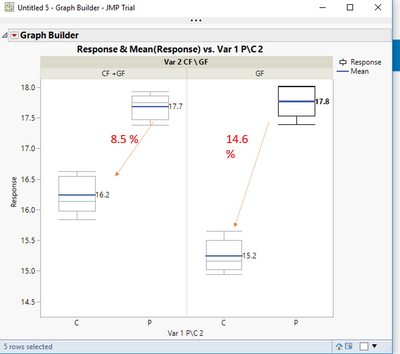
does anyone have a recommendation what is the best way to do this?
Accepted Solutions


- Mark as New
- Bookmark
- Subscribe
- Mute
- Subscribe to RSS Feed
- Get Direct Link
- Report Inappropriate Content
Re: how to add Percentage difference on graph
Yes.
Here is an example taken right from the Scripting Index for "<< Add Graphics Script". It uses the Bivariate platform, but << Add Graphics Script is also supported for the Graph Builder
Names Default To Here( 1 );
Open( "$SAMPLE_DATA/Big Class.jmp" );
biv = Bivariate( Y( :weight ), X( :height ), FitLine );
rbiv = biv << report;
framebox = rbiv[frame box( 1 )];
framebox << Add Graphics Script(
	Transparency( 0.5 );
	Fill Color( {1.0, 0.5, 0.0} );
	Polygon( [60, 72, 57], [75, 120, 120] );
);- Mark as New
- Bookmark
- Subscribe
- Mute
- Subscribe to RSS Feed
- Get Direct Link
- Report Inappropriate Content
Re: how to add Percentage difference on graph
You can add the annotations by using the Objects available under the Tool Bar
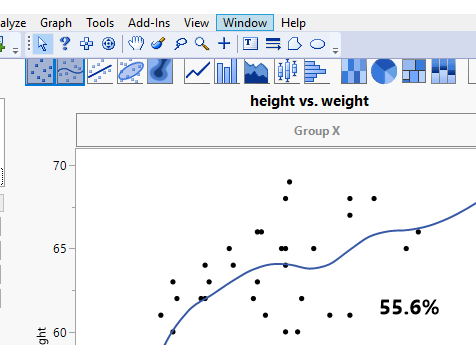
Or you can use JSL and the "<< Add Graphics Script" to add the annotation programmatically
- Mark as New
- Bookmark
- Subscribe
- Mute
- Subscribe to RSS Feed
- Get Direct Link
- Report Inappropriate Content
Re: how to add Percentage difference on graph
Thanks!
add it is possible to add a custom calculation automatically ?
- Mark as New
- Bookmark
- Subscribe
- Mute
- Subscribe to RSS Feed
- Get Direct Link
- Report Inappropriate Content
Re: how to add Percentage difference on graph
Yes.
Here is an example taken right from the Scripting Index for "<< Add Graphics Script". It uses the Bivariate platform, but << Add Graphics Script is also supported for the Graph Builder
Names Default To Here( 1 );
Open( "$SAMPLE_DATA/Big Class.jmp" );
biv = Bivariate( Y( :weight ), X( :height ), FitLine );
rbiv = biv << report;
framebox = rbiv[frame box( 1 )];
framebox << Add Graphics Script(
	Transparency( 0.5 );
	Fill Color( {1.0, 0.5, 0.0} );
	Polygon( [60, 72, 57], [75, 120, 120] );
);Recommended Articles
- © 2026 JMP Statistical Discovery LLC. All Rights Reserved.
- Terms of Use
- Privacy Statement
- Contact Us