- Don’t miss your chance to experience Discovery Summit Europe at our best available rate! Early bird registration through 31 Oct.
- Graph Builder Toolbar streamlines interactive graphing. Creates shortcuts on Report and GraphBuilder Helpers toolbars. Download and install the extension.
- Subscribe to RSS Feed
- Mark Topic as New
- Mark Topic as Read
- Float this Topic for Current User
- Bookmark
- Subscribe
- Mute
- Printer Friendly Page
Discussions
Solve problems, and share tips and tricks with other JMP users.- User Community
- :
- Discussions
- :
- Re: how do you generate this plot in JMP?

- Mark as New
- Bookmark
- Subscribe
- Mute
- Subscribe to RSS Feed
- Get Direct Link
- Report Inappropriate Content
how do you generate this plot in JMP?
I have a grid of crosses that I measure. Each grid position has a nominal expected position, and I measure its actual position and calculate the error. I would like to plot the magnitude and direction of the error at each nominal position. Is there a way to do this in JMP? The plot I'm hoping for looks like the following (I did not generate this plot; I have software that does it):
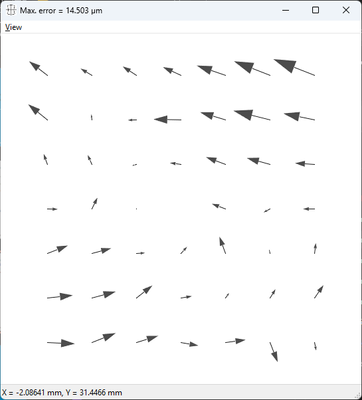
I don't know what is needed to generate such a plot, so for now I've attached what I have: the nominal position at each cross, the actual measured position, and the errors.
Accepted Solutions

- Mark as New
- Bookmark
- Subscribe
- Mute
- Subscribe to RSS Feed
- Get Direct Link
- Report Inappropriate Content
Re: how do you generate this plot in JMP?
There is a blog post by @XanGregg where he explains how to generate Vector plots in Jmp:
Vector Plots in JMP
[different length, but not different size of arrow heads]
Besides that, Jmp developers plan to include Vector Plots directly in Graph Builder:
- Mark as New
- Bookmark
- Subscribe
- Mute
- Subscribe to RSS Feed
- Get Direct Link
- Report Inappropriate Content
Re: how do you generate this plot in JMP?
Hi hogi, that did the trick; thank you. Half the battle for us newbies is knowing what a plot is called (didn't know it was a "vector plot"). Using your info I was able to reproduce the plot in my original post using JMP:
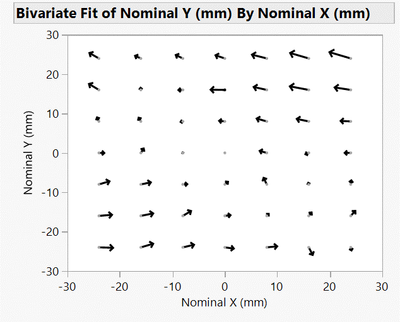
For those who are interested, I have attached a second file with the script for this plot included. Run the script "Vector Plot", right click on the chart and select "Customize..." from the drop-down menu, select "Script" and you'll see what I had to add to make the arrows appear, namely:
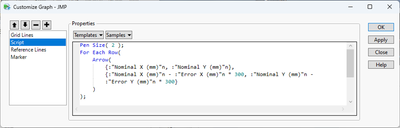
Note that the first time I did this there was no Script option, so I pressed the "+" button, which made it appear. After making the addition I pressed OK and voila: the desired arrows.
- Mark as New
- Bookmark
- Subscribe
- Mute
- Subscribe to RSS Feed
- Get Direct Link
- Report Inappropriate Content
Re: how do you generate this plot in JMP?
There is a blog post by @XanGregg where he explains how to generate Vector plots in Jmp:
Vector Plots in JMP
[different length, but not different size of arrow heads]
Besides that, Jmp developers plan to include Vector Plots directly in Graph Builder:
- Mark as New
- Bookmark
- Subscribe
- Mute
- Subscribe to RSS Feed
- Get Direct Link
- Report Inappropriate Content
Re: how do you generate this plot in JMP?
Hi hogi, that did the trick; thank you. Half the battle for us newbies is knowing what a plot is called (didn't know it was a "vector plot"). Using your info I was able to reproduce the plot in my original post using JMP:
For those who are interested, I have attached a second file with the script for this plot included. Run the script "Vector Plot", right click on the chart and select "Customize..." from the drop-down menu, select "Script" and you'll see what I had to add to make the arrows appear, namely:
Note that the first time I did this there was no Script option, so I pressed the "+" button, which made it appear. After making the addition I pressed OK and voila: the desired arrows.
- Mark as New
- Bookmark
- Subscribe
- Mute
- Subscribe to RSS Feed
- Get Direct Link
- Report Inappropriate Content
Re: how do you generate this plot in JMP?
JMP19: Vector plot is available now in Graph Builder.
-> It's very easy now to generate this type of plot via drag & drop.
Recommended Articles
- © 2026 JMP Statistical Discovery LLC. All Rights Reserved.
- Terms of Use
- Privacy Statement
- Contact Us