- Don’t miss your chance to experience Discovery Summit Europe at our best available rate! Early bird registration through 31 Oct.
- Graph Builder Toolbar streamlines interactive graphing. Creates shortcuts on Report and GraphBuilder Helpers toolbars. Download and install the extension.
- Subscribe to RSS Feed
- Mark Topic as New
- Mark Topic as Read
- Float this Topic for Current User
- Bookmark
- Subscribe
- Mute
- Printer Friendly Page
Discussions
Solve problems, and share tips and tricks with other JMP users.- User Community
- :
- Discussions
- :
- concatenating data of the same category with delimiter in the same cell

- Mark as New
- Bookmark
- Subscribe
- Mute
- Subscribe to RSS Feed
- Get Direct Link
- Report Inappropriate Content
concatenating data of the same category with delimiter in the same cell
Hi, I have an input as below. How do I generate the summary output as below, using jmp existing function like tabulate or other, concatenating the market with delimiter "|"?
Once we have the output, how to use jmp function to convert the output back to the input format?
Thank you!
| input | |
| Code | Market |
| 1 | A |
| 2 | A |
| 3 | A |
| 1 | B |
| 5 | B |
| 1 | C |
| 7 | C |
| 7 | A |
| output | |
| Code | Market |
| 1 | A|B|C |
| 2 | A |
| 3 | A |
| 5 | B |
| 7 | A|C |
Accepted Solutions


- Mark as New
- Bookmark
- Subscribe
- Mute
- Subscribe to RSS Feed
- Get Direct Link
- Report Inappropriate Content
Re: concatenating data of the same category with delimiter in the same cell
With some tinkering around in Tables and Cos menu I might have figured it out. Image instructions follow:
Start:
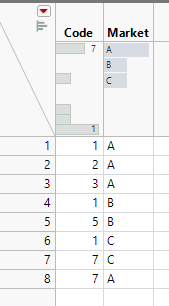
1. Tables / Split
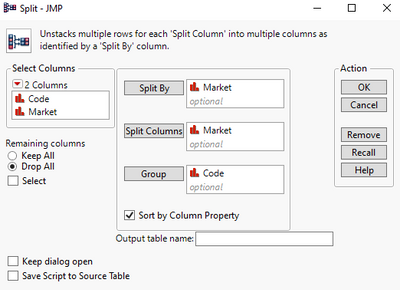
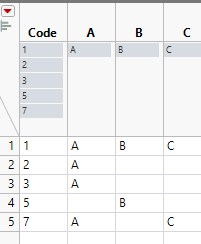
2. With A, B and C columns selected go to Cols / Utilities / Combine Columns(might want to keep Multiple Response, depending how you use the data)
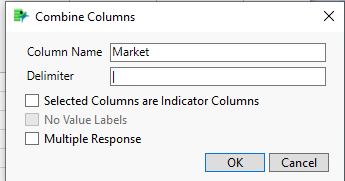
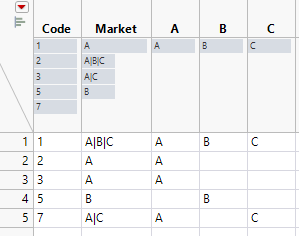
3. Delete unnecessary colums A, B, C
4. To go back, select Market column and go to Cols / Utilities / Text To Columns
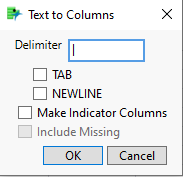
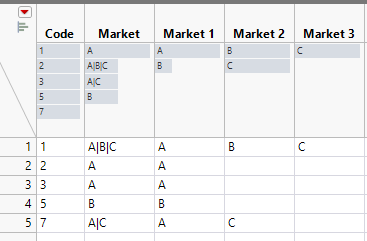
5. Tables / Stack
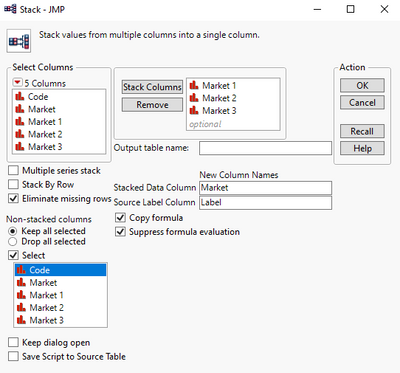
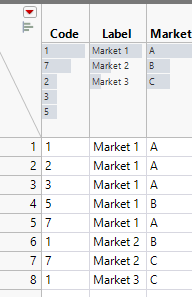
6. Delete Label column
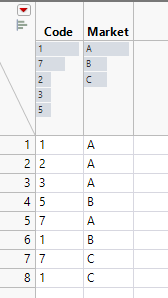
- Mark as New
- Bookmark
- Subscribe
- Mute
- Subscribe to RSS Feed
- Get Direct Link
- Report Inappropriate Content
Re: concatenating data of the same category with delimiter in the same cell
With some tinkering around in Tables and Cos menu I might have figured it out. Image instructions follow:
Start:
1. Tables / Split
2. With A, B and C columns selected go to Cols / Utilities / Combine Columns(might want to keep Multiple Response, depending how you use the data)
3. Delete unnecessary colums A, B, C
4. To go back, select Market column and go to Cols / Utilities / Text To Columns
5. Tables / Stack
6. Delete Label column
- Mark as New
- Bookmark
- Subscribe
- Mute
- Subscribe to RSS Feed
- Get Direct Link
- Report Inappropriate Content
Re: concatenating data of the same category with delimiter in the same cell
Recommended Articles
- © 2026 JMP Statistical Discovery LLC. All Rights Reserved.
- Terms of Use
- Privacy Statement
- Contact Us